1. Wprowadzenie
This document provides instructions for the installation and maintenance of the Simplex 4100-2302 8 Slot Expansion Bay Filler Panel. This panel is designed to cover unused expansion bay openings in Simplex 4100U or 4100ES Dress Panels, ensuring proper system integrity and aesthetics.

Rysunek 1.1: The Simplex 4100-2302 8 Slot Expansion Bay Filler Panel. This image displays the front view of the black, rectangular filler panel, which is used to cover empty slots in a control panel.
2. Konfiguracja
Before beginning installation, ensure all necessary tools are available and that the system is powered down to prevent accidental activation or damage. Verify that the installation environment is clean and free of debris.
3. Instalacja
Follow these steps to properly install the Simplex 4100-2302 8 Slot Expansion Bay Filler Panel:
- Przygotowanie: Ensure the Simplex 4100U or 4100ES Dress Panel is open and the bay where the filler panel will be installed is accessible and clear.
- Pozycjonowanie: Attach the Filler Panel to the inside of the Dress Panel. Align the panel with the existing studs within the bay opening.
- Zabezpieczanie: Secure the panel using the four (4) gauge nuts provided. Ensure the brackets located on the Filler Panel are positioned at the bottom, and the textured side of the panel faces the outside of the Dress Panel. Refer to Figure 3.1 for visual guidance.
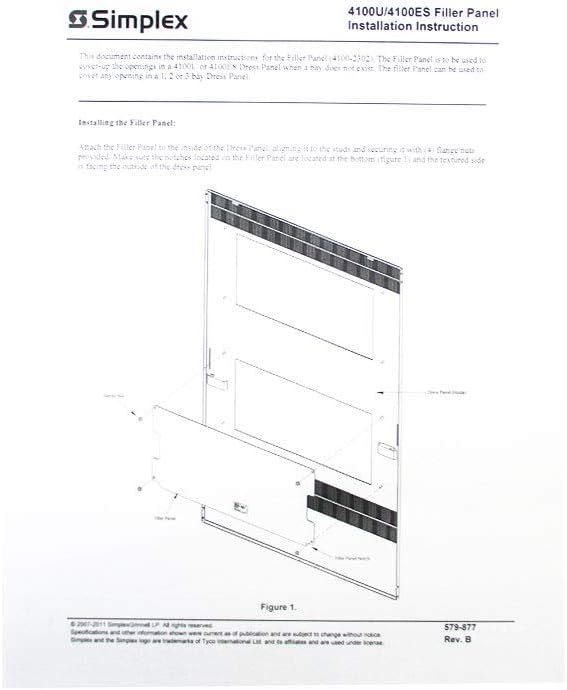
Rysunek 3.1: Installation diagram for the Simplex 4100U/4100ES Filler Panel. This diagram illustrates how the filler panel attaches to the inside of the dress panel, showing the alignment with studs and the placement of gauge nuts.
4. Instrukcja obsługi
The Simplex 4100-2302 8 Slot Expansion Bay Filler Panel is a passive component designed to cover unused bay openings. It does not require operational procedures once correctly installed. Its function is purely structural and aesthetic.
5. Konserwacja
The filler panel requires minimal maintenance. Periodically inspect the panel for secure attachment and any signs of damage or wear. Clean the surface with a soft, dry cloth if dust or debris accumulates. Avoid using abrasive cleaners or solvents that could damage the panel's finish.
6. Rozwiązywanie Problemów
If the filler panel does not fit correctly or becomes loose, consider the following:
- Niewłaściwe dopasowanie: Verify that the panel is properly aligned with the mounting studs within the bay. Ensure the correct panel model (4100-2302) is being used for the specific Simplex 4100U or 4100ES Dress Panel.
- Loose Panel: Check that the four (4) gauge nuts are securely fastened. Over-tightening is not necessary, but they should be snug to prevent movement.
- Szkoda: Inspect the panel for any physical damage that might prevent proper installation or secure fitting.
7. Specyfikacje
| Marka | PROSTY |
| Numer modelu | 4100-2302 |
| Numer części | S41002302 (also referenced as 0743807) |
| Opis | 8 Slot Expansion Bay Filler Panel |
| Waga przedmiotu | 1 funt |
| Ilość w opakowaniu przedmiotu | 1 |
| UPC | 734038306154 |

Rysunek 7.1: Product identification label for the Simplex 4100-2302. This label shows the PID, description, quantity, part number (0743807), and country of manufacture (Mexico).

Rysunek 7.2: The Simplex 4100-2302 Filler Panel as received in its protective packaging. The image shows the panel enclosed in a yellow envelope, with a product label visible on the outside.
8. Gwarancja i wsparcie
Specific warranty details for the Simplex 4100-2302 8 Slot Expansion Bay Filler Panel are not provided in this document. For comprehensive warranty information, technical support, or to inquire about replacement parts, please contact your authorized Simplex distributor or visit the official Simplex website. Always refer to the latest documentation provided by Simplex for the most current information.


