1. Wprowadzenie
Welcome to the user manual for your Creative Pebble Plus 2.1 USB-Powered Desktop Speakers. This system is designed to provide enhanced audio for your computer PCs and laptops, featuring a powerful down-firing subwoofer and far-field drivers for immersive sound.
Please read this manual carefully before using your speaker system to ensure proper setup, operation, and maintenance.

Image: The Creative Pebble Plus 2.1 speaker system positioned on a desk alongside a laptop, demonstrating its compact and aesthetic integration into a desktop environment.
2. Zawartość opakowania
- Creative Pebble Plus Satellite Speakers (2 units)
- Creative Pebble Plus Subwoofer (1 unit)
- USB Power Cable (integrated)
- 3.5mm AUX-in Cable (integrated)
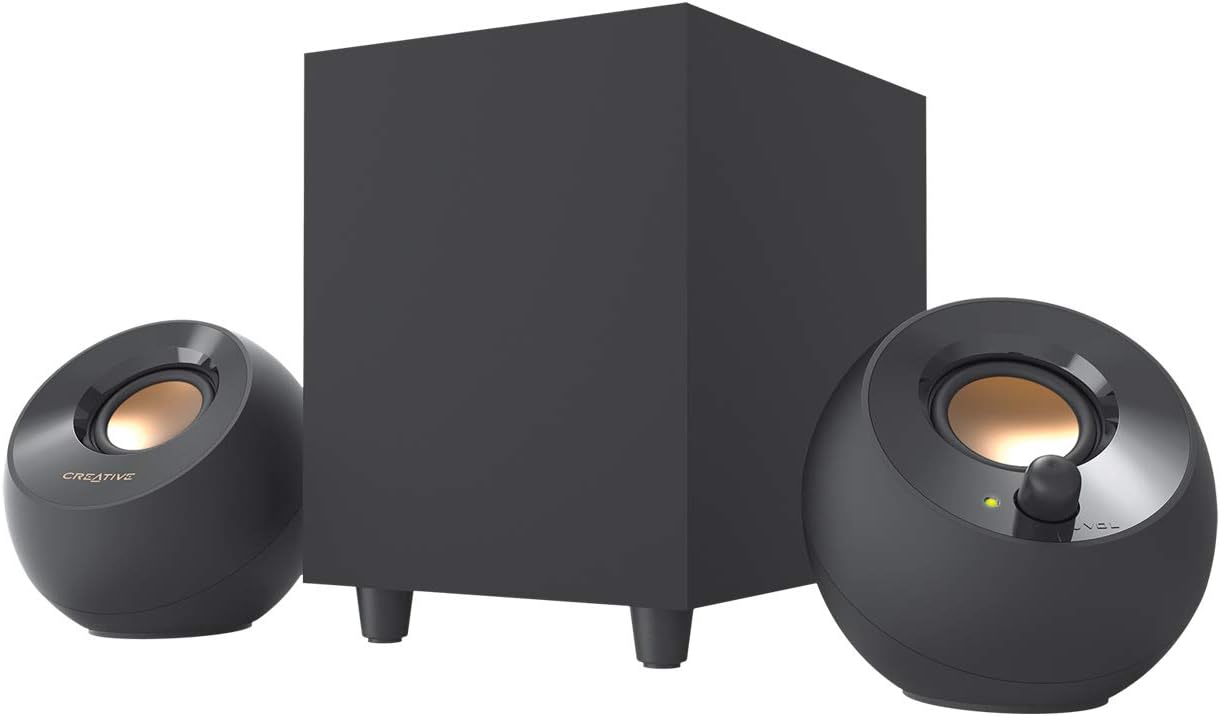
Image: The Creative Pebble Plus 2.1 speaker system, showcasing the two compact satellite speakers and the larger, cubic subwoofer, as they appear out of the box.
3. Główne cechy
The Creative Pebble Plus 2.1 system incorporates several design and technological features for an enhanced audio experience:
- Powerful Down-Firing Subwoofer: Features a newly designed standalone 4-inch down-firing ported subwoofer for remarkable power and depth in bass frequencies.
- Kierowcy z podwyższeniem 45°: The 2-inch mid-range drivers in the satellite speakers are specifically angled at 45° towards the listener, optimizing the soundstage for a direct and immersive audio experience.
- Tryb wysokiego wzmocnienia: A selectable mode that increases the power output to 8W RMS, providing stronger bass and room-filling audio when used with a 5V 2A USB adapter.
- Easy Access Volume Controls: The volume knob is conveniently located on the front of one of the satellite speakers for quick adjustments.
- Wygoda zasilana przez USB: The entire system is powered via a single USB connection, eliminating the need for a wall socket.

Obraz: Zbliżenie view of the Creative Pebble Plus satellite speakers, highlighting their unique 45-degree elevated driver design, which directs sound upwards towards the listener.
4. Konfiguracja i połączenia
Follow these steps to set up your Creative Pebble Plus 2.1 speaker system:
- Pozycjonowanie głośników: Place the two satellite speakers on your desktop, ideally equidistant from your listening position. The 45° elevated drivers are designed to direct sound towards you.
- Pozycjonowanie subwoofera: Place the subwoofer on the floor or desktop, ensuring the down-firing driver has clear space beneath it for optimal bass performance.
- Podłączanie głośników satelitarnych do subwoofera: Connect the RCA cables from the satellite speakers to the corresponding RCA input ports on the back of the subwoofer.
- Połącz ze źródłem dźwięku: Plug the 3.5mm AUX-in cable from the speaker system into the headphone jack or audio output port of your computer, laptop, or other audio device.
- Podłączenie zasilania: Plug the USB power cable into an available USB port on your computer or a 5V 2A USB power adapter (not included). The system is entirely USB-powered.

Image: A detailed diagram illustrating the connection points for the Creative Pebble Plus 2.1 system, including the USB power, 3.5mm audio input, and RCA connections to the subwoofer.

Obraz: Tył view of the Creative Pebble Plus subwoofer, showing its dimensions (202mm x 150mm x 195mm) and the input ports for the satellite speakers.
5. Instrukcja obsługi
5.1 Włączanie/wyłączanie i regulacja głośności
The system powers on automatically when connected to a powered USB port. The volume control knob is conveniently located on the front of the right satellite speaker. Rotate clockwise to increase volume and counter-clockwise to decrease volume.
5.2 High Gain Mode
For increased power output and stronger bass performance, activate the High Gain Mode. This mode boosts the total RMS power output to 8W. To enable High Gain Mode, locate the switch on the bottom of the right satellite speaker and slide it to the 'H' position.

Obraz: Zbliżenie view of the High Gain Mode switch located on the underside of one of the satellite speakers, showing 'L' (Low Gain) and 'H' (High Gain) settings.
Note: High Gain Mode requires a 5V 2A USB adapter (not included) for optimal performance. Using a lower amperage USB port may result in reduced output.
6. Konserwacja
To ensure the longevity and optimal performance of your Creative Pebble Plus 2.1 speaker system, follow these maintenance guidelines:
- Czyszczenie: Use a soft, dry cloth to wipe down the speakers and subwoofer. Avoid using abrasive cleaners, solvents, or sprays directly on the units.
- Umieszczenie: Keep the speakers away from direct sunlight, heat sources, and excessive moisture. Ensure adequate ventilation around the subwoofer.
- Zarządzanie kablami: Avoid kinking or sharply bending the integrated cables.
- Składowanie: If storing the system for an extended period, disconnect all cables and store in a cool, dry place.
7. Rozwiązywanie Problemów
| Problem | Możliwa przyczyna | Rozwiązanie |
|---|---|---|
| Brak dźwięku |
|
|
| Zniekształcony dźwięk |
|
|
| Subwoofer nie działa |
|
|
8. Specyfikacje
| Funkcja | Szczegół |
|---|---|
| Marka | Twórczy |
| Maksymalna moc wyjściowa głośnika | 8 W (RMS) |
| Odpowiedź częstotliwościowa | 20 kHz |
| Technologia łączności | Wired (USB power, 3.5mm AUX-in, RCA for subwoofer) |
| Tryb wyjścia audio | Stereofoniczny |
| Subwoofer Driver Size | 4 inches (down-firing) |
| Satellite Driver Size | 2 inches (mid-range, elevated at 45°) |
| Źródło zasilania | USB (5V 1A for standard, 5V 2A for High Gain Mode) |
| Wymiary subwoofera (wys. x szer. x gł.) | 202mm x 150mm x 195mm (8 x 5.9 x 7.7 cale) |
9. Gwarancja i wsparcie
Aby uzyskać informacje o gwarancji i pomocy technicznej, zapoznaj się z oficjalną stroną Creative website or contact Creative customer service directly. Keep your proof of purchase for warranty claims.
Wsparcie online: https://us.creative.com/support/
Rejestracja produktu: Registering your product may provide additional benefits and support. Visit the Creative webstronie o szczegóły.


