Wstęp
This manual provides instructions for the Elekpia CT-RC2US-17 remote control. This remote is designed for use with various Toshiba Smart LED HDTV models, offering a direct replacement experience without complex setup.
Compatible Toshiba Smart LED HDTV Models: 32L221U, 43L621U, 49L621U, 55L421U, 55L621U, 65L621U.
Organizować coś
The Elekpia CT-RC2US-17 remote control requires two AAA batteries (not included) for operation. No programming or pairing is necessary; the remote is ready for use once batteries are installed.
Instalacja baterii
- Znajdź komorę baterii z tyłu pilota.
- Aby otworzyć pokrywę baterii, przesuń ją w dół.
- Włóż dwie baterie AAA, zwracając uwagę na prawidłową biegunowość (bieguny + i - muszą się pokrywać z oznaczeniami wewnątrz komory).
- Wsuń pokrywę baterii z powrotem na miejsce, aż zaskoczy.

Image: Back of the remote control, illustrating the battery compartment.
Instrukcja obsługi
The CT-RC2US-17 remote control features standard buttons for navigating your Toshiba Smart LED HDTV. Below is a general overview of common button functions.
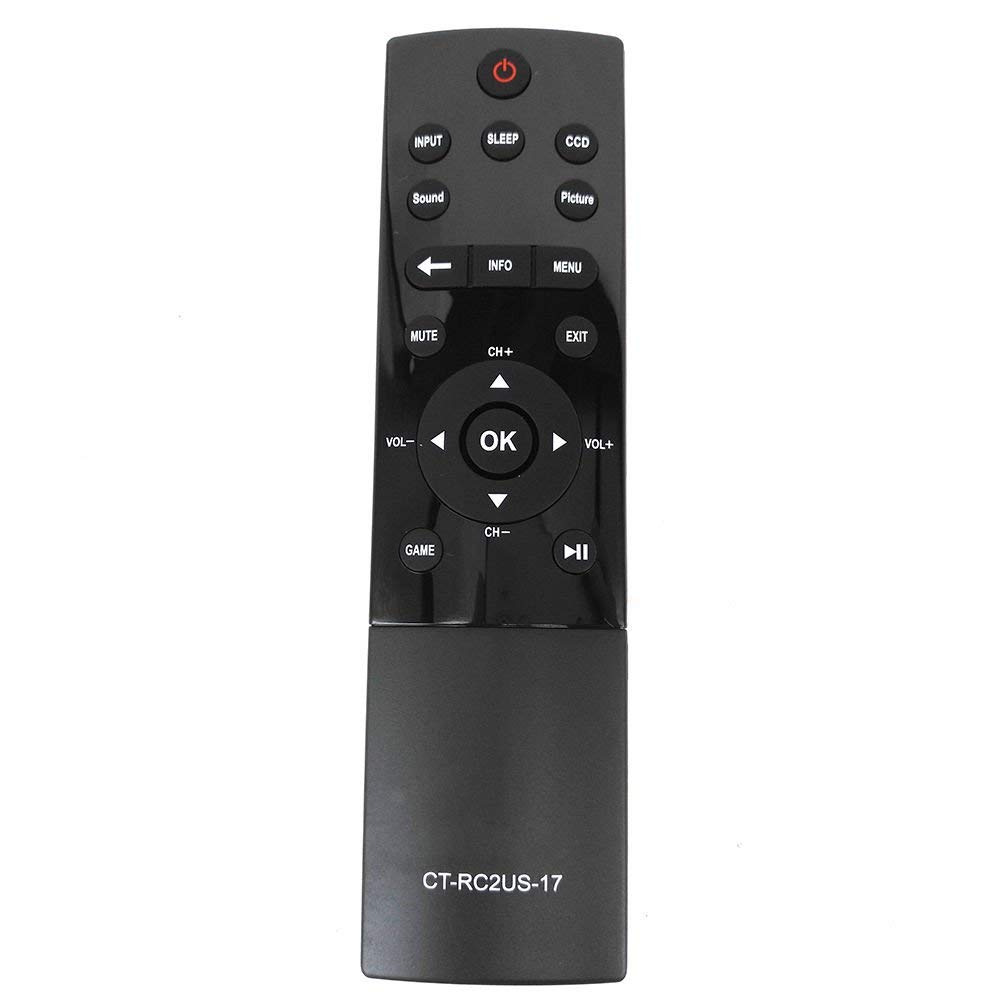
Image: Front of the remote control, displaying button layout.
Funkcje przycisków
- Przycisk zasilania: Włącza lub wyłącza telewizor.
- Przycisk wprowadzania: Selects the input source (e.g., HDMI 1, HDMI 2, AV).
- Przycisk uśpienia: Activates the TV's sleep timer function.
- CCD Button: Controls Closed Captioning display.
- Przycisk obrazu: Adjusts picture modes or settings.
- Przycisk dźwięku: Adjusts sound modes or settings.
- Przycisk wyciszenia: Wycisza lub włącza dźwięk telewizora.
- Przycisk informacyjny: Displays on-screen information about the current program or input.
- Przycisk menu: Dostęp do głównego menu telewizora.
- Panel nawigacyjny (góra, dół, lewo, prawo, OK): Służy do poruszania się po menu i potwierdzania wyborów.
- Przyciski CH+ / CH-: Zmienia kanały w górę lub w dół.
- Przyciski VOL+ / VOL-: Zwiększa lub zmniejsza głośność.
- Przycisk wyjścia: Wychodzi z bieżącego menu lub ekranu.
- Game Button: May activate a specific game mode or input.
- Playback Controls (Play/Pause, Rewind, Fast Forward): Used for media playback functions.
Konserwacja
Aby zapewnić optymalną wydajność i długą żywotność pilota, należy przestrzegać poniższych wskazówek dotyczących konserwacji:
- Wymiana baterii: Wymień baterie, gdy pilot reaguje wolniej lub przestaje działać. Zawsze wymieniaj obie baterie jednocześnie na nowe baterie AAA.
- Czyszczenie: Wipe the remote control with a soft, dry cloth. Avoid using liquid cleaners or abrasive materials, as they may damage the remote's surface or internal components.
- Składowanie: Przechowuj pilota w chłodnym, suchym miejscu, z dala od bezpośredniego światła słonecznego i ekstremalnych temperatur. W przypadku dłuższego przechowywania wyjmij baterie, aby zapobiec wyciekowi.
Rozwiązywanie problemów
If you encounter issues with your Elekpia CT-RC2US-17 remote control, refer to the following common problems and solutions:
- Pilot nie odpowiada:
- Ensure there is a clear line of sight between the remote and the TV's infrared sensor.
- Sprawdź, czy baterie zostały włożone prawidłowo, z zachowaniem właściwej polaryzacji.
- Wymień stare baterie na nowe baterie AAA.
- Limited functionality (e.g., only power and volume work):
- Some users have reported that this replacement remote may have limited functionality on certain Toshiba Smart LED HDTV models, primarily controlling power, volume, and basic menu access. Full navigation or advanced smart TV features might require the original TV remote or a universal remote specifically programmed for those functions.
- Verify your TV model is listed as compatible. If issues persist, consult the TV's original manual for remote control compatibility details.
- Przyciski są lepkie lub nie reagują:
- This may indicate dirt or debris under the buttons. Gently clean around the buttons with a dry cotton swab. Do not attempt to disassemble the remote.
Specyfikacje
| Funkcja | Szczegół |
|---|---|
| Numer modelu | CT-RC2US-17 |
| Marka | Elekpia |
| Wymiary produktu | 6.5 x 1.5 x 0.5 cala |
| Waga przedmiotu | 2.08 uncji |
| Wymagane baterie | 2 baterie AAA (brak w zestawie) |
| Technologia łączności | Podczerwony |
| Kompatybilne urządzenia | Toshiba Smart LED HDTVs |
| Funkcja specjalna | Ergonomiczna konstrukcja |
| Maksymalna liczba obsługiwanych urządzeń | 1 |
Informacje o pomocy technicznej
For product support related to your Toshiba TV, please refer to the official Toshiba support channels:
- Webstrona: www.toshiba.com
- Phone (US & Canada Market): 855-527-2411
Note: This remote control is a compatible replacement manufactured by Elekpia. For specific TV features or advanced troubleshooting, consult your Toshiba TV's original user manual.


