Wstęp
This manual provides detailed instructions for the installation, operation, and maintenance of your FOSCAM R4S 4MP WiFi IP Camera. Designed for home security and monitoring, this camera offers advanced features such as 4MP resolution, dual-band WiFi connectivity, AI human detection, two-way audio, and night vision. Please read this manual thoroughly before using the product to ensure proper setup and functionality.

Figure 1: FOSCAM R4S 4MP WiFi IP Camera
Zawartość opakowania
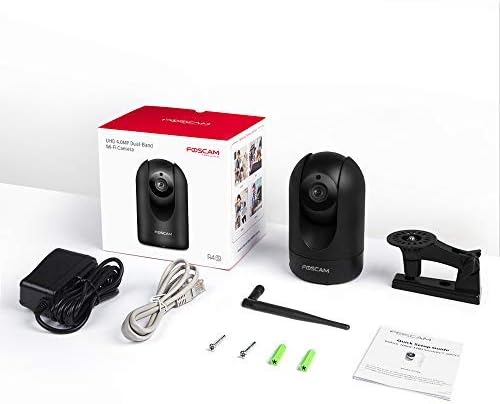
Verify that all items listed below are included in your package. If any items are missing or damaged, please contact FOSCAM support.
- FOSCAM R4S 4MP WiFi IP Camera
- Zasilacz
- Kabel Ethernet
- Uchwyt montażowy
- Śruby montażowe i kołki ścienne
- Przewodnik szybkiej instalacji
- Antena WiFi

Figure 2: FOSCAM R4S Package Contents
Produkt ponadview i funkcje
The FOSCAM R4S camera is equipped with advanced technology to provide reliable surveillance and monitoring. Key features include:
- Rozdzielczość 4MP/2K: Zapewnia wyraźny i szczegółowy obraz wideotage.
- Dual-Band WiFi (2.4/5GHz): Zapewnia stabilną i elastyczną łączność bezprzewodową.
- Wykrywanie ludzi przez sztuczną inteligencję: Reduces false alarms by distinguishing human shapes from other movements.
- Wykrywanie dźwięku: Alerts you to unusual sounds.
- Wizja nocna do 33 stóp: Zapewnia wyraźną widoczność w warunkach słabego oświetlenia.
- Dwukierunkowy dźwięk: Umożliwia komunikację w czasie rzeczywistym poprzez kamerę.
- Funkcjonalność panoramowania/pochylania: Oferuje zakres 360° w poziomie i 100° w pionie viewzakres.
- 20-krotny zoom cyfrowy: Umożliwia dokładniejszą analizę szczegółów.
- Tryb prywatności: Temporarily disables recording and transmission for privacy.
- Zgodność: Współpracuje z Amazon Alexa i Asystentem Google.
- Opcje przechowywania: Supports Micro SD card (up to 256GB, not included) and cloud storage services.
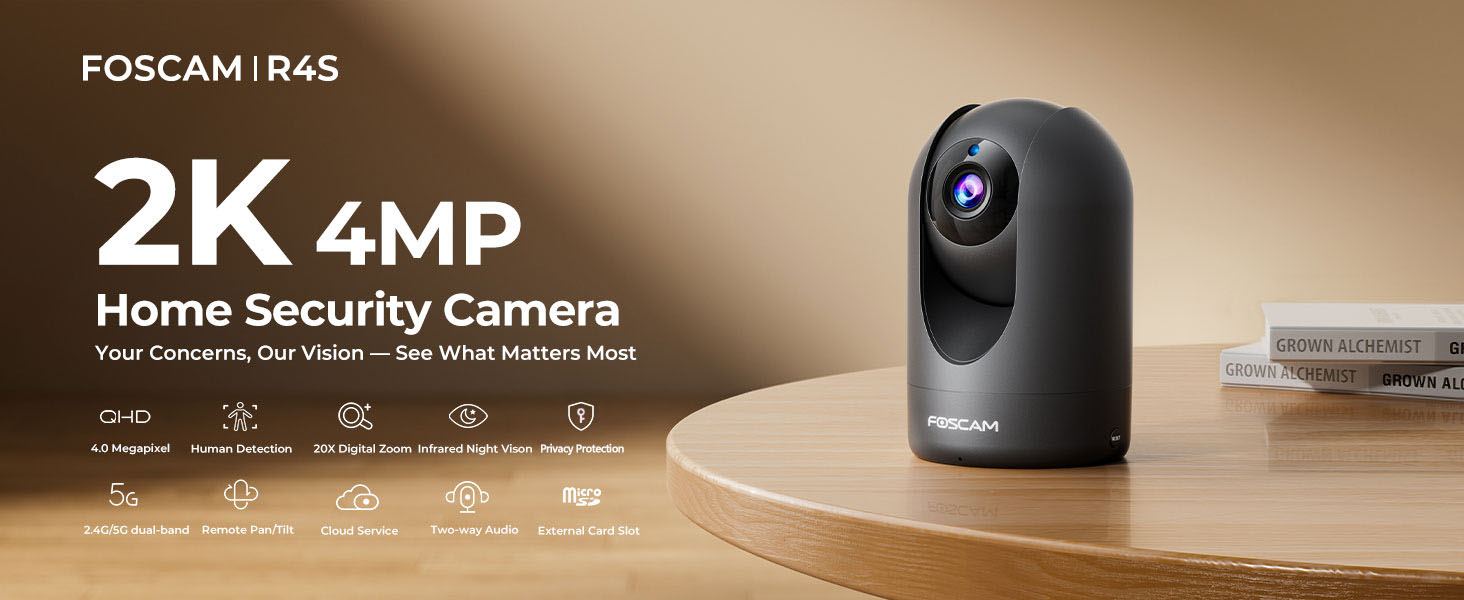
Figure 3: FOSCAM R4S Key Features
Przewodnik po konfiguracji
1. Umieszczenie fizyczne
The FOSCAM R4S camera can be placed on a flat surface or mounted to a wall or ceiling. Ensure the camera is positioned to cover the desired monitoring area.

Figure 4: Camera Placement Options
2. Podłączenie zasilania
Connect the power adapter to the camera's power input and plug it into a standard electrical outlet. The camera will power on automatically.
3. Instalacja aplikacji i konfiguracja początkowa
- Download the Foscam App from your mobile device's app store (iOS or Android).
- Open the Foscam App and create an account or log in.
- Kliknij ikonę „+”, aby dodać nową kamerę.
- Follow the on-screen instructions to connect your camera to your Wi-Fi network using either the sound wave or QR code setup method. Ensure your mobile device is connected to the same Wi-Fi network (2.4GHz or 5GHz) you intend to use for the camera.
- Once connected, you can name your camera and set a password.

Figure 5: Dual-Band WiFi Connection
Instrukcja obsługi
1. Na żywo View i sterowanie obrotem/pochyleniem
From the Foscam App, select your camera to view the live feed. Use the on-screen controls to pan (horizontal movement) and tilt (vertical movement) the camera lens to adjust your viewkąt.

Figure 6: Pan/Tilt Camera Control
2. Dźwięk dwukierunkowy
Tap the microphone icon in the app to enable two-way audio. You can speak through your phone, and your voice will be broadcast through the camera's speaker. Similarly, you can hear audio from the camera's environment.
Rysunek 7: Dwukierunkowa komunikacja audio
3. Detekcja ruchu i dźwięku
Configure detection settings in the app to receive alerts for human movement or unusual sounds. You can customize sensitivity and detection zones to minimize false alarms.

Figure 8: Intelligent Human and Pet Detection
4. Wizja nocna
Kamera automatycznie przełącza się na tryb noktowizyjny w warunkach słabego oświetlenia, zapewniając wyraźny czarno-biały obraz w odległości do 33 stóp.

Rysunek 9: Możliwość widzenia w nocy
5. Tryb prywatności
Activate Privacy Mode via the app to temporarily disable video recording and transmission, ensuring your privacy when needed. The camera lens will physically retract or turn away.

Figure 10: Activating Privacy Mode
6. Przechowywanie i odtwarzanie
Recordings can be stored on a Micro SD card (up to 256GB, not included) or via FOSCAM's cloud service. Access and playback recorded footage through the Foscam App.

Rysunek 11: Opcje przechowywania
Konserwacja
To ensure optimal performance and longevity of your FOSCAM R4S camera, follow these maintenance guidelines:
- Czyszczenie: Delikatnie przetrzyj obiektyw i korpus aparatu miękką, suchą ściereczką. Unikaj stosowania silnych środków chemicznych i materiałów ściernych.
- Aktualizacje oprogramowania układowego: Regularly check for and install firmware updates through the Foscam App to ensure your camera has the latest features and security enhancements.
- Umieszczenie: Upewnij się, że kamera jest umieszczona w stabilnym miejscu, z dala od bezpośredniego światła słonecznego, ekstremalnych temperatur i nadmiernej wilgoci.
- Zasilanie: Należy używać wyłącznie oryginalnego zasilacza dołączonego do aparatu.
Rozwiązywanie problemów
If you encounter issues with your FOSCAM R4S camera, refer to the following common troubleshooting steps:
| Problem | Możliwa przyczyna | Rozwiązanie |
|---|---|---|
| Kamera nieaktywna | No power, Wi-Fi disconnected, router issue. | Check power connection. Restart camera and router. Verify Wi-Fi signal strength. |
| Słaba jakość wideo | Niska przepustowość, brudny obiektyw, niewystarczające oświetlenie. | Ensure stable Wi-Fi. Clean the lens. Adjust camera position or add lighting. |
| Wykrywanie ruchu nie działa | Incorrect settings, detection zone not configured. | Check motion detection settings in the app. Ensure detection zones are active. |
| Problemy z dwukierunkową transmisją dźwięku | Mikrofon/głośnik wyciszony, uprawnienia aplikacji nieaktywne. | Check volume settings in the app. Ensure app has microphone permissions. |
For further assistance, please refer to the FOSCAM support webodwiedź witrynę lub skontaktuj się z obsługą klienta.
Specyfikacje
| Funkcja | Szczegół |
|---|---|
| Rezolucja | 4MP (2K) |
| Łączność | Dwuzakresowe Wi-Fi 2.4 GHz i 5 GHz |
| Zakres noktowizora | Do 33 stóp (10 metrów) |
| Viewing kąt | 105° (przekątna) |
| Zakres obrotu/pochylenia | Poziomo: 360°, Pionowo: 100° |
| Zoom cyfrowy | 20X |
| Audio | Two-Way Audio with built-in mic and speaker |
| Wykrywanie | AI Human Detection, Sound Detection |
| Składowanie | Karta Micro SD (do 256 GB), przechowywanie w chmurze |
| Zgodność | Amazon Alexa, Asystent Google |
| Moc wejściowa | DC 5V/2A (via power adapter) |
| Wymiary (dł. x szer. x wys.) | 2.91 x 3.03 x 4.69 cala |
| Waga | 1.15 funta |
Gwarancja i wsparcie
FOSCAM is committed to providing high-quality products and excellent customer service.
- Gwarancja jakości: 180-Day Quality Guarantee.
- Zwroty: 30-Day Free Returns.
- Wsparcie techniczne: 24/7 Fast Reply & Lifetime Tech Support.
- Kontakt: For support, please visit the official FOSCAM webwitryny lub skontaktuj się z zespołem obsługi klienta.


