1. Wprowadzenie
This user manual provides comprehensive instructions for the setup, operation, and maintenance of your SHARP LC-32HI5012E HD Ready Smart LED TV. Please read this manual thoroughly before using your television to ensure proper functionality and safety.
The SHARP LC-32HI5012E is an 81 cm (32-inch) HD Ready Smart LED TV featuring Active Motion 200 technology for enhanced picture quality and a Triple Tuner for versatile reception options. It includes integrated Wi-Fi and a Harman/Kardon sound system for a complete entertainment experience.
2. Zawartość opakowania
Po otwarciu opakowania należy sprawdzić, czy zawiera ono wszystkie poniższe elementy:
- SHARP LC-32HI5012E Main Unit
- Pilot (z bateriami)
- Instrukcja obsługi (ten dokument)

Obraz: Przód view of the SHARP LC-32HI5012E television, displaying a vibrant city skyline on its screen. This image shows the slim bezel design and the central SHARP logo.
3. Konfiguracja
3.1 Montaż stojaka
Carefully place the TV screen-down on a soft, flat surface to prevent damage. Attach the two stand feet to the designated slots at the bottom of the TV, securing them with the provided screws. Ensure the stand is firmly attached before proceeding.
3.2 Podłączanie urządzeń peryferyjnych
Telewizor oferuje różne możliwości podłączenia urządzeń zewnętrznych:
- Porty HDMI (x3): Podłącz odtwarzacze Blu-ray, konsole do gier i dekodery.
- Porty USB (x2): Do odtwarzania multimediów z dysków USB.
- Antenna In (RF): Connect your terrestrial antenna for DVB-T/T2HD reception.
- Sat In: Podłącz antenę satelitarną do odbioru sygnału DVB-S/S2.
- RJ45 (LAN): Do przewodowego połączenia internetowego.
- CI+ Port: W przypadku modułów dostępu warunkowego (CAM) view szyfrowane kanały.
- Mini Component/YPbPr, Mini AV Composite: Do starszych urządzeń analogowych.
- Cyfrowe optyczne wyjście audio: Do podłączania zewnętrznych systemów audio.
- Audio out / Headphone: Do słuchawek lub głośników zewnętrznych.

Obraz: Tył view of the SHARP LC-32HI5012E television, highlighting the arrangement of various input and output ports for connecting external devices.
3.3 Pierwsze włączenie i pierwsza konfiguracja
After connecting all necessary cables, plug the power cord into an electrical outlet. Press the power button on the remote control or the TV. The first-time setup wizard will guide you through:
- Wybór języka.
- Połączenie sieciowe (Wi-Fi lub przewodowa sieć LAN).
- Channel scanning for DVB-C, DVB-S/S2, or DVB-T/T2HD.
- Strefa czasowa i inne podstawowe ustawienia.
4. Instrukcja obsługi
4.1 Podstawowe funkcje telewizora
- Włączanie/wyłączanie: Użyj przycisku zasilania na pilocie lub telewizorze.
- Regulacja głośności: Użyj przycisków VOL +/-.
- Wybór kanału: Use CH +/- or number buttons.
- Źródło sygnału wejściowego: Press the SOURCE button to switch between HDMI, AV, TV, etc.
- Nawigacja po menu: Use arrow keys and OK button to navigate menus.
4.2 Funkcje Smart TV
Your SHARP LC-32HI5012E is equipped with integrated Wi-Fi and offers access to various smart features:
- Zainstalowane aplikacje: Access popular streaming services like Netflix and YouTube directly.
- Web Przeglądarka: Przeglądaj Internet bezpośrednio na telewizorze.
- Aquos Net+: Access additional online content and services provided by Sharp.
Ensure your TV is connected to the internet for full Smart TV functionality.
System audio 4.3
The integrated Harman/Kardon sound system provides a high-quality audio experience with excellent dynamics and clarity. Adjust audio settings in the TV menu to customize your sound preferences.
5. Konserwacja
5.1 Czyszczenie ekranu
Aby wyczyścić ekran, delikatnie przetrzyj go miękką, niepozostawiającą włókien ściereczką. W przypadku uporczywych zabrudzeń delikatnie przetrzyjampWyczyść ściereczkę wodą lub specjalnym środkiem do czyszczenia ekranów. Nie rozpylić płyn bezpośrednio na ekran.
5.2 Ogólna opieka
- Trzymaj telewizor z dala od bezpośredniego światła słonecznego i źródeł ciepła.
- Zapewnij odpowiednią wentylację wokół telewizora.
- Odłączaj telewizor od gniazdka elektrycznego podczas burzy z piorunami lub jeśli nie będziesz go używać przez dłuższy czas.
6. Rozwiązywanie Problemów
If you encounter any issues with your TV, please refer to the following common problems and solutions before contacting support.
| Problem | Możliwa przyczyna | Rozwiązanie |
|---|---|---|
| Brak zasilania | Power cord unplugged, power outlet issue. | Sprawdź podłączenie przewodu zasilającego. Spróbuj użyć innego gniazdka. |
| Brak obrazu, ale dźwięk jest obecny | Incorrect input source, faulty cable. | Verify correct input source. Check HDMI/AV cable connections. |
| Brak dźwięku | Volume muted or too low, external audio system issue. | Unmute volume, increase volume. Check external audio connections. |
| Nie można połączyć się z siecią Wi-Fi | Incorrect password, router issue, TV too far from router. | Wprowadź ponownie hasło. Zrestartuj router. Przesuń telewizor bliżej lub użyj połączenia przewodowego. |
7. Specyfikacje
| Funkcja | Szczegół |
|---|---|
| Marka | OSTRY |
| Numer modelu | LC-32HI5012E |
| Technologia ekranowa | PROWADZONY |
| Rezolucja | HD Ready (1366 x 768 pikseli) |
| Przekątna ekranu | 81.3 cm (32 cala) |
| Częstotliwość odświeżania | 60 Hz |
| Funkcja specjalna | Internet (Smart TV) |
| Obsługiwane usługi internetowe | Netflix, YouTube, Browser |
| Technologia łączności | USB, HDMI, LAN, Wi-Fi |
| Tunery | DVB-C, DVB-S/S2, DVB-T/T2HD |
| System audio | Harman/Kardon |
| Wymiary produktu (szer. X wys. X gł.) | 74 x 49.1 x 18 cm (z podstawką) |
| Waga | 4.8 kilograma |
| Typ montażu | Mocowanie na stole |
7.1 Efektywność energetyczna
The SHARP LC-32HI5012E has an energy efficiency rating of F. For detailed energy consumption information, please refer to the energy label and product information sheet.

Image: Energy efficiency label for the SHARP LC-32HI5012E television, showing its energy class F and power consumption details.
Więcej szczegółów znajdziesz w oficjalnej bazie danych EPREL: https://eprel.ec.europa.eu/qr/402565
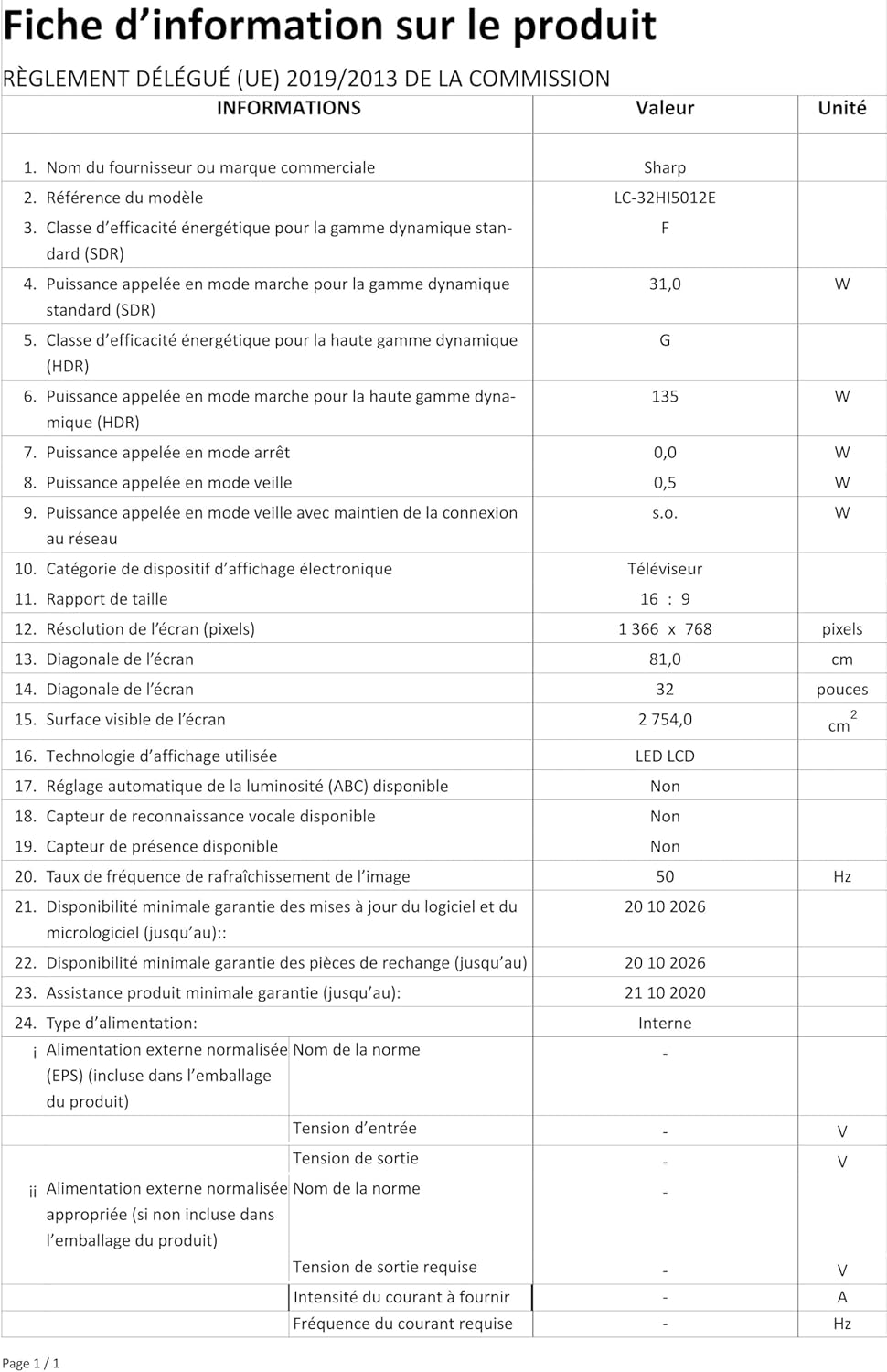
Image: Product information sheet detailing technical specifications and compliance information for the SHARP LC-32HI5012E television.
8. Gwarancja i wsparcie
For warranty information, please refer to the warranty card included with your product or visit the official SHARP webZachowaj paragon jako dowód zakupu na wypadek ewentualnych roszczeń gwarancyjnych.
For technical support or service inquiries, please contact SHARP customer service. Contact details can typically be found on the SHARP official webmiejscu lub w opakowaniu produktu.


