Powitanie
Thank you for choosing the iTek GGC 30-inch Curved Monitor. This manual provides essential information for setting up, operating, and maintaining your new monitor. Please read it thoroughly before use to ensure optimal performance and safety.
Ważne instrukcje bezpieczeństwa
Aby zapobiec uszkodzeniom i zapewnić bezpieczną eksploatację, należy przestrzegać następujących środków ostrożności:
- Nie wystawiaj monitora na działanie deszczu, wilgoci ani ekstremalnych temperatur.
- Zapewnij odpowiednią wentylację wokół monitora. Nie blokuj otworów wentylacyjnych.
- Należy używać wyłącznie zasilacza dołączonego do monitora.
- Unikaj umieszczania ciężkich przedmiotów na przewodzie zasilającym.
- Jeśli monitor nie będzie używany przez dłuższy czas, należy odłączyć wtyczkę zasilającą od gniazdka.
- Nie próbuj samodzielnie naprawiać monitora. Wszelkie prace serwisowe zleć wykwalifikowanemu personelowi.
- Wyczyść ekran monitora iasinCzyścić miękką, suchą ściereczką. Unikać stosowania środków czyszczących o działaniu ściernym i rozpuszczalników.
Zawartość opakowania
Proszę sprawdzić, czy w paczce znajdują się następujące elementy:
- iTek GGC 30-inch Curved Monitor
- Stojak na monitor (podstawa i szyjka)
- Zasilacz i kabel
- Kabel DisplayPort
- Kabel HDMI
- Instrukcja obsługi
- Śruby do montażu stojaka
Produkt ponadview
The iTek GGC 30-inch Curved Monitor is designed for an immersive viewing experience, ideal for gaming and professional use. It features a WFHD (2560x1080) resolution, a high 200Hz refresh rate, and a rapid 1ms MPRT response time.

Key Performance Highlights
- 200Hz Refresh Rate & AMD FreeSync Technology: Experience ultra-smooth visuals and tear-free gaming with a high refresh rate and adaptive sync technology.

Figure 2: 200Hz Refresh Rate and AMD FreeSync Technology in action. - Flicker-Free & Low Blue Light: Designed to reduce eye strain during prolonged use, providing a more comfortable viewzdobywania doświadczenia.

Figure 3: Flicker-Free and Low Blue Light features for eye comfort. - Czas reakcji MPRT 1 ms: Minimizes motion blur and ghosting, crucial for fast-paced games and action sequences.

Figure 4: Rapid Refresh Rate and Response Time for smooth visuals. - Wyświetlacz zakrzywiony 1800R: The immersive curvature brings the edges of the screen closer to your field of view, enhancing depth perception and reducing distortion.

Figure 5: 1800R Curved Display for an immersive experience.
Organizować coś
Montaż stojaka
- Ostrożnie wyjmij monitor i elementy stojaka z opakowania.
- Attach the stand neck to the monitor panel using the provided screws. Ensure it clicks securely into place or is fastened tightly.
- Attach the stand base to the stand neck, securing it with the thumb screw or screws from underneath.
- Zmontowany monitor należy umieścić na stabilnej, płaskiej powierzchni.
Podłączanie monitora
The iTek GGC monitor offers multiple connectivity options for various devices:
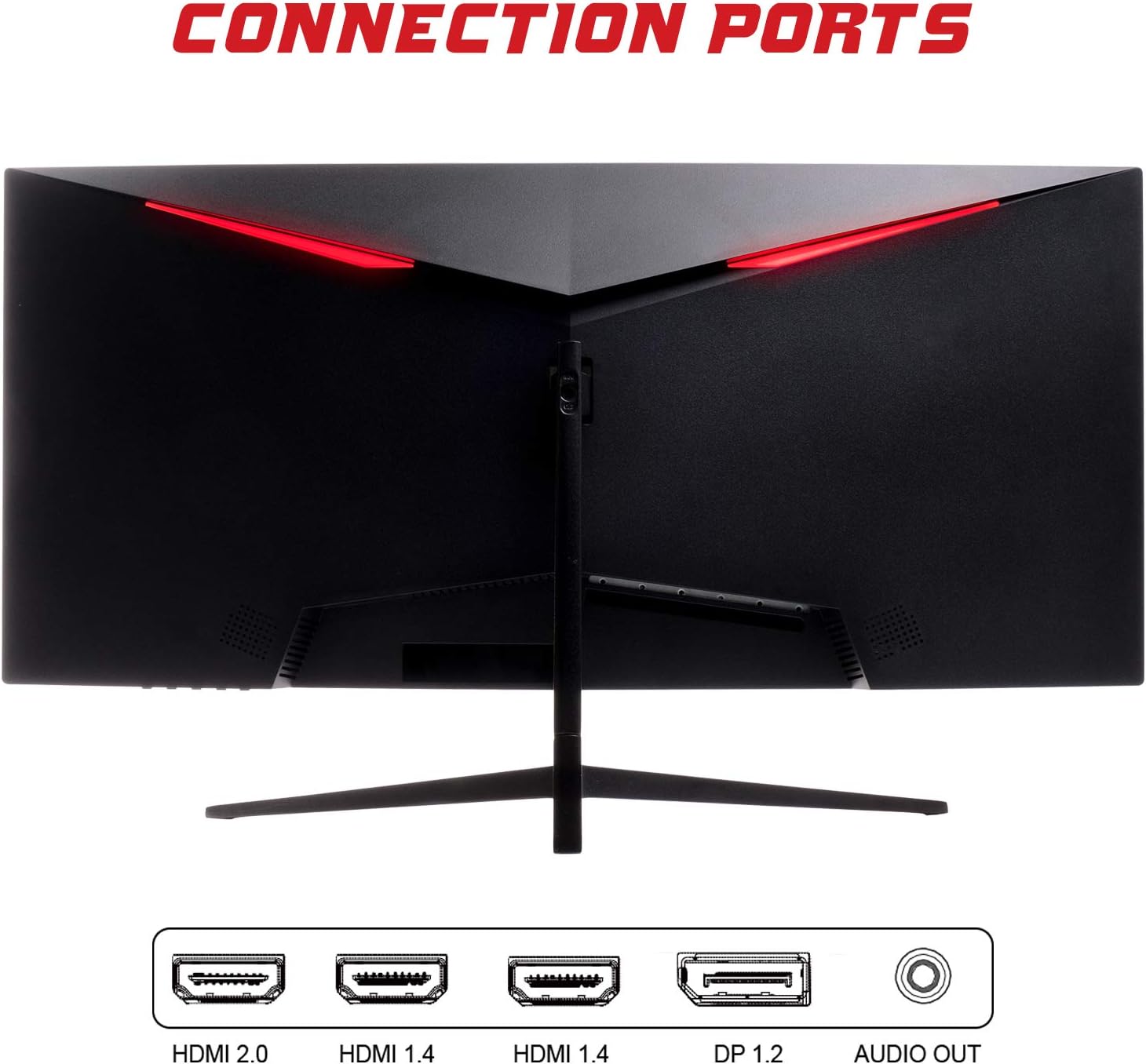
- DisplayPort (DP 1.2): For high-resolution and high-refresh-rate connections to your PC.
- HDMI (HDMI 2.0, HDMI 1.4 x2): Connect to PCs, gaming consoles, and other multimedia devices. HDMI 2.0 supports higher refresh rates at certain resolutions.
- Wyjście dzwięku: Podłącz zewnętrzne głośniki lub słuchawki.
After connecting the video cable, connect the power adapter to the monitor and then to a power outlet.
Obsługa monitora
Włączanie/wyłączanie zasilania
Naciśnij przycisk zasilania, zazwyczaj znajdujący się na dole lub z tyłu monitora, aby go włączyć lub wyłączyć. Kontrolka zasilania zaświeci się, gdy monitor jest włączony.
Menu ekranowe (OSD)
The OSD menu allows you to adjust various monitor settings. Use the buttons on the monitor (typically on the back or bottom right) to navigate the menu.
- Ustawienia obrazu: Dostosuj jasność, kontrast, ostrość i współczynnik gamma.
- Ustawienia kolorów: Zmień temperaturę barwową, odcień i nasycenie.
- Wybór wejścia: Ręczne przełączanie między wejściami DisplayPort i HDMI.
- Audio: Dostosuj głośność wyjścia audio.
- Ustawienia systemowe: Access language, OSD timeout, and reset options.
- Funkcje gier: Enable/disable FreeSync, adjust response time overdrive, and activate crosshair overlays if available.
Konserwacja
Właściwa pielęgnacja gwarantuje długowieczność monitora:
- Przed czyszczeniem należy zawsze wyłączyć monitor i odłączyć przewód zasilający.
- Delikatnie przetrzyj ekran miękką, niepozostawiającą włókien ściereczką. W przypadku uporczywych zabrudzeń delikatnie przetrzyjampPrzetrzyj szmatkę wodą lub delikatnym, nieściernym środkiem do czyszczenia ekranów.
- Wyczyść monitor casinmiękką, suchą szmatką.
- Avoid spraying liquids directly onto the screen or casing.
- Do not use benzene, thinner, ammonia-based cleaners, or abrasive materials.
Rozwiązywanie problemów
If you encounter issues with your monitor, please refer to the following table for common problems and solutions:
| Problem | Możliwe rozwiązanie |
|---|---|
| Brak zasilania | Ensure the power cable is securely connected to the monitor and the power outlet. Check if the power outlet is working. |
| Brak sygnału / Pusty ekran | Verify the video cable (DisplayPort or HDMI) is firmly connected to both the monitor and your computer. Select the correct input source via the OSD menu. Ensure your computer is powered on and not in sleep mode. |
| Migotanie lub niestabilność obrazu | Check the video cable connection. Try a different cable or port. Ensure your graphics card drivers are up to date. Adjust the refresh rate in your computer's display settings. |
| Poor image quality (blurry, distorted colors) | Adjust brightness, contrast, and color settings in the OSD menu. Ensure the display resolution on your computer matches the monitor's native resolution (2560x1080). |
| Brak dźwięku z wyjścia audio | Check the audio cable connection to your speakers/headphones. Verify the volume setting in the OSD menu and on your computer. Ensure the correct audio output device is selected in your computer's sound settings. |
Dane techniczne
| Funkcja | Specyfikacja |
|---|---|
| Marka | Itek |
| Model | ITMC30V201FHD |
| Rozmiar ekranu | 30 cali |
| Typ panelu | VA |
| Krzywizna | R1800 |
| Rezolucja | 2560 x 1080 (WFHD) |
| Proporcje obrazu | 21:9 |
| Częstotliwość odświeżania | 200 Hz |
| Czas reakcji | 1ms MPRT |
| Jasność | 350 cd/m² |
| Współczynnik kontrastu | 3000:1 |
| Viewing kąt | 178° (poziomo/pionowo) |
| Łączność | 1x DisplayPort 1.2, 1x HDMI 2.0, 2x HDMI 1.4, Audio Out |
| Cechy specjalne | HDR Ready, FreeSync, Low Blue Light, Flicker Free, VESA Mountable |
| Wymiary produktu (z podstawą) | Wymiary 70.68 x 40.89 x 18.48 cm |
| Waga | 6.9 kilogramów |
Efektywność energetyczna

For detailed energy consumption information and product registration, please refer to the official EPREL database:
Gwarancja i wsparcie
Your iTek GGC monitor is backed by a manufacturer's warranty. Please retain your proof of purchase for warranty claims.
- Gwarantowane wsparcie produktu: This product is guaranteed to have support available until at least January 1, 2031.
- For technical support, warranty inquiries, or service requests, please contact iTek customer service through their official webstronie internetowej lub danych kontaktowych podanych przy zakupie.


