Wstęp
The Daytech Emergency Call Button System is designed to provide a reliable and convenient way for seniors, patients, and individuals with disabilities to call for assistance. This system ensures that caregivers or family members are alerted promptly, offering peace of mind and enhanced safety. This manual will guide you through the installation, operation, and maintenance of your device.
The system allows individuals to signal for help without needing to shout, making it ideal for situations where immediate attention is required, especially during the night or when caregivers are in another room.
Produkt ponadview
The Daytech Emergency Call Button System typically includes one or more receivers and multiple transmitters (call buttons). The receivers plug into a standard wall outlet and emit an audible alert when a transmitter button is pressed. The transmitters are portable and can be worn or placed in accessible locations.

Rysunek 1: Nadview of the Daytech Emergency Call System in use. An elderly woman activates the call button, and a receiver unit alerts a caregiver.
Who Can Benefit?
- Seniorzy: For independent living with immediate access to assistance.
- Pacjenci: For those recovering or with chronic conditions needing care.
- Individuals with Disabilities: To easily signal for support.
- Bedridden Individuals: To call for help without physical strain.

Rysunek 2: Various applications of the emergency call system, highlighting its utility for different user groups.
Zawartość opakowania
Your Daytech Emergency Call Button System (Model CC02, variant B) includes the following components:
- 2 x jednostek odbiorczych
- 2 x Transmitter Call Buttons
- 1 x Doorbell Transmitter (if applicable to your specific variant)
- Batteries (12V 23A for transmitters, AAA for receivers)
- Lanyards for transmitters
- Adhesive pads for mounting
- Instrukcja obsługi
Note: The exact number of components may vary based on the specific product variant purchased. Please refer to your product packaging for precise contents.
Instrukcje konfiguracji
1. Powering the Receiver Units
- Insert 3 AAA batteries into each receiver unit.
- Plug each receiver unit into a standard 110-260V wall outlet. The receiver will power on and be ready for use.
2. Powering the Transmitter Call Buttons
- Each transmitter call button comes with a pre-installed 12V 23A alkaline battery.
- Ensure the battery tab (if present) is removed before use.
3. Pairing Transmitters with Receivers (If Not Pre-Paired)
Your system may come pre-paired. If not, or if you wish to add new transmitters, follow these steps:
- Wybierz dzwonek: Naciśnij krótko Up or W dół button on the receiver to cycle through and select your preferred ringtone.
- Wejdź w tryb parowania: Naciśnij i przytrzymaj Up button on the receiver until you hear a "ding-dong" sound and the indicator light begins to flash. This indicates the receiver is in pairing mode.
- Aktywuj nadajnik: Press the push button on the transmitter you wish to pair. The receiver should emit the selected ringtone, confirming it has received the signal.
- Potwierdź parowanie: Press the transmitter button again to verify successful pairing. If the receiver plays your selected ringtone, the pairing is complete.
- Repeat for all transmitters.
To restore factory settings, press and hold the Wyłączony przycisk na odbiorniku.
4. Umieszczenie i montaż
The transmitters are portable and can be worn around the neck using the provided lanyard, or attached to a wheelchair or wall using the adhesive pads. The call button is IPX5 waterproof, making it suitable for use in bathrooms or near water, but it should not be fully submerged.
Place receiver units in central locations or rooms where caregivers are most likely to hear the alert. The system offers a range of up to 150 meters (open air), with effective range through walls typically around 100 meters.

Rysunek 3: Illustration of the system's wireless range within a home environment.
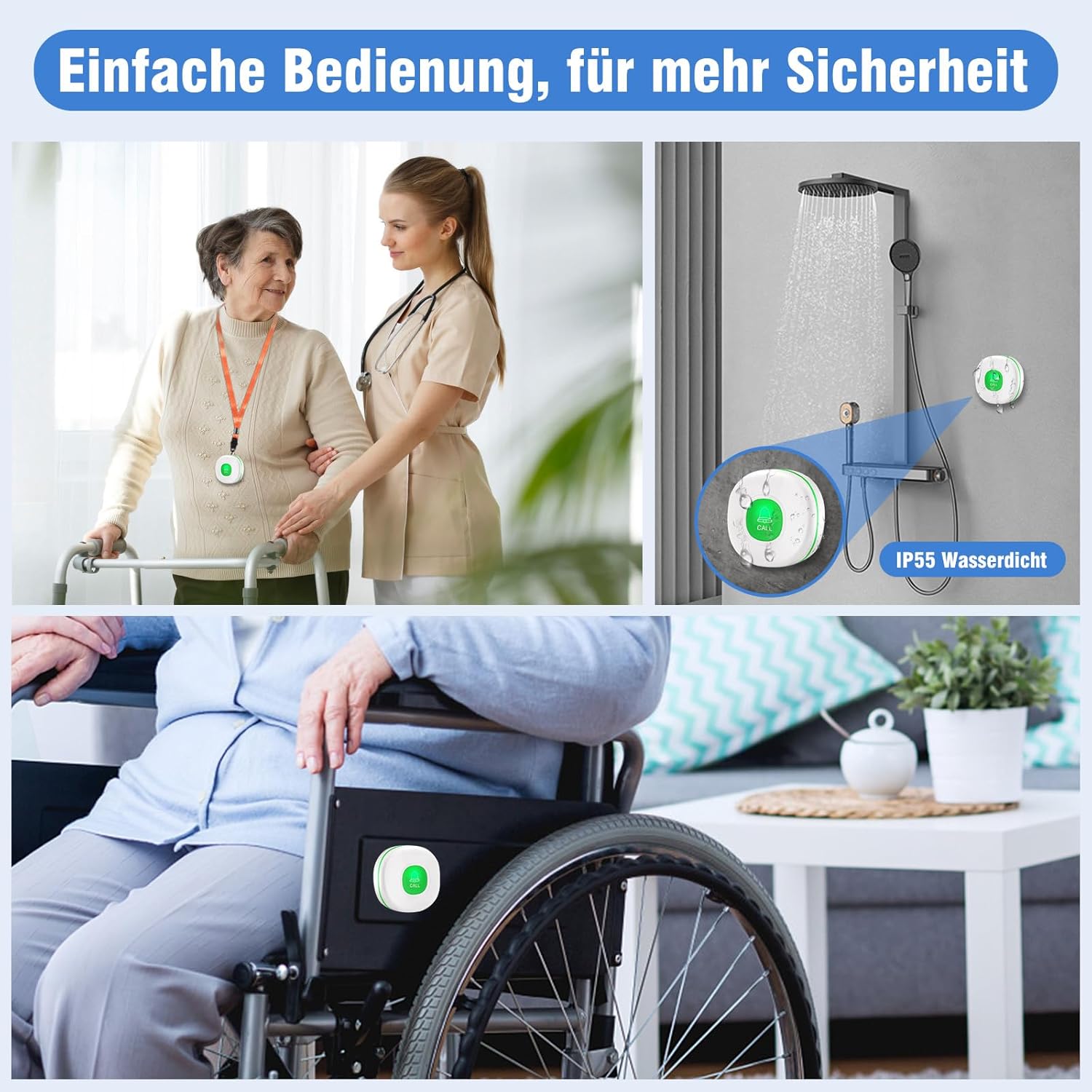
Rysunek 4: Examples of flexible placement and the IP55 waterproof feature of the call button.
Instrukcja obsługi
1. Wykonywanie połączenia
To call for assistance, simply press the button on the transmitter. The receiver unit(s) will immediately sound the selected ringtone and flash its indicator light.
2. Regulacja głośności
The receiver offers 4 adjustable volume levels, ranging from 0 dB (mute) to 110 dB. Use the volume buttons on the side of the receiver to adjust the sound level to your preference. Setting the volume to 0 dB will mute the sound while the indicator light will still flash.
3. Zmiana dzwonków
The receiver has 55 different ringtones to choose from. Briefly press the Up or W dół button on the receiver to cycle through the available melodies. The default ringtone is "Ding-Dong".

Rysunek 5: Customizing ringtones and volume settings on the receiver units.
Konserwacja
1. Wymiana baterii
- Jednostki odbiorcze: Each receiver uses 3 AAA batteries. Replace them when the low battery indicator sounds.
- Transmitter Call Buttons: Each transmitter uses one 12V 23A Alkaline battery. Replace when the low battery alert is triggered.
2. Przypomnienie o niskim stanie baterii
The system provides a low battery reminder. When the receiver's battery voltage drops below 3V, a "Low Battery" tone will sound every two minutes. If the battery is critically low, the tone will sound every ten seconds.

Rysunek 6: Visual representation of the low battery warning system for the receiver units.
3. Czyszczenie
Wipe the units with a soft, dry cloth. Do not use abrasive cleaners or immerse the units in water (except for the IPX5 rated call button, which is splash-proof but not submersible).
Rozwiązywanie problemów
| Problem | Możliwa przyczyna | Rozwiązanie |
|---|---|---|
| Receiver does not sound when transmitter is pressed. |
|
|
| Low battery tone sounds frequently. | Receiver AAA batteries are low. | Replace the 3 AAA batteries in the receiver unit. |
| Zmniejszony zasięg sieci bezprzewodowej. |
|
|
Specyfikacje
- Numer modelu: CC02
- Zasięg bezprzewodowy: Up to 150 meters (open air), approx. 100 meters (through walls)
- Objętość robocza odbiornikatage: 110-260 V
- Bateria nadajnika: 1 baterie alkaliczne 12V 23A
- Akumulator odbiornika: 3 x AAA batteries (for portable pager, if included, or backup)
- Stopień wodoodporności (nadajnik): IPX5 (bryzgoszczelny)
- Poziomy głośności: 4 poziomów (od 0 dB do 110 dB)
- Dzwonki: 55 melodii do wyboru
- Metoda sterowania: Dotykać
- Wymiary produktu: 10 x 5 x 10 cm; 430 grams (overall package dimensions)
- Producent: DZIEŃ
- Kod UPC: 791261632511
Gwarancja i wsparcie
Informacje o gwarancji
Daytech products are designed for reliability and performance. For specific warranty details, please refer to the warranty card included with your product or contact Daytech customer support. Typically, products are covered against manufacturing defects for a specified period from the date of purchase.
Obsługa klienta
If you encounter any issues or have questions regarding your Daytech Emergency Call Button System, please contact our customer support team. You can usually find contact information (email, phone number, or website) on the product packaging or on the official Daytech website. Please have your model number (CC02) and purchase date ready when contacting support.
For general inquiries or to find more information, you may visit the DAYTECH brand page on Amazon.


