1. Wprowadzenie
This manual provides detailed instructions for the installation, operation, and maintenance of your TooQ TQE-2528B 2.5-inch SATA USB 3.1 Gen1 HDD Enclosure. This device allows you to convert a 2.5-inch SATA I/II/III hard disk drive or solid-state drive into an external storage solution, connecting via USB 3.1 Gen1 for high-speed data transfer.
2. Zawartość opakowania
Sprawdź, czy w przesyłce znajdują się wszystkie elementy:
- TooQ TQE-2528B 2.5-inch SATA USB 3.1 Gen1 HDD Enclosure
- Kabel USB 3.0 typu A do Micro-B
- Instrukcja obsługi (ten dokument)

Image 2.1: The TooQ TQE-2528B enclosure shown with its included USB 3.0 cable.
3. Koniec produktuview
The TooQ TQE-2528B is designed for ease of use and portability. Key features include:
- Compatible with 2.5-inch SATA I/II/III HDDs and SSDs up to 9.5mm height.
- USB 3.1 Gen1 (USB 3.0) interface for data transfer speeds up to 5.0 Gbps.
- Tool-free installation for quick setup.
- LED indicator for connection status and data access.
- Powered directly via USB port.
3.1. Identyfikacja komponentów
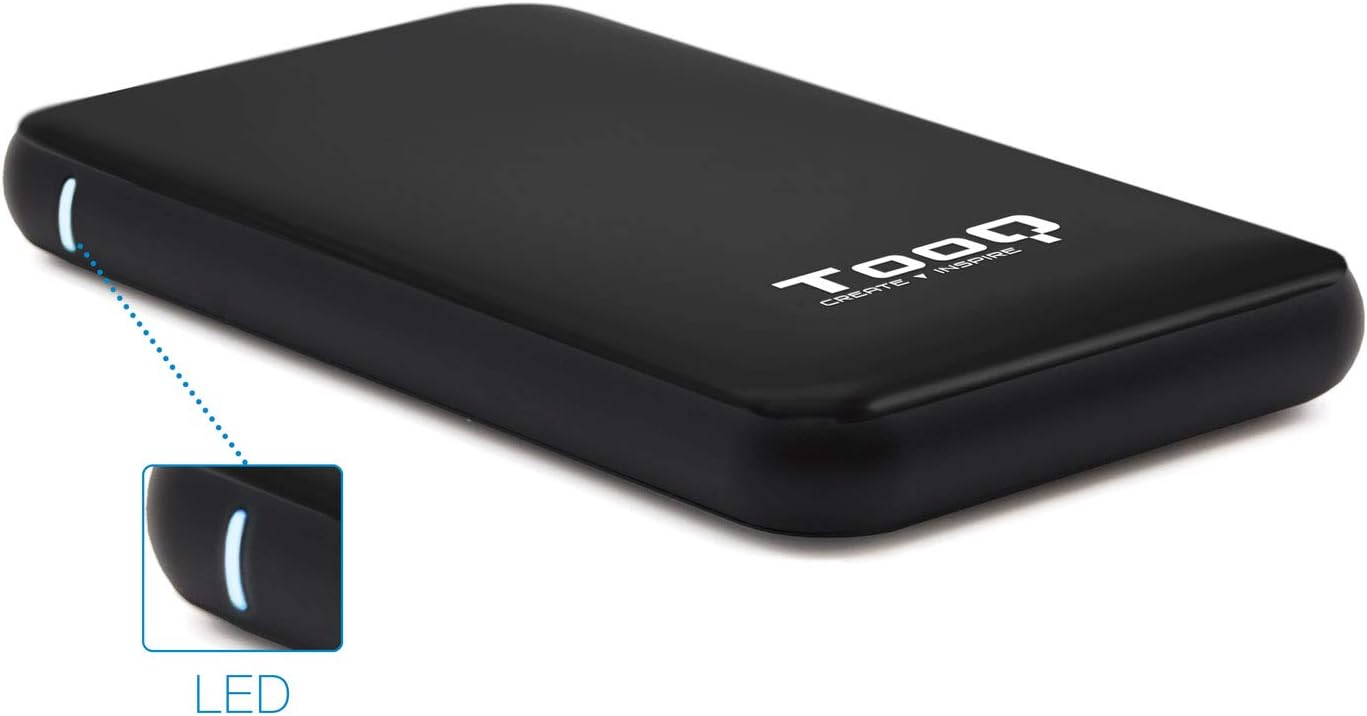
Image 3.1: The enclosure features an LED indicator on the side, which illuminates to show power and data activity.

Image 3.2: The rear of the enclosure includes a power button and a Micro-USB port for connection.
4. Setup: Hard Drive Installation
Follow these steps to install a 2.5-inch SATA HDD or SSD into the enclosure:
- Otwórz obudowę: Gently slide the top cover of the enclosure to open it. The design allows for tool-free access.
- Podłącz dysk: Align your 2.5-inch SATA HDD/SSD with the SATA connector inside the enclosure. Carefully push the drive into the connector until it is firmly seated. Ensure the drive is flush with the internal tray.
- Zamknij obudowę: Przesuń górną pokrywę z powrotem na miejsce, aż zatrzaśnie się pewnie.
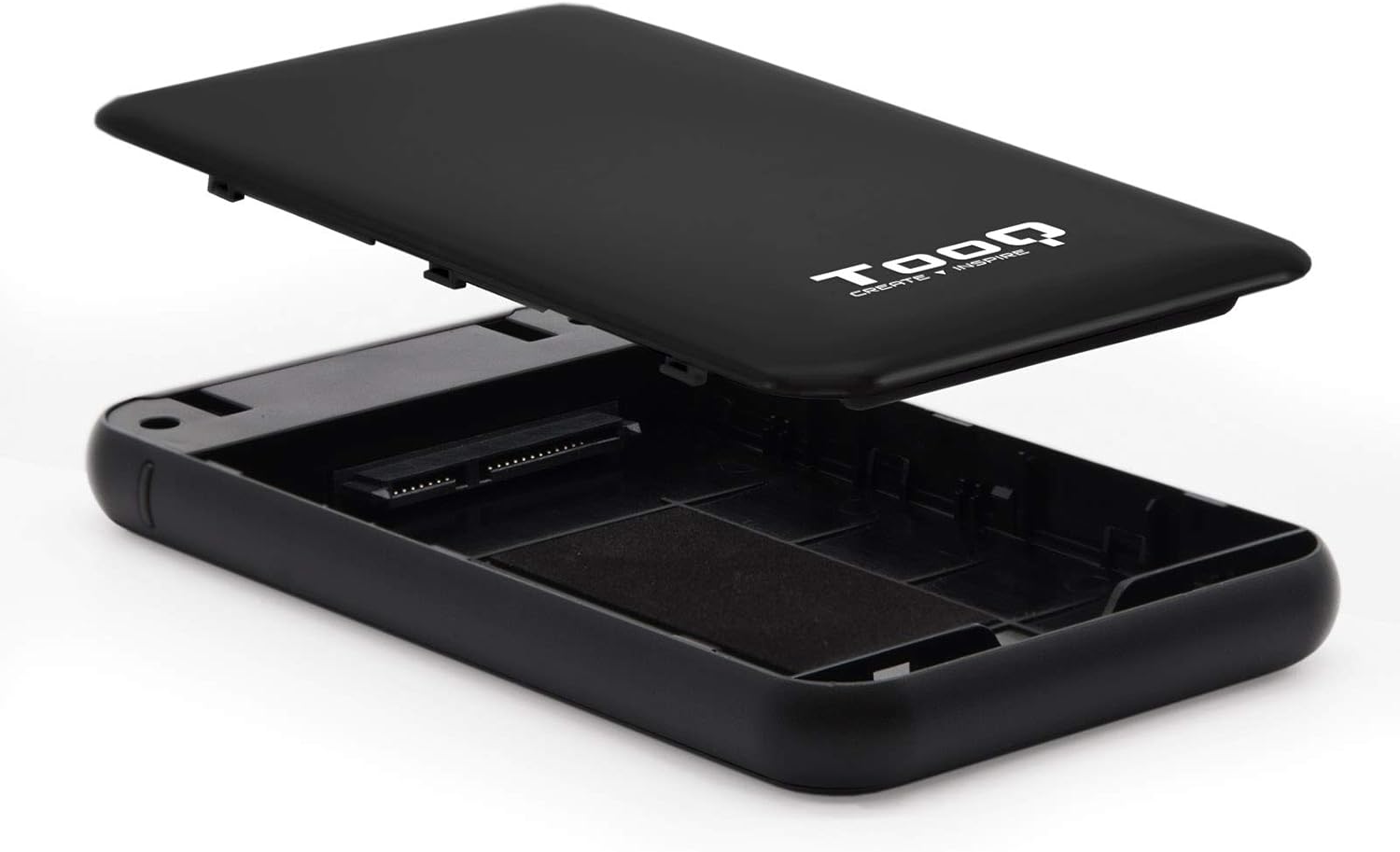
Image 4.1: The enclosure opened, revealing the internal SATA data and power connector for a 2.5-inch drive.
5. Instrukcja obsługi
After installing your hard drive, connect the enclosure to your computer:
- Podłącz kabel USB: Plug the Micro-B end of the included USB 3.0 cable into the enclosure's Micro-USB port.
- Połącz z komputerem: Plug the Type-A end of the USB cable into an available USB port on your computer. For optimal performance, use a USB 3.0 or USB 3.1 Gen1 port.
- Włączanie: If the enclosure has a power button (refer to Image 3.2), press it to turn on the device. The LED indicator (Image 3.1) will illuminate, indicating power and connection status.
- Dostęp do dysku: Your operating system should automatically detect the new storage device.
- Nowe dyski: If you are using a brand new hard drive, it may need to be initialized and formatted before use. Refer to your operating system's disk management tools for this process.
- Existing Drives: If the drive contains data, it should appear as a removable drive in 'My Computer' (Windows) or on the desktop (macOS).

Image 5.1: The TooQ TQE-2528B enclosure connected to a laptop, demonstrating a typical usage scenario.
6. Konserwacja
To ensure the longevity and optimal performance of your enclosure:
- Utrzymuj obudowę w czystości i zapobiegaj jej zakurzaniu. Do czyszczenia używaj miękkiej, suchej ściereczki.
- Unikaj wystawiania urządzenia na działanie ekstremalnych temperatur, wilgoci lub bezpośredniego światła słonecznego.
- Do not drop or subject the enclosure to strong impacts.
- Aby zapobiec uszkodzeniu danych, zawsze bezpiecznie wyjmij dysk z systemu operacyjnego przed odłączeniem kabla USB.
7. Rozwiązywanie Problemów
If you encounter issues with your TooQ TQE-2528B enclosure, refer to the following common solutions:
- Napęd nie został wykryty:
- Upewnij się, że kabel USB jest solidnie podłączony do obudowy i komputera.
- Spróbuj podłączyć do innego portu USB w komputerze.
- Verify that the hard drive is correctly seated within the enclosure's SATA connector.
- Check your computer's Disk Management (Windows) or Disk Utility (macOS) to see if the drive is recognized but uninitialized or unformatted.
- Test the enclosure with a different 2.5-inch SATA drive, if available, to rule out a drive issue.
- Powolny transfer danych:
- Ensure you are connected to a USB 3.0 or USB 3.1 Gen1 port on your computer. Connecting to a USB 2.0 port will result in slower speeds.
- Sprawdź, czy system operacyjny i sterowniki są aktualne.
- Enclosure Does Not Power On:
- Ensure the USB cable is properly connected and providing power. The enclosure is bus-powered.
- Wypróbuj inny port USB na swoim komputerze.
8. Specyfikacje
| Numer modelu | TQE-2528B |
| Kompatybilne dyski | 2.5-inch SATA I/II/III HDD/SSD (up to 9.5mm height) |
| Interfejs | USB 3.1 Gen1 (USB 3.0) |
| Szybkość przesyłu danych | Do 5.0 Gb/s |
| Zasilacz | USB Bus-powered (5 Volts) |
| Tworzywo | Tworzywo ABS |
| Wymiary (dł. x szer. x wys.) | 13.5 cm x 8 cm x 1.6 cm (ok. 5.3 x 3.1 x 0.6 cala) |
| Waga | 50 g (ok. 0.11 funta) |
| Zgodność z systemem operacyjnym | Universal (Windows, macOS, Linux) |

Image 8.1: Technical drawing illustrating the dimensions of the TooQ TQE-2528B enclosure.
9. Gwarancja i wsparcie
TooQ products are designed for reliability and performance. This product comes with a standard manufacturer's warranty. For specific warranty terms and conditions, please refer to the warranty card included with your product or visit the official TooQ webstrona.
For technical support, frequently asked questions, or to download the latest drivers (if applicable), please visit the official TooQ support weblub skontaktuj się z działem obsługi klienta. Dane kontaktowe zazwyczaj znajdują się na opakowaniu produktu lub na oficjalnej stronie internetowej. webstrona.
Producent: TOOQ
Globalny numer jednostki handlowej (GTIN): 08433281008304


