1. Wprowadzenie
The Optex ORT 8930-HD is a digital terrestrial receiver designed to receive free-to-air digital programs broadcast in MPEG2/MPEG4 format, compatible with DVB-T2 and HEVC/H.265 standards. This device connects to your television via HDMI or SCART. It features a USB input for future software updates, multimedia file playback (photos, music, videos), and direct recording to an external USB storage device (not included).
This manual provides detailed instructions for the proper installation, operation, and maintenance of your Optex ORT 8930-HD receiver. Please read it thoroughly before use to ensure optimal performance and to prevent damage.
2. Informacje dotyczące bezpieczeństwa
- Zapewnij odpowiednią wentylację wokół urządzenia, aby zapobiec przegrzaniu.
- Do not expose the receiver to rain, moisture, or extreme temperatures.
- Unikaj umieszczania urządzenia w pobliżu źródeł ciepła, takich jak grzejniki czy piece.
- Używaj wyłącznie zasilacza dostarczonego wraz z urządzeniem.
- Nie otwierać casing; wszelkie prace serwisowe należy zlecać wykwalifikowanemu personelowi.
- Disconnect the power plug from the wall outlet during lightning storms or when unused for long periods.
3. Zawartość opakowania
Sprawdź, czy w opakowaniu znajdują się wszystkie elementy:
- 1 x Optex ORT 8930-HD Digital Receiver
- 1 x Pilot zdalnego sterowania
- 1 x Instrukcja obsługi
4. Koniec produktuview
4.1 Panel przedni

Obraz 1: Przód view of the Optex ORT 8930-HD receiver, showing the display, USB port, and control buttons.
The front panel includes a digital display for channel numbers, a USB 2.0 port for external storage, and basic control buttons (CH+, CH-, Power).
4.2 Panel tylny
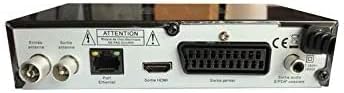
Obraz 2: Tył view of the Optex ORT 8930-HD receiver, displaying various connectivity ports.
Na tylnym panelu znajdują się następujące złącza:
- Antenna In/Out: IEC 9.52 mm connectors for terrestrial antenna.
- Wyjście HDMI: For connecting to an HD television.
- SCART Connector: For connecting to older televisions.
- S/PDIF Coaxial Audio: Cyfrowe wyjście audio.
- Pobór mocy: For the external power adapter.
4.3 Pilot zdalnego sterowania

Obraz 3: The remote control unit for the Optex ORT 8930-HD receiver.
The remote control allows full operation of the receiver, including power, channel selection, volume, menu navigation, recording functions, and multimedia playback controls.
5. Konfiguracja
5.1 Podłączenie anteny
- Connect your terrestrial antenna cable to the "Antenna In" port on the rear panel of the receiver.
- If you wish to loop the antenna signal to another device, connect a coaxial cable from the "Antenna Out" port to the input of the next device.
5.2 Podłączanie do telewizora
Wybierz jedną z następujących metod połączenia:
- HDMI (Recommended for HD): Connect an HDMI cable from the "HDMI Output" port on the receiver to an available HDMI input on your television.
- SCART: Connect a SCART cable from the "SCART Connector" on the receiver to the SCART input on your television.
5.3 Połączenie zasilania
- Connect the power adapter to the power input port on the receiver.
- Podłącz zasilacz do odpowiedniego gniazdka ściennego.
5.4 Początkowe skanowanie kanałów
- Turn on your television and select the correct input source (HDMI or SCART) corresponding to your connection.
- Power on the Optex ORT 8930-HD receiver.
- The first-time setup wizard should appear. Follow the on-screen instructions to perform an automatic channel search. This will scan for all available digital terrestrial channels in your area.
- If the wizard does not appear, navigate to the "Menu" > "Installation" > "Automatic Search" using the remote control.
6. Instrukcja obsługi
6.1 Podstawowa obsługa
- Włączanie/wyłączanie: Naciśnij MOC na pilocie lub panelu przednim.
- Wybór kanału: Użyj CH+ / CH- przycisków lub wprowadź numer kanału bezpośrednio za pomocą klawiatury numerycznej.
- Regulacja głośności: Użyj Objętość + / TOM- pikolak.
- Niemy: Naciśnij NIEMY przycisk, aby tymczasowo wyciszyć dźwięk.
Zarządzanie kanałami 6.2
- Wyszukiwanie automatyczne/ręczne: Dostęp przez Menu > Instalacja to rescan for channels.
- Funkcja LCN: The Logical Channel Numbering (LCN) function automatically sorts channels into a logical order. This can usually be enabled/disabled in the installation menu.
- Favorite List: Create personalized lists of your preferred channels for quick access. Refer to the on-screen menu for instructions on adding and managing favorite channels.
6.3 Nagrywanie i odtwarzanie
To use recording and multimedia playback features, connect a USB storage device (e.g., USB flash drive or external hard drive) to the USB port on the front panel.
- Nagrywanie USB: Naciśnij REK button on the remote control to start recording the current program. Press ZATRZYMYWAĆ SIĘ aby zakończyć nagrywanie.
- Funkcja przesunięcia czasu: This allows you to pause live TV and resume watching later. Activate Timeshift via the remote control (usually a dedicated button or through the menu).
- Odtwarzanie multimediów: Access the multimedia player via the Menu. You can browse and play music, photo, and video files stored on your connected USB device.
6.4 Elektroniczny przewodnik po programach (EPG)
Naciśnij EPG przycisk na pilocie, aby view Elektroniczny Przewodnik Programowy, w którym wyświetlane są programy nadchodzących emisji.
6.5 Blokada rodzicielska
Set up a parental lock to restrict access to certain channels or programs. This feature is typically found in the Menu > Ustawienia systemowe > Kontrola rodzicielska sekcja.
6.6 Funkcja timera
The timer function allows you to schedule the receiver to turn on/off or record a specific program at a set time. Access this feature through the Menu.
6.7 Software Update via USB
Okresowo sprawdzaj producenta website for available software updates. Download the update file to a USB drive and follow the instructions in the Menu > Ustawienia systemowe > Aktualizacja oprogramowania section to install it.
7. Konserwacja
- Czyszczenie: Do czyszczenia zewnętrznej części odbiornika należy używać miękkiej, suchej ściereczki. Nie należy używać środków czyszczących w płynie ani aerozolu.
- Wentylacja: Aby zapobiec przegrzaniu, upewnij się, że otwory wentylacyjne urządzenia nie są zablokowane.
- Oprogramowanie: Keep the receiver's software updated to ensure optimal performance and access to the latest features.
8. Rozwiązywanie Problemów
| Problem | Możliwa przyczyna | Rozwiązanie |
|---|---|---|
| Brak zasilania | Odłączony kabel zasilający; uszkodzone gniazdko elektryczne. | Sprawdź podłączenie kabla zasilającego; spróbuj użyć innego gniazdka. |
| No signal / No channels | Antenna not connected; incorrect input source on TV; no channel scan performed. | Check antenna connection; select correct TV input; perform an automatic channel scan. |
| Pilot nie działa | Batteries depleted; obstruction between remote and receiver. | Wymień baterie i upewnij się, że czujnik podczerwieni odbiornika jest wyraźnie widoczny. |
| Nagrywanie USB nie działa | USB device not connected or formatted incorrectly; insufficient storage space. | Ensure USB device is properly connected; format USB device (FAT32/NTFS); check available space. |
| Urządzenie zawiesza się lub przestaje reagować | Tymczasowy błąd oprogramowania. | Disconnect power for a few seconds, then reconnect. If problem persists, check for software updates. |
9. Specyfikacje
| Funkcja | Szczegół |
|---|---|
| Model | ORT 8930-HD |
| Marka | Optex |
| Typ tunera | Naziemne (DVB-T2) |
| Dekodowanie wideo | HEVC/H.265, MPEG-2.5 |
| Łączność | 1x HDMI, 1x SCART, 1x USB 2.0, 1x S/PDIF Coaxial Audio, Antenna In/Out |
| Pojemność kanału | Over 1000 channels |
| Nagranie | External USB media (PVR function) |
| Odtwarzanie multimediów | Music, Photos, Videos |
| Cechy specjalne | Timeshift, EPG, Parental Lock, Favorite List, Multi-language Menu, LCN, 5V Antenna Power, Timer Function, Dolby Digital+ compatible |
| Tryb wyjścia audio | [SOM] |
| Konfiguracja dźwięku przestrzennego głośników | 5.1 |
| Moc wyjściowa | 5 watów |
| Waga produktu | 600 gramów |
10. Gwarancja i wsparcie
Specific warranty information is not provided within this manual. Please refer to the warranty card included with your purchase, contact your retailer, or visit the official Optex webSzczegółowe warunki gwarancji można znaleźć na naszej stronie.
For technical support or service inquiries, please contact your local Optex distributor or the customer service department as indicated on the product packaging or manufacturer's webstrona.


