Wstęp
The JLab Flex Sport Wireless Headphones are designed for active lifestyles, offering a secure fit, long battery life, and customizable sound. This manual provides detailed instructions for optimal use and maintenance of your headphones.

Image: JLab Flex Sport Wireless Headphones, black, shown from a three-quarter angle.
Główne cechy
- 20-Hour Bluetooth Playtime: Dłuższa żywotność baterii umożliwiająca dłuższe użytkowanie.
- Wygodne dopasowanie: Moisture-wicking ear pads and adjustable tension headbands for a secure fit during workouts.
- Najwyższa jakość dźwięku: High-quality sound drivers deliver full-range audio with deep bass.
- Sterowanie uniwersalne: Integrated microphone and controls for volume, track skipping, and call management.
- Konstrukcja odporna na pot: Built to withstand intense workouts.
Organizować coś
1. Ładowanie słuchawek
Before first use, fully charge your JLab Flex Sport headphones. Connect the provided USB Type-C cable to the charging port on the headphones and to a USB power source.
- Charging Time: Approximately 300 hours (as per product data)
- Battery Life: Up to 20 hours of Bluetooth playtime.

Image: The JLab Flex Sport headphones highlighting their 20+ hour playtime capability.
2. Dopasowanie dopasowania
The JLab Flex Sport headphones come with adjustable tension headbands to ensure a custom and secure fit. You can choose between a looser fit without a tension band, a normal fit, or a tight fit for rigorous activities.

Image: The JLab Flex Sport headphones disassembled to show the adjustable tension headbands and headband pad.
3. Parowanie Bluetooth
- Sprawdź, czy słuchawki są naładowane.
- Power on the headphones. They should automatically enter pairing mode (indicated by a flashing LED light, typically blue).
- Na swoim urządzeniu (smartfonie, tablecie, komputerze) przejdź do ustawień Bluetooth i włącz Bluetooth.
- Select "JLab Flex Sport" from the list of available devices.
- Once connected, the LED indicator on the headphones will typically turn solid blue or off, depending on the model.
For optimal sound quality, some users recommend a "burn-in" period. Connect the headphones to a PC/laptop via Bluetooth, set the volume to low to medium, and let them play for 30 minutes to 1 hour without wearing them. A total of 30-40 hours of break-in time is suggested for best results.
Instrukcja obsługi
Sterownica
The JLab Flex Sport headphones feature universal mic and music controls, allowing you to manage audio and calls directly from the headphones.
- Odtwórz/Pauza: Naciśnij raz przycisk wielofunkcyjny.
- Zwiększanie/zmniejszanie głośności: Użyj dedykowanych przycisków głośności.
- Następny utwór: Naciśnij i przytrzymaj przycisk zwiększania głośności.
- Poprzedni utwór: Naciśnij i przytrzymaj przycisk zmniejszania głośności.
- Odbieranie/kończenie połączeń: Naciśnij raz przycisk wielofunkcyjny.
- Odrzuć połączenie: Naciśnij i przytrzymaj przycisk wielofunkcyjny.
- Aktywuj asystenta głosowego: Naciśnij dwukrotnie przycisk wielofunkcyjny.
Custom EQ3 Sound
The headphones feature Custom EQ3 Sound settings, allowing you to adjust the audio profile to your preference. These settings are typically cycled by pressing a specific button (often the JLab logo button on the right earcup, as indicated in user reviewS).
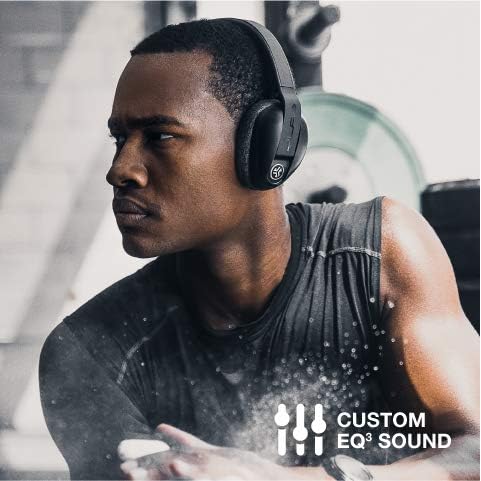
Image: A man wearing the JLab Flex Sport headphones, illustrating the Custom EQ3 Sound feature.
Be Aware Audio
The "Be Aware Audio" feature allows you to hear your surroundings while listening to music, enhancing safety during outdoor activities or when interacting with others. This feature can typically be toggled on or off via a button on the headphones (e.g., the JLab logo button).

Image: A woman stretching while wearing the JLab Flex Sport headphones, demonstrating the "Be Aware Audio" feature.
Wideo: Ponadview of the JLab Flex Sport Wireless Headphones, showcasing their features and use during workouts. This video highlights the adjustable fit, sound quality, and sweat-proof design.
Konserwacja
Cleaning Ear Pads
The JLab Flex Sport headphones are designed with removable earcups for easy cleaning. This helps maintain hygiene and comfort, especially after intense workouts.
- Gently remove the ear pads from the headphone cups.
- Hand wash the ear pads with mild soap and water, or machine wash on a light cycle.
- Allow the ear pads to air dry completely before reattaching them to the headphones.

Image: A man working out, emphasizing the sweat-proof design of the JLab Flex Sport headphones.

Image: The JLab Flex Sport headphones highlighting their moisture-wicking properties.
Rozwiązywanie problemów
- Brak dźwięku lub słaba jakość dźwięku:
- Ensure headphones are charged and properly paired.
- Sprawdź poziom głośności zarówno na słuchawkach, jak i na podłączonym urządzeniu.
- Verify that the "Be Aware Audio" feature is not inadvertently activated, as it can sometimes affect perceived sound quality.
- Consider performing the recommended "burn-in" process for optimal audio performance.
- Headphones Not Pairing:
- Upewnij się, że w urządzeniu jest włączona funkcja Bluetooth, a słuchawki są w trybie parowania.
- Turn off and on both the headphones and your device.
- Clear previous Bluetooth connections on your device and attempt to pair again.
- Elementy sterujące nie odpowiadają:
- Sprawdź, czy słuchawki są włączone i podłączone do urządzenia.
- Reboot the headphones and your connected device.
Specyfikacje
| Funkcja | Szczegół |
|---|---|
| Nazwa modelu | Flex Sport |
| Numer modelu przedmiotu | HBFLEXSPORTRBLK4 |
| Technologia łączności | Bezprzewodowy (Bluetooth) |
| Wersja Bluetooth | 5.0 |
| Żywotność baterii | 20 godzin |
| Czas ładowania | 300 Hours (as per product data) |
| Kształt słuchawki | Nauszne |
| Poziom wodoodporności | Wodoodporny |
| Waga przedmiotu | 191 gramów (6.7 uncji) |
| Wymiary produktu | 7.5 x 5.38 x 3.63 cala |
| UPC | 812887018029 |
Gwarancja i wsparcie
JLab oferuje Dwuletnia ograniczona gwarancja on the Flex Sport Wireless Headphones, covering manufacturing defects from the date of purchase. Additionally, a 30-dniowa gwarancja zwrotu pieniędzy jest zapewniane w celu zapewnienia satysfakcji klienta.
For support, warranty claims, or further assistance, please visit the official JLab webwitryny lub skontaktuj się z obsługą klienta.
Note: Warranty terms and conditions may apply. Please refer to the official JLab documentation for complete details.


