1. Introduction: About the Anderic RR2573
The Anderic RR2573 is a fully functional Master/Setup Remote Control designed for ALL Philips/Magnavox Commercial and Non-commercial (consumer) TVs. It serves as a direct substitute for various original remotes, including the RC2573GR (Green Master ITV remote), RG4172BK (Older style black Master remote), and 22AV8573/00 (Newer Yellow Hospitality remote).
This remote is compatible with a wide range of Philips and Magnavox televisions, including Philips ITV, Philips Commercial TVs, Philips Professional TVs, Philips Hospitality TVs, and all older Magnavox Commercial TVs. No programming is required for its use. The remote's default codes are pre-set to the "Setup" mode, eliminating the need for a sliding switch or manual mode selection. It is already configured in the "RC5" Setup mode.
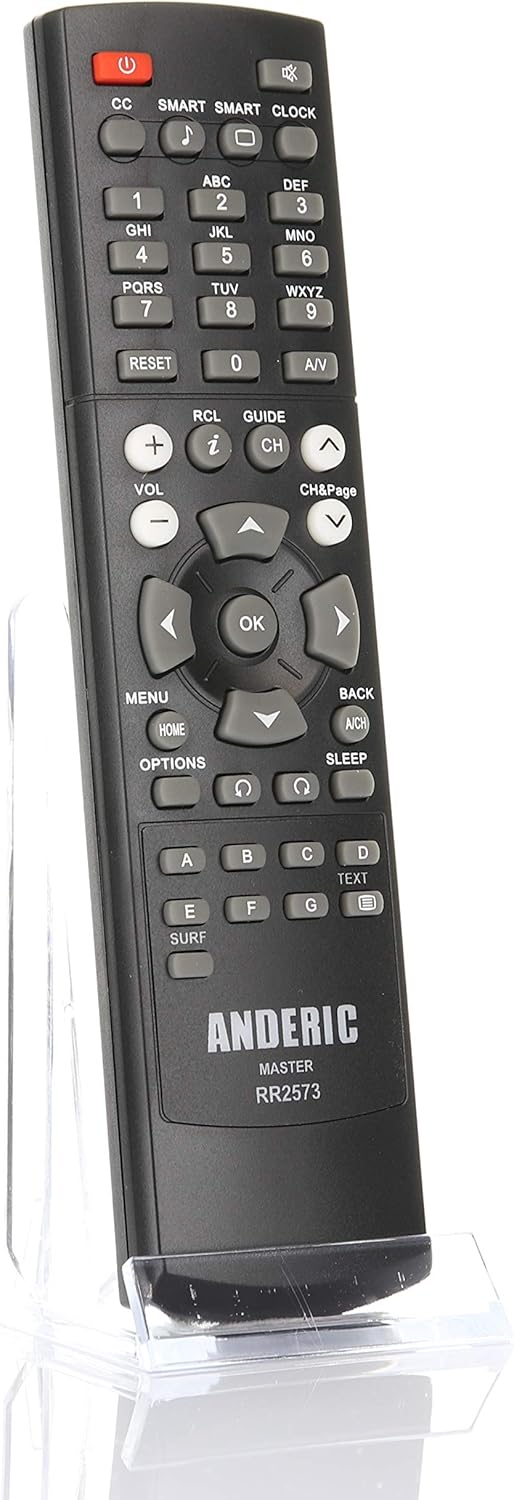
This manual provides essential information for setting up, operating, and maintaining your Anderic RR2573 remote control.
2. Główne cechy
- Fully functional Master/Setup Remote Control for ALL Philips/Magnavox Commercial and Non-commercial (consumer) TVs.
- Direct substitute for RC2573GR (Green Master ITV remote), RG4172BK (Older style black Master remote), and 22AV8573/00 (Newer Yellow Hospitality remote).
- Compatible with Philips ITV, Philips Commercial TVs, Philips Professional TVs, Philips Hospitality TVs, and all older Magnavox Commercial TVs.
- No programming required; default codes are pre-set to "Setup" mode.

3. Konfiguracja i pierwsze użycie
3.1. Instalacja baterii
The Anderic RR2573 remote control requires two (2) AAA batteries for operation. Follow these steps to install the batteries:
- Znajdź pokrywę komory baterii z tyłu pilota.
- Aby otworzyć komorę, naciśnij zakładkę i przesuń pokrywę w dół.
- Włóż dwie baterie AAA, upewniając się, że bieguny dodatni (+) i ujemny (-) są prawidłowo ustawione względem wskaźników biegunowości wewnątrz komory.
- Przesuń pokrywę komory baterii z powrotem na miejsce, aż zatrzaśnie się pewnie.

3.2. First Time Use (No Programming Required)
The Anderic RR2573 is designed for immediate use with compatible Philips and Magnavox TVs without any programming. Its default codes are pre-set to the "Setup" mode, which is typically required for accessing advanced settings on commercial or hospitality televisions. Simply insert the batteries, and the remote is ready to operate your TV.
4. Instrukcja obsługi
4.1. Funkcje przycisków
The Anderic RR2573 features a standard layout of buttons for controlling your television. Below is a general overview typowych funkcji przycisków:

| Przycisk | Funkcjonować |
|---|---|
| MOC | Włącza lub wyłącza telewizor. |
| CC | Activates/deactivates Closed Captions. |
| MĄDRY | Accesses Smart TV features or picture modes. |
| ZEGAR | Wyświetla lub ustawia zegar. |
| Przyciski numeryczne (0-9) | Bezpośredni wybór kanału. |
| Audiowizualny | Switches between video input sources. |
| GŁOŚNOŚĆ +/- | Reguluje głośność w górę lub w dół. |
| CH +/- | Zmienia kanały w górę lub w dół. |
| NIEMY | Wycisza lub włącza dźwięk telewizora. |
| MENU | Otwiera główne menu telewizora. |
| DOM | Returns to the home screen or main menu. |
| OK | Potwierdza wybory w menu. |
| Strzałki Kierunkowe | Umożliwia nawigację po opcjach menu. |
| Z POWROTEM | Powrót do poprzedniego menu lub ekranu. |
| SPAĆ | Ustawia wyłącznik czasowy. |
| OPCJE | Dostęp do dodatkowych opcji lub ustawień. |
| Kolorowe przyciski (A, B, C, D) | Functions vary by TV model and menu context. |
4.2. Activating TV Setup Menu (for Commercial/Hospitality TVs)
The Anderic RR2573 is a Master/Setup Remote Control for Philips and Magnavox commercial televisions. These instructions will help you convert your TV from "Commercial Mode" to "Consumer Mode" for full access to the menu. This remote is capable of controlling all Philips/Magnavox commercial TVs, but depending on the TV, instructions may vary. This is why you must locate your TV's owner's manual.
NOTATKA: The following instructions may not work for every TV. If the following instructions do not work, you will need to refer to your TV's operating manual for instructions.

To Check if your TV is in Commercial Mode or Consumer Mode:
- Press the "RC5" MODE button at the bottom of the remote. This will put the remote in correct mode.
- Press the "RECALL" button on the remote. The TV Status menu will appear.
- Look at line #11 of the onscreen menu to see if the TV is in Commercial or Consumer mode.
Notatka: If Line #11 says "COMMERCIAL" mode then you must change this mode to "Consumer Mode" in order to grant access to the full setup menu. Please use the following steps to change it.
Changing from Commercial Mode to Consumer Mode:
- Press the "RC5" MODE button at the bottom of remote. To put remote in SETUP mode.
- Press the "Menu" button on remote. This will activate the TV Setup Menu.
- Press number keys "024995" (or "319753") followed by the "Menu" button on the remote. The TV Setup Menu will appear.
Notatka: The following steps may vary depending on the model of TV.
- Using the directional pad on the remote, highlight "Commercial mode," and Press ARROW keys to select "Consumer Mode."
- To exit, highlight STORE and press the "RIGHT ARROW" button on remote to store the change. The TV will turn off. You are now in Consumer Mode and should have full access to your menu options.
Please refer to your operating manual for a full set of instructions.
5. Pielęgnacja i konserwacja
To ensure the longevity and optimal performance of your Anderic RR2573 remote control, follow these care and maintenance guidelines:
- Czyszczenie: Wipe the remote regularly with a soft, dry cloth. For stubborn dirt, slightly dampen the cloth with water or a mild, non-abrasive cleaner. Avoid using harsh chemicals or abrasive materials, as they can damage the remote's surface or buttons.
- Wymiana baterii: Replace batteries when the remote's response becomes sluggish or inconsistent. Always replace both batteries at the same time with new AAA batteries. Do not mix old and new batteries, or different types of batteries.
- Składowanie: Store the remote in a cool, dry place away from direct sunlight, extreme temperatures, and high humidity. If the remote will not be used for an extended period, it is advisable to remove the batteries to prevent leakage.
- Unikaj upadków i uderzeń: Protect the remote from physical shocks. Dropping the remote can damage internal components or crack the casing.
- Ekspozycja na płyny: Keep the remote away from liquids. Spills can cause short circuits and permanent damage.
6. Rozwiązywanie typowych problemów
If you encounter issues with your Anderic RR2573 remote control, consider the following troubleshooting steps:
- Pilot nie odpowiada:
- Sprawdź, czy baterie zostały włożone prawidłowo, z zachowaniem właściwej polaryzacji.
- Wymień baterie na nowe baterie AAA.
- Upewnij się, że między pilotem a czujnikiem podczerwieni telewizora nie ma żadnych przeszkód.
- TV Not Changing Modes (Commercial to Consumer):
- Verify that you are following the specific steps outlined in Section 4.2 for your TV model.
- Some TV models may have unique menu structures or require different key sequences. Refer to your TV's original owner's manual for detailed instructions on accessing and changing service or setup modes.
- Ensure the remote is in the correct "Setup" mode (RC5 mode).
- Ograniczona funkcjonalność:
- If certain buttons do not work, it might be due to the TV's current mode (e.g., still in Commercial mode). Complete the mode change process if applicable.
- Confirm that the remote is pointed directly at the TV's IR receiver.
Tips for finding your TV's operating manual:
- Try searching the Internet. Go to www.Google.com, type in the model of your TV and the keywords "operating manual" (i.e. PL5125 operating manual). There are many operating manuals online available for free to download.
- Try contacting Philips customer support. Go to the following URL: www.support.philips.com/support/sms_page.jsp
- Call Philips at 1-888-744-5477.
7. Specyfikacje produktu
- Wymiary produktu: 7 x 2 x 1 cala
- Waga przedmiotu: 3.2 uncji
- Baterie: Wymagane 2 baterie AAA (brak w zestawie)
- Producent: Dan's Electronics Etc., Inc.
- Dodatek specjalny: Ergonomiczna konstrukcja
- Kolor: Czarny
- Maksymalna liczba obsługiwanych urządzeń: 1
- Zgodne urządzenia: Television (Philips/Magnavox Commercial and Non-commercial TVs)
8. Gwarancja i obsługa klienta
Anderic® is a registered trademark of Dan's Electronics Etc., Inc. All rights reserved.
For further assistance or inquiries regarding your Anderic RR2573 remote control, please visit the official Anderic store or contact their customer support channels. You can find more information and products at the Anderic Amazon Store.


