Wstęp
This manual provides comprehensive instructions for the safe and effective operation, maintenance, and troubleshooting of your FLIR K45 High Performance Thermal Imaging Camera. The FLIR K45 is designed to provide clear thermal images in challenging environments, aiding in navigation and decision-making.

Figure 1: FLIR K45 Thermal Imaging Camera in operation, showing a thermal view.
Informacje dotyczące bezpieczeństwa
Always read and understand all safety warnings and instructions before operating the FLIR K45 camera. Failure to do so may result in injury or damage to the device.
- Do not expose the camera to temperatures exceeding its operational limits (up to 500°F for 5 minutes).
- Ensure the battery is properly charged and installed before use.
- Avoid direct exposure of the lens to extreme heat sources when not in use for thermal imaging.
- The device is water resistant (IP67), but avoid prolonged submersion.
Składniki produktu
The FLIR K45 package includes the following items:
- FLIR K45 Thermal Imaging Camera
- Akumulator litowo-jonowy (w zestawie)
- Charging dock (if applicable, based on image)
- Kabel USB
- Zasilacz
- Dokumentacja
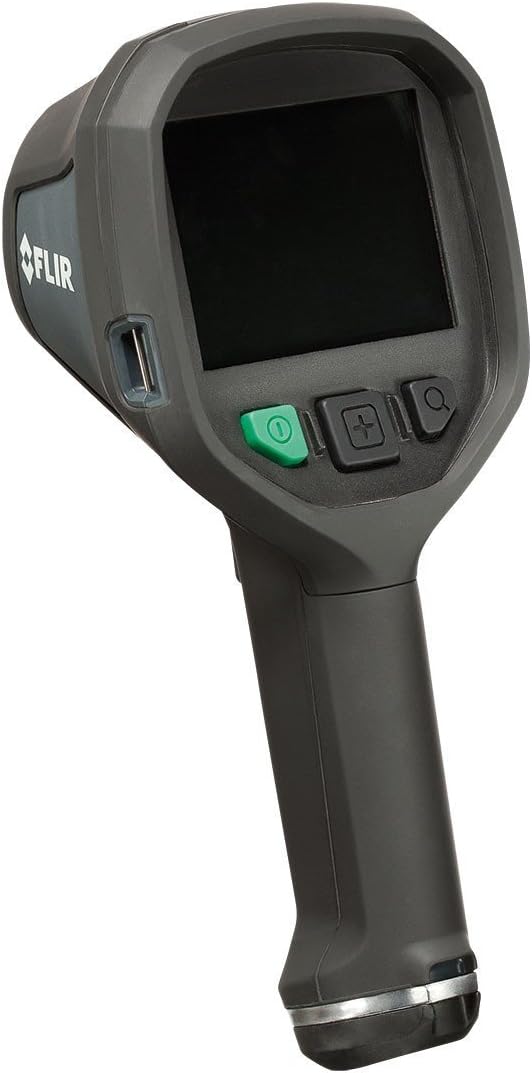
Rycina 2: Przód view of the FLIR K45 camera, showing the screen and control buttons.

Rycina 3: Przód view of the FLIR K45, highlighting the thermal lens.
Organizować coś
1. Ładowanie akumulatora
The FLIR K45 uses a Lithium Ion battery. Before first use, fully charge the battery. Connect the camera to the charging dock or directly via the USB cable to a power adapter.
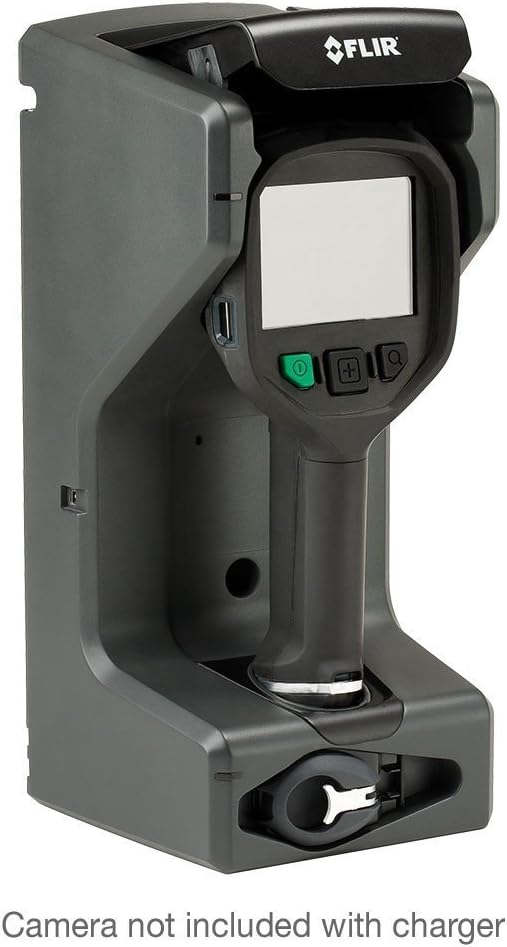
Figure 4: FLIR K45 in its charging dock. Camera not included with charger.
2. Wkładanie baterii
Locate the battery compartment, typically at the base of the handle. Insert the charged Lithium Ion battery, ensuring it clicks into place securely.
3. Pierwsze włączenie zasilania
Press and hold the power button (green button) to turn on the device. The 4-inch screen will illuminate, displaying the FLIR logo followed by the thermal image feed.
Instrukcja obsługi
1. Podstawowa obsługa
Point the camera towards the area of interest. The thermal image will be displayed on the 4-inch screen. The K45 provides a crisp, 240 x 180 pixel thermal image, enhanced by FSX™ Flexible Scene Enhancement for improved detail.

Rysunek 5: Example of a thermal image captured by the FLIR K45, indicating temperature variations.
2. Tryby obrazu
The FLIR K45 offers several image modes to optimize viewing for different scenarios. Use the mode selection button (often indicated by a plus/minus or menu icon) to cycle through these options:
- IR image: Standard infrared thermal view.
- TI Basic fire-fighting mode: Optimized for general firefighting scenarios.
- Black-and-white fire-fighting mode: Provides a high-contrast monochrome thermal view.
- Fire mode: Specific mode for fire scene analysis.
- Search-and-rescue mode: Enhances visibility for locating individuals.
- Heat detection mode: Highlights areas of significant heat.
- Thumbnail gallery: Umożliwia ponowneview of saved images.

Figure 6: Detail of the FLIR K45 control buttons for navigation and mode selection.
3. Robienie zdjęć
To capture a thermal image, press the designated capture button (refer to the device's physical buttons, often a trigger or a specific button on the control panel). Images are saved to the internal memory or an inserted SD card.
Konserwacja
1. Czyszczenie aparatu
Regularly clean the camera body with a damp cloth. For the lens, use a soft, lint-free cloth specifically designed for optical surfaces. Do not use abrasive cleaners or solvents.
2. Pielęgnacja baterii
To prolong battery life, avoid fully discharging the battery frequently. Store the camera and battery in a cool, dry place when not in use for extended periods.
Rozwiązywanie problemów
| Problem | Możliwa przyczyna | Rozwiązanie |
|---|---|---|
| Kamera się nie włącza. | Niski poziom naładowania baterii lub jej rozładowanie. | Całkowicie naładuj baterię. |
| Obraz jest rozmazany lub niewyraźny. | Dirty lens; extreme temperature difference. | Clean the lens; allow camera to acclimate to environment. |
| Nie można zapisać obrazów. | Memory full or no SD card inserted. | Delete old images or insert a compatible SD card. |
Jeśli natrafisz na problemy, które nie zostały tutaj wymienione, zapoznaj się z sekcją pomocy, aby uzyskać dalszą pomoc.
Specyfikacje
| Funkcja | Szczegół |
|---|---|
| Model | FLIR K45 |
| Rozdzielczość termiczna | 240 x 180 pikseli |
| Rozmiar ekranu | 4 cali (11 cm) |
| Dokładność | ±4°C (±7.2°F) or ±4% of reading (for ambient 10°C to 35°C) |
| Trwałość | Withstands 2-meter drop, IP67 water resistant |
| Temperatura pracy | Fully operational up to 500°F (5 minutes) |
| Typ baterii | 1 bateria litowo-jonowa (w zestawie) |
| Wymiary produktu | 4.7 x 4.9 x 11 cala |
| Waga przedmiotu | 1 funt |
| Typ nośnika | Karta SD |
Informacje o gwarancji
The FLIR K45 camera is protected by FLIR's 2-5-10 Warranty:
- 2 lata na baterie.
- 5 lata do kamery.
- 10 lata dla detektora.
For detailed warranty terms and conditions, please refer to the official FLIR webodwiedź witrynę lub skontaktuj się z działem obsługi klienta.
Obsługa klienta
For technical assistance, service, or additional information regarding your FLIR K45 Thermal Imaging Camera, please contact FLIR customer support or visit the official FLIR webstrona.
Możesz również odwiedzić FLIR Store on Amazon aby uzyskać informacje o produkcie i zasoby.
Filmy o produktach
W dostępnych danych przeznaczonych do umieszczenia w niniejszej instrukcji nie umieszczono żadnych oficjalnych filmów wideo produktu pochodzących od sprzedawcy.


