Wstęp
This manual provides essential information for the safe and proper operation of your VTech Switch & Go Dinos 2-Pack, featuring T-Don the Pteranodon and Tonn the Stegosaurus. Please read these instructions thoroughly before use and retain them for future reference.
The VTech Switch & Go Dinos are 2-in-1 toys that transform between a dinosaur and a vehicle. They feature an LCD screen for customizable animations and play various sounds and phrases.
Zawartość opakowania
- 1 x VTech Switch & Go Dino - T-Don the Pteranodon
- 1 x VTech Switch & Go Dino - Tonn the Stegosaurus
- 4 baterie AAA (wstępnie zainstalowane)

Image: T-Don (red Pteranodon) and Tonn (yellow Stegosaurus) in their dinosaur forms.
Organizować coś
Instalacja i wymiana baterii
Each Switch & Go Dino requires 2 AAA batteries. Batteries are pre-installed for demonstration purposes. For optimal performance, it is recommended to replace them with new alkaline batteries.
- Znajdź komorę baterii na spodzie zabawki.
- Using a screwdriver, loosen the screw on the battery cover.
- Remove the old batteries (if any) and dispose of them properly.
- Włóż 2 nowe baterie AAA, zwracając uwagę na prawidłową biegunowość (+/-).
- Załóż pokrywę baterii i dokręć śrubę.
Ważne informacje o baterii:
- Use only new AAA alkaline batteries.
- Nie należy mieszać starych i nowych baterii.
- Nie należy mieszać baterii alkalicznych, standardowych (węglowo-cynkowych) ani akumulatorów (niklowo-kadmowych).
- Wyjmij wyczerpane baterie z zabawki.
- Wyjmij baterie, jeśli zabawka nie będzie używana przez dłuższy czas.
Instrukcja obsługi
Włączanie/wyłączanie zasilania
To turn the toy on, locate the On/Off switch, usually on the underside or side of the toy, and slide it to the "On" position. To turn off, slide the switch to "Off".
Transformation: Dinosaur to Vehicle and Vice Versa
Each Switch & Go Dino is designed for easy transformation. Follow these general steps:
- From Dinosaur to Vehicle: Carefully fold and tuck away the dinosaur's limbs, head, and tail. Extend the wheels and vehicle body panels until the vehicle shape is complete.
- From Vehicle to Dinosaur: Extend the dinosaur's limbs, head, and tail from the vehicle body. Fold in the wheels and vehicle panels until the dinosaur shape is complete.
The transformation process is intuitive and designed for repeated use. Refer to the specific toy's molded details for guidance.

Image: Tonn the Stegosaurus (yellow) shown in both dinosaur and vehicle modes, with an arrow indicating transformation.
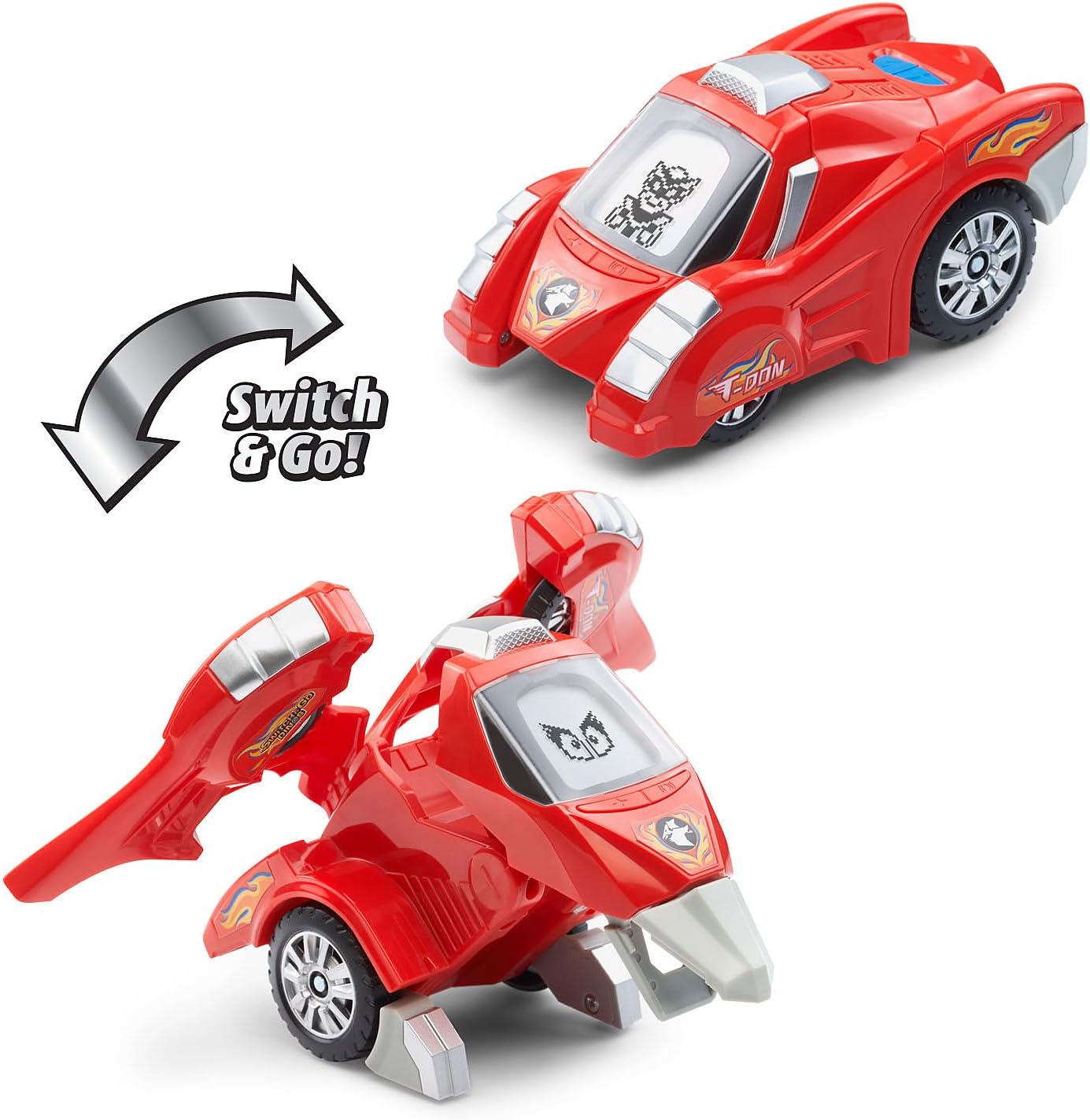
Image: T-Don the Pteranodon (red) shown in both dinosaur and vehicle modes, with an arrow indicating transformation.
Funkcje ekranu LCD
Each dino features an LCD screen that displays various animations:
- Dinosaur Mode: Displays customizable dinosaur eyes.
- Vehicle Mode: Displays driver animations.
The animations change dynamically with play and button presses.

Image: A finger pressing a button on Tonn the Stegosaurus, demonstrating how the LCD screen displays different eye animations.
Funkcje przycisków
Press the various buttons on the dino to activate different features:
- Dinosaur Facts: Learn interesting facts about each dinosaur.
- Efekty dźwiękowe: Hear realistic dinosaur roars, vehicle sounds, and other sound effects.
- Phrases: Listen to over 50 unique sounds and phrases.
Experiment with different buttons and modes to discover all the interactive elements.
Kontrola głośności
Some models may include a volume control switch, typically located near the battery compartment or power switch. Adjust to your preferred sound level.
Konserwacja
Czyszczenie
To clean the toy, wipe it with a slightly damp cloth. Do not use harsh chemicals or abrasive cleaners. Ensure the toy is completely dry before storage or further use.
Ostrożność:
- Do not immerse the toy in water or any other liquid.
- Keep the toy away from direct sunlight and direct heat sources.
Składowanie
When not in use for extended periods, store the toy in a cool, dry place. Remove batteries if storing for several months to prevent leakage.
Rozwiązywanie problemów
| Problem | Możliwa przyczyna | Rozwiązanie |
|---|---|---|
| Zabawka nie włącza się i nie reaguje. | Baterie są słabe lub nieprawidłowo zainstalowane. | Check battery polarity. Replace with new AAA alkaline batteries. Ensure the On/Off switch is in the "On" position. |
| Dźwięk jest zniekształcony lub zbyt cichy. | Low batteries or volume setting. | Replace batteries. Adjust the volume switch if available. |
| Ekran LCD jest pusty lub migocze. | Niski poziom baterii lub awaria wewnętrzna. | Replace batteries. If the issue persists, contact VTech customer support. |
| Difficulty transforming the toy. | Incorrect manipulation. | Refer to the transformation steps in the Operating Instructions. Ensure all parts are aligned correctly. Do not force parts. |
Specyfikacje
| Funkcja | Szczegół |
|---|---|
| Numer modelu produktu | 80-204750 |
| Wymiary produktu | 7.5 x 7.3 x 3.7 cala |
| Waga przedmiotu | 1.13 funta |
| Zalecany wiek producenta | 36 miesięcy - 8 lat |
| Wymagane baterie | 4 x AAA batteries (2 per dino, included) |
| Producent | VTech |
| Data wydania | 2 maja 2018 r. |
Informacje o gwarancji
VTech products are manufactured with high-quality materials and undergo rigorous testing. For specific warranty details, please refer to the warranty card included with your product or visit the official VTech webZachowaj paragon jako dowód zakupu.
Obsługa klienta
If you have any questions, require assistance, or encounter issues not covered in this manual, please contact VTech Customer Support. Contact information can typically be found on the VTech official webmiejscu lub na opakowaniu produktu.
Online resources and FAQs may also be available on the VTech webstrona.


