1. Wprowadzenie
This manual provides comprehensive instructions for the setup, operation, and maintenance of your RCA OEM 228892 TV/VCR Combo Remote Control. This remote is designed to control various functions of compatible RCA, Mitsubishi, and Sharp TV/VCR combo units. Please read this manual thoroughly to ensure proper use and to maximize the functionality of your remote control.
2. Koniec produktuview
The RCA OEM 228892 remote control features a standard layout for TV and VCR functions. Familiarize yourself with the button layout as shown in the image below.
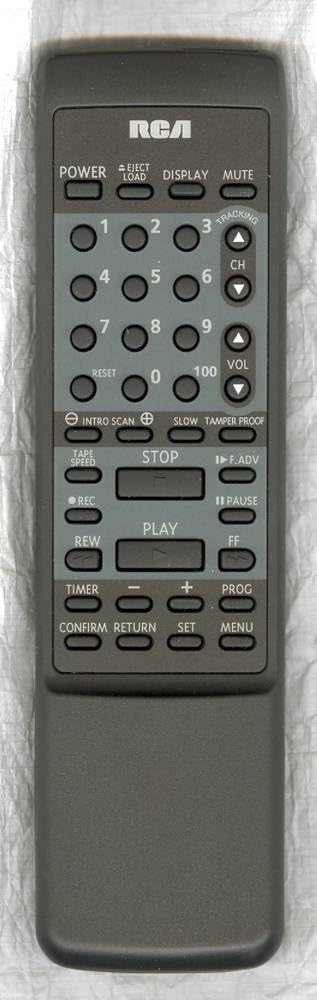
Funkcje przycisków:
- MOC: Turns the TV/VCR combo unit on or off.
- EJECT/LOAD: Ejects or loads a VCR tape.
- POKAZ: Shows on-screen information such as channel number, time, or VCR status.
- NIEMY: Wycisza dźwięk.
- Przyciski numeryczne (0-9, 100): Used to directly select channels or input numerical values.
- RESETOWANIE: Resets certain settings or counters, often for VCR functions.
- CH (Kanał w górę/w dół): Zmienia kanał telewizyjny w górę lub w dół.
- VOL (zwiększanie/zmniejszanie głośności): Adjusts the audio volume up or down.
- INTRO SCAN: Scans the beginning of each recorded program on a tape.
- POWOLNY: Activates slow-motion playback for VCR.
- TAMPER PROOF: A security feature, often related to VCR recording.
- PRĘDKOŚĆ TAŚMY: Adjusts the VCR tape playback or recording speed.
- ZATRZYMYWAĆ SIĘ: Stops VCR playback or recording.
- F.ADV (Frame Advance): Advances the VCR playback frame by frame.
- REC (Nagranie): Rozpoczyna nagrywanie na magnetowidzie.
- PAUZA: Pauses VCR playback or recording.
- GRAĆ: Starts VCR playback.
- REW (Przewijanie do tyłu): Rewinds the VCR tape.
- FF (szybkie przewijanie do przodu): Fast forwards the VCR tape.
- REGULATOR CZASOWY: Accesses timer settings for recording or power on/off.
- MINUSY (-): Decreases a value or navigates backward in menus.
- DODATKOWO (+): Increases a value or navigates forward in menus.
- PROG (Program): Accesses programming functions, often for VCR recording or channel setup.
- POTWIERDZAĆ: Confirms a selection or setting.
- POWRÓT: Powrót do poprzedniego menu lub ekranu.
- ZESTAW: Enters setup mode or confirms a setting.
- MENU: Opens the on-screen menu for TV or VCR settings.
3. Konfiguracja
3.1 Instalacja baterii
The remote control requires two (2) AA batteries for operation.
- Znajdź pokrywę komory baterii z tyłu pilota.
- Aby otworzyć, przesuń pokrywę w dół lub naciśnij zatrzask i unieś.
- Włóż dwie baterie AA, upewniając się, że bieguny dodatni (+) i ujemny (-) są prawidłowo ustawione względem oznaczeń wewnątrz komory.
- Załóż pokrywę komory baterii i wsuń ją z powrotem na miejsce, aż usłyszysz kliknięcie.
Notatka: Zawsze wymieniaj obie baterie jednocześnie. Nie mieszaj starych i nowych baterii ani baterii różnych typów. Wyjmij baterie, jeśli pilot nie będzie używany przez dłuższy czas.
4. Podstawowa obsługa
4.1 Włączanie/wyłączanie zasilania
- Naciśnij MOC button to turn your TV/VCR combo unit on or off.
4.2 Wybór kanału
- To change channels sequentially, press the CH ▲ (Channel Up) or CH ▼ (Channel Down) buttons.
- To directly select a channel, use the Przyciski numeryczne (0-9). For two-digit channels, enter both digits. For channel 100, press the 100 przycisk.
4.3 Regulacja głośności
- Naciśnij TOM ▲ (Zwiększenie głośności) lub Tom ▼ (Volume Down) buttons to adjust the audio level.
4.4 Funkcja wyciszenia
- Naciśnij NIEMY button to temporarily silence the audio. Press it again to restore the sound.
5. VCR Operation
5.1 Tape Playback
- Insert a VHS tape into the VCR.
- Naciśnij GRAĆ przycisk, aby rozpocząć odtwarzanie.
- Aby wstrzymać odtwarzanie, naciśnij PAUZA. Naciskać GRAĆ ponownie, aby wznowić.
- Aby zatrzymać odtwarzanie, naciśnij ZATRZYMYWAĆ SIĘ.
- To rewind the tape, press REW.
- To fast forward the tape, press FF.
- Aby wysunąć taśmę, naciśnij EJECT/LOAD.
5.2 Nagrywanie
- Włóż nagrywalną kasetę VHS.
- Select the desired input source or channel.
- Naciśnij REK przycisk, aby rozpocząć nagrywanie.
- Naciskać ZATRZYMYWAĆ SIĘ aby zakończyć nagrywanie.
5.3 Special VCR Functions
- INTRO SCAN: Press this button to play the first few seconds of each recorded program on a tape, allowing you to quickly find specific content.
- PRĘDKOŚĆ TAŚMY: Use this button to cycle through available tape speeds (e.g., SP, LP, EP) for recording or playback, if supported by your VCR.
- POWOLNY: During playback, press this button to activate slow-motion.
- F.ADV (Frame Advance): During pause or slow-motion, press to advance the video one frame at a time.
- TAMPER PROOF: This function is typically used to prevent accidental recording or erasure on certain VCR models. Refer to your VCR's specific manual for details on its use.
6. Funkcje zaawansowane
- POKAZ: Press to show on-screen information such as current channel, time, or VCR status.
- RESETOWANIE: Used to reset the VCR's tape counter or other temporary settings.
- REGULATOR CZASOWY: Accesses the VCR's timer programming menu to set up future recordings.
- PROG (Program): Used in conjunction with the Timer function to program recording events or to access channel programming menus.
- MENU: Opens the main on-screen menu for your TV/VCR combo unit, allowing access to various settings (picture, sound, VCR options, etc.).
- ZESTAW: Used to confirm selections within menus or to enter setup modes.
- POTWIERDZAĆ: Confirms a selection or action, similar to 'Enter'.
- POWRÓT: Navigates back to the previous menu screen or exits a current menu without saving changes.
7. Zgodność
The RCA OEM 228892 remote control is compatible with a range of TV/VCR combo units. Below is a list of known compatible models and any specific feature limitations:
7.1 OEM Compatibility:
- RCA: T25004BC, T25204BC
7.2 Full Feature Support:
- RCA: 221359, RRMCG1139PESA, T25001, T25001GY, T25003, T25003BC
- MITSUBISHI: RRMCG1166PESA, G1166PESA, CV-20125, RRMCG1166PESB, CV-20126
- OSTRY: RRMCG1103PESA, G1103PESA, 13VT-G60, 20VT-G60, 25VT-G60, RRMCG1242PESA, G1242PESA, 13VT-CH6, 13VT-H60, 20VT-CH6, 20VT-H60, 25VT-H60
7.3 Partial Feature Support:
- Supports all features except CH GUIDE and VIEW LIMIT for:
OSTRY: RRMCG1144PESA, G1144PESA, 20VT-G200, 25VT-G200, 25VT-G50, 27VS-G300, RRMCG1113PESA, G1113PESA, 13VT-G100, 13VT-G120, 20VT-G100, 25TV-G100, 25VT-G100, RRMCG1112PESA, G1112PESA, 13VT-G80, 25VT-G80 - Supports all features except CATV for:
OSTRY: RRMCG1244PESA, G1244SA, 13VT-H100, 13VT-H150, 20VT-H200, 25VT-H80 - Supports all features except WAKE-UP TIMER and SLEEP TIMER for:
OSTRY: RRMCG1032PESA, G1032PESA, 13VT-F40, 20VT-F40 - Supports all features except INPUT and FLASHBACK for:
OSTRY: RRMCG1330PESB, G1330SB, 13VT-J150, 13VT-K150, 13VT-L150, 13VT-N150, 13VT-R150, RRMCG1330PESA, G1330SA, 13VT-CJ10, 13VT-CK10, 13VT-CL10, 13VT-CN10, 13VT-CR10, 13VT-J100, 13VT-K100, 13VT-L100, 13VT-N100, 13VT-R100, 20VT-J100, 25VS-J250, 25VT-CJ10, 25VT-CK10, 25VT-J100, 25VT-K100, RRMCG1331PESA, G1331SA, 13VT-L200, 13VT-N200
8. Rozwiązywanie Problemów
Jeśli masz problemy z pilotem, zapoznaj się z poniższymi typowymi procedurami rozwiązywania problemów:
- Pilot nie odpowiada:
- Ensure the remote has fresh AA batteries installed correctly (check polarity).
- Make sure there is a clear line of sight between the remote control and the TV/VCR combo unit's infrared sensor. Obstructions can block the signal.
- Confirm that the remote is pointed directly at the unit. - Niektóre przyciski nie działają:
- Some buttons may only function with specific models or modes (e.g., VCR buttons only work when the unit is in VCR mode). Refer to the compatibility section and your unit's manual.
- Clean the remote control buttons and surface to remove any dirt or debris that might be interfering with button presses. - Praca przerywana:
- Weak batteries can cause inconsistent performance. Replace them.
- Strong ambient light (like direct sunlight) can sometimes interfere with infrared signals. Try operating the remote in different lighting conditions.
If problems persist after trying these steps, consult the user manual for your specific TV/VCR combo unit or contact customer support.
9. Specyfikacje
- Numer modelu: 228892 (also T25004BC, T25204BC)
- Marka: RCA
- Technologia łączności: Podczerwony
- Rodzaj kontrolera: Sterowanie przyciskami
- Zgodne urządzenia: TV/VCR Combo Units (refer to compatibility list)
- Wymagane baterie: 2 baterie AA
- Dodatek specjalny: Ergonomiczna konstrukcja
- Producent: RCA Parts
- Data pierwszej dostępności: 12 kwietnia 2018 r.
10. Konserwacja
- Czyszczenie: Do czyszczenia pilota używaj miękkiej, suchej ściereczki. W przypadku uporczywych zabrudzeń delikatnie przetrzyj.ampPrzetrzyj ściereczkę wodą lub delikatnym środkiem czyszczącym, a następnie natychmiast wytrzyj do sucha. Nie używaj środków czyszczących o działaniu ściernym ani nie zanurzaj pilota w płynach.
- Pielęgnacja baterii: Remove batteries if the remote will not be used for an extended period (e.g., one month or more) to prevent leakage and damage.
- Składowanie: Przechowuj pilota w chłodnym, suchym miejscu, z dala od bezpośredniego światła słonecznego i ekstremalnych temperatur.
11. Informacje o pomocy technicznej
For further assistance or inquiries regarding your RCA OEM 228892 TV/VCR Combo Remote Control, please refer to the support resources provided by your retailer or the manufacturer, RCA. You may also consult the user manual specific to your TV/VCR combo unit for detailed operational instructions related to your device.
Zasoby internetowe: For general information about RCA products, you may visit the official RCA webstronie lub skontaktuj się z działem obsługi klienta.


