1. Wprowadzenie
The Rockville RPG082K Dual 8" Powered PA System is designed to deliver clear, powerful audio for various applications, including DJs, event hosts, and performers. This system provides 500W peak / 125W RMS output, ensuring rich bass and crisp highs suitable for small events, karaoke nights, or presentations.
Główne cechy obejmują:
- High-Performance Sound: Equipped with 8" long-throw woofers and 1" tweeters for balanced audio in both indoor and outdoor environments.
- Wszechstronna łączność: Offers Bluetooth for wireless streaming, USB/SD card MP3 playback, XLR/1/4" combo mic/line inputs, and RCA input/output for expanded setup options.
- Możliwość dostosowania dźwięku: Features built-in EQ presets (Pop, Rock, Jazz, Classic, Country, Normal) to tailor the sound to your specific event.
- Przenośny i trwały: Constructed with lightweight ABS material and integrated top handles for easy transport. Includes rugged tripod stands for stable setup.
- Karaoke-Ready: Comes with a high-quality wired microphone with echo control to enhance vocal performances.
2. Co znajduje się w pudełku
Your Rockville RPG082K system includes the following components:
- 1 x Active Speaker (with control panel)
- 1 x Passive Speaker
- 2 x Tripod Speaker Stands (adjustable height 25.6"-47.24")
- 1 x 1/4" Speaker Cable (for connecting active to passive speaker)
- 1 x kabel zasilający
- 1 x mikrofon przewodowy
- 1 x XLR to 1/4" Microphone Cable
- 1 x antena FM
- 1 x bezprzewodowy pilot zdalnego sterowania
- 1 x Instrukcja obsługi (ten dokument)

Figure 2.1: All components included in the Rockville RPG082K package.
3. Konfiguracja
Follow these steps to set up your Rockville RPG082K PA system.
Montaż podstawki pod głośnik 3.1
- Unfold the tripod legs of each speaker stand. Adjust the spread of the legs to your desired stability and tighten the lower knob to secure them.
- Loosen the upper knob on the stand. Extend the upper pole to your desired height.
- Insert the safety pin through the appropriate hole on the extended pole to prevent accidental collapse. Tighten the upper knob to lock the height.
- Repeat for the second stand.

Figure 3.1: Folded tripod speaker stands.

Figure 3.2: Adjusting the speaker stand height and securing with the safety pin.
3.2 Mounting Speakers
- Locate the pole mount on the bottom of each speaker. Loosen the knob on the pole mount.
- Carefully lift each speaker and align its pole mount with the top of a speaker stand. Slide the speaker onto the stand.
- Once the speaker is securely seated, tighten the knob on the pole mount to fix it in place.

Figure 3.3: Speaker bottom with pole mount.
3.3 Connecting Speakers and Power
- Connect one end of the included 1/4" speaker cable to the GŁOŚNIK WYŁĄCZONY jack on the active speaker (the one with the control panel).
- Connect the other end of the 1/4" speaker cable to the GŁOŚNIK W jack on the passive speaker.
- Plug the power cable into the active speaker's power inlet, then into a standard AC outlet (AC100-240V 50Hz/60Hz).
- Flip the power switch on the active speaker to the ON pozycji. Zaświeci się kontrolka zasilania.

Figure 3.4: Rear panel of the active speaker.
Video 3.1: How To Set Up Your RPG082K
4. Instrukcja obsługi
This section details the various functions and connectivity options of your RPG082K system.
4.1 Panel sterowania ponadview
The active speaker features a comprehensive control panel on its rear. Familiarize yourself with the layout:
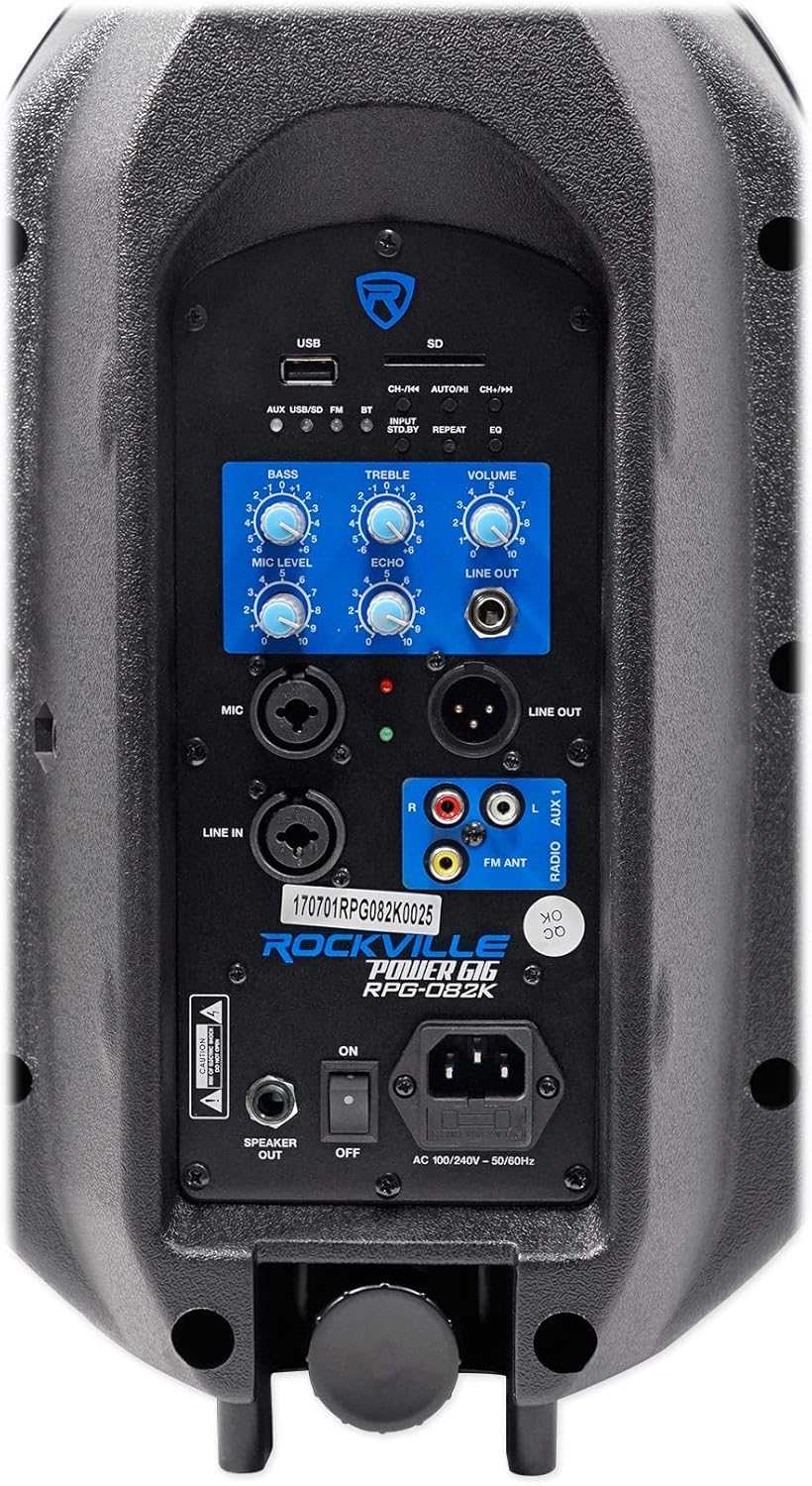
Rysunek 4.1: Szczegółowy view of the active speaker's control panel.
- Gniazda kart USB/SD: Do odtwarzania plików audio MP3 files bezpośrednio.
- Przycisk wyboru wejścia: Cycles through AUX, USB/SD, FM, and Bluetooth modes.
- Przycisk czuwania: Puts the speaker into standby mode, muting all output.
- Przycisk powtarzania: Repeats the current track or playlist in USB/SD mode.
- Przycisk korektora: Cycles through built-in EQ presets for USB/SD playback (Pop, Rock, Jazz, Classic, Country, Normal).
- Pokrętła basów/wysokich tonów: Adjust the low and high frequencies of the overall sound.
- Pokrętło głośności: Controls the master output volume of the system.
- Mic Level Knob: Reguluje głośność podłączonego mikrofonu.
- Gałka echa: Dodaje efekt echa do sygnału wejściowego mikrofonu.
- Line Out Jack (1/4" & XLR): Sends the mixed audio signal to additional powered speakers or subwoofers.
- Mic Input (XLR/1/4" Combo): Łączy mikrofon.
- Line In (XLR/1/4" Combo): Connects external audio sources like mixers or instruments.
- AUX 1 Input (RCA): Connects devices like MP3 players, record players, or DVD/CD players.
- FM ANT: Connects the included FM antenna for radio reception.
Video 4.1: Inputs Outputs & Controls Explained on Your RPG082K
4.2 Odtwarzanie USB/SD
Insert a USB drive or SD card containing MP3 files into the respective slot. The system will automatically switch to USB/SD mode. Use the control panel buttons (CH-/<<, AUTO/II, CH+/>>) or the remote control to navigate tracks, play/pause, and repeat. Press the EQ button to select different sound presets.
4.3 Łączność Bluetooth
- Naciśnij Selektor wejścia button until the Bluetooth (BT) indicator light blinks, indicating pairing mode.
- On your smartphone or tablet, enable Bluetooth and search for "ROCKVILLE RPG082K". Select it to pair.
- The BT indicator light will stop blinking once successfully paired. You can now stream audio wirelessly.
4.4 Radio FM
Podłącz dołączoną antenę FM do FMANT jack. Press the Selektor wejścia button to switch to FM mode. Use the CH-/<< and CH+/>> buttons to tune to radio stations.
4.5 Microphone Usage (Karaoke Setup)
- Podłącz przewodowy mikrofon do MIKROFON input using the provided XLR to 1/4" cable.
- Dostosuj POZIOM MIKROFONU knob to control the microphone's volume.
- Włącz ECHO knob to add a vocal echo effect, enhancing karaoke performances.
- For karaoke, pair a tablet via Bluetooth (as described in 4.3) and use a karaoke app or YouTube to display lyrics and play instrumental tracks.

Rysunek 4.2: Dołączony przewodowy mikrofon.
Video 4.2: How To Set Up Your RPG082K for Karaoke
4.6 Line Input & Output
- Wyrysować: Use the XLR/1/4" combo jack or RCA (AUX 1) inputs to connect external audio sources such as mixers, instruments (e.g., guitar), or other playback devices. Adjust the master TOM knob for overall output.
- Zakreślać: Use the 1/4" or XLR WYJŚCIE jacks to send the mixed audio signal from the RPG082K to additional powered speakers, subwoofers, or recording devices. This allows for system expansion.
4.7 Pilot zdalnego sterowania
The included wireless remote control provides convenient access to various functions, including input selection, track navigation, play/pause, volume adjustment, and EQ presets.

Rysunek 4.3: Bezprzewodowy pilot zdalnego sterowania.
5. Konserwacja
To ensure the longevity and optimal performance of your Rockville RPG082K system, follow these maintenance guidelines:
- Czyszczenie: Use a soft, dry cloth to clean the speaker cabinets. Avoid abrasive cleaners or solvents that could damage the finish.
- Składowanie: Gdy głośniki nie są używane, należy je przechowywać w chłodnym i suchym miejscu, z dala od bezpośredniego światła słonecznego i ekstremalnych temperatur.
- Obsługiwanie: Always use the integrated top handles for lifting and transporting the speakers. Avoid dropping or subjecting them to strong impacts.
- Kable: Regularly inspect all cables for signs of wear or damage. Replace any damaged cables immediately to prevent electrical hazards or signal loss.
- Wentylacja: Aby zapobiec przegrzaniu, należy upewnić się, że otwory wentylacyjne głośnika nie są zablokowane.
6. Rozwiązywanie Problemów
If you encounter any issues with your RPG082K system, refer to the following troubleshooting tips:
- Brak zasilania: Ensure the power cable is securely connected to both the speaker and a working power outlet. Check the power switch is in the ON position.
- Brak dźwięku: Verify that the master TOM knob is turned up. Check all input connections. Ensure the speaker is not in standby mode (press the Selektor wejścia button to cycle modes). Confirm the correct input source is selected.
- Mikrofon nie działa: Check microphone cable connections. Ensure the microphone's power switch (if applicable) is ON. Adjust the POZIOM MIKROFONU pokrętło.
- Problemy z parowaniem Bluetooth: Ensure the speaker is in Bluetooth pairing mode (BT light blinking). Turn off and on Bluetooth on your device, then try pairing again. Ensure no other devices are currently paired to the speaker.
- Zniekształcony dźwięk: Reduce the input volume from your source device. Lower the master TOM knob. Check for damaged cables.
7. Specyfikacje
| Funkcja | Specyfikacja |
|---|---|
| Numer modelu | RPG082 tys |
| Marka | Rockville |
| Moc wyjściowatage | 500 W szczytowe / 125 W RMS |
| Rozmiar głośnika | 8" Woofer, 1" Tweeter |
| Liczba kanałów | 2 |
| Wejście audio | XLR, 1/4" (TS), RCA, Bluetooth |
| Typ złącza | XLR, 1/4" |
| Technologia łączności | Bluetooth, USB, SD, FM Radio, Wired |
| Źródło zasilania | Corded Electric (AC100-240V 50Hz/60Hz) |
| Typ montażu | Montaż na słupie |
| Waga przedmiotu | 32.2 funtów |
| Wymiary produktu | 26.1 x 11 x 25.39 cala |
| Tworzywo | Metal, tworzywo sztuczne (ABS) |
| Kolor | Czarny |
8. Gwarancja
For detailed warranty information regarding your Rockville RPG082K PA Speaker System, please refer to the warranty card included in your product packaging or visit the official Rockville webZachowaj dowód zakupu na wypadek roszczeń gwarancyjnych.
9. Wsparcie
If you have any questions, comments, or concerns regarding your Rockville RPG082K system, please do not hesitate to contact our customer support team:
- Telefon: 1-646-758-0144 (Open 24/7)
- E-mail: sprzedaż@rockvilleaudio.com


