Wstęp
This manual provides comprehensive instructions for the GTM Queclink GL300W 3G GPS Tracker. The GL300W is a robust, water-resistant GPS locator designed for a variety of tracking applications, including lone worker safety, vehicle monitoring, pet tracking, and asset management. It features a highly sensitive built-in GPS receiver and UMTS technology for real-time location monitoring. Its integrated 3-axis accelerometer enables motion detection and efficient power management.
Please read this manual thoroughly before operating the device to ensure proper setup, usage, and maintenance.
Produkt ponadview
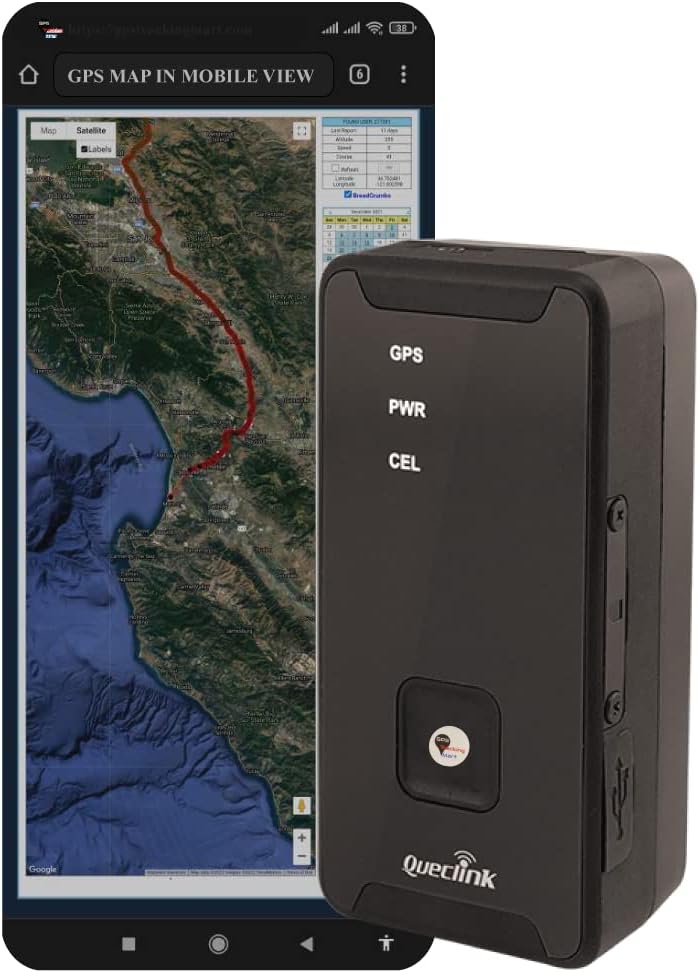
Rysunek 1: The GTM Queclink GL300W GPS Tracker shown alongside a smartphone displaying a real-time GPS map, illustrating its primary function for location tracking.

Rysunek 2: Szczegółowy view of the GL300W device, highlighting its compact design and the front panel with GPS, PWR, and CEL indicators, and the emergency button.
Główne cechy
- Multi-purpose tracking for vehicles, pets, assets, and lone workers.
- Water-resistant (IPX5 compliant) design for durability.
- Highly sensitive built-in GPS receiver for fast and accurate positioning.
- UMTS/HSPA/GSM triple-band and quad-band support for worldwide connectivity.
- Integrated 3-axis accelerometer for motion detection and intelligent power management.
- Thumb-sized emergency button for rapid alerts and geo-fence setting.
- LED indicators for GPS, Power, and Cellular status.
- Mini USB interface for charging and configuration.
- Supports TCP, UDP, and SMS transmit protocols.
- CE and FCC certified.
Co jest zawarte
Sprawdź, czy w przesyłce znajdują się wszystkie wymienione poniżej elementy:

Rysunek 3: The complete set of items included with the GTM Queclink GL300W GPS Tracker.
- GTM Queclink GL300W GPS Tracker
- Kołek ścienny
- Charging Cable (Mini USB)
- Mini śrubokręt
- Śruby
- Lithium Polymer Battery (pre-installed or included)
Organizować coś
1. Ładowanie urządzenia
Before first use, fully charge the GL300W. Connect the provided charging cable to the Mini USB port on the device and the wall plug. The PWR LED indicator will show charging status.
- Objętość ładowaniatage: 5V prądu stałego
- Bateria wewnętrzna: Litowo-polimerowy 2600 mAh
2. Activating Tracking Service
To activate your tracking service, refer to the note/instruction insert that came with your GPS tracker. This typically involves registering the device with a service provider and configuring it for your specific tracking needs.
3. Initial Placement Considerations
For optimal GPS signal reception, place the device in an area with a clear view of the sky. Avoid placing it directly under large metal objects or in enclosed spaces that could obstruct the signal.

Rysunek 4: Recommended locations for discreet placement of the GPS tracker within a vehicle, such as inside the trunk, dashboard, or undercarriage.
Recommended places to hide the GPS Tracker:
- Inside the trunk
- Wewnątrz deski rozdzielczej
- On the undercarriage
- In the front or rear bumper
- Inside the brake lights
- Inside a car seat cushion
- In the sun visors
- Behind the glove compartment
- Above the pedals
- Behind the back seats
Instrukcja obsługi
Wskaźniki LED
The GL300W features three LED indicators on its front panel:
- GPS: Wskazuje status sygnału GPS.
- PWR: Indicates power and charging status.
- CEL: Indicates cellular network connectivity.
Przycisk alarmowy
The thumb-sized button on the front of the device serves as an emergency alert trigger. Pressing this button can send an SOS alarm to pre-configured contacts or the tracking platform. It also allows for instant geo-fence setting based on the current location. The device provides vibration feedback to confirm successful button presses.
Śledzenie i monitorowanie
The GL300W's location can be monitored in real-time or periodically tracked via a backend server and mobile devices. The @Track protocol supports various reports, including:
- Alerty alarmowe
- Geo-fence boundary crossings
- Ostrzeżenia o niskim poziomie baterii
- Scheduled GPS position reports
- Power On/Off reports
- Motion detection alarms
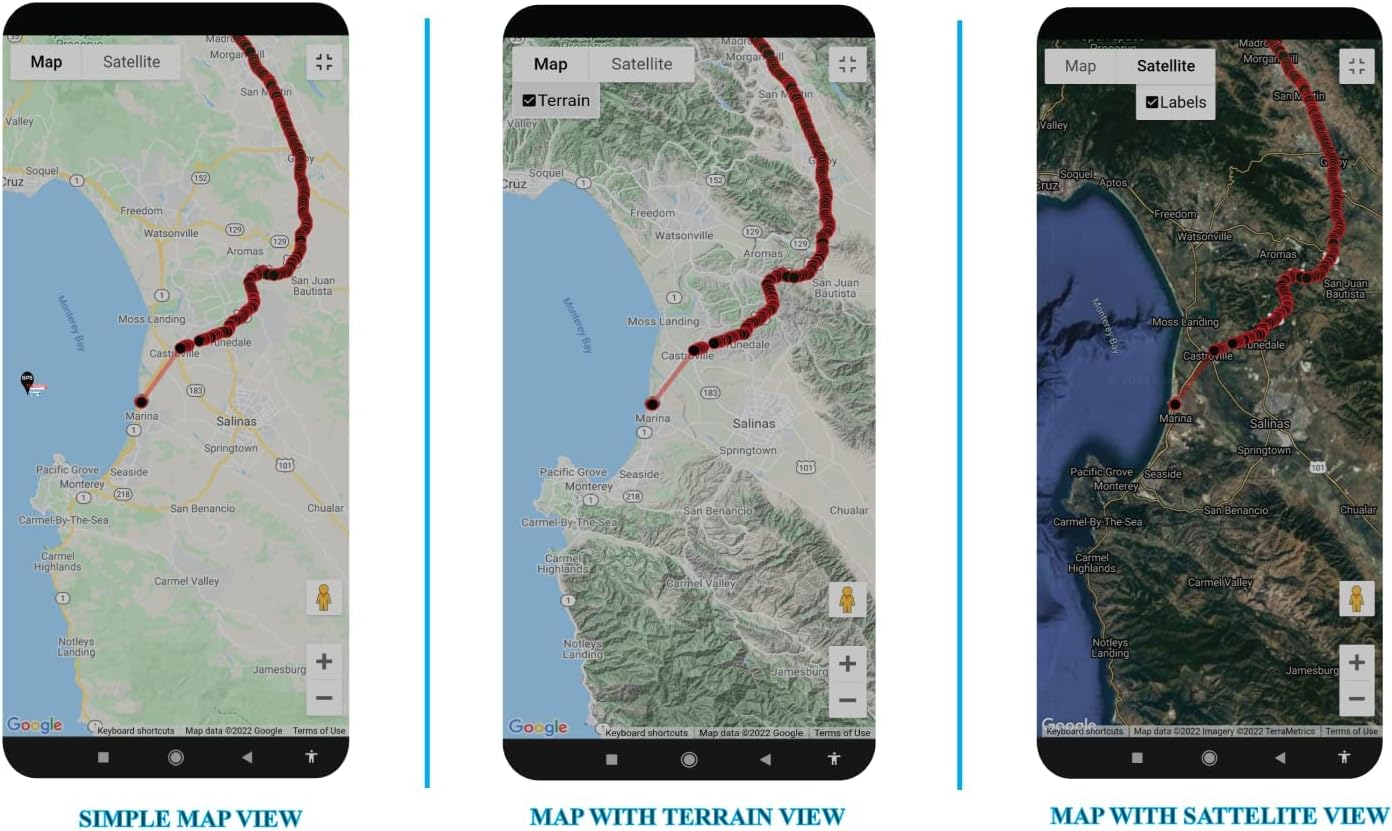
Rysunek 5: Examples of mobile application interfaces displaying different map views (Simple, Terrain, Satellite) for tracking the GL300W.

Rysunek 6: Examples of desktop application interfaces displaying various map views (Satellite, Geo-Fenced, Simple) for comprehensive tracking and monitoring.
Konserwacja
Czyszczenie
Wipe the device with a soft, dry cloth. Do not use harsh chemicals or abrasive cleaners. While the device is water-resistant (IPX5), avoid submerging it in water or exposing it to high-pressure water jets.
Pielęgnacja baterii
The GL300W uses an internal Li-Polymer 2600 mAh battery. To maximize battery life:
- Unikaj ekstremalnych temperatur.
- Ładuj urządzenie regularnie, ale unikaj przeładowywania go przez dłuższy czas.
- Jeśli urządzenie będzie przechowywane przez dłuższy czas, przed schowaniem należy je naładować do około 50%.
Aktualizacje oprogramowania układowego
Okresowo sprawdzaj u swojego dostawcy usług lub producenta website for available firmware updates. Updates can improve performance, add new features, or fix bugs.
Rozwiązywanie problemów
| Problem | Możliwa przyczyna | Rozwiązanie |
|---|---|---|
| Urządzenie się nie włącza. | Niski poziom naładowania baterii lub jej rozładowanie. | Connect the device to the charger and allow it to charge for at least 30 minutes before attempting to power on. |
| Brak sygnału GPS. | Przeszkoda view of the sky; device indoors or under heavy cover. | Przenieś urządzenie na otwartą przestrzeń na zewnątrz, gdzie jest dużo światła. view of the sky. Ensure the GPS LED is active. |
| No cellular connectivity. | Out of network coverage; SIM card issue; service not activated. | Move to an area with better cellular reception. Verify SIM card installation and service activation with your provider. Ensure the CEL LED is active. |
| Inaccurate location data. | Weak GPS signal; environmental interference. | Upewnij się, że urządzenie jest czyste view of the sky. Avoid placing it near large metal objects or strong electromagnetic fields. |
| Emergency button not responding. | Device not powered on; software issue. | Ensure the device is powered on. If the issue persists, contact customer support. |
Specyfikacje
Rysunek 7: Detailed technical specifications for the GL300W, including dimensions, weight, battery, and operating bands.
| Funkcja | Szczegół |
|---|---|
| Model | GTM GL300W |
| Technologia | UMTS/HSPA/GSM (850/1900/2100 MHz & 850/900/1800/1900 MHz) |
| Wymiary (dł. × szer. × wys.) | 77.9mm × 39.9mm × 26.7mm (approx. 3.07 × 1.57 × 1.05 inches) |
| Waga | 93 g (ok. 3.28 uncji) |
| Wewnętrzna bateria | Litowo-polimerowy 2600 mAh |
| Czas czuwania | Without reporting: 400 hours; 5 minutes reporting: 140 hours |
| Odporność na wodę | IPX5 Compliant |
| Objętość ładowaniatage | 5V prądu stałego |
| Temperatura pracy | -20°C do +55°C (-4°F do +131°F) |
| Typ GNSS | u-blox All-in-One GPS receiver |
| Geo-Fence Support | Up to 5 geo-fence regions |
| Certyfikaty | CE, FCC |
Informacje o gwarancji
Specific warranty details for the GTM Queclink GL300W GPS Tracker are typically provided with your purchase documentation or by your service provider. Please refer to the warranty card or contact the vendor from whom you purchased the device for precise terms and conditions. Generally, products are covered against manufacturing defects for a specified period from the date of purchase.
Wsparcie i kontakt
For technical support, service activation, or any inquiries regarding your GTM Queclink GL300W GPS Tracker, please contact your tracking service provider or the vendor from whom you purchased the device.
Możesz również odwiedzić oficjalną stronę website of GPS Tracking Mart for general information and resources related to their products.
Uwaga: Niniejsza instrukcja ma charakter wyłącznie informacyjny. Dane techniczne i funkcje mogą ulec zmianie bez powiadomienia.


