Wstęp
This manual provides detailed instructions for the safe and efficient operation of your Mikado MD-856 Multimedia Bluetooth Speaker system. Please read this manual thoroughly before using the product and retain it for future reference.
Informacje dotyczące bezpieczeństwa
- Aby uniknąć pożaru lub porażenia prądem, nie wystawiaj urządzenia na działanie deszczu i wilgoci.
- Nie otwierać casing. Wszelkie prace serwisowe powierzaj wykwalifikowanemu personelowi.
- Zapewnij odpowiednią wentylację wokół urządzenia.
- Należy używać wyłącznie zasilacza przeznaczonego do tego urządzenia.
- Trzymać z dala od bezpośredniego światła słonecznego, źródeł ciepła i silnych pól magnetycznych.
- Unikaj umieszczania ciężkich przedmiotów na urządzeniu.
Zawartość opakowania
Sprawdź, czy w przesyłce znajdują się wszystkie wymienione poniżej elementy:
- Main Subwoofer Unit
- Głośniki satelitarne (5 szt.)
- Zdalne sterowanie
- Usage Manual (this document)
- Certyfikat Gwarancji
- Kabel RCA
- Kabel antenowy
Produkt ponadview
The Mikado MD-856 is a 5.1 channel multimedia speaker system designed to deliver rich audio. It features multiple connectivity options including Bluetooth, USB, SD card, FM radio, and AUX input.
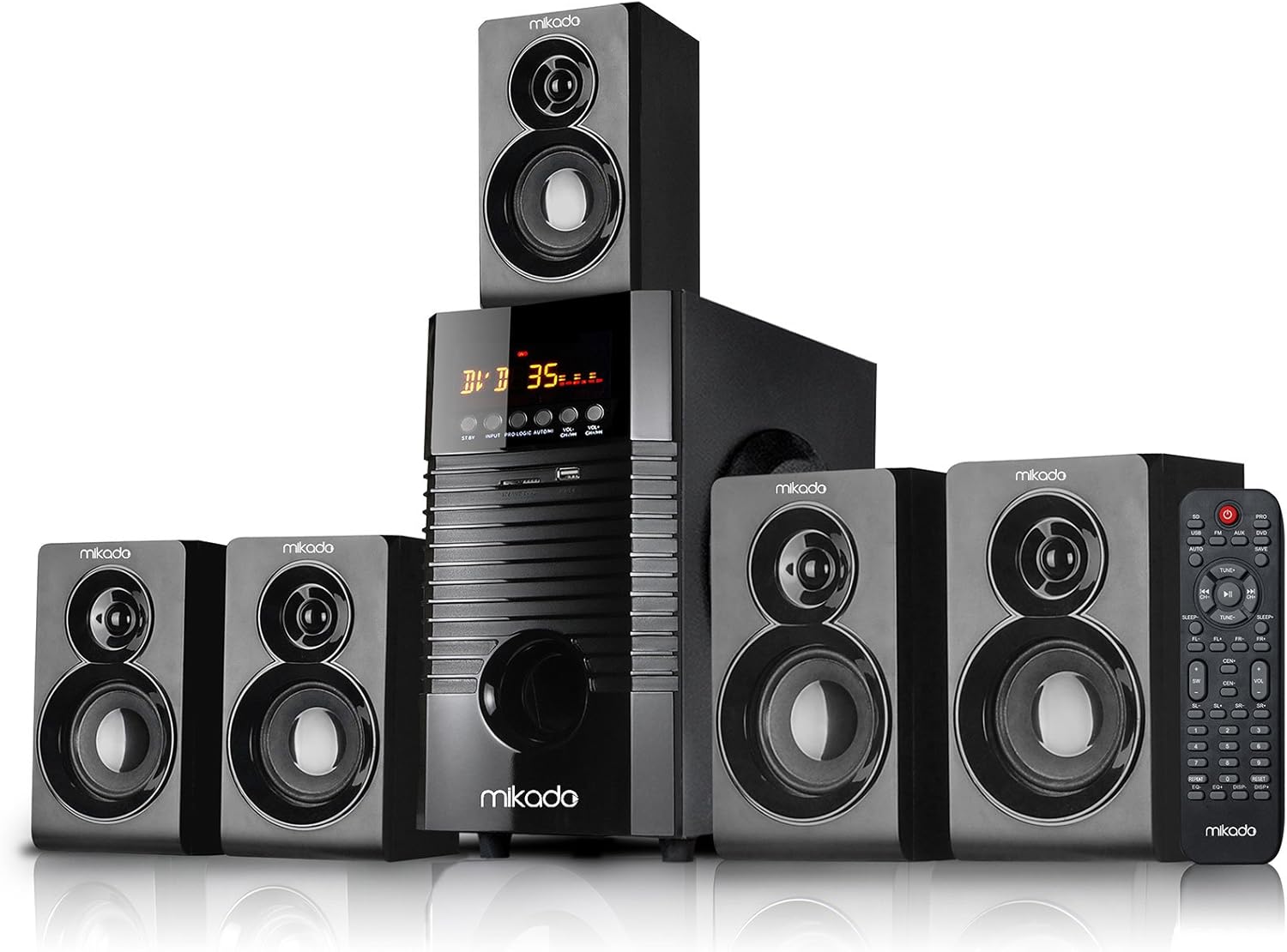
Rysunek 1: Przód view of the Mikado MD-856 5.1 Multimedia Bluetooth Speaker system, showing the central subwoofer unit, five satellite speakers, and the remote control.

Rysunek 2: Rear panel of the Mikado MD-856 subwoofer, displaying various audio input and output ports, power switch, and power cable connection.
Organizować coś
1. Połączenie głośnika
- Connect the five satellite speakers to the corresponding output ports on the rear panel of the main subwoofer unit. Ensure correct polarity (+ to + and - to -).
- Position the speakers for optimal 5.1 surround sound experience. Typically, one center speaker, two front speakers, and two rear speakers.
2. Podłączenie zasilania
- Upewnij się, że wyłącznik zasilania na tylnym panelu jest w pozycji WYŁĄCZONY.
- Connect the power cable to the main subwoofer unit and then plug it into a standard electrical outlet.
3. Połączenia wejściowe audio
Wybierz jedną z poniższych metod podłączenia źródła dźwięku:
- Wejście RCA (AUX): Use the provided RCA cable to connect your audio source (e.g., TV, PC, DVD player) to the "AUX AUDIO INPUT" ports on the rear panel. Match the red and white connectors.
- Karta USB/SD: Insert a USB flash drive or SD card into the respective slots on the front panel of the subwoofer.
- Antena FM: Connect the included antenna cable to the FM antenna port on the rear panel for improved radio reception.
Instrukcja obsługi
1. Włączanie/wyłączanie zasilania
Flip the power switch on the rear panel to the ON position. The display on the front panel will illuminate.
2. Wybór trybu
Press the "MODE" button on the front panel or the remote control to cycle through available input modes: Bluetooth, USB, SD, FM, and AUX.
3. Regulacja głośności
Adjust the master volume using the large knob on the front panel or the volume buttons on the remote control.
4. Parowanie Bluetooth
- Switch the speaker system to Bluetooth mode. The display will show "BT" or a similar indicator.
- Włącz Bluetooth w swoim urządzeniu mobilnym (smartfonie, tablecie itp.) i wyszukaj dostępne urządzenia.
- Select "MD-856" from the list of devices. Once paired, you will hear a confirmation sound.
5. Odtwarzanie z USB/SD
When a USB drive or SD card is inserted, the system will automatically switch to USB/SD mode and begin playing compatible audio files. Use the remote control for playback functions (play/pause, next/previous track).
6.Radio FM
In FM mode, press the "SCAN" button on the remote control to automatically scan and save available radio stations. Use the "PREV/NEXT" buttons to navigate through saved stations.
Konserwacja
- Czyszczenie: Do czyszczenia powierzchni głośników należy używać miękkiej, suchej ściereczki. Nie należy używać płynnych środków czyszczących ani materiałów ściernych.
- Składowanie: Jeśli urządzenie będzie przechowywane przez dłuższy czas, należy odłączyć je od zasilania i przechowywać w chłodnym, suchym miejscu.
- Wentylacja: Aby zapobiec przegrzaniu, należy upewnić się, że otwory wentylacyjne subwoofera nie są zablokowane.
Rozwiązywanie problemów
| Problem | Możliwa przyczyna | Rozwiązanie |
|---|---|---|
| Brak zasilania | Power cable not connected; Power switch off; Power outlet faulty | Check power cable connection; Turn power switch ON; Try a different power outlet |
| Brak dźwięku | Volume too low; Incorrect input mode; Audio cables not connected properly; Source device not playing | Increase volume; Select correct input mode; Check audio cable connections; Ensure source device is playing audio |
| Bluetooth nie łączy się | Speaker not in Bluetooth mode; Device too far; Bluetooth on device off | Switch to Bluetooth mode; Move device closer; Enable Bluetooth on your device |
| Słaby odbiór FM | Antena nie jest podłączona; słaby sygnał | Podłącz antenę FM; Dostosuj położenie anteny, aby uzyskać lepszy sygnał |
Specyfikacje
- Model: MD-856
- Marka: Mikado
- Typ głośnika: Multimedia 5.1 Channel
- Technologia łączności: Bluetooth, USB
- Maksymalna moc wyjściowa głośnika: 25 watów
- Konfiguracja kanałów dźwięku przestrzennego: 5.1
- Zalecane zastosowanie: PC - TV
- Wymiary produktu: Wymiary 35 x 35 x 44 cm
- Waga przedmiotu: 7.9 kilograma
- Kolor: Czarny
- Zawartość zestawu: Controller, Usage Manual, Warranty Certificate, RCA Cable, Antenna Cable
Gwarancja i wsparcie
Your Mikado MD-856 speaker system comes with a Warranty Certificate. Please refer to the certificate for details regarding warranty coverage and terms. For technical support or service inquiries, please contact your local Mikado dealer or authorized service center.


