1. Wprowadzenie
Dziękujemy za zakupasing the GPX PDB1077B Portable DVD Player. This device offers versatile entertainment with its 10.1-inch display, DVD/CD playback capabilities, and built-in Bluetooth wireless transmitter for audio streaming to compatible headphones. This manual provides detailed instructions for setup, operation, and maintenance to ensure optimal performance and longevity of your device.
2. Ważne informacje dotyczące bezpieczeństwa
Please read all safety warnings and instructions carefully before using this product. Retain this manual for future reference.
- Źródło zasilania: Używaj tylko wskazanego zasilacza. Nieprawidłowa głośnośćtagMoże to spowodować uszkodzenie urządzenia oraz unieważnienie gwarancji.
- Woda i wilgoć: Do not expose the device to rain, moisture, or immerse it in water.
- Ciepło: Trzymaj urządzenie z dala od źródeł ciepła, takich jak grzejniki, kratki wentylacyjne, piece lub inne urządzenia (w tym amp(lifiers) wytwarzające ciepło.
- Wentylacja: Zapewnij odpowiednią wentylację. Nie blokuj żadnych otworów wentylacyjnych.
- Czyszczenie: Czyścić wyłącznie suchą szmatką. Nie używaj środków czyszczących w płynie ani w aerozolu.
- Serwisowanie: Nie próbuj samodzielnie naprawiać tego produktu. Wszelkie czynności serwisowe należy powierzyć wykwalifikowanemu personelowi serwisowemu.
- Bezpieczeństwo baterii: The device contains a rechargeable battery. Do not expose to excessive heat or direct sunlight. Dispose of batteries properly according to local regulations.
- Ochrona słuchu: Unikaj słuchania przy wysokim poziomie głośności przez dłuższy czas, aby zapobiec uszkodzeniu słuchu.
3. Zawartość opakowania
Sprawdź, czy w przesyłce znajdują się wszystkie elementy wymienione poniżej:
- GPX PDB1077B Portable DVD Player
- Bezprzewodowe słuchawki Bluetooth
- Zdalne sterowanie
- Zasilacz AC/DC
- Zasilacz samochodowy
- Kabel AV
- Instrukcja obsługi (ten dokument)
4. Koniec produktuview
Familiarize yourself with the components of your GPX PDB1077B Portable DVD Player.
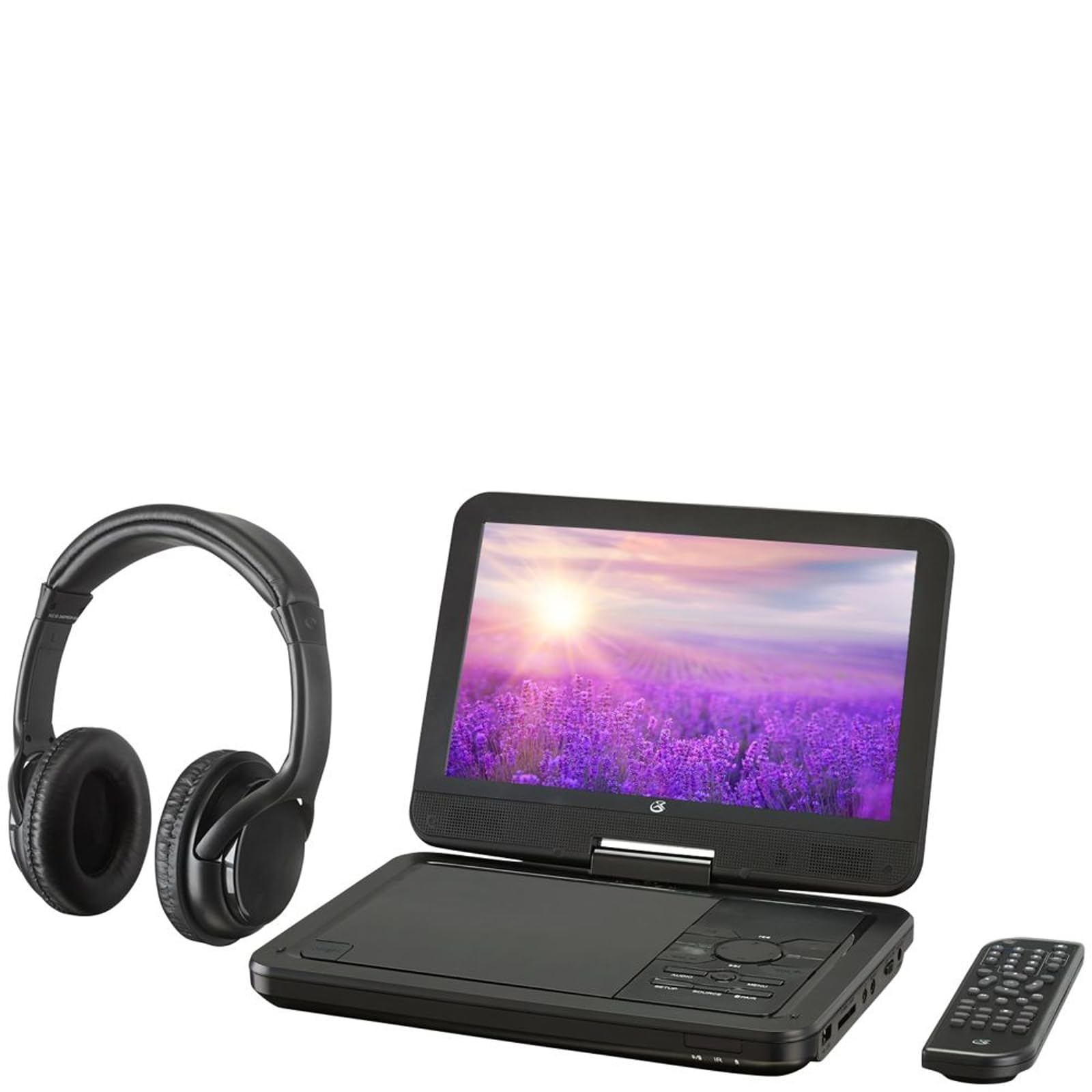
Rysunek 4.1: The GPX PDB1077B Portable DVD Player, showing the 10.1-inch screen, control panel, wireless Bluetooth headphones, and remote control.
4.1 Portable DVD Player Unit
The main unit features a swivel screen, disc tray, and control buttons. Key components include:
- 10.1-calowy wyświetlacz LCD: Dla viewing video content.
- Taca na płytę: Do wkładania płyt DVD i CD.
- Panel sterowania: Buttons for playback, menu navigation, volume, and source selection.
- Porty: USB, SD card slot, AV out, headphone jack, DC in.
- Prelegenci: Zintegrowane głośniki stereo.
4.2 Wireless Bluetooth Headphones
The included headphones connect wirelessly to the DVD player via Bluetooth for private listening.
Rysunek 4.2: Zbliżenie view of the black wireless Bluetooth headphones, featuring padded earcups and an adjustable headband.
4.3 Pilot zdalnego sterowania
Pilot zdalnego sterowania zapewnia wygodny dostęp do wszystkich funkcji z odległości.
Rysunek 4.3: Zbliżenie view of the compact black remote control with various buttons for playback, menu navigation, and volume adjustment.
5. Przewodnik konfiguracji
5.1 Ładowanie urządzenia
- Connect the AC/DC power adapter to the DC IN port on the DVD player.
- Podłącz adapter do standardowego gniazdka ściennego.
- Zaświeci się kontrolka ładowania. Pełne naładowanie zajmie około 3-4 godzin.
- For in-car use, connect the car power adapter to the DC IN port and your vehicle's 12V power outlet.
5.2 Włączanie/wyłączanie
- To power on, slide the POWER switch to the ON position. The screen will light up.
- Aby wyłączyć urządzenie, przesuń przełącznik POWER do pozycji OFF.
5.3 Connecting Bluetooth Headphones
- Sprawdź, czy odtwarzacz DVD jest włączony.
- Turn on the Bluetooth headphones and put them into pairing mode (refer to headphone manual if needed).
- On the DVD player, navigate to the Bluetooth settings menu.
- Select "Scan for Devices" or similar option.
- Choose your headphones from the list of available devices to pair.
- Once paired, audio will automatically transmit to the headphones.
5.4 Podłączanie do zewnętrznego wyświetlacza (opcjonalnie)
Use the included AV cable to connect the DVD player to a TV or monitor.
- Podłącz jeden koniec kabla AV do portu AV OUT w odtwarzaczu DVD.
- Connect the other end to the AV IN ports (Yellow for Video, White for Left Audio, Red for Right Audio) on your external display.
- Select the correct AV input on your external display.
6. Instrukcja obsługi
6.1 Playing DVDs and CDs
- Open the disc tray by gently lifting the screen.
- Place a DVD or CD onto the spindle with the label side facing up.
- Gently close the disc tray.
- The player will automatically detect the disc and begin playback or display the disc menu.
- Use the navigation buttons (Up, Down, Left, Right, Enter) on the control panel or remote to navigate menus.
- Naciśnij ODTWÓRZ/PAUZA przycisk, aby rozpocząć lub wstrzymać odtwarzanie.
- Naciśnij ZATRZYMYWAĆ SIĘ aby zatrzymać odtwarzanie.
6.2 Using USB and SD Card Media
- Włóż dysk flash USB do portu USB lub kartę SD do gniazda karty SD.
- Naciśnij ŹRÓDŁO button on the control panel or remote to select "USB" or "SD".
- Poruszaj się po swoim fileza pomocą przycisków sterujących.
- Wybierz file (e.g., MP3, JPEG) and press WCHODZIĆ grać lub view.
6.3 Dostosowywanie ustawień
Access the system settings to customize your viewi wrażenia słuchowe.
- Naciśnij ORGANIZOWAĆ COŚ przycisk na pilocie lub panelu sterowania.
- Use the navigation buttons to select options such as:
- Ustawienia wyświetlania: Adjust brightness, contrast, color.
- Ustawienia audio: Adjust volume, equalizer.
- Ustawienia językowe: Select OSD language, audio language, subtitle language.
- Kontrola rodzicielska: Set rating levels for disc playback.
- Naciskać WCHODZIĆ aby potwierdzić wybór i ORGANIZOWAĆ COŚ ponownie, aby wyjść.
6.4 Korzystanie z pilota zdalnego sterowania
The remote control provides full functionality. Ensure batteries are correctly inserted (2 x AAA, not included).
| Przycisk | Funkcjonować |
|---|---|
| MOC | Włącza lub wyłącza odtwarzacz. |
| ORGANIZOWAĆ COŚ | Dostęp do menu konfiguracji systemu. |
| ŹRÓDŁO | Switches between DVD, USB, SD, and AV input modes. |
| ODTWÓRZ/PAUZA | Rozpoczyna lub wstrzymuje odtwarzanie. |
| ZATRZYMYWAĆ SIĘ | Zatrzymuje odtwarzanie. |
| GŁOŚNOŚĆ+/GŁOŚNOŚĆ- | Dostosowuje poziom głośności. |
| NAVIGATE (Up/Down/Left/Right/ENTER) | Umożliwia nawigację po menu i potwierdzanie wyborów. |
| MENU | Accesses the disc menu during DVD playback. |
7. Konserwacja
7.1 Czyszczenie urządzenia
- Przed czyszczeniem upewnij się, że urządzenie jest wyłączone i odłączone od zasilania.
- Do przecierania powierzchni zewnętrznych należy używać miękkiej, suchej i niepozostawiającej włókien ściereczki.
- For the screen, use a screen-specific cleaning solution and a microfiber cloth, applying gentle pressure.
- Nie należy używać środków czyszczących o właściwościach ściernych, wosków ani rozpuszczalników.
7.2 Pielęgnacja dysków
- Trzymaj płyty za krawędzie, aby uniknąć pozostawienia odcisków palców.
- Aby zapobiec zarysowaniom, nieużywane płyty przechowuj w oryginalnych pudełkach.
- Zabrudzone płyty należy czyścić miękką, niepozostawiającą włókien ściereczką, przecierając je od środka na zewnątrz.
7.3 Pielęgnacja baterii
- To prolong battery life, fully charge the device before first use.
- Jeśli przechowujesz urządzenie przez dłuższy czas, ładuj je do poziomu około 50% co kilka miesięcy.
- Unikaj wystawiania urządzenia na działanie ekstremalnych temperatur.
8. Rozwiązywanie Problemów
If you encounter issues with your GPX PDB1077B, refer to the following common problems and solutions.
| Problem | Możliwa przyczyna | Rozwiązanie |
|---|---|---|
| Brak zasilania | Battery drained; Power adapter not connected properly; Power switch off. | Charge the device; Ensure power adapter is securely connected; Slide power switch to ON. |
| No Disc Playback | Płyta włożona nieprawidłowo; Płyta jest brudna lub porysowana; Format płyty nie jest obsługiwany. | Reinsert disc label-side up; Clean or replace disc; Check supported media types in specifications. |
| Brak dźwięku | Volume too low; Mute function active; Headphones not connected/paired correctly. | Increase volume; Deactivate mute; Reconnect or re-pair headphones. |
| Bluetooth Headphones Not Pairing | Headphones not in pairing mode; Player not in Bluetooth scan mode; Interference. | Ensure headphones are in pairing mode; Activate Bluetooth scan on player; Move closer to player, away from other devices. |
| Pilot nie działa | Batteries are dead or inserted incorrectly; Obstruction between remote and player; Remote sensor blocked. | Replace batteries, check polarity; Remove obstructions; Ensure remote sensor on player is clear. |
9. Specyfikacje
Technical specifications for the GPX PDB1077B Portable DVD Player.
| Funkcja | Szczegół |
|---|---|
| Model | PDB1077B |
| Rozmiar wyświetlacza | 10.1 cali |
| Typ wyświetlacza | LCD |
| Rozdzielczość natywna | 1024x600 |
| Obsługiwane media | DVD, DVD±R/RW, CD, CD-R/RW, MP3 CD, JPEG CD |
| Łączność | Bluetooth wireless transmitter, USB port, SD card slot, AV Out, Headphone Jack, DC In |
| Źródło zasilania | Built-in rechargeable battery, AC/DC adapter, Car adapter |
10. Gwarancja i obsługa klienta
GPX products are designed for reliability and performance. For specific warranty information, please refer to the warranty card included with your purchase or visit the official GPX website. If you require technical assistance or have questions regarding your device, please contact GPX customer support.
GPX Official Webstrona: www.gpx.com
Please note that warranty terms and customer support availability may vary by region.


