1. Wprowadzenie
This manual provides comprehensive instructions for the proper use and maintenance of your SKMEI Gmarks-1245 Digital Watch. Please read this manual thoroughly to ensure optimal performance and longevity of your timepiece. Keep this manual for future reference.
2. Koniec produktuview
The SKMEI Gmarks-1245 is a versatile digital watch designed for daily wear, featuring a robust construction and multiple functions. It includes a digital display, chronograph, alarm, date display, and luminous elements for visibility in low light.
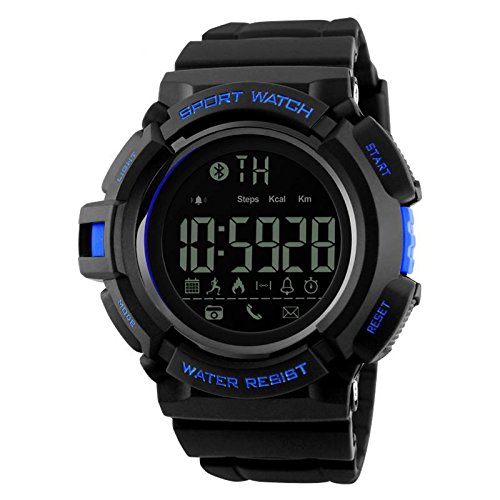
Rycina 2.1: Przód view of the SKMEI Gmarks-1245 Digital Watch, showing the digital display and control buttons.
Główne cechy:
- Cyfrowy wyświetlacz czasu
- Wyświetlanie daty
- Water Resistant construction
- Luminous display for low-light conditions
- Chronograph (Stopwatch) function
- Alarm Clock function
- Durable Stainless Steel Back Case
- Reliable JAPAN Movement
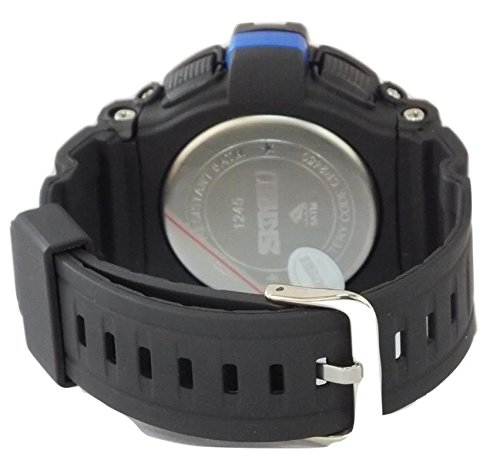
Rysunek 2.2: Tył view of the SKMEI Gmarks-1245 Digital Watch, showing the stainless steel case back with model number and water resistance markings.
3. Konfiguracja
3.1 Funkcje przycisków:
- ŚWIATŁO: Włącza podświetlenie.
- Sposób użycia: Przełącza między trybami wyświetlania (Czas, Alarm, Chronograf).
- START: Used to start/stop chronograph, adjust values in setting mode.
- RESETOWANIE: Used to reset chronograph, select items in setting mode.
3.2 Initial Time Setting:
- W normalnym trybie wyświetlania czasu naciśnij przycisk TRYB button three times to enter time setting mode. The seconds digits will begin to flash.
- Naciśnij NASTAWIĆ button to select the hour digits. The hour digits will flash.
- Naciśnij START przycisk, aby ustawić godzinę.
- Naciśnij NASTAWIĆ button to select the minute digits. The minute digits will flash.
- Naciśnij START przycisk, aby ustawić minuty.
- Kontynuuj naciskanie NASTAWIĆ aby przełączać się między ustawieniami roku, miesiąca i dnia, dostosowując każde z nich za pomocą START przycisk.
- Po wprowadzeniu wszystkich prawidłowych ustawień naciśnij przycisk TRYB button to exit time setting mode and return to the normal time display.
4. Instrukcja obsługi
4.1 Using the Chronograph (Stopwatch):
- W normalnym trybie wyświetlania czasu naciśnij przycisk TRYB Naciśnij przycisk raz, aby przejść do trybu chronografu. Na wyświetlaczu pojawi się „00:00:00”.
- Naciśnij START przycisk, aby rozpocząć odliczanie czasu.
- Naciśnij START naciśnij przycisk ponownie, aby wstrzymać odliczanie.
- Naciśnij NASTAWIĆ naciśnij przycisk podczas pauzy, aby zresetować chronograf do wartości „00:00:00”.
- Naciśnij TRYB przycisk, aby wyjść z trybu chronografu.
4.2 Ustawianie alarmu:
- W normalnym trybie wyświetlania czasu naciśnij przycisk TRYB button twice to enter Alarm setting mode. The hour digits of the alarm will flash.
- Naciśnij START przycisk, aby ustawić godzinę alarmu.
- Naciśnij NASTAWIĆ button to select the alarm minute digits. The minute digits will flash.
- Naciśnij START przycisk, aby dostosować minuty alarmu.
- Naciśnij TRYB przycisk, aby wyjść z trybu ustawiania alarmu.
- To turn the alarm ON/OFF, in normal time display, press and hold START a następnie naciśnij NASTAWIĆ. An alarm icon will appear/disappear.
4.3 Using the Backlight:
Naciśnij ŚWIATŁO button at any time to illuminate the display for a few seconds, improving visibility in dark environments.
5. Konserwacja
5.1 Czyszczenie:
- Przetrzyj kopertę i pasek zegarka miękką ściereczką.amp płótno.
- Avoid using chemical cleaners, as they may damage the watch's finish or seals.
5.2 Wodoodporność:
- This watch is water resistant. However, avoid pressing buttons underwater to prevent water ingress.
- Do not expose the watch to hot water or steam, as this can compromise the water-resistant seals.
5.3 Wymiana baterii:
When the display becomes dim or functions become erratic, the battery may need replacement. Battery replacement should be performed by a qualified watch technician to ensure proper sealing and function.
6. Rozwiązywanie Problemów
| Problem | Rozwiązanie |
|---|---|
| Wyświetlacz jest pusty lub przyciemniony. | Bateria może być rozładowana lub rozładowana. Wymień baterię. |
| Przyciski nie reagują. | Ensure the watch is not in a locked mode (if applicable). If issue persists, battery may be low. |
| Time is incorrect after setting. | Re-enter time setting mode and carefully follow the instructions. Ensure the correct AM/PM is selected if applicable. |
| Wewnątrz zegarka pojawia się woda. | Immediately take the watch to a qualified technician for inspection and repair. Avoid further water exposure. |
7. Specyfikacje
| Funkcja | Szczegół |
|---|---|
| Numer modelu | Gmarks-1245 |
| Typ ruchu | Quartz (JAPAN Movement) |
| Typ wyświetlacza | Cyfrowy |
| Średnica koperty | 55 milimetrów |
| Rodzaj materiału paska | Guma |
| Kolor paska | Czarny |
| Case Back Material | Stal nierdzewna |
| Odporność na wodę | Yes (Specific ATM/Bar not provided, general statement based on "Water Resistant") |
| Waga przedmiotu | 62 gram |
8. Informacje o gwarancji
This SKMEI Gmarks-1245 Digital Watch comes with a 6 miesięcy gwarancji producenta. For warranty claims or service, please contact the Seller of Record directly. Proof of purchase may be required.
9. Wsparcie
For further assistance, technical support, or inquiries regarding your SKMEI Gmarks-1245 Digital Watch, please refer to the following:
- Skontaktuj się ze sprzedawcą: For product-specific support and warranty claims, please contact the seller through your purchase platform.
- SKMEI Official Store: Odwiedź Sklep SKMEI na Amazon for additional product information and brand details.


