Produkt ponadview
This manual provides instructions for the Delock USB 2.0 A-B Cable, model 83687. This cable is designed for connecting devices with a USB Type-A port to devices with a USB Type-B port, facilitating data transfer.
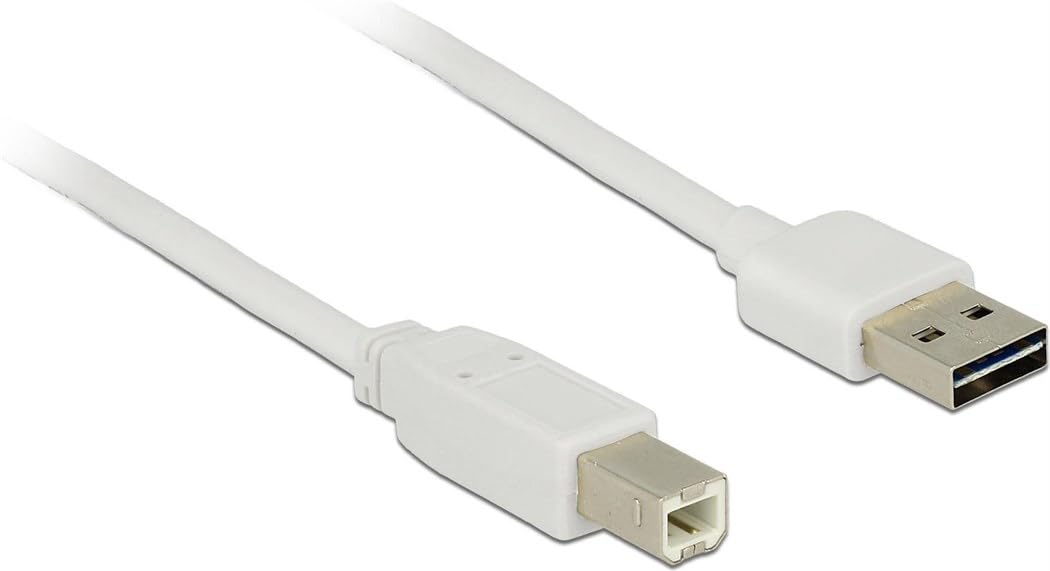
Image: The Delock USB 2.0 A-B Cable, featuring a white cable and gold-plated connectors. The USB Type-A connector is visible on the right, and the USB Type-B connector is on the left.
Organizować coś
The Delock USB 2.0 A-B Cable is designed for simple plug-and-play operation. Follow these steps to connect your devices:
- Identyfikacja portów: Locate the USB Type-A port on your host device (e.g., computer, laptop) and the USB Type-B port on your peripheral device (e.g., printer, scanner, external hard drive).
- Connect USB Type-A: Insert the USB Type-A connector of the cable into the corresponding USB Type-A port on your host device. Ensure it is fully seated.
- Connect USB Type-B: Insert the USB Type-B connector of the cable into the corresponding USB Type-B port on your peripheral device. Ensure it is fully seated.
- Sprawdź połączenie: Once both ends are connected, your operating system should automatically detect the peripheral device. If necessary, install any required drivers for your peripheral device as per its manufacturer's instructions.
This cable is compatible with devices such as laptops and personal computers.
Instrukcja obsługi
Once the cable is properly connected, it facilitates data transfer between the connected devices. The cable supports USB 2.0 specifications, allowing for data transfer rates of up to 480 Mbit/s.
- Ensure both connected devices are powered on for proper communication.
- Initiate data transfer operations (e.g., printing, scanning, file transfer) through the software or operating system interface of your host device.
- For optimal performance, avoid disconnecting the cable during active data transfer.
Konserwacja
To ensure the longevity and optimal performance of your Delock USB 2.0 A-B Cable, follow these maintenance guidelines:
- Składowanie: Store the cable in a cool, dry place away from direct sunlight and extreme temperatures. Avoid tightly coiling or bending the cable, especially near the connectors, to prevent internal damage.
- Czyszczenie: Jeśli kabel lub złącza ulegną zabrudzeniu, należy je delikatnie przetrzeć miękką, suchą, niepozostawiającą włókien ściereczką. Nie należy używać płynnych środków czyszczących ani materiałów ściernych.
- Obsługiwanie: Always grasp the connector housing when plugging or unplugging the cable, rather than pulling on the cable itself. This prevents strain on the cable's internal wires and connections.
- Ochrona: Keep the cable away from sharp objects, heavy furniture, or areas where it might be stepped on or pinched, as this can damage the insulation and internal conductors.
Rozwiązywanie problemów
If you encounter issues with your Delock USB 2.0 A-B Cable, consider the following troubleshooting steps:
| Problem | Możliwa przyczyna / rozwiązanie |
|---|---|
| Urządzenie nie zostało rozpoznane |
|
| Powolny transfer danych |
|
| Przerywane połączenie |
|
Specyfikacje
| Funkcja | Szczegół |
|---|---|
| Marka | Odblokuj |
| Numer modelu | 83687 |
| Typ kabla | Kabel USB 2.0 AB |
| Długość kabla | 2 metrów (6.56 stóp) |
| Złącze 1 | USB typu A męski |
| Złącze 2 | USB Type-B Male |
| Wersja USB | 2.0 |
| Szybkość przesyłania danych (maks.) | 480 Mbit/s |
| Łączność | Pozłacany |
| Kolor | Biały |
| Kompatybilne urządzenia | Laptop, Personal Computer, and other devices with USB A and B ports |
| Funkcja specjalna | Przesyłanie danych |
Gwarancja i wsparcie
For information regarding warranty coverage and technical support for your Delock USB 2.0 A-B Cable, please refer to the official Delock webOdwiedź stronę internetową lub skontaktuj się bezpośrednio z działem obsługi klienta. Szczegółowe warunki gwarancji mogą się różnić w zależności od regionu i sprzedawcy.
Manufacturer: DeLOCK
Data pierwszej dostępności: 29 sierpnia 2017 r.


