Wstęp
Dziękujemy za zakupasing the POWERFLEX PF-AZ01-Z003 Portable Bluetooth Speaker. This device is designed to provide high-quality audio playback and hands-free calling capabilities. Please read this manual carefully before using the speaker to ensure proper operation and to maximize its performance.

Obraz: The POWERFLEX PF-AZ01-Z003 Portable Bluetooth Speaker is shown from an angled perspective, highlighting its black finish, front grille, and the touch-sensitive control panel on its top surface, which features illuminated volume controls.
Zawartość opakowania
Proszę zaznaczyć pole dotyczące następujących elementów:
- POWERFLEX PF-AZ01-Z003 Portable Bluetooth Speaker
- Kabel ładujący Micro USB
- Kabel AUX
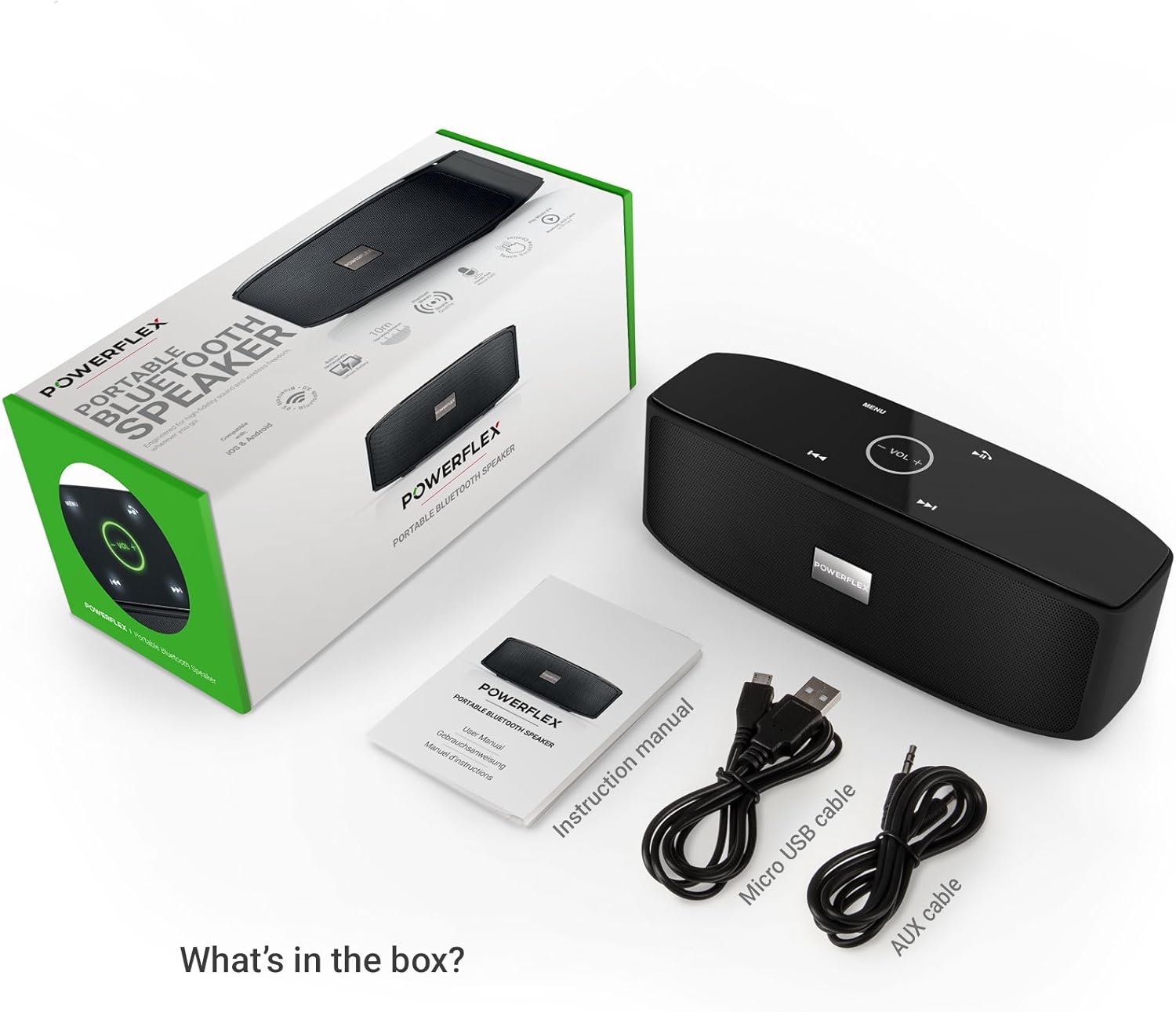
- Instrukcja obsługi

Obraz: This image displays the POWERFLEX PF-AZ01-Z003 Portable Bluetooth Speaker alongside its accessories: a Micro USB charging cable, an AUX cable, and the instruction manual. These are the items typically found inside the product packaging.
Funkcje Ponadview
The POWERFLEX PF-AZ01-Z003 speaker offers several key features for an enhanced audio experience:
- Doskonały dźwięk: Equipped with dual five-watt drivers for clear highs, detailed mid-ranges, and deep bass.
- Łączność Bluetooth 3.0: Provides a stable wireless connection up to 10 meters (33 feet).
- Rozmowy bez użycia rąk: Integrated microphone allows for clear phone calls.
- Wiele opcji odtwarzania: Supports Bluetooth, AUX input, and TF (MicroSD) card playback.
- Sterowanie dotykowe: Intuitive touch-sensitive panel for easy music and call management.
- Przenośna konstrukcja: Compact build for easy transport.

Obraz: This image presents a cutaway view of the POWERFLEX PF-AZ01-Z003 speaker, revealing its internal components, specifically the dual five-watt drivers. The visual emphasizes the speaker's design for delivering vibrant highs, detailed mid-ranges, and deep bass for true stereo sound.

Obraz: This image showcases the POWERFLEX PF-AZ01-Z003 speaker positioned in front of a collection of diverse iOS and Android Bluetooth-enabled devices, including smartphones and tablets. The arrangement visually confirms the speaker's broad compatibility with various mobile operating systems.

Obraz: This image demonstrates the compact design of the POWERFLEX PF-AZ01-Z003 speaker, showing it being easily placed into a backpack. The accompanying text highlights its portability and specific dimensions (190 x 58 x 70mm), indicating it fits conveniently into bags.
Organizować coś
1. Ładowanie głośnika
The speaker is powered by an internal 1800 mAh rechargeable battery. Before first use, fully charge the speaker.
- Connect the Micro USB charging cable to the DC5V port on the speaker.
- Podłącz drugi koniec kabla USB do zasilacza USB (nie ma go w zestawie) lub do portu USB komputera.
- The charging indicator light will illuminate. Once fully charged, the light will change color or turn off (refer to LED indicator section in the full manual for details).
2. Włączanie/wyłączanie zasilania
To power on the speaker, slide the ON/OFF switch to the 'ON' position. To power off, slide the switch to the 'OFF' position.
Obraz: Na tym obrazie przedstawiono szczegółowo view of the speaker's rear panel, highlighting the physical ON/OFF switch, the DC5V port for charging, the AUX input jack for wired connections, and the TF (MicroSD) card slot for direct media playback.
Instrukcja obsługi
1. Parowanie Bluetooth
- Upewnij się, że głośnik jest włączony i znajduje się w odległości nie większej niż 10 metrów (33 stóp) od urządzenia obsługującego technologię Bluetooth.
- The speaker will automatically enter Bluetooth pairing mode, indicated by a flashing LED light (refer to LED indicator section in the full manual).
- Na swoim urządzeniu (smartfonie, tablecie itp.) przejdź do ustawień Bluetooth i wyszukaj dostępne urządzenia.
- Select "PF-AZ01-Z003" from the list.
- Once paired, the speaker will emit an audible confirmation, and the LED light will become solid.

Obraz: This image demonstrates the speaker's Bluetooth connectivity, showing a smartphone wirelessly streaming music to the POWERFLEX PF-AZ01-Z003. Blue concentric circles emanate from the phone towards the speaker, symbolizing the wireless connection, and text indicates playback from up to 10 meters.
2. Odtwarzanie muzyki
Once connected via Bluetooth, you can play music from your device. The speaker also supports AUX cable and TF card playback.
- Bluetooth: Play music directly from your paired device.
- Wejście AUX: Podłącz urządzenie audio za pomocą dołączonego kabla AUX 3.5 mm do portu AUX. Głośnik automatycznie przełączy się w tryb AUX.
- Karta TF: Włóż kartę TF (MicroSD) z plikiem MP3 fileWłóż kartę TF do gniazda. Głośnik automatycznie rozpocznie odtwarzanie muzyki z karty.
3. Sterowanie dotykowe
The speaker features touch-sensitive controls on its top panel for easy operation.
- Odtwórz/Pauza: Tap the Play/Pause button (usually indicated by a triangle or two vertical bars).
- Zwiększanie/zmniejszanie głośności: Tap the '+' or '-' buttons to adjust the volume.
- Następny utwór: Tap the '>>|' button.
- Poprzedni utwór: Tap the '|<<' button.
- Tryb/Menu: Tap the 'MENU' button to switch between input modes (Bluetooth, AUX, TF).

Obraz: This image shows a hand interacting with the touch-sensitive controls on the top surface of the POWERFLEX PF-AZ01-Z003 speaker. A finger is pressing the 'VOL +' button, which is illuminated in green, while a smartphone displaying music playback is visible in the foreground, emphasizing the ease of control.
4. Dzwonienie bez użycia rąk
The speaker includes a built-in microphone, allowing you to answer phone calls when connected via Bluetooth.
- Gdy ktoś zadzwoni, odtwarzanie muzyki zostanie wstrzymane.
- Tap the Play/Pause button to answer the call.
- Speak into the speaker.
- Tap the Play/Pause button again to end the call.

Obraz: This image depicts a smartphone displaying an incoming call, positioned next to the POWERFLEX PF-AZ01-Z003 speaker. The text "Make hands free calls with the built-in microphone" is prominently displayed, indicating the speaker's capability for hands-free communication.
Konserwacja
To ensure the longevity and optimal performance of your POWERFLEX PF-AZ01-Z003 speaker, follow these maintenance guidelines:
- Czyszczenie: Do przecierania powierzchni głośnika należy używać miękkiej, suchej ściereczki. Nie należy używać środków ściernych, alkoholu ani rozpuszczalników chemicznych.
- Składowanie: Przechowuj głośnik w chłodnym, suchym miejscu, z dala od bezpośredniego światła słonecznego i ekstremalnych temperatur.
- Narażenie na działanie wody: Ten głośnik nie jest wodoodporny. Unikaj narażania go na działanie wody i nadmiernej wilgoci.
- Pielęgnacja baterii: Aby wydłużyć żywotność baterii, unikaj częstego całkowitego rozładowywania. Ładuj głośnik regularnie, nawet jeśli nie jest używany przez dłuższy czas.
Rozwiązywanie problemów
If you encounter issues with your POWERFLEX PF-AZ01-Z003 speaker, refer to the following common problems and solutions:
| Problem | Możliwa przyczyna | Rozwiązanie |
|---|---|---|
| Głośnik nie włącza się. | Bateria jest rozładowana. | Naładuj głośnik za pomocą kabla Micro USB. |
| Nie można sparować przez Bluetooth. | Speaker is not in pairing mode; device is too far; Bluetooth is off on device. | Ensure speaker is in pairing mode (flashing LED). Move device closer. Enable Bluetooth on your device. Forget previous pairings and try again. |
| Brak dźwięku lub niski poziom głośności. | Volume too low on speaker or device; incorrect input mode; loose AUX cable. | Increase volume on both speaker and connected device. Press 'MENU' to select correct input mode. Ensure AUX cable is securely connected. |
| Zniekształcenie dźwięku. | Głośność jest zbyt wysoka; urządzenie znajduje się zbyt daleko od głośnika. | Reduce volume on speaker and/or connected device. Move device closer to the speaker. |
Specyfikacje
| Funkcja | Szczegół |
|---|---|
| Nazwa modelu | PF-AZ01-Z003 |
| Marka | Zasilacz |
| Technologia łączności | Bluetooth, USB |
| Wersja Bluetooth | 3.0 |
| Funkcja specjalna | Portable, Built-in Microphone |
| Kompatybilne urządzenia | Universal (iOS & Android Bluetooth enabled devices) |
| Typ montażu | Blat stołu |
| Źródło zasilania | Bateria |
| Pojemność baterii | 1800 mAh |
| Zawartość energii w akumulatorze | 6.66 watogodzin |
| Lithium Ion Cells | 1 |
| Wymiary produktu | Wymiary 23 x 10.6 x 9.6 cm |
| Waga produktu | 760 gramów |
| Kolor | Czarny |
Gwarancja i wsparcie
For warranty information and technical support, please refer to the documentation included with your purchase or contact POWERFLEX customer service. Keep your proof of purchase for warranty claims.
Producent: Zasilacz
Produkt ASIN: B074M8W712


