Wstęp
The beyerdynamic Impacto Essential is a compact high-resolution converter designed to provide a digital edge to beyerdynamic's high-end headphones. It enables impeccable digital transmission for an exceptional sound experience.

Zawartość opakowania
- Impacto Essential DAC/Headphone Ampżywsze
- 0.4 m headphone cable with 2 x 3.5 mm jack plug (hard-wired)
- 0.8 m Micro-USB cable (On-The-Go)
- 0.8 m kabel USB-C
- 1.4 m USB-A cable
- Szybki przewodnik
Organizować coś
Follow these steps to connect your Impacto Essential to your headphones and audio source.
Podłączanie do słuchawek
Connect the hard-wired 0.4m headphone cable from the Impacto Essential to your compatible beyerdynamic headphones. Ensure the 3.5mm jack plugs are fully inserted into the headphone's input ports.

Łączenie z urządzeniami z systemem Android
Use the provided 0.8m Micro-USB (On-The-Go) or 0.8m USB-C cable to connect the Impacto Essential to your Android smartphone or tablet. The device will draw power directly from your Android device.
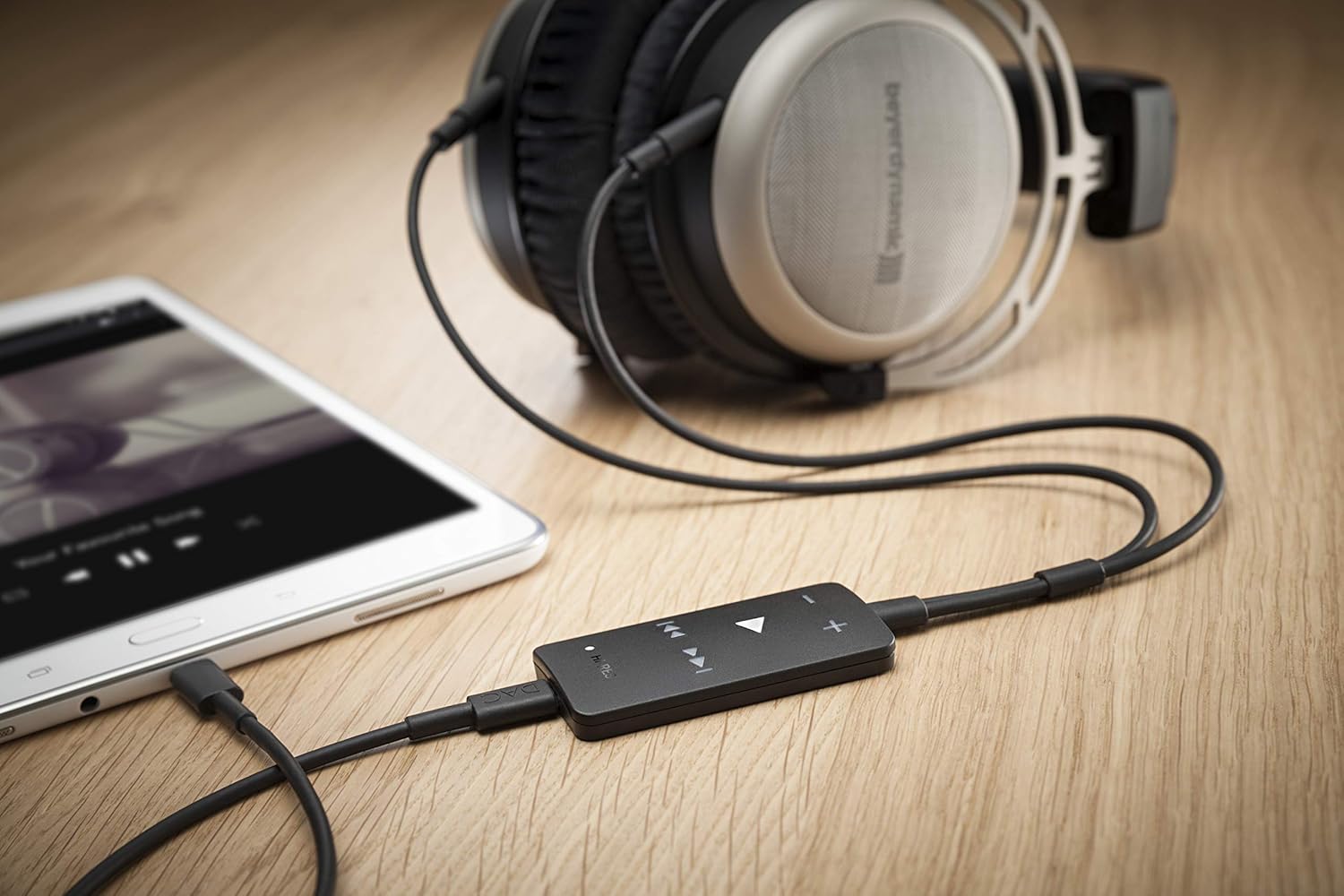
Podłączanie do komputera/laptopa
For PC or laptop connection, use the 1.4m USB-A cable. Connect one end to your computer's USB port and the other to the Impacto Essential. Your computer should automatically recognize the device.

Cable Overview
The Impacto Essential comes with various cables to ensure compatibility with different devices. Always use the appropriate cable for your connection type.

Instrukcja obsługi
Once connected, the Impacto Essential is ready for use. The device features intuitive controls for audio playback.
Sterowanie odtwarzaniem
The Impacto Essential features dedicated buttons for volume control and media playback:
- Przyciski + / -: Dostosuj głośność w górę lub w dół.
- Przycisk Odtwórz/Pauza: Press the central triangular button to play or pause audio.
- Przyciski „Pomiń do przodu”/„Wstecz”: Use the arrow buttons to skip to the next or previous track.

Hi-Res Audio Indicator
A 'HI-RES' indicator light on the device illuminates when high-resolution audio is being processed, confirming optimal audio quality.
Konserwacja
To ensure the longevity and optimal performance of your Impacto Essential, follow these maintenance guidelines:
- Czyszczenie: Use a soft, dry cloth to wipe the device. Avoid using abrasive cleaners or solvents.
- Składowanie: Przechowywać urządzenie w chłodnym i suchym miejscu, z dala od bezpośredniego światła słonecznego i ekstremalnych temperatur.
- Pielęgnacja kabli: Handle cables gently. Avoid sharp bends or excessive pulling to prevent damage.
Rozwiązywanie problemów
If you encounter issues with your Impacto Essential, refer to the following common problems and solutions:
Brak wyjścia dźwięku
- Ensure all cables are securely connected to both the Impacto Essential, your headphones, and your audio source.
- Verify that the volume on both the Impacto Essential and your audio source (smartphone, PC) is turned up.
- Check if your headphones are properly connected to the Impacto Essential's 3.5mm jacks.
- Confirm that your audio source is playing media.
Device Not Recognized by Computer/Smartphone
- Try connecting the Impacto Essential to a different USB port on your computer or a different compatible smartphone.
- Ensure you are using the correct USB cable (Micro-USB OTG, USB-C, or USB-A) for your device.
- Uruchom ponownie komputer lub smartfon.
- For PC, check your sound settings to ensure the Impacto Essential is selected as the default playback device.
Overheating or Unexpected Shutdown
- Ensure the device is used in a well-ventilated area and not covered during operation.
- If the device becomes excessively hot and shuts down, disconnect it immediately and allow it to cool down before attempting to use it again.
Problemy ze zgodnością
- The Impacto Essential is compatible with specific beyerdynamic high-end headphones: T 1 (2nd generation), T 5 p (2nd generation), Amiron home, and Aventho wired.
- It is suitable for use with Android smartphones and tablets (with USB-OTG) as well as with PC and notebook. It is not designed for iOS devices.
Dane techniczne
| Funkcja | Szczegół |
|---|---|
| Model | Impacto Niezbędne |
| Odpowiedź częstotliwościowa | 15 Hz - 20 000 Hz |
| Impedancja | 11.5 omy |
| Technologia łączności | Przewodowy |
| Gniazdo słuchawkowe | 3.5 mm Jack |
| Wymiary (dł. x szer. x wys.) | 9.1 x 2.3 x 5.6 cala |
| Waga przedmiotu | 9.6 uncji (0.6 funta) |
| Kompatybilne słuchawki | beyerdynamic T 1 (2nd generation), T 5 p (2nd generation), Amiron home, Aventho wired |
| Kompatybilne urządzenia | Android smartphones/tablets (with USB-OTG), PC, Notebook |
Gwarancja i wsparcie
For warranty information and technical support, please refer to the official beyerdynamic webOdwiedź witrynę lub skontaktuj się z działem obsługi klienta. Zachowaj dowód zakupu na wypadek reklamacji.


