1. Wprowadzenie
This manual provides essential information for the safe and effective use of the Vimar 0R16004 1P 10 Ax Inverter. This grey electrical switch, part of the Vimar Idea series, is designed for civil electrical installations. It functions as a 1-pole, 10 Ampere inverter switch, suitable for controlling lighting circuits or other electrical loads. Its compact design (8.5 x 1.1 x 15 cm) and robust plastic construction ensure reliable performance within compatible Vimar civil series systems.
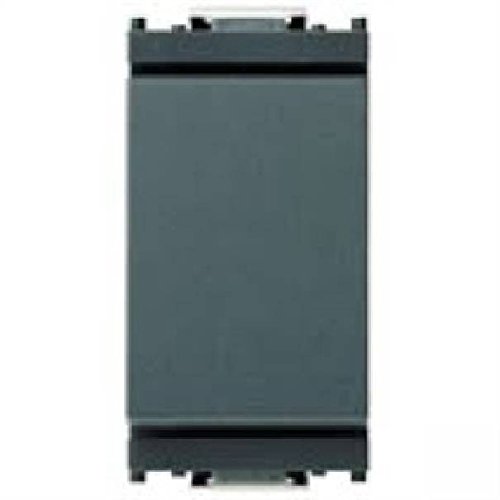
Rycina 1: Przód view of the Vimar 0R16004 1P 10 Ax Inverter. This image shows the grey faceplate of the electrical switch, designed for integration into Vimar Idea series modular systems.
2. Konfiguracja i instalacja
2.1 Środki ostrożności
- Zawsze odłączaj zasilanie to the circuit at the main breaker or fuse box before beginning any installation or maintenance work. Failure to do so can result in serious injury or death.
- Installation should only be performed by a wykwalifikowany elektryk or a competent person familiar with electrical wiring and local electrical codes.
- Ensure the product's specifications (voltage, current rating) are compatible with your electrical system. This device is rated for 10 Ampsą.
- Nie instalować w mokrych lub damp lokalizacji, chyba że produkt jest specjalnie przeznaczony do stosowania w takich środowiskach.
- Stosuj odpowiedni sprzęt ochrony osobistej (PPE), taki jak rękawice termoizolacyjne i okulary ochronne.
2.2 Kroki instalacji
The Vimar 0R16004 inverter is designed for modular installation within the Vimar Idea series. It requires a compatible Vimar support frame and faceplate (not included) for proper mounting.
- Przygotuj obszar instalacji: Ensure the electrical box is clean and free of debris. Verify that the power to the circuit is OFF.
- Zidentyfikuj okablowanie: For an inverter switch (often used as a 2-way or 3-way switch), you will typically have a common wire and two traveler wires. Refer to your existing wiring or circuit diagram.
- Podłącz przewody:
- Connect the common wire to the terminal marked 'L' or 'COM' on the switch.
- Connect the two traveler wires to the remaining two terminals. This switch uses screw terminals for secure connections.
- Sprawdź, czy wszystkie połączenia przewodów są solidne i bezpieczne.
- Zamontuj przełącznik: Snap the Vimar 0R16004 module into the appropriate slot on the Vimar Idea support frame.
- Zabezpiecz ramę: Mount the support frame with the switch module into the electrical box using the provided screws.
- Zamontuj płytę czołową: Once the support frame is securely mounted, snap the Vimar Idea series faceplate over the switch module.
- Przywróć zasilanie: Carefully restore power to the circuit at the main breaker or fuse box.
- Operacja testowa: Test the switch to ensure it functions correctly (ON-OFF operation).
3. Instrukcja obsługi
The Vimar 0R16004 Inverter operates as a standard electrical switch with an ON-OFF function. It is designed to control a single electrical circuit.
- Aby włączyć podłączone urządzenie lub światło ON, press the switch rocker to the 'ON' position (typically the upper part of the rocker).
- Aby włączyć podłączone urządzenie lub światło WYŁĄCZONY, press the switch rocker to the 'OFF' position (typically the lower part of the rocker).
In a multi-way switching setup (e.g., controlling a light from two locations), toggling either inverter switch will change the state of the light (ON to OFF, or OFF to ON).
4. Konserwacja
The Vimar 0R16004 Inverter requires minimal maintenance. Regular inspection and cleaning can help ensure its longevity and proper function.
- Czyszczenie:
- Before cleaning, ensure power to the switch is disconnected at the main breaker.
- Wipe the surface of the switch and faceplate with a soft, dry, or slightly damp płótno.
- Do not use abrasive cleaners, solvents, or excessive moisture, as these can damage the plastic material or internal components.
- Kontrola:
- Periodically check the switch for any signs of physical damage, such as cracks, discoloration, or loose components.
- If any damage is observed, disconnect power and have the switch inspected and replaced by a qualified electrician.
- Ensure the switch operates smoothly without excessive force or sticking.
5. Rozwiązywanie Problemów
If you experience issues with your Vimar 0R16004 Inverter, refer to the following table for common problems and solutions. Always ensure power is disconnected before inspecting wiring.
| Problem | Możliwa przyczyna | Rozwiązanie |
|---|---|---|
| Light/Device does not turn ON/OFF. |
|
|
| Switch feels loose or wobbly. |
|
|
| Switch is hot to the touch. |
|
|
If the problem persists after attempting these solutions, contact a qualified electrician or Vimar customer support.
6. Specyfikacje
| Funkcja | Szczegół |
|---|---|
| Wymiary produktu (dł. x szer. x wys.) | Wymiary 8.5 x 1.1 x 15 cm |
| Waga | 20 gramów |
| Producent | Wimar |
| Numer modelu | 0R16004 |
| Tryb pracy | WŁ-WYŁ |
| Obecna ocena | 10 A |
| Typ kontaktu | Normalnie zamknięty |
| Marka | VIMAR |
| Typ terminala | Śruba |
| Tworzywo | Plastic (Housing), Phosphor Bronze (Contact) |
| Typ obwodu | 1-Way (Inverter/2-Way) |
| Typ siłownika | Piston (Rocker) |
7. Gwarancja i wsparcie
7.1 Informacje o gwarancji
Vimar products are manufactured to high-quality standards. Specific warranty terms and conditions may vary by region and retailer. Please retain your proof of purchase for any warranty claims. For detailed warranty information, refer to the documentation provided with your purchase or visit the official Vimar webstrona.
7.2 Obsługa klienta
For technical assistance, installation queries, or any other support needs regarding your Vimar 0R16004 Inverter, please contact Vimar customer service or your local authorized Vimar distributor. Contact information can typically be found on the Vimar official webmiejscu lub na opakowaniu produktu.
Vimar Official Webstrona: www.vimar.pl (Please note: This is a generic link. Refer to your product packaging or Vimar's official site for region-specific contact details.)


