Wstęp
The Astrum ET200 Stereo Wireless Headset is an in-ear Bluetooth headset designed for hands-free communication and audio playback. Featuring Bluetooth V4.0 connectivity, it supports music and call functions with an in-built microphone and audio caller ID. This manual provides detailed instructions to help you set up, operate, and maintain your headset.
Co jest w pudełku
- 1 x Astrum ET200 Wireless Headset Earphone
- 1 x kabel ładujący
- 2 x Ear-hooks (various sizes)
- 1 x Instrukcja obsługi
Produkt ponadview
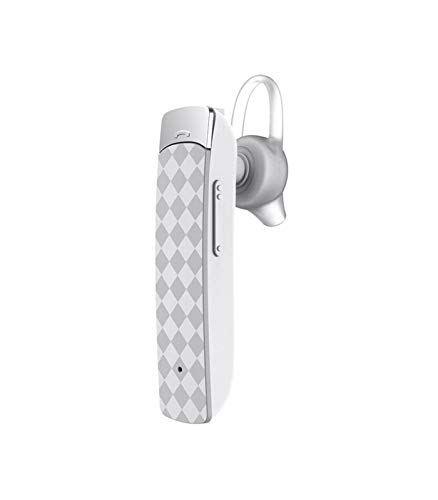

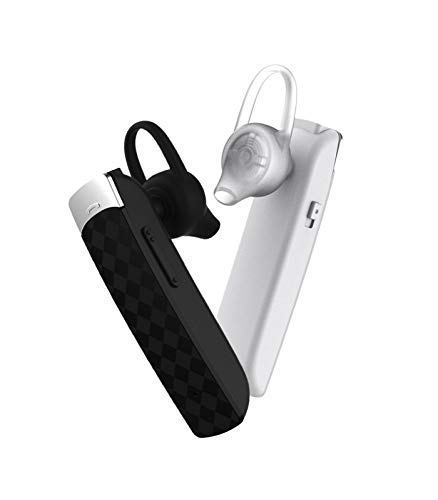
Organizować coś
1. Ładowanie zestawu słuchawkowego
Before first use, fully charge the headset. Connect the provided charging cable to the headset's charging port and the other end to a USB power source (e.g., computer USB port, wall adapter). The charging indicator light will illuminate during charging and turn off or change color when fully charged. Charging time is approximately 2 hours.
2. Parowanie z urządzeniem Bluetooth
- Upewnij się, że zestaw słuchawkowy jest wyłączony.
- Naciśnij i przytrzymaj przycisk wielofunkcyjny na zestawie słuchawkowym, aż kontrolka zacznie migać naprzemiennie na czerwono i niebiesko, wskazując tryb parowania.
- Na urządzeniu z włączoną funkcją Bluetooth (smartfonie, tablecie itp.) przejdź do ustawień Bluetooth i włącz Bluetooth.
- Szukaj available devices. The headset will appear as "ET200" or similar.
- Select "ET200" to connect. If prompted for a password, enter "0000".
- Once successfully paired, the indicator light will flash blue slowly, and you may hear a confirmation tone.
The headset supports Bluetooth V4.0 and has a range of up to 10 meters (33 feet) in an open environment.
Instrukcja obsługi
Włączanie/wyłączanie zasilania
- Włączanie: Naciśnij i przytrzymaj przycisk wielofunkcyjny przez około 3 sekundy, aż niebieska kontrolka zacznie migać.
- Wyłączone: Naciśnij i przytrzymaj przycisk wielofunkcyjny przez około 3 sekund, aż czerwona kontrolka zacznie migać, a następnie zgaśnie.
Kontrola połączeń
- Odbierz połączenie: Briefly press the multi-function button.
- Zakończ połączenie: Briefly press the multi-function button during a call.
- Odrzuć połączenie: Press and hold the multi-function button for 2 seconds when an incoming call rings.
- Ponowne wybieranie ostatniego numeru: Naciśnij dwukrotnie przycisk wielofunkcyjny.
Odtwarzanie muzyki
- Odtwórz/Pauza: Briefly press the multi-function button.
- Następny utwór: Naciśnij i przytrzymaj przycisk zwiększania głośności.
- Poprzedni utwór: Naciśnij i przytrzymaj przycisk głośności -.
Regulacja głośności
- Zwiększ głośność: Briefly press the Volume + button.
- Zmniejsz głośność: Briefly press the Volume - button.
Konserwacja
- Regularnie czyść zestaw słuchawkowy miękką, suchą ściereczką. Nie używaj środków czyszczących o właściwościach ściernych ani rozpuszczalników.
- Unikaj wystawiania zestawu słuchawkowego na działanie ekstremalnych temperatur, wilgoci lub bezpośredniego światła słonecznego.
- Gdy nie używasz zestawu słuchawkowego, przechowuj go w chłodnym i suchym miejscu.
- Do not attempt to disassemble or modify the headset, as this will void the warranty.
Rozwiązywanie problemów
| Problem | Możliwa przyczyna | Rozwiązanie |
|---|---|---|
| Zestaw słuchawkowy nie włącza się. | Niski poziom naładowania baterii. | Naładuj całkowicie zestaw słuchawkowy. |
| Cannot pair the headset. | Headset not in pairing mode; Bluetooth disabled on device; device out of range. | Ensure headset is in pairing mode (flashing red/blue). Enable Bluetooth on your device. Move device closer to headset (within 10m). |
| Brak dźwięku lub słaba jakość dźwięku. | Volume too low; headset not connected; interference. | Increase volume on headset and device. Re-pair the headset. Move away from other wireless devices. |
| Problemy z jakością połączeń. | Słaby sygnał; mikrofon zasłonięty. | Move to an area with better signal. Ensure microphone is not covered. |
Specyfikacje
- Model: ET200
- Technologia łączności: Bluetooth V4.0
- BluetoothProfiles: HFP / HSP / A2DP / AVRCP
- Zasięg bezprzewodowy: Do 10 metrów (33 stóp)
- Czas połączenia: Do 5 godzin
- Czas gry: Do 4.5 godzin
- Czas ładowania: Do 2 godzin
- Czas czuwania: Do 200 godzin
- Typ sterowania: Call Control, Touch
- Waga przedmiotu: 10 gram
- Wymiary produktu: Wymiary 3.5 x 3.5 x 12.8 cm
- Tworzywo: Plastikowy
Gwarancja i wsparcie
The Astrum ET200 Stereo Wireless Headset comes with a 1-letnia gwarancja producenta od daty zakupu. Niniejsza gwarancja obejmuje wady produkcyjne i wykonawcze wynikające z normalnego użytkowania. Nie obejmuje uszkodzeń spowodowanych niewłaściwym użytkowaniem, wypadkami, nieautoryzowanymi modyfikacjami ani normalnym zużyciem.
For warranty claims, technical support, or any inquiries, please contact Astrum customer service. You can find more information and contact details on the official Astrum webna stronie internetowej lub w miejscu zakupu.
Visit the official Astrum store for more products and support: Astrum Store on Amazon


