Wstęp
Przyciski Amazon Echo to interaktywne akcesoria zaprojektowane z myślą o ulepszeniu wrażeń z korzystania z kompatybilnych urządzeń Amazon Echo. Zapewniają one fizyczny interfejs do grania w gry i aktywowania inteligentnych procedur domowych za pośrednictwem Alexy.
Przyciski te łączą się bezprzewodowo z urządzeniem Echo, oferując nowy sposób interakcji z funkcjami Alexa i personalizacji inteligentnego środowiska domowego.
Co jest w pudełku
- 2 przyciski echa
- 4 baterie AAA (2 na przycisk)
Ostrzeżenie: Zawiera małe części. Może stwarzać ryzyko zadławienia dla małych dzieci.
Organizować coś
- Zainstaluj baterie: Każdy przycisk Echo Button wymaga 2 baterii AAA. Aby zainstalować, należy znaleźć komorę baterii na spodzie przycisku. Do otwarcia pokrywy komory może być potrzebny mały śrubokręt. Włóż baterie zgodnie ze wskaźnikami polaryzacji (+/-) i szczelnie zamknij pokrywę.
- Parowanie z urządzeniem Echo:
- Upewnij się, że Twoje zgodne urządzenie Echo (Echo, Echo Dot, Echo Show, Echo Plus lub Echo Spot) jest włączone i podłączone do Internetu.
- Umieść przycisk Echo w pobliżu urządzenia Echo.
- Powiedz: „Alexa, skonfiguruj moje przyciski Echo”.
- Postępuj zgodnie z instrukcjami głosowymi Alexy, aby zakończyć proces parowania. Pierścień świetlny przycisku wskaże status parowania.
- Połącz wiele przycisków: Możesz połączyć maksymalnie 4 przyciski Echo Buttons z kompatybilnym urządzeniem Echo za pomocą Bluetooth. Powtórz proces parowania dla każdego kolejnego przycisku.

Obraz: Dwa przyciski Echo gotowe do konfiguracji i użycia.
Instrukcja obsługi
Po sparowaniu przyciski Echo Buttons można wykorzystywać do różnych interaktywnych zastosowań:
- Granie w gry: Przyciski Echo są przeznaczone do gier interaktywnych z Alexą. Podczas grania w kompatybilną grę, naciśnij przycisk, aby włączyć dźwięk, odpowiedzieć na pytania lub wykonać inne czynności zgodnie z instrukcjami Alexy. Podświetlenie przycisku często zmienia kolor, sygnalizując Twoją kolej lub status.
- Aktywacja inteligentnych procedur domowych: Możesz skonfigurować przyciski Echo, aby uruchamiały określone procedury inteligentnego domu Alexa. Na przykładampNa przykład, pojedyncze naciśnięcie może włączyć światła, wyregulować termostat lub wyświetlić niestandardową wiadomość. Aby to skonfigurować, użyj aplikacji Alexa do utworzenia lub zmodyfikowania procedury i wybierz przycisk Echo jako wyzwalacz.
- Plany umiejętności Alexa: Spersonalizuj swoje umiejętności w grze quizowej, korzystając z Alexa Skill Blueprints i integrując przyciski Echo, aby zapewnić spersonalizowane, interaktywne doświadczenie.

Obraz: Użytkownicy korzystający z przycisków Echo Buttons podczas gry. Przyciski wyświetlają różne kolory.
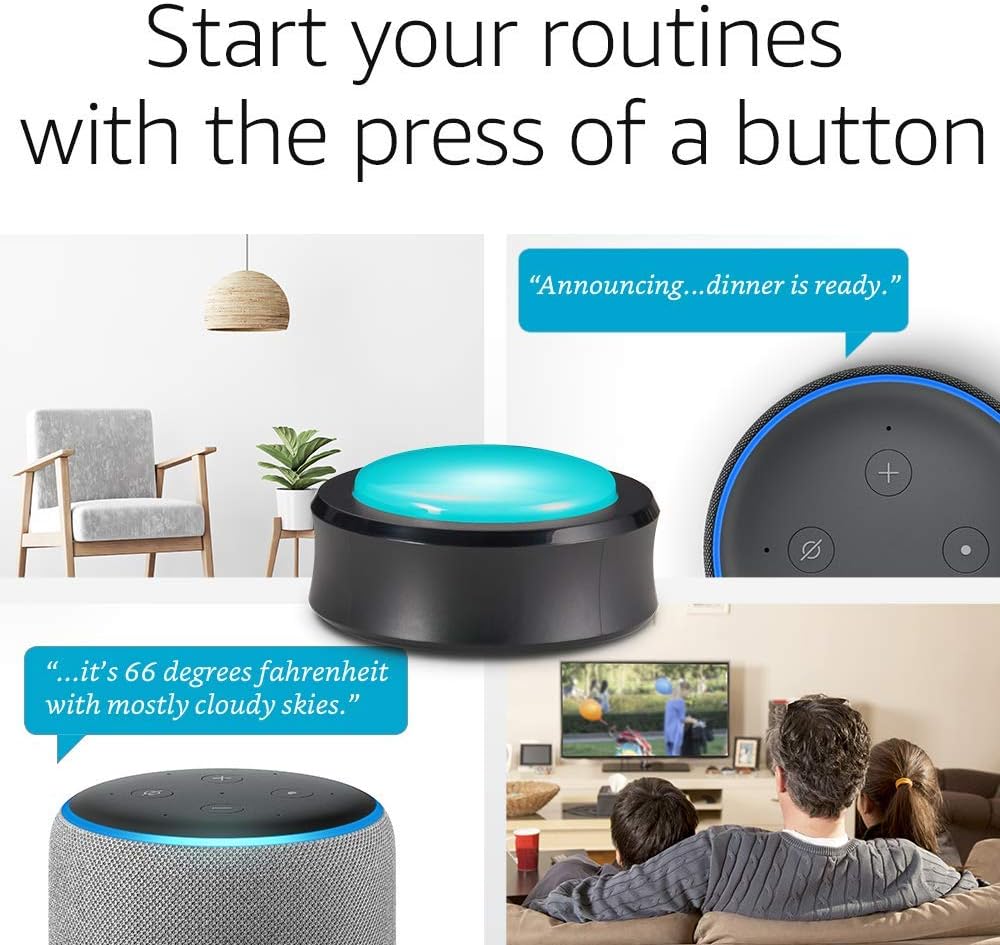
Zdjęcie: Przycisk Echo służący do aktywowania inteligentnych funkcji domowych, takich jak zapowiadanie obiadu lub sprawdzanie pogody.
Konserwacja
Wymiana baterii: Gdy kontrolka przycisku Echo wskazuje niski poziom naładowania baterii lub nie reaguje, należy wymienić baterie AAA. Postępuj zgodnie z instrukcjami instalacji baterii opisanymi w sekcji „Konfiguracja”. Zadbaj o prawidłową utylizację zużytych baterii, zgodnie z lokalnymi przepisami.
Czyszczenie: Aby wyczyścić przyciski Echo, delikatnie przetrzyj je miękką, suchą ściereczką. Unikaj stosowania środków czyszczących o właściwościach ściernych i zanurzania urządzenia w wodzie.
Rozwiązywanie problemów
- Przycisk nie łączy się:
- Sprawdź, czy baterie są prawidłowo zainstalowane i naładowane.
- Sprawdź, czy urządzenie Echo jest podłączone do sieci i znajduje się w zasięgu (najlepiej w odległości 4.5 metra lub 15 stóp).
- Spróbuj ponownie uruchomić urządzenie Echo, odłączając je na 10 sekund i podłączając ponownie.
- Jeśli urządzenie zostało wcześniej sparowane, spróbuj odłączyć przycisk od aplikacji Alexa, a następnie sparować go ponownie.
- Przycisk nie odpowiada:
- Sprawdź poziom naładowania baterii.
- Sprawdź, czy przycisk jest nadal sparowany z urządzeniem Echo.
- Sprawdź, czy umiejętność lub procedura Alexa, której próbujesz użyć, jest aktywna i poprawnie skonfigurowana.
- Problemy z łącznością Bluetooth: Przyciski Echo są zgodne ze specyfikacją Bluetooth Core w wersji 4.2. W przypadku utrzymujących się problemów z łącznością należy upewnić się, że między przyciskiem a urządzeniem Echo nie ma żadnych istotnych przeszkód i zminimalizować zakłócenia ze strony innych urządzeń bezprzewodowych.
Aby uzyskać dalszą pomoc, zapoznaj się z sekcjami pomocy „Korzystanie z przycisków Echo z systemem Alexa” lub „Korzystanie z przycisków Echo z procedurami” dostępnymi w zasobach pomocy technicznej Amazon.
Specyfikacje
- Rozmiar i waga: 2.95” x 2.95” x 1.42” (75 mm x 75 mm x 36 mm), 1.83 uncji (52 gramy). Rzeczywisty rozmiar i waga mogą się różnić w zależności od procesu produkcyjnego.
- Łączność Bluetooth: Zgodny ze specyfikacją Bluetooth Core w wersji 4.2, w tym ze standardami Basic Rate (BR) i Bluetooth Low Energy (BLE). Działa najlepiej w odległości 4.5 metra od podłączonego urządzenia.
- Moc: Każdy przycisk wymaga 2 baterii AAA.
Gwarancja i wsparcie
Gwarancja: Urządzenia Amazon Echo Buttons objęte są 90-dniową ograniczoną gwarancją i serwisem.
Wsparcie: W przypadku jakichkolwiek problemów lub potrzeby dodatkowej pomocy dotyczącej przycisków Echo Buttons, odwiedź stronę pomocy technicznej Amazon webwejdź na stronę i wyszukaj „Korzystanie z przycisków Echo z Alexą” lub „Korzystanie z przycisków Echo z procedurami”.


