1. Wprowadzenie i koniecview
The DS18 GEN-X1200.2D is a Class AB 2-channel high-power amplifier designed for car audio systems. It delivers 1200 watts peak output and 2 x 180 watts RMS at 2 Ohms. This amplifier series is stable at both 2 and 4 ohms, offering versatility for various speaker configurations. It incorporates advanced features to optimize sound performance and user control.
Główne cechy obejmują:
- Class A/B Technology for efficient power delivery.
- Fully adjustable 12dB/Octave crossover with differential circuitry.
- Subsonic filter to protect subwoofers.
- Fully adjustable bass equalizer for precise sound tuning.
- Mute and delay soft start technology to prevent turn-on thumps.
- Phase control switch for optimal sound staging.
- Remote dashboard subwoofer control for convenient bass adjustment.
- Full IC-controlled protection circuitry for reliability.
- Professional peak limiter circuitry for distortion-free audio.

Rycina 1: Przód view of the DS18 GEN-X1200.2 Amplifier with included bass remote.
2. Informacje dotyczące bezpieczeństwa
Przed instalacją i uruchomieniem urządzenia należy uważnie przeczytać wszystkie instrukcje. amplifier. Nieprzestrzeganie tych wytycznych może spowodować uszkodzenie ampgłośnika, głośników lub pojazdu i może spowodować unieważnienie gwarancji.
- Przed rozpoczęciem jakiejkolwiek instalacji należy zawsze odłączyć ujemny zacisk akumulatora pojazdu.
- Zapewnij właściwe uziemienie ampmocowanie do podwozia pojazdu.
- Należy stosować przewody zasilające i uziemiające o odpowiednim przekroju, zgodnie ze specyfikacją podaną w części dotyczącej instalacji.
- Unikaj montowania tzw amplifier in areas exposed to excessive heat, moisture, or direct sunlight.
- Chroń wszystkie przewody przed ostrymi krawędziami i ruchomymi częściami.
- Nie próbuj otwierać ani modyfikować pliku amplifier. Wszelkie prace serwisowe należy zlecać wykwalifikowanemu personelowi.
- Always use fuses of the specified rating.
3. Co znajduje się w pudełku
Po otwarciu opakowania należy sprawdzić, czy znajdują się w nim wszystkie elementy:
- DS18 GEN-X1200.2 Ampżywsze
- Zdalne sterowanie basowe
- Instrukcja obsługi (ten dokument)
- Śruby montażowe

Figure 2: Packaging of the DS18 GEN-X1200.2 Ampliyfikator.
4. Specyfikacje
| Specyfikacja | Wartość |
|---|---|
| RMS Power @ 14.4VDC (4 Ohm) | 120W x 2 |
| RMS Power @ 14.4VDC (2 Ohm) | 180W x 2 |
| Bridge Power @ 14.4VDC (4 Ohm) | 300W x 1 |
| Zniekształcenia THD | 0.08% |
| Filtr dolnoprzepustowy (LPF) | 50Hz - 500Hz |
| Filtr górnoprzepustowy (HPF) | 50Hz - 500Hz |
| Odpowiedź częstotliwościowa | 20Hz - 20KHz |
| Ocena bezpiecznika | 25A x 2 |
| Liczba kanałów | 2 |
| Tomtage | 14.4 V |
| Wymiary (dł. x szer. x wys.) | 400 × 190 × 60 mm (15.74 × 7.5 × 2 cala) |
| Waga przedmiotu | 8 funta |
5. Instalacja i konfiguracja
Prawidłowy montaż jest kluczowy dla optymalnej wydajności i bezpieczeństwa. W razie wątpliwości co do któregokolwiek kroku, skonsultuj się z profesjonalnym instalatorem car audio.
5.1 Montaż Ampżywsze
Choose a secure, dry location with adequate ventilation. Avoid mounting on carpet or directly to metal surfaces without insulation. Ensure the amplifier is easily accessible for wiring and adjustments.
5.2 połączeń przewodów
Refer to the diagram below for proper wiring connections. Use high-quality cables of appropriate gauge.

Figure 3: Rear panel showing power, ground, remote, fuse, and speaker output connections.
- Power Connection (B+): Connect a heavy-gauge power cable (e.g., 4 AWG) directly from the positive terminal of the vehicle's battery to the B+ terminal on the amplifier. Install an in-line fuse holder within 18 inches of the battery.
- Połączenie uziemiające (GND): Connect a heavy-gauge ground cable (same gauge as power) from the GND terminal on the amplifier to a clean, unpainted metal surface on the vehicle chassis. Ensure a solid, low-resistance connection.
- Remote Turn-On (REM): Connect a remote turn-on wire (e.g., 18 AWG) from your head unit's remote output to the REM terminal on the amplifier. This turns the ampwłączanie i wyłączanie projektora za pomocą jednostki głównej.
- RCA Input Connection: Podłącz kable RCA do gniazda wyjściowego jednostki głównej.amp outputs to the CH1 and CH2 RCA input jacks on the ampliyfikator.
- Podłączenie wyjścia głośnikowego: Connect your speakers to the SPEAKER output terminals. Ensure correct polarity (+ to + and - to -). For bridged mode, connect to the designated bridged terminals.
5.3 Ustawienia początkowe
Przed włączeniem zasilania należy ustawić ampprzywróć elementy sterujące urządzenia do ich początkowych pozycji:
- OSIĄGAĆ: Set to minimum (fully counter-clockwise).
- KONIEC: Set to FULL for initial setup, or LPF/HPF as needed for your speaker type.
- CZĘSTOTLIWOŚĆ: Set to the middle of the range.
- WZMOCNIENIE BASÓW: Set to 0dB.
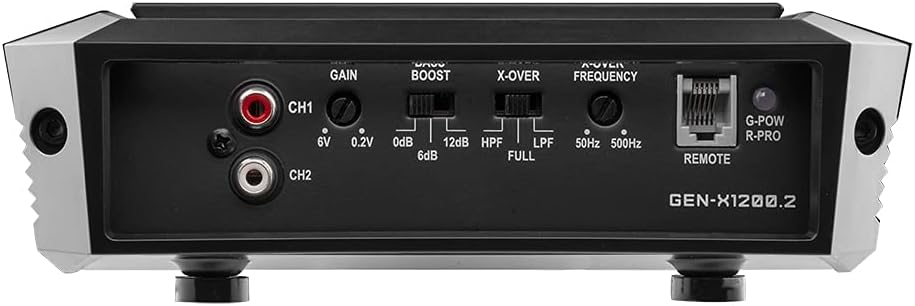
Figure 4: Front panel showing gain, bass boost, crossover, and frequency controls.
6. Instrukcja obsługi
Po zainstalowaniu wykonaj poniższe kroki, aby obsługiwać swój amplifier and fine-tune your audio system:
- Włącz zasilanie: Turn on your vehicle and head unit. The amplifier's power indicator LED should illuminate.
- Regulacja wzmocnienia: Play a familiar piece of music at a moderate volume on your head unit (around 75% of max volume). Slowly increase the amplifier's GAIN control until you hear slight distortion, then back it off slightly. This matches the ampczułość wejściowa odtwarzacza audio do wyjścia jednostki głównej.
- Regulacja zwrotnicy: Adjust the X-OVER switch and FREQUENCY knob according to your speaker type. For full-range speakers, use FULL. For subwoofers, use LPF (Low Pass Filter) and set the frequency to cut off high notes. For component speakers, use HPF (High Pass Filter) and set the frequency to cut off low notes.
- Regulacja wzmocnienia basów: Use the BASS BOOST control sparingly. Excessive bass boost can cause distortion and damage speakers. Adjust to enhance bass response as desired, ensuring clarity.
- Zdalne pokrętło basowe: Connect the included bass remote to the 'REMOTE' port on the amplifier. This allows convenient adjustment of the subwoofer level from the driver's seat.

Figure 5: Included bass remote control for convenient adjustment.
6.1 Film o produkcieview
Obejrzyj ten film, aby zobaczyć podgląd wizualnyview of the DS18 GEN-X1200.2D amplifier i jego cechy.
Wideo 1: Ponadview of the DS18 GEN-X1200.2D 2-Channel Amplifier, highlighting its design and features.
7. Rozwiązywanie Problemów
Jeśli napotkasz problemy z urządzeniem amplifier, zapoznaj się z poniższymi typowymi problemami i rozwiązaniami:
| Problem | Możliwa przyczyna | Rozwiązanie |
|---|---|---|
| Brak zasilania / Amplifier nie włącza się | Przepalony bezpiecznik, słabe połączenie zasilania/uziemienia, brak sygnału zdalnego. | Sprawdź bezpiecznik liniowy i amplifier fuses. Verify power and ground connections are secure. Check remote wire for 12V signal. |
| Brak wyjścia dźwięku | RCA cables disconnected, speaker wires disconnected/shorted, amplifier w trybie ochronnym. | Check RCA and speaker connections. Ensure speaker wires are not touching each other or chassis. If protect light is on, refer to amplifier protection section. |
| Zniekształcony dźwięk | Zbyt wysokie wzmocnienie, niewłaściwe ustawienia zwrotnicy, słaba jakość źródła dźwięku. | Reduce gain setting. Adjust crossover frequencies. Test with a different audio source. |
| Amplifier przegrzewa się | Inadequate ventilation, improper impedance load, prolonged high-volume use. | Zapewnij odpowiedni przepływ powietrza wokół amplifier. Sprawdź zgodność impedancji głośników amplifier's capabilities. Reduce listening volume. |
8. Konserwacja
To ensure the longevity and performance of your DS18 GEN-X1200.2 amplifier, postępuj zgodnie z poniższymi prostymi wskazówkami dotyczącymi konserwacji:
- Utrzymuj czystość: Regularnie wycieraj ampPrzetrzyj zewnętrzną część urządzenia miękką, suchą ściereczką, aby usunąć kurz i zanieczyszczenia. Unikaj stosowania silnych środków chemicznych i ściernych środków czyszczących.
- Sprawdź połączenia: Periodically inspect all power, ground, remote, RCA, and speaker connections to ensure they are secure and free from corrosion. Loose connections can lead to poor performance or damage.
- Wentylacja:Upewnij się, że amplifier's cooling fins are not obstructed. Proper airflow is essential to prevent overheating.
- Fuse Inspection:Jeśli amplifier stops working, check the fuses. Replace blown fuses only with fuses of the exact same type and rating.
9. Gwarancja i wsparcie
DS18 products are designed and manufactured to the highest quality standards. For specific warranty terms and conditions, please refer to the warranty card included with your product or visit the official DS18 webZachowaj paragon jako dowód zakupu na wypadek reklamacji.
For technical support, troubleshooting assistance, or service inquiries, please contact DS18 customer support through their official website or authorized service centers. Provide your product model number (GEN-X1200.2) and a detailed description of the issue when seeking support.
Official DS18 Webstrona: ds18.com


