1. Koniec produktuview
The LinQ W735 is a versatile dynamic microphone designed for both wired and wireless operation. It features a durable metal construction, an internal shock mount, a hum-compensating coil, and a neodymium magnet. The microphone includes an on/off switch with a locking mechanism. For wireless use, it offers a range of up to 30 meters with its included receiver, which connects directly to a karaoke machine or amplifier's 6.5 mm jack input. Alternatively, a 3-meter wired connection is possible using the provided cable. The microphone is powered by AA batteries, which are included. It is designed to be insensitive to acoustic noise, boasts a high sound pressure level of over 150 dB SPL, and features a silent switch. Its cardioid polar pattern focuses on sound from the front, minimizing background noise.
1.1 Zawartość opakowania
- LinQ W735 Dynamic Microphone
- Wireless Receiver (6.5 mm Jack)
- 3-meter Audio Cable (6.5 mm Jack to 6.5 mm Jack)
- AA Batteries (for microphone and receiver)

Image 1.1: LinQ W735 microphone, wireless receiver, and product packaging.
2. Informacje dotyczące bezpieczeństwa
- Do not expose the microphone or receiver to water or excessive moisture.
- Unikaj upuszczania i narażania urządzenia na silne uderzenia.
- Do not attempt to disassemble or modify the microphone or receiver. This will void the warranty.
- Use only the specified AA batteries. Ensure correct polarity when inserting batteries.
- Aby zapobiec wyciekowi baterii, wyjmij je, jeśli urządzenie nie będzie używane przez dłuższy czas.
- Przechowuj baterie w miejscu niedostępnym dla dzieci.
3. Funkcje produktu
- Praca w dwóch trybach: Supports both wireless and wired connections.
- Unidirectional (Cardioid) Polar Pattern: Captures sound primarily from the front, reducing background noise.
- Trwała konstrukcja: Features a metal microphone body for longevity.
- Wewnętrzne mocowanie amortyzatora: Minimizes handling noise.
- Hum-Compensating Coil & Neodymium Magnet: Poprawia klarowność dźwięku.
- On/Off Switch with Lock: Prevents accidental power changes.
- Zasięg bezprzewodowy: Up to 30 meters (line of sight).
- Obsługa wysokiego SPL: Capable of handling sound pressure levels over 150 dB.
- Zasilany bateryjnie: Uses AA batteries for convenience.
4. Konfiguracja
4.1 Instalacja baterii
- Mikrofon: Unscrew the bottom part of the microphone handle. Insert two AA batteries, ensuring correct polarity (+/-). Screw the handle back on securely.
- Odbiornik bezprzewodowy: Open the battery compartment on the receiver. Insert one AA battery, ensuring correct polarity (+/-). Close the compartment.
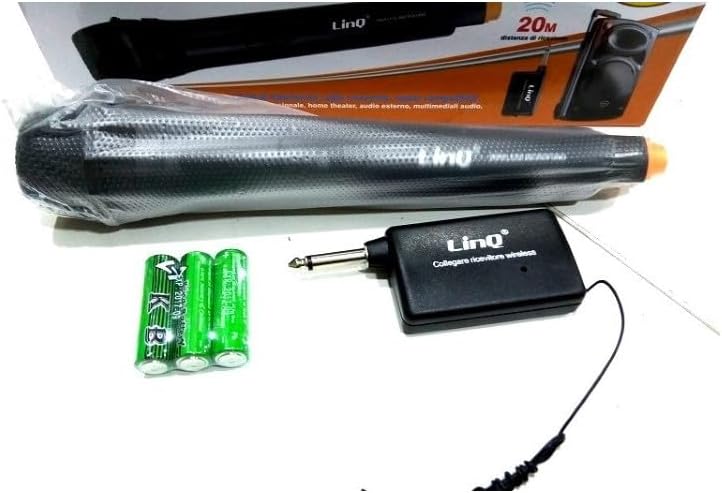
Image 4.1: LinQ W735 microphone, wireless receiver, audio cable, and AA batteries.
4.2 Połączenie bezprzewodowe
- Ensure batteries are correctly installed in both the microphone and the wireless receiver.
- Insert the 6.5 mm jack of the wireless receiver directly into the microphone input of your amplifier, karaoke machine, or mixer.
- Turn on the wireless receiver.
- Slide the ON/OFF switch on the microphone to the 'ON' position.
- The microphone and receiver should automatically pair. Adjust the volume on your audio device as needed.
4.3 Połączenie przewodowe
- Ensure batteries are installed in the microphone. The microphone requires power even in wired mode for optimal performance.
- Connect one end of the 3-meter audio cable to the microphone's output port.
- Connect the other end of the audio cable to the microphone input of your amplifier, karaoke machine, or mixer.
- Slide the ON/OFF switch on the microphone to the 'ON' position.
- Adjust the volume on your audio device as needed.
5. Instrukcja obsługi
5.1 Włączanie/wyłączanie
To power on the microphone, slide the switch located on the microphone body to the 'ON' position. To power off, slide the switch to the 'OFF' position. The switch also features a 'LOCK' position to prevent accidental power changes during use.
5.2 Wskazówki dotyczące użytkowania
- Hold the microphone approximately 2-6 inches (5-15 cm) from your mouth for optimal sound capture.
- Point the top of the microphone directly towards the sound source.
- Avoid covering the microphone grille with your hand, as this can affect sound quality.
- When using wirelessly, ensure a clear line of sight between the microphone and the receiver for best performance and range.
- Dostosuj głośność na podłączonym urządzeniu audio (amplifier, mixer) to achieve the desired sound level.
6. Konserwacja
- Czyszczenie: Przetrzyj obudowę mikrofonu miękką, suchą ściereczką. Nie używaj płynnych środków czyszczących ani materiałów ściernych.
- Składowanie: Store the microphone and receiver in a cool, dry place away from direct sunlight and extreme temperatures.
- Wymiana baterii: Replace batteries when the sound quality degrades or the microphone/receiver fails to power on. Always replace all batteries at the same time.
7. Rozwiązywanie Problemów
| Problem | Możliwa przyczyna | Rozwiązanie |
|---|---|---|
| No sound output (Wireless) | Microphone/receiver off; Low batteries; Receiver not connected; Out of range; Volume too low. | Ensure microphone and receiver are ON. Replace batteries. Connect receiver securely. Move closer to receiver. Increase volume on audio device. |
| No sound output (Wired) | Microphone off; Cable not connected; Volume too low. | Ensure microphone is ON. Connect cable securely. Increase volume on audio device. |
| Słaba jakość dźwięku/zakłócenia | Low batteries; Obstructions in wireless path; Other electronic interference; Incorrect microphone placement. | Replace batteries. Ensure clear line of sight. Move away from other electronic devices. Adjust microphone position. |
| Microphone not powering on | Baterie rozładowane lub nieprawidłowo włożone. | Wymień baterie na nowe, zwracając uwagę na prawidłową biegunowość. |
8. Specyfikacje
| Model | W735 |
| Typ | Mikrofon dynamiczny |
| Wzór biegunowy | Jednokierunkowy (kardioidalny) |
| Odpowiedź częstotliwościowa | 80 - 12,000 Hz |
| Wrażliwość | 1.5mV/PA |
| Impedancja nominalna | 350 omy |
| Minimalna impedancja obciążenia | 1000 omy |
| Maksymalne ciśnienie akustyczne | > 150 dB SPL |
| Typ złącza | 6.5 mm Jack (for receiver and wired cable) |
| Zasięg bezprzewodowej | Do 30 metrów |
| Źródło zasilania | AA Batteries (2 for microphone, 1 for receiver) |
| Wymiary mikrofonu | 48x180mm |
| Tworzywo | Metal (microphone body), ABS Plastic (receiver) |
| Zalecane zastosowania | Śpiew, Karaoke |
9. Gwarancja i wsparcie
Aby uzyskać informacje dotyczące gwarancji lub wsparcia technicznego, zapoznaj się z dokumentacją dołączoną do produktu lub skontaktuj się ze sprzedawcą. Zachowaj dowód zakupu na wypadek roszczeń gwarancyjnych.


