1. Wprowadzenie
The Browning Defender 850 (BTC-9D) is a high-performance trail camera designed for capturing wildlife images and videos. Featuring 20-megapixel resolution, Full HD video recording, and advanced infrared technology, it provides clear and detailed footage day or night. Its compact, camouflage design allows for discreet placement in various outdoor environments. This manual provides essential information for setting up, operating, and maintaining your camera.
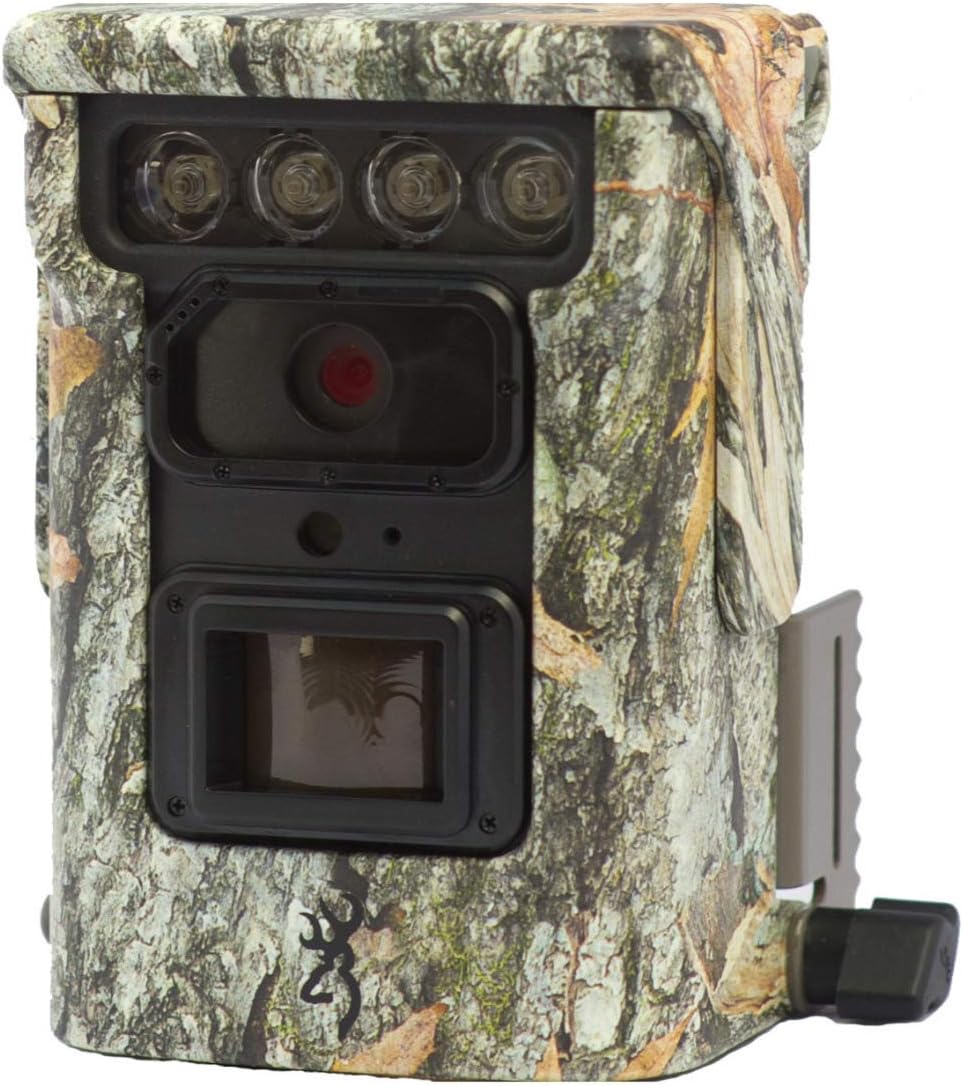
Obraz 1.1: Przód view of the Browning Defender 850 trail camera, showcasing its lens, IR emitters, and camouflage casing.
2. Zawartość opakowania
Sprawdź, czy w przesyłce znajdują się wszystkie elementy wymienione poniżej:
- 1x Browning Defender 850 Trail Camera (BTC-9D)
- 4x CR123 Lithium Batteries
- 1x 16GB SDXC SD Card
- CD with 'Time Lapse Viewer' Software
3. Główne cechy
The Browning Defender 850 is equipped with several advanced features to enhance your trail monitoring experience:
- Obrazowanie o wysokiej rozdzielczości: Captures still images at 20 Megapixels.
- Wideo w pełnej rozdzielczości HD: Records 1920x1080 Full HD videos with sound.
- Szybka prędkość spustu: Bardzo szybki czas wyzwalania migawki wynoszący 0.4 sekundy pozwala uchwycić szybko poruszające się obiekty.
- Invisible IR Flash: Features 850 nm infrared flash for silent, nearly invisible night illumination up to 36 meters (120 feet).
- Łączność WiFi i Bluetooth: Allows for wireless viewing and management of photos and videos via the Browning Trail Camera app on your smartphone or tablet.
- Multiple Capture Modes: Supports Photo, Video, Time-lapse, and Time-lapse Plus modes.
- Tryb seryjny: Captures 1-8 photos per trigger, with a fast burst option of 8 photos in 2 seconds.
- Nakładka danych: Images and videos include time, date, camera ID, moon phase, and temperature stamps.
- Kompaktowa konstrukcja: Small and discreet camouflage housing.
4. Przewodnik konfiguracji
4.1. Instalacja baterii
The camera requires 4x CR123 Lithium batteries (included). To install:
- Znajdź komorę baterii w aparacie.
- Otwórz drzwi przedziału.
- Insert the 4 CR123 batteries, ensuring correct polarity (+/-) as indicated inside the compartment.
- Dokładnie zamknij pokrywę komory baterii.
4.2. Wkładanie karty SD
A 16GB SDXC SD card is included. The camera supports up to 128GB SDXC cards. To insert:
- Znajdź gniazdo karty SD, zazwyczaj znajdujące się w pobliżu komory baterii.
- Włóż kartę SD etykietą skierowaną w stronę przodu aparatu, aż do momentu, w którym zatrzaśnie się na miejscu.
- Aby wyjąć kartę, delikatnie naciśnij ją do środka, aż wysunie się.
4.3. Montaż kamery
The Defender 850 features a 1/4" tripod thread for versatile mounting options. It also comes with an integrated mounting bracket.
- Use the included strap or a compatible mounting accessory to secure the camera to a tree or post.
- Ensure the camera is stable and pointed towards the desired monitoring area.
- For optimal performance, position the camera at a height of approximately 1-2 meters (3-6 feet) from the ground.

Obraz 4.1: Bok view of the Browning Defender 850, illustrating the integrated mounting bracket.
5. Instrukcja obsługi
5.1. Włączanie/wyłączanie zasilania
Once batteries and SD card are installed, the camera will enter a ready state. Most configuration and operation are managed through the Browning Trail Camera app.
5.2. Connecting via WiFi and Bluetooth
The Defender 850 utilizes WiFi and Bluetooth for seamless connectivity with your smartphone or tablet.
- Pobierz oficjalną wersję Browning Trail Camera App ze sklepu z aplikacjami na Twoim urządzeniu (iOS lub Android).
- Upewnij się, że w smartfonie/tablecie włączony jest Bluetooth.
- Open the Browning Trail Camera App and follow the on-screen instructions to discover and connect to your BTC-9D camera via Bluetooth.
- Once connected via Bluetooth, the app will guide you to establish a WiFi connection for faster data transfer and live viewing (if supported).
5.3. Tryby i ustawienia aparatu
Through the Browning Trail Camera App, you can configure various settings:
- Tryb przechwytywania: Select between Photo, Video, Time-lapse, or Time-lapse Plus.
- Rozdzielczość zdjęcia: Set to 20 Megapixels for highest quality.
- Video Resolution & Length: Choose 1920x1080 Full HD. Adjust video length (5/10/20/30 seconds, 1/2 minutes).
- Trigger Delay/Image Delay: Set the delay between detections (5/10/20/30 seconds, 1/5/10/30/60 minutes).
- Burst Settings: Configure the number of photos taken per trigger (1-8 photos).
- Time-lapse Interval: Define the interval for time-lapse captures (5/10/20/30 seconds, 1/2/5/10/30/60 minutes).
- IR Flash Power: Adjust the infrared flash power (Power Save, Long Range, Fast Motion) based on your needs.
- Data i godzina: Synchronize the camera's clock with your device.
- Identyfikator kamery: Assign a unique ID to your camera for easier identification if you operate multiple units.
5.4. Viewing i zarządzanie Files
Aplikacja pozwala view captured images and videos directly on your device without retrieving the SD card.
- Browse thumbnails of captured media.
- Download selected photos or videos to your device.
- Usuń niechciane files z karty SD.
- For time-lapse sequences, use the included 'Time Lapse Viewer' software on a computer for optimal playback.
6. Konserwacja
Proper maintenance ensures the longevity and optimal performance of your Browning Defender 850 camera.
- Czyszczenie: Gently wipe the camera lens and IR emitters with a soft, lint-free cloth. Avoid abrasive materials or harsh chemicals. Keep the casing clean from dirt and debris.
- Pielęgnacja baterii: Replace batteries when the low battery indicator appears in the app. Remove batteries if the camera will be stored for an extended period to prevent leakage.
- Zarządzanie kartami SD: Periodically format the SD card using the camera's app or a computer to maintain optimal performance and prevent data corruption. Back up important files przed formatowaniem.
- Składowanie: Gdy nie używasz aparatu, przechowuj go w chłodnym, suchym miejscu, z dala od bezpośredniego światła słonecznego i ekstremalnych temperatur.
7. Rozwiązywanie Problemów
If you encounter issues with your Browning Defender 850, refer to the following common troubleshooting steps:
- Kamera nie włącza się:
- Sprawdź, czy baterie zostały włożone prawidłowo, z zachowaniem właściwej polaryzacji.
- Replace with fresh CR123 Lithium batteries.
- Brak zdjęć/filmów:
- Check if the SD card is properly inserted and not full.
- Ensure the SD card is formatted correctly (FAT32 or exFAT, depending on card size).
- Verify camera settings (e.g., trigger delay, operating schedule) via the app.
- Confirm the camera is in an active capture mode (Photo, Video, etc.).
- Słaba jakość obrazu/wideo:
- Clean the camera lens and IR emitters.
- Ensure the camera is not too close or too far from the subject.
- Check IR flash settings for night captures.
- Cannot Connect via App (WiFi/Bluetooth):
- Ensure Bluetooth and WiFi are enabled on your smartphone/tablet.
- Make sure the camera is powered on and within range.
- Restart both the camera (by removing/reinserting batteries) and your smartphone/tablet.
- Update the Browning Trail Camera App to the latest version.
- Upływ czasu Viewer Software Issues:
- Upewnij się, że Twój komputer spełnia minimalne wymagania systemowe oprogramowania.
- Zainstaluj ponownie oprogramowanie z dostarczonej płyty CD.
If problems persist, contact Browning customer support for further assistance.
8. Specyfikacje
Detailed technical specifications for the Browning Defender 850 (BTC-9D) trail camera:
| Funkcja | Specyfikacja |
|---|---|
| Numer modelu | BTC-9D |
| Rozdzielczość obrazu | 20 megapiksela |
| Rozdzielczość wideo | 1920x1080 Full HD with Sound |
| Szybkość wyzwalania | 0.4 sekund |
| Typ lampy błyskowej IR | 850 nm Infrared (Invisible) |
| Zasięg lampy błyskowej IR | 36 metrów (120 stóp) |
| Źródło zasilania | 4x CR123A Lithium Batteries (included) |
| Zasilanie zewnętrzne | Podłączenie 12 V |
| Obsługa kart pamięci | Up to 128GB SDXC (16GB included) |
| Łączność | WiFi, Bluetooth, USB, TV Out |
| Wymiary (wys. x szer. x gł.) | 127 mm x 102 mm x 64 mm (ok. 5 x 4 x 2.5 cala) |
| Waga | 453.59 g (ok. 1 funta) |
| Kolor | Kamuflaż |
| Temperatura pracy | Not specified, typical for outdoor use. |
9. Gwarancja i wsparcie
The Browning Defender 850 (BTC-9D) trail camera comes with a 24-miesięczna gwarancja od daty zakupu, obejmując wady produkcyjne.
For technical support, warranty claims, or further inquiries, please contact Browning customer service. Refer to the official Browning webAby uzyskać najaktualniejsze dane kontaktowe, odwiedź witrynę lub opakowanie produktu.
Notatka: Zachowaj dowód zakupu w celu potwierdzenia gwarancji.


