Wstęp
This manual provides detailed instructions for the setup, operation, and maintenance of your Hyperkin Knight Premium Controller. Designed for use with PlayStation 3 (PS3), PC, and Mac systems, this controller offers a versatile gaming experience with its ergonomic design and responsive controls. Please read this manual thoroughly before using the product to ensure optimal performance and longevity.
Cechy produktu
- Podwójne analogowe joysticki: Two wide-spectrum analog joysticks for precise control.
- Pressure-Sensitive D-Pad: An eight-way directional pad with pressure sensitivity.
- Pressure-Sensitive Buttons: Four shoulder buttons and four face buttons with pressure sensitivity for nuanced input.
- Wymuś sprzężenie zwrotne: Integrated force feedback for immersive gaming experiences.
- Przycisk Home: Dedicated button for system menu access.
- Długi kabel: A 6-foot (1.8 meter) cable for flexible positioning.
- Zgodność z wieloma platformami: Compatible with all PS3 models, as well as PC and Mac via USB.
Zawartość opakowania
- Hyperkin Knight Premium Controller (White)
- Integrated USB Cable (6 ft.)
Instrukcje konfiguracji
Łączenie z PlayStation 3 (PS3)
- Ensure your PS3 console is powered off or in standby mode.
- Locate an available USB port on your PS3 console.
- Plug the USB connector of the Hyperkin Knight Controller into the USB port on your PS3.
- Power on your PS3 console. The controller should be automatically recognized and assigned a player number.
- If the controller does not respond, try a different USB port or restart the console.
Podłączanie do komputera PC/Mac
- Locate an available USB port on your PC or Mac computer.
- Plug the USB connector of the Hyperkin Knight Controller into the USB port.
- Twój system operacyjny (Windows, macOS) powinien automatycznie wykryć i zainstalować niezbędne sterowniki. Ten proces może potrwać chwilę.
- Once installed, the controller will be ready for use with compatible games and applications. You may need to configure controller settings within individual games or system preferences.
- Notatka: Functionality may vary depending on the operating system and specific game titles.
Instrukcja obsługi
The Hyperkin Knight Premium Controller features a standard layout for intuitive gameplay.
Układ kontrolera

Obraz: Góra view of the Hyperkin Knight Premium Controller, showing the D-pad, analog sticks, face buttons, and central buttons.
- D-Pad (pad kierunkowy): Located on the left, used for directional input.
- Lewy drążek analogowy: Below the D-Pad, for precise movement and camera control.
- Prawy drążek analogowy: On the right side, typically for camera control or aiming.
- Face Buttons (Triangle, Circle, Cross, Square): On the right, used for actions within games.
- Guziki na ramionach (L1, L2, R1, R2): Located on the top edge of the controller, used for various in-game functions.
- Przycisk WYBIERZ: Używane zazwyczaj do uzyskania dostępu do menu lub określonych funkcji gry.
- Przycisk Start: Używane zazwyczaj do wstrzymywania gry lub potwierdzania wyboru.
- Przycisk DOMOWY: Central button to access the PS3 XMB (CrossMediaBar) or system menus on PC/Mac.
Sprzężenie zwrotne siły
The controller features force feedback (rumble) functionality, which provides tactile sensations during gameplay, enhancing immersion. This feature is automatically enabled when supported by the game and system. If you wish to disable it, check your game's or system's controller settings.
Konserwacja
- Czyszczenie: Do wycierania kontrolera użyj miękkiej, suchej ściereczki. W przypadku uporczywych zabrudzeń delikatnie przetrzyjampPrzetrzyj szmatkę wodą. Unikaj stosowania silnych środków chemicznych i ściernych środków czyszczących.
- Składowanie: Przechowuj kontroler w chłodnym, suchym miejscu, z dala od bezpośredniego światła słonecznego i ekstremalnych temperatur. Unikaj zbyt ciasnego owijania kabla, aby zapobiec jego uszkodzeniu.
- Pielęgnacja kabli: Do not pull the controller by its cable. Always grasp the USB connector when plugging or unplugging.
Rozwiązywanie problemów
Kontroler nie odpowiada
- Sprawdź połączenie: Ensure the USB cable is securely plugged into both the controller and the console/computer.
- Wypróbuj inny port USB: Connect the controller to another USB port on your system.
- Uruchom ponownie system: Power cycle your PS3, PC, or Mac.
- Driver Check (PC/Mac): On PC, check Device Manager to see if the controller is recognized and if there are any driver issues. On Mac, check System Information > USB.
Incorrect Button Mapping or Limited Functionality
- Ustawienia gry: Many games allow for custom controller mapping. Check the in-game settings for controller configuration.
- System Settings (PC/Mac): For PC, some games or emulators may require specific controller configurations or third-party software. For Mac, check System Preferences > Game Controllers (if available) or specific application settings.
- Kompatybilność z PS3: While compatible with all PS3 models, some older games or specific PS3 system software versions might have unique controller handling. Ensure your PS3 system software is up to date.
Force Feedback Not Working
- Wsparcie gry: Verify that the game you are playing supports force feedback.
- Ustawienia w grze: Check the game's options menu to ensure force feedback (rumble) is enabled.
- Ustawienia systemowe: On PC, ensure rumble is enabled in your controller settings.
Specyfikacje
| Numer modelu | M07213-WH |
| Zgodność | PlayStation 3, PC, Mac (via USB) |
| Długość kabla | 6 stopy (ok. 1.8 metra) |
| Typ wejścia | Pressure-sensitive buttons and D-pad, dual analog joysticks |
| Informacja zwrotna | Force Feedback (Rumble) |
| Wymiary | 2.99 x 7.99 x 7.01 cala (ok. 7.6 x 20.3 x 17.8 cm) |
| Waga | 12.5 uncji (około 354 gramów) |
| Producent | Hyperkin Inc |
Gwarancja i wsparcie
For warranty information and technical support, please refer to the official Hyperkin webOdwiedź stronę internetową lub skontaktuj się bezpośrednio z działem obsługi klienta. Zachowaj paragon jako dowód zakupu na wypadek ewentualnych roszczeń gwarancyjnych.
Producent: Hyperkin Inc
Webstrona: www.hyperkin.com (Proszę odwiedzić oficjalną stronę web(na tej stronie znajdziesz najnowsze informacje dotyczące pomocy technicznej.)
Produkt ponadview Obrazy
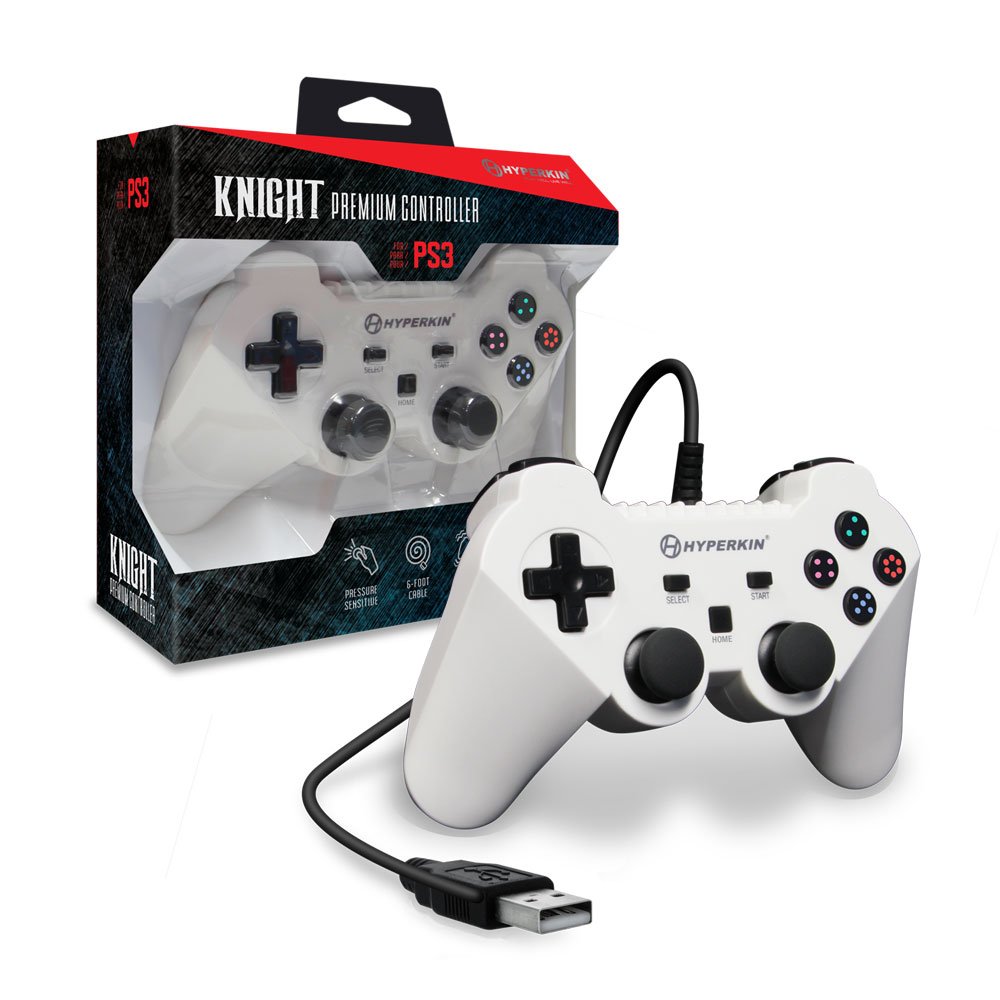
Image: The Hyperkin Knight Premium Controller displayed alongside its retail packaging, highlighting the product's design and branding.

Obraz: Zbliżenie view of the Hyperkin Knight Premium Controller's retail box, showcasing kluczowe cechy i elementy projektu.

Obraz: kątowy view of the Hyperkin Knight Premium Controller, emphasizing its ergonomic shape and button placement.


