1. Wprowadzenie
This manual provides comprehensive instructions for the operation and maintenance of your MIDAS DM16 16 Input Analogue Live and Studio Mixer. The DM16 is designed for both live performance and studio recording environments, featuring award-winning MIDAS microphone preamplifiers and robust construction.
Please read this manual thoroughly before operating the device to ensure proper usage and to maximize its lifespan.
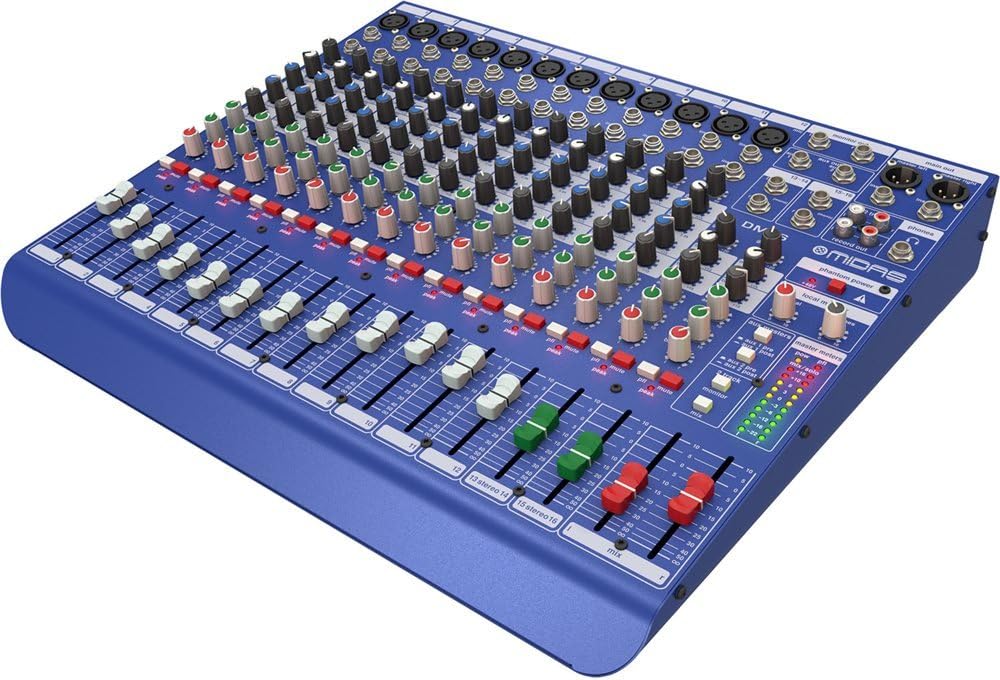
Rysunek 1.1: Przód pod kątem view of the MIDAS DM16 mixer.
2. Konfiguracja
2.1 Rozpakowanie i kontrola
Upon receiving your MIDAS DM16, carefully unpack the unit and inspect it for any signs of damage that may have occurred during transit. Retain the original packaging materials for future transport or storage.
Zawartość pudełka:
- MIDAS DM16 16-wejściowy analogowy mikser na żywo i studyjny
- Przewód zasilający
- Instrukcja obsługi (ten dokument)
2.2 Połączenie zasilania
The DM16 operates on a standard AC power supply. Connect the provided power cord to the AC inlet on the rear panel of the mixer and then to a suitable power outlet. Ensure the power switch is in the 'Off' position before connecting to power.
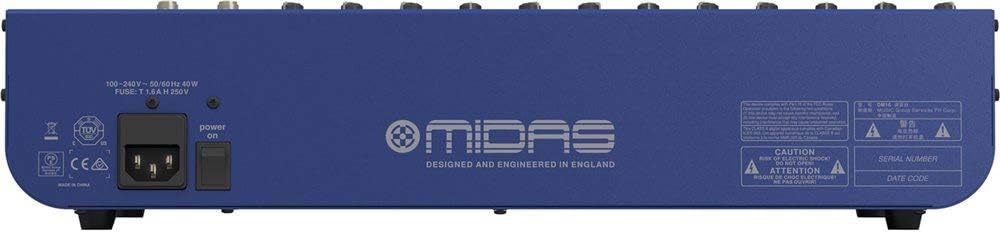
Figure 2.1: Rear panel of the MIDAS DM16 showing power input and warnings.
2.3 Połączenia wejściowe i wyjściowe
The DM16 features a variety of input and output options for connecting microphones, instruments, and other audio devices.
- Wejścia mikrofonowe: 12 mono input channels with XLR connectors for microphones. These channels feature MIDAS microphone preampwężownice.
- Wejścia liniowe: 2 electronically-balanced stereo line input channels on 1/4" TRS connectors for instruments or line-level devices.
- Główne wyjścia: Podłącz się do głównego systemu nagłośnieniowego lub interfejsu nagrywającego.
- Wysyłki Aux: For monitor mixes or effects sends.
- Wyjście słuchawkowe: Do monitorowania dźwięku.
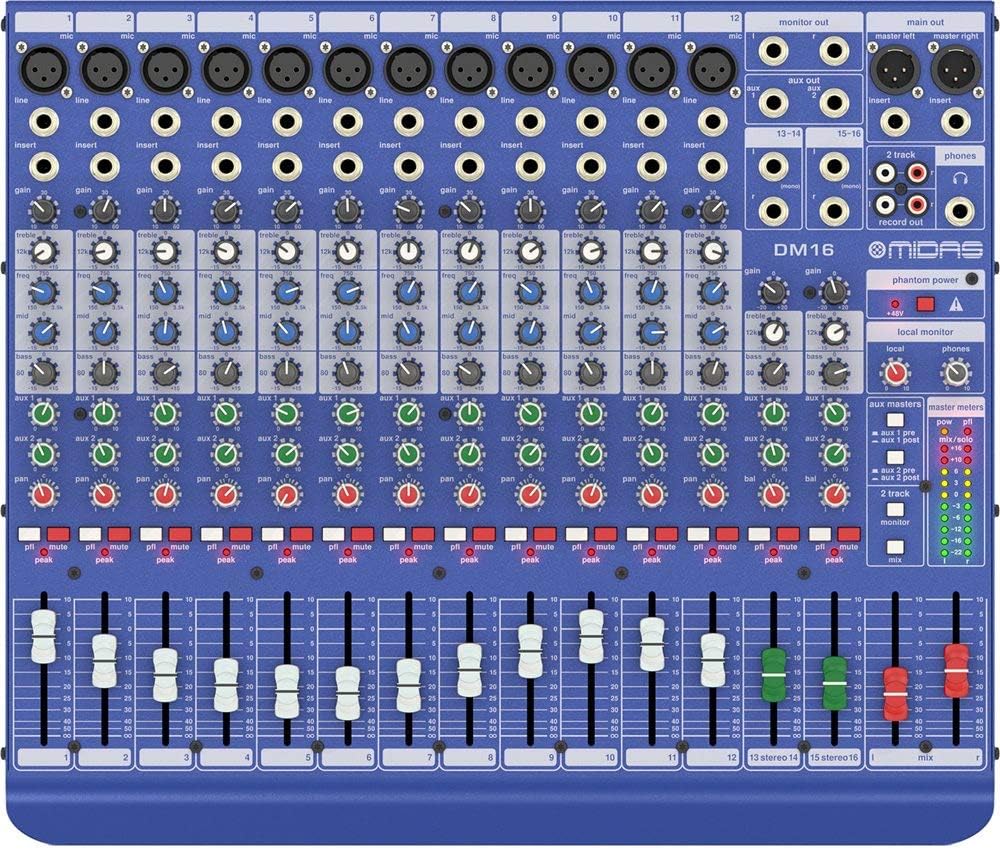
Rysunek 2.2: Góra view of the MIDAS DM16 showing all input/output connections and controls.
3. Instrukcja obsługi
3.1 Kontrola kanałów
Each mono input channel on the DM16 features the following controls:
- ZDOBYĆ: Adjusts the input sensitivity for the microphone preampliyfikator.
- EQ: A 3-band equalizer with a swept mid-band for precise tone shaping.

Rysunek 3.1: Szczegółowy view of the 3-band EQ section on a mono channel.
- AUX 1/2: Controls the level sent to the auxiliary outputs. These can be switched pre/post fader.

Figure 3.2: Aux masters section with pre/post fader switching.
- PATELNIA: Dostosowuje pozycję stereo kanału.
- NIEMY: Wycisza kanał.
- Dioda szczytowa: Wskazuje, że sygnał wejściowy jest przycinany.
- TŁUMIK: Steruje poziomem wyjściowym kanału do miksu głównego.

Figure 3.3: Channel faders for precise level control.
3.2 Zasilanie fantomowe
The DM16 provides +48V phantom power for condenser microphones. This is a global switch, meaning it applies to all microphone inputs simultaneously. Ensure all connections are made before activating phantom power to prevent damage to non-phantom powered devices.

Figure 3.4: Phantom power switch.
3.3 Monitorowanie
Use the headphone output and monitor controls to listen to the main mix or specific auxiliary sends. The monitor section includes controls for local monitor and phones output levels.

Figure 3.5: Monitor and headphone controls.
4. Konserwacja
Proper maintenance ensures the longevity and optimal performance of your MIDAS DM16 mixer.
- Czyszczenie: Use a soft, dry cloth to clean the exterior of the mixer. Avoid abrasive cleaners or solvents that could damage the finish or controls.
- Ochrona przed kurzem: Trzymaj mikser przykryty, gdy go nie używasz, aby zapobiec gromadzeniu się kurzu, zwłaszcza wokół suwaków i pokręteł.
- Wentylacja: Zapewnij odpowiedni przepływ powietrza wokół urządzenia, aby zapobiec przegrzaniu. Nie blokuj otworów wentylacyjnych.
- Składowanie: Przechowuj mikser w chłodnym i suchym miejscu, z dala od bezpośredniego światła słonecznego i ekstremalnych temperatur.
5. Rozwiązywanie Problemów
This section addresses common issues you might encounter with your DM16 mixer.
- Brak zasilania:
- Sprawdź, czy przewód zasilający jest prawidłowo podłączony do miksera i gniazdka elektrycznego.
- Sprawdź, czy gniazdko elektryczne jest sprawne.
- Ensure the power switch on the rear panel is in the 'On' position.
- Brak dźwięku:
- Sprawdź wszystkie połączenia kabli wejściowych i wyjściowych.
- Ensure channel faders and the main mix fader are raised.
- Verify that the MUTE buttons on active channels are not engaged.
- Check the gain settings for each channel.
- Confirm that your connected speakers or monitoring system are powered on and functioning correctly.
- Zniekształcony dźwięk:
- Reduce the GAIN setting on the input channel if the PEAK LED is frequently illuminating.
- Lower the output level of the connected source device.
- Sprawdź, czy kable nie są uszkodzone.
- Szum lub szum:
- Upewnij się, że wszystkie kable są odpowiednio ekranowane i w dobrym stanie.
- Check for ground loops; try connecting all audio equipment to the same power strip.
- Trzymaj kable audio z dala od kabli zasilających.
Jeśli natrafisz na problemy, które nie zostały tutaj omówione, zapoznaj się z sekcją pomocy.
6. Specyfikacje
| Funkcja | Szczegół |
|---|---|
| Typ produktu | Analogowy mikser na żywo i studyjny |
| Kanały wejściowe | 16 (12 mono, 2 stereo) |
| Przedwzmacniacz mikrofonuampliofilizatory | Award-winning MIDAS preampliofilizatory |
| EQ on Mono Channels | 3-band with swept mid band |
| Wysyłanie Aux | 2 (with pre/post fader switching) |
| Źródło zasilania | Elektryczny przewodowy |
| Waga przedmiotu | 11.02 funtów (5.0 kg) |
| Wymiary produktu (dł. x szer. x wys.) | 17.24 x 14.57 x 3.74 cala (438 x 370 x 95 mm) |
| Kraj pochodzenia | Chiny |
| Numer modelu | DM16 |
| Technologia łączności | Pomocniczy |
7. Gwarancja i wsparcie
7.1 Informacje o gwarancji
Your MIDAS DM16 mixer is covered by a limited warranty against defects in materials and workmanship. Please refer to the warranty card included with your product or visit the official MIDAS webSzczegółowe warunki gwarancji można znaleźć na naszej stronie.
Notatka: The warranty may not cover damage caused by improper use, unauthorized modifications, or natural disasters.
7.2 Obsługa klienta
For technical assistance, troubleshooting, or service inquiries, please contact MIDAS customer support through their official webwitrynę lub dane kontaktowe podane w dokumentacji produktu.
Zasoby internetowe:
- Official MIDAS Webstrona: www.midasconsoles.com
- Product Support Page: (Specific link if available, otherwise general webteren)
When contacting support, please have your product model number (DM16) and serial number ready.


