1. Wprowadzenie
This manual provides detailed instructions for the installation, operation, and maintenance of the Commax DR-8UM 8-Button Audio Intercom Lobby Panel. Please read this manual thoroughly before installation and use to ensure proper functionality and safety.
The DR-8UM is designed for 8-apartment buildings, facilitating audio communication between visitors at the lobby panel and residents inside their apartments.
2. Informacje dotyczące bezpieczeństwa
- Przed instalacją lub konserwacją należy upewnić się, że całe zasilanie jest odłączone.
- Instalacja powinna być wykonana przez wykwalifikowany personel.
- Use only the specified power supply (DC12V, 1Amp, Commax RF-1A or equivalent).
- Do not expose the unit to excessive moisture or extreme temperatures outside the specified operating range (-10°C ~ 50°C).
- This unit is designed for flush-mounted installation.
3. Zawartość opakowania
Sprawdź, czy w opakowaniu znajdują się wszystkie elementy:
- Commax DR-8UM 8-Button Lobby Panel x1
- 4-pin connector x1
- 8-pin connector x1
- Instruction Manual x1 (this document)
4. Koniec produktuview
The Commax DR-8UM is an audio intercom lobby panel featuring 8 call buttons, a speaker, and a microphone. It is constructed from aluminum and designed for flush mounting.

Rysunek 4.1: Przód view of the Commax DR-8UM 8-Button Audio Intercom Lobby Panel. The panel features a speaker grille at the top, followed by a microphone, and eight call buttons arranged vertically on the right side. Each button corresponds to an apartment unit.
5. Instalacja
5.1 Montaż panelu
The DR-8UM is designed for flush-mounted installation. Ensure adequate space is available in the wall for the back box.

Rysunek 5.1: Installation diagram showing the dimensions for flush mounting the Commax DR-8UM. The diagram illustrates the panel's front plate, the recessed back box, and the screw points for secure installation. Key dimensions are provided in millimeters.
Wymiary: 142 mm (W) x 315 mm (H) x 50 mm (D).
- Prepare the wall opening according to the dimensions provided in Figure 5.1.
- Secure the back box (not explicitly shown but implied by flush mount) into the wall opening.
- Route the necessary wiring through the back box.
- Attach the DR-8UM panel to the back box using appropriate screws, ensuring a secure and flush fit.
5.2 połączeń przewodów
The DR-8UM requires a DC12V, 1Amp power supply (Commax RF-1A, sold separately). It is compatible only with Commax interphone series, such as the DP-SS (sold separately).
Typ okablowania: Common 3 wires + Individual 1 wire (Wire 3 wires: 1, 2, 3; Individual 1 wire: L1).
Connect the 4-pin and 8-pin connectors to the corresponding ports on the DR-8UM panel and to the interphone system according to the system's wiring diagram. Ensure correct polarity for the power supply.
6. Instrukcja obsługi
The Commax DR-8UM allows visitors to call and communicate with residents in an 8-apartment building.
- To Call an Apartment: A visitor presses the corresponding button for the desired apartment unit on the lobby panel.
- Komunikacja dwukierunkowa: Once the resident answers via their indoor interphone unit (e.g., DP-SS), two-way audio communication is established between the visitor at the lobby panel and the resident.
7. Konserwacja
- Czyszczenie: Wipe the panel surface with a soft, dry cloth. Do not use abrasive cleaners or solvents.
- Kontrola: Okresowo sprawdzaj, czy nie występują luźne połączenia lub uszkodzenia fizyczne.
- Funkcjonalność przycisku: Ensure all call buttons operate smoothly. If a button becomes faulty, contact customer support for assistance.
8. Rozwiązywanie Problemów
| Problem | Możliwa przyczyna | Rozwiązanie |
|---|---|---|
| Brak zasilania urządzenia. | Incorrect power supply connection or faulty power adapter. | Check power supply (DC12V, 1Amp) and connections. Ensure the power adapter is functional. |
| Brak dźwięku podczas komunikacji. | Incorrect wiring, faulty indoor unit, or damaged speaker/microphone. | Verify wiring connections (Common 3 wires + Individual 1 wire). Test with a known working indoor unit. |
| Przycisk połączenia nie odpowiada. | Faulty button or wiring issue to that specific apartment. | Inspect the button for physical damage. Check the individual wire connection for that apartment. Contact support if the button is faulty. |
| Praca przerywana. | Loose wiring connections or unstable power supply. | Secure all wiring connections. Ensure the power supply is stable and within specifications. |
9. Specyfikacje
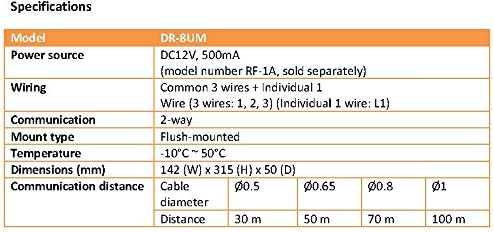
Rysunek 9.1: Technical specifications table for the Commax DR-8UM, detailing model, power source, wiring, communication type, mount type, temperature range, dimensions, and communication distance based on cable diameter.
| Funkcja | Szczegół |
|---|---|
| Model | DR-8UM |
| Źródło zasilania | DC12V, 1Amp (Commax RF-1A, sold separately) |
| Okablowanie | Common 3 wires + Individual 1 wire (Wire 3 wires: 1, 2, 3; Individual 1 wire: L1) |
| Rodzaj komunikacji | Dźwięk dwukierunkowy |
| Typ mocowania | Montaż podtynkowy |
| Temperatura pracy | -10°C ~ 50°C |
| Wymiary (szer. x wys. x gł.) | Wymiary: 142mm x 315mm x 50mm |
| Compatible Interphone | Commax DP-SS series (sold separately) |
10. Gwarancja i wsparcie
For warranty information and technical support, please refer to the official Commax webOdwiedź witrynę lub skontaktuj się z lokalnym dystrybutorem. Zachowaj paragon zakupu na wypadek reklamacji.
For replacement parts, including individual buttons, please contact Commax customer service directly as parts availability may vary.


