1. Wprowadzenie
The Amkette Trubeats S50 is a versatile smart wireless Bluetooth speaker designed to enhance your audio experience. It features multiple connectivity options including Bluetooth, USB, Micro SD card, and AUX input, along with an integrated FM radio. The speaker also includes a digital clock with alarm functions and can be controlled via a dedicated smartphone application. Additionally, it can function as a power bank to charge your mobile devices.
2. Zawartość opakowania
Proszę zaznaczyć pole dotyczące następujących elementów:
- Amkette Trubeats S50 Smart Wireless Bluetooth Speaker
- Kabel ładujący USB
- Kabel AUX
- Instrukcja obsługi (ten dokument)
3. Koniec produktuview
Familiarize yourself with the various parts and controls of your Amkette Trubeats S50 speaker.
3.1 Przód View

Rycina 1: Przód view of the Amkette Trubeats S50 speaker, showing the speaker grille and LED display.
3.2 Górny panel sterowania

Figure 2: Labeled diagram of the Amkette Trubeats S50 speaker's top control buttons: Mode, Volume Down/Previous, Play/Pause/Answer Call, Volume Up/Next, Clock, and Microphone.
- Przycisk TRYB: Press to switch between Bluetooth, FM, AUX, USB, and Micro SD modes.
- K-/ Button: Press to decrease volume; long press for previous track/station.
- Play/Pause/Answer Call Button: Press to play/pause audio; press to answer/end calls.
- +/N Button: Press to increase volume; long press for next track/station.
- Przycisk ZEGAR: Press to set time and alarms.
- Mikrofon: Do połączeń bez użycia rąk.
3.3 Rear Ports and Switch

Figure 3: Labeled diagram of the Amkette Trubeats S50 speaker's rear ports: AUX, Micro SD, USB Host, USB DC, and On/Off switch.
- Wejście AUX: Connect external audio devices using the 3.5mm AUX cable.
- Gniazdo kart Micro SD: Insert a Micro SD card for audio playback.
- Port hosta USB: Insert a USB drive for audio playback or use as a power bank.
- USB DC Input: Connect the USB charging cable to power the speaker.
- Przełącznik włącz / wyłącz: Włączanie i wyłączanie głośnika.
4. Konfiguracja
4.1 Ładowanie głośnika
- Connect the small end of the USB charging cable to the USB DC Input port on the rear of the speaker.
- Podłącz większy koniec kabla ładującego USB do zasilacza USB (brak w zestawie) lub do portu USB komputera.
- Wskaźnik LED pokaże stan ładowania. Pełne naładowanie trwa zazwyczaj około 4 godziny.
Notatka: The speaker does not have a visible battery level indicator. It is recommended to charge fully before first use and when the battery is low.
4.2 Włączanie/wyłączanie
- Aby włączyć, przesuń Przełącznik WŁ./WYŁ. on the rear of the speaker to the 'ON' position.
- Aby wyłączyć, przesuń Przełącznik WŁ./WYŁ. do pozycji 'WYŁ'.
5. Instrukcja obsługi
5.1 parowanie Bluetooth

Figure 4: Speaker in Bluetooth pairing mode, indicated by 'BT' on the display.
- Power on the speaker. It will automatically enter Bluetooth pairing mode, indicated by 'BT' flashing on the LED display.
- Włącz Bluetooth w swoim smartfonie lub innym urządzeniu.
- Szukaj available devices and select "Amkette S50" from the list.
- Once paired, the speaker will emit a confirmation tone, and 'BT' will stop flashing.
- Teraz możesz odtwarzać dźwięk ze swojego urządzenia przez głośnik.
5.2 Korzystanie z wejścia AUX

Figure 5: Speaker connected to a smartphone via AUX cable for wired audio playback.
- Podłącz jeden koniec kabla AUX 3.5 mm do Wejście AUX port on the rear of the speaker.
- Connect the other end of the AUX cable to the audio output jack of your external device (e.g., smartphone, MP3 player, laptop).
- Naciśnij Przycisk TRYB repeatedly until the speaker enters AUX mode.
- Odtwórz dźwięk z podłączonego urządzenia.
5.3 Using USB/Micro SD Card
- Włóż dysk USB do Port hosta USB lub kartę Micro SD do Gniazdo karty Micro SD z tyłu głośnika.
- Zadbaj o swój dźwięk files (MP3 format recommended) are stored on the drive/card.
- Naciśnij Przycisk TRYB repeatedly until the speaker enters USB or Micro SD mode. Playback will begin automatically.
- Użyj K-/ I +/N przyciski do nawigacji po utworach i regulacji głośności.
5.4 Obsługa radia FM

Figure 6: Speaker displaying FM frequency, with app control for station selection.
- Naciśnij Przycisk TRYB repeatedly until the speaker enters FM radio mode.
- Automatyczne skanowanie: In FM mode, long press the Odtwórz/Pauza button to initiate an automatic scan for available FM stations. The speaker will save detected stations.
- Strojenie ręczne: Użyj K-/ I +/N przyciski do poruszania się po zapisanych stacjach.
- For precise tuning and station management, use the Amkette Trubeats Smart Speaker App (see section 5.7).
5.5 Digital Clock and Alarm Setup

Figure 7: Speaker displaying the current time on its LED screen.
- Czas wiązania: Naciśnij i przytrzymaj Przycisk ZEGAR. The hour display will flash. Use the K-/ I +/N Przyciski do ustawienia godziny. Naciśnij Przycisk ZEGAR again to set minutes, and adjust with K-/ I +/N. Naciskać Przycisk ZEGAR once more to confirm.
- Ustawianie alarmów: Naciśnij krótko Przycisk ZEGAR to cycle through Alarm 1 and Alarm 2 settings. When an alarm time is displayed, long press the Przycisk ZEGAR to enter alarm setting mode. Adjust hour and minute using K-/ I +/N, confirming each with a short press of the Przycisk ZEGAR. You can also set the alarm source (FM/SD Card/USB) via the app.
5.6 Używanie jako powerbanku
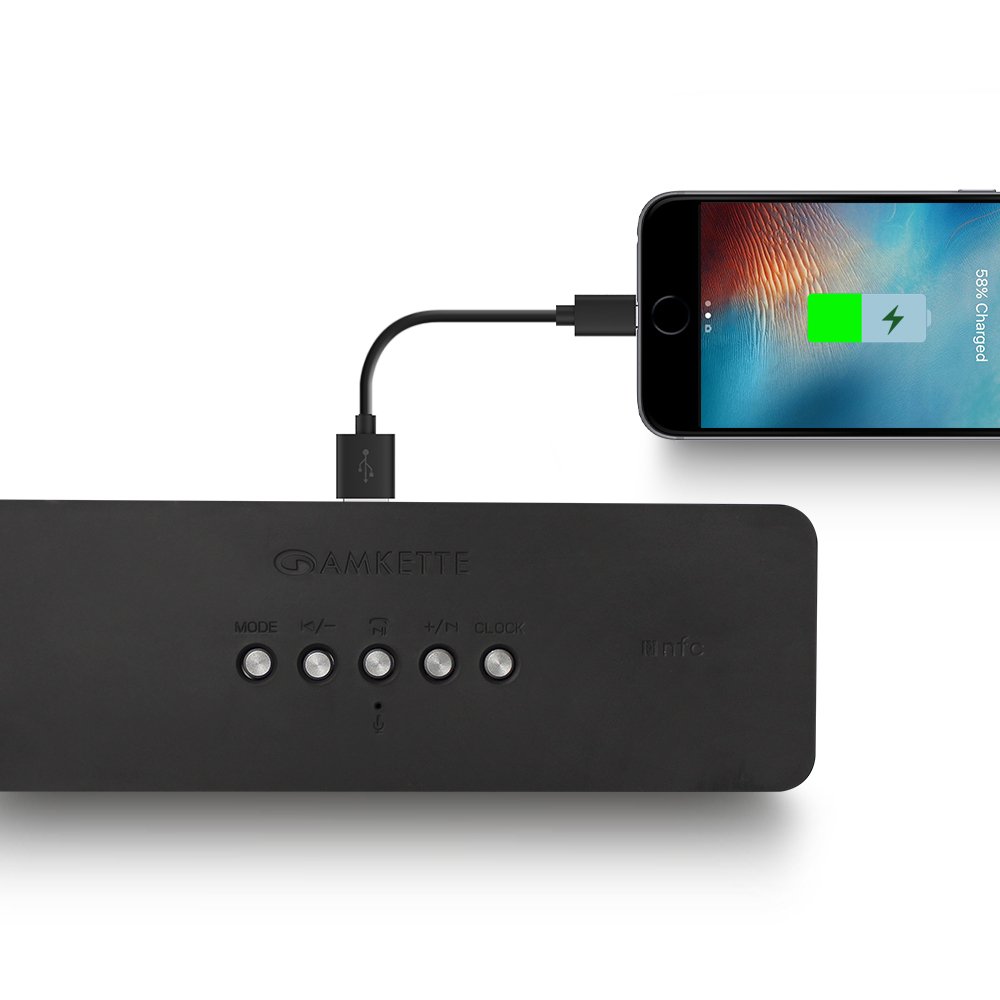
Figure 8: Speaker providing power to a smartphone through its USB Host port.
The Amkette Trubeats S50 can charge your smartphone or other USB-powered devices. Connect your device's charging cable to the Port hosta USB on the rear of the speaker. The speaker's internal battery will then supply power to your device.
5.7 App Control (Android Only)

Figure 9: Smartphone displaying the Amkette Trubeats Smart Speaker App interface.
For enhanced control, download the Amkette Trubeats Smart Speaker App from the Google Play Store (for Android phones). The app allows you to:
- Switch between different audio modes.
- Control volume and track playback.
- Manage FM radio stations and perform precise tuning.
- Set and customize alarms, including alarm source.
Ensure your speaker is connected via Bluetooth to your smartphone for app functionality.
5.8 Obsługa połączeń
When connected via Bluetooth to a smartphone, the speaker can be used for hands-free calling:
- Odbierz połączenie: Naciśnij Play/Pause/Answer Call Button raz.
- Zakończ połączenie: Naciśnij Play/Pause/Answer Call Button raz w trakcie połączenia.
- Odrzuć połączenie: Naciśnij i przytrzymaj Play/Pause/Answer Call Button.
6. Konserwacja
- Trzymaj głośnik z dala od ekstremalnych temperatur, bezpośredniego światła słonecznego i wilgoci.
- Czyść głośnik miękką, suchą ściereczką. Nie używaj środków czyszczących o właściwościach ściernych ani rozpuszczalników.
- Unikaj upuszczania głośnika i narażania go na silne uderzenia.
- Jeśli głośnik nie będzie używany przez dłuższy czas, należy przechowywać go w chłodnym, suchym miejscu i okresowo go ładować, aby zachować sprawność akumulatora.
7. Rozwiązywanie Problemów
| Problem | Możliwa przyczyna | Rozwiązanie |
|---|---|---|
| Głośnik nie włącza się. | Bateria jest rozładowana. | Naładuj głośnik całkowicie. |
| Brak dźwięku z głośnika. | Głośność jest zbyt niska; wybrano niewłaściwy tryb; urządzenie nie jest prawidłowo podłączone. | Increase speaker and source device volume. Ensure correct mode (Bluetooth, AUX, etc.) is selected. Reconnect the device. |
| Parowanie Bluetooth nie powiodło się. | Głośnik nie jest w trybie parowania; urządzenie jest za daleko; występują zakłócenia. | Ensure speaker is in pairing mode ('BT' flashing). Move device closer to speaker. Turn off other Bluetooth devices. |
| Słaby odbiór radia FM. | Słaby sygnał; zakłócenia ze strony otoczenia. | Relocate the speaker to an area with better reception. Perform an auto-scan again. |
| App not connecting to speaker. | Bluetooth not connected; app issue. | Ensure speaker is paired via Bluetooth to your phone. Restart the app and try again. |
8. Specyfikacje
- Model: S50
- Marka: Amketa
- Typ głośnika: Portable Bluetooth Speaker (Outdoor)
- Łączność: Bluetooth, USB, Micro SD, AUX, radio FM
- Technologia komunikacji bezprzewodowej: Bluetooth
- Metoda sterowania: Buttons, App (Android)
- Tryb wyjścia audio: Stereofoniczny
- Dźwięk Wattage: 10 watów
- Źródło zasilania: Zasilany bateryjnie
- Czas pracy baterii: Do 12 godzin (średnio)
- Czas ładowania: Około 4 godzin
- Zgodne urządzenia: Laptop, Mobile, Tablet
- Wymiary (dł. x szer. x wys.): Wymiary 26.7 x 10.9 x 7.9 cm
- Waga przedmiotu: 703 gram
- Wodoodporny: Tak
- Typ montażu: Uchwyt na blat
9. Gwarancja i wsparcie
The Amkette Trubeats S50 Smart Wireless Bluetooth Speaker comes with a 1-letnia gwarancja od daty zakupu. Niniejsza gwarancja obejmuje wady produkcyjne powstałe w wyniku normalnego użytkowania.
For warranty claims, technical assistance, or any other support inquiries, please contact Amkette customer support through their official webstronę lub dane kontaktowe podane w dokumentacji zakupu.
Proszę zachować paragon jako dowód zakupu w celach gwarancyjnych.


