Wstęp
This user manual provides comprehensive instructions for the operation, setup, maintenance, and troubleshooting of your PeakTech P 9020 Digital DVB Measurement Device. Please read this manual carefully before using the device to ensure proper functionality and safety.
The PeakTech P 9020 is a versatile digital DVB measurement device designed for signal searches in cable, satellite, and terrestrial television systems. It features a TFT color display, a graphical user interface for easy navigation, and supports various DVB standards including DVB-C, DVB-S, S2, DVB-T, and T2 with H.265 codec support.
Zawartość opakowania
Po rozpakowaniu sprawdź, czy wszystkie wymienione poniżej przedmioty znajdują się na miejscu i są w dobrym stanie:
- PeakTech P 9020 Digital DVB Measurement Device
- Metal Carrying Case
- Zasilacz sieciowy
- Integrated Lithium-Ion Battery (pre-installed)
- Zasilacz samochodowy 12V
- Windows Software CD/Download Link (if applicable)
- Zdalne sterowanie
- Kabel wideo
- Pasek na ramię

Figure 1: PeakTech P 9020 device shown with its complete set of accessories, including the carrying case, power adapters, remote control, and cables.
Urządzenie ponadview
The PeakTech P 9020 features a robust design with a clear TFT color display and intuitive controls. Familiarize yourself with the main components:

Rycina 2: Przód view of the PeakTech P 9020, highlighting the TFT color display, control buttons, and input ports.
Kluczowe komponenty:
- Kolorowy wyświetlacz TFT: 12.5 cm (approx. 5 inches) screen for live TV, audio, and menu navigation.
- Panel sterowania: Buttons for menu navigation, function selection (F1, F2), signal search (FIND), exit (EXIT), and OK.
- Porty wejściowe: Connectors for DVB-S/S2, DVB-C, DVB-T/T2 signals.
- Wyjście HDMI: Do podłączenia do zewnętrznego wyświetlacza.
- Port USB: For software updates and data transfer.
- Pobór mocy: For AC adapter or 12V car adapter.
Organizować coś
1. Ładowanie baterii:
Before first use, fully charge the integrated lithium-ion battery. Connect the AC power adapter to the device's power input and plug it into a wall outlet. The charging indicator will illuminate. A full charge typically takes several hours.
2. Początkowe włączenie zasilania:
Press and hold the power button (usually red) on the device until the screen illuminates. The device will boot up and display the main menu.
3. Language and Region Settings:
Navigate to the "Settings" menu using the directional buttons and OK button. Select "Language" to choose your preferred language. Then, configure region-specific settings for DVB-T/T2 or DVB-C if prompted.
Instrukcja obsługi
1. Selecting DVB Mode:
From the main menu, select the desired DVB mode (DVB-S/S2 for satellite, DVB-C for cable, or DVB-T/T2 for terrestrial) using the navigation buttons. Press OK to confirm.
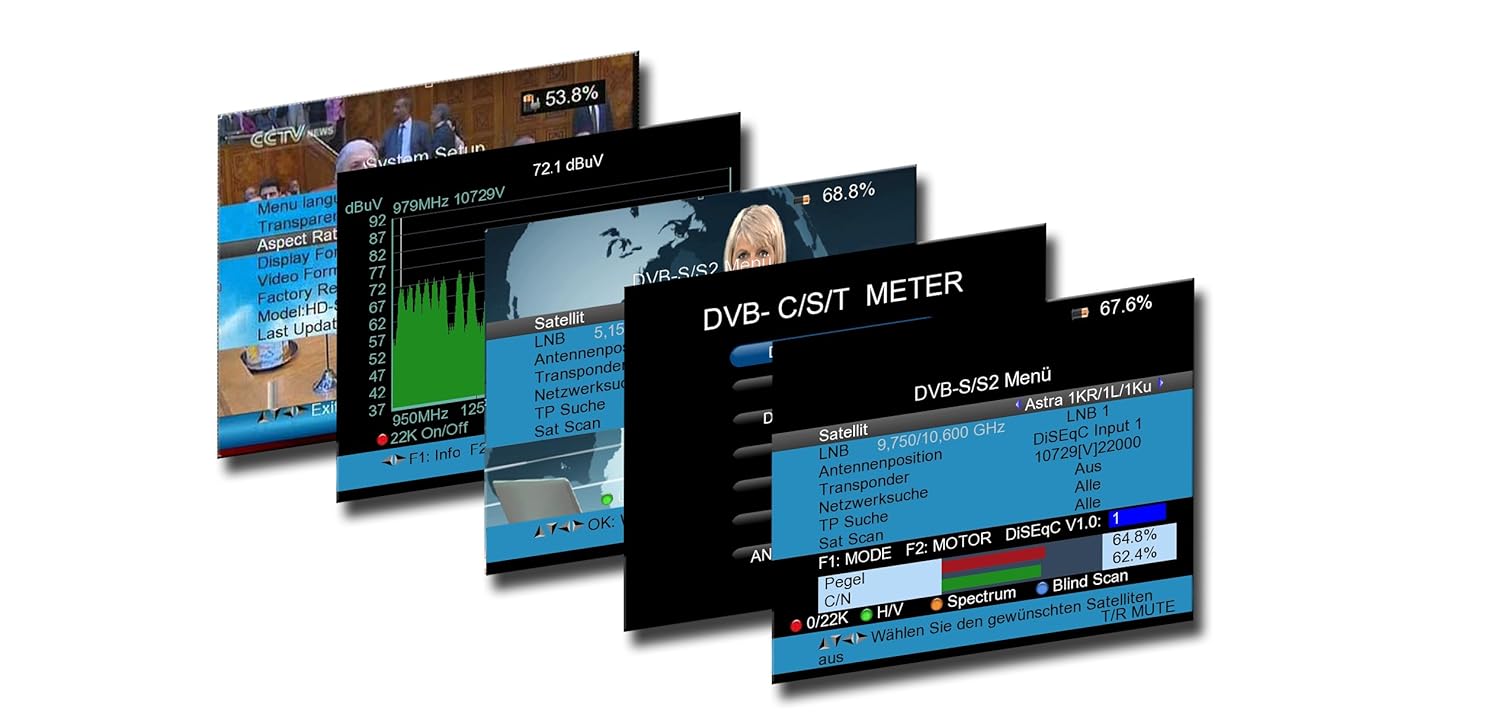
Rysunek 3: Examples of the graphical user interface on the PeakTech P 9020, displaying menu options and signal measurement data.
2. Signal Search (DVB-S/S2):
- Connect the satellite dish LNB cable to the device's satellite input.
- In the DVB-S/S2 menu, configure LNB settings (e.g., LNB type, frequency).
- Select a satellite from the predefined list or manually enter transponder details.
- Press the "FIND" button to initiate a signal search. The device will display signal strength and quality. Adjust the dish alignment until optimal signal levels are achieved.
- Use the spectrum analyzer function to visualize signal characteristics.
3. Signal Search (DVB-T/T2 and DVB-C):
- Connect the terrestrial antenna or cable TV line to the appropriate input.
- In the DVB-T/T2 or DVB-C menu, select the desired channel or frequency range.
- Press "FIND" to scan for available signals. The device will display signal strength, quality, and identify channels.
4. Live TV and Audio:
Once a signal is locked, the device can display live TV channels and play audio directly on its screen, allowing for real-time verification of signal quality and content.
5. Korzystanie z pilota:
The included remote control provides convenient access to most functions, including menu navigation, volume control, and channel selection. Ensure the remote's batteries are installed correctly.
Konserwacja
Czyszczenie:
Przetrzyj urządzenie miękką, suchą ściereczką. W przypadku uporczywych zabrudzeń delikatnie przetrzyj.amp cloth can be used. Do not use abrasive cleaners or solvents. Keep the screen clean to ensure clear visibility.
Pielęgnacja baterii:
To prolong battery life, avoid fully discharging the lithium-ion battery frequently. Store the device in a cool, dry place when not in use for extended periods. Recharge the battery periodically if stored for a long time.
Aktualizacje oprogramowania:
Periodically check the PeakTech website for firmware updates. Updates can improve performance, add new features, or fix bugs. Use the provided Windows software and USB cable to perform updates as per the instructions on the PeakTech webstrona.
Rozwiązywanie problemów
| Problem | Możliwa przyczyna | Rozwiązanie |
|---|---|---|
| Urządzenie nie włącza się. | Akumulator jest rozładowany lub zasilacz nie jest podłączony. | Charge the battery using the AC adapter. Ensure the power button is pressed firmly. |
| Nie wykryto sygnału. | Incorrect DVB mode selected, cable not connected properly, or antenna/dish misalignment. | Verify DVB mode. Check all cable connections. Adjust antenna/dish alignment. Check LNB settings for satellite. |
| Słaba jakość sygnału. | Weak signal, interference, or incorrect settings. | Fine-tune antenna/dish position. Check for obstructions. Ensure correct transponder/channel settings. |
| Pilot nie działa. | Dead batteries or line of sight obstruction. | Replace remote control batteries. Ensure no objects are blocking the infrared signal path. |
Specyfikacje
- Model: Nr P 9020
- Wyświetlacz: 12.5 cm (5 cala) kolorowy wyświetlacz TFT
- Supported DVB Standards: DVB-S/S2, DVB-C, DVB-T/T2
- Dekodowanie wideo: H.265 (HEVC) compatible
- Edytor: 450MHz
- SDRAM: 256 MB
- Demodulacja: 16QAM - 256 QAM, QPSK / 8PSK
- Łączność: HDMI, USB
- Bateria: Integrated Lithium-Ion Battery
- Pobór mocy: AC Adapter, 12V Car Adapter
- Wymiary: 13 x 20 x 5 cm (ok. 5.1 x 7.9 x 2 cala)
- Waga: 800 g (ok. 1.76 funta)
Gwarancja i wsparcie
PeakTech products are manufactured with high quality standards. For information regarding warranty coverage, technical support, or service, please refer to the official PeakTech webOdwiedź stronę internetową lub skontaktuj się bezpośrednio z działem obsługi klienta. Zachowaj paragon jako dowód zakupu na wypadek reklamacji.
Urzędnik Webstrona: www.peaktech.de
For further assistance, please contact your local distributor or the PeakTech support team.


