1. Koniec produktuview
The ADATA HM900 (model AHM900-6TU3-CEUBK) is a 6TB external hard disk drive designed for high-capacity data storage and transfer. This mechanical hard disk drive offers ample space for extensive data needs and supports simultaneous operations without compromising performance. It connects via USB, making it compatible with various devices, including personal computers and televisions.

Rysunek 1: Widok z przodu view of the ADATA HM900 External Hard Drive.
2. Instrukcje konfiguracji
2.1 Zawartość opakowania
Przed przystąpieniem do dalszych czynności należy upewnić się, czy w przesyłce znajdują się wszystkie elementy:
- ADATA HM900 External Hard Disk Drive
- Kabel danych USB
- Zasilacz
- Szybki przewodnik (jeśli dołączony)
2.2 Podłączanie dysku twardego
- Podłącz zasilacz: Plug the power adapter into the DC IN port on the back of the ADATA HM900. Connect the other end of the power adapter to a wall outlet. The device requires 12 Watts of power.
- Podłącz kabel USB: Insert one end of the provided USB data cable into the USB port (marked 'SS' for SuperSpeed USB) on the back of the hard drive.
- Połącz się ze swoim urządzeniem: Plug the other end of the USB cable into an available USB port on your computer, television, or other compatible device.
- Włączanie: The drive should power on automatically. A status indicator light will typically illuminate to show it is active.
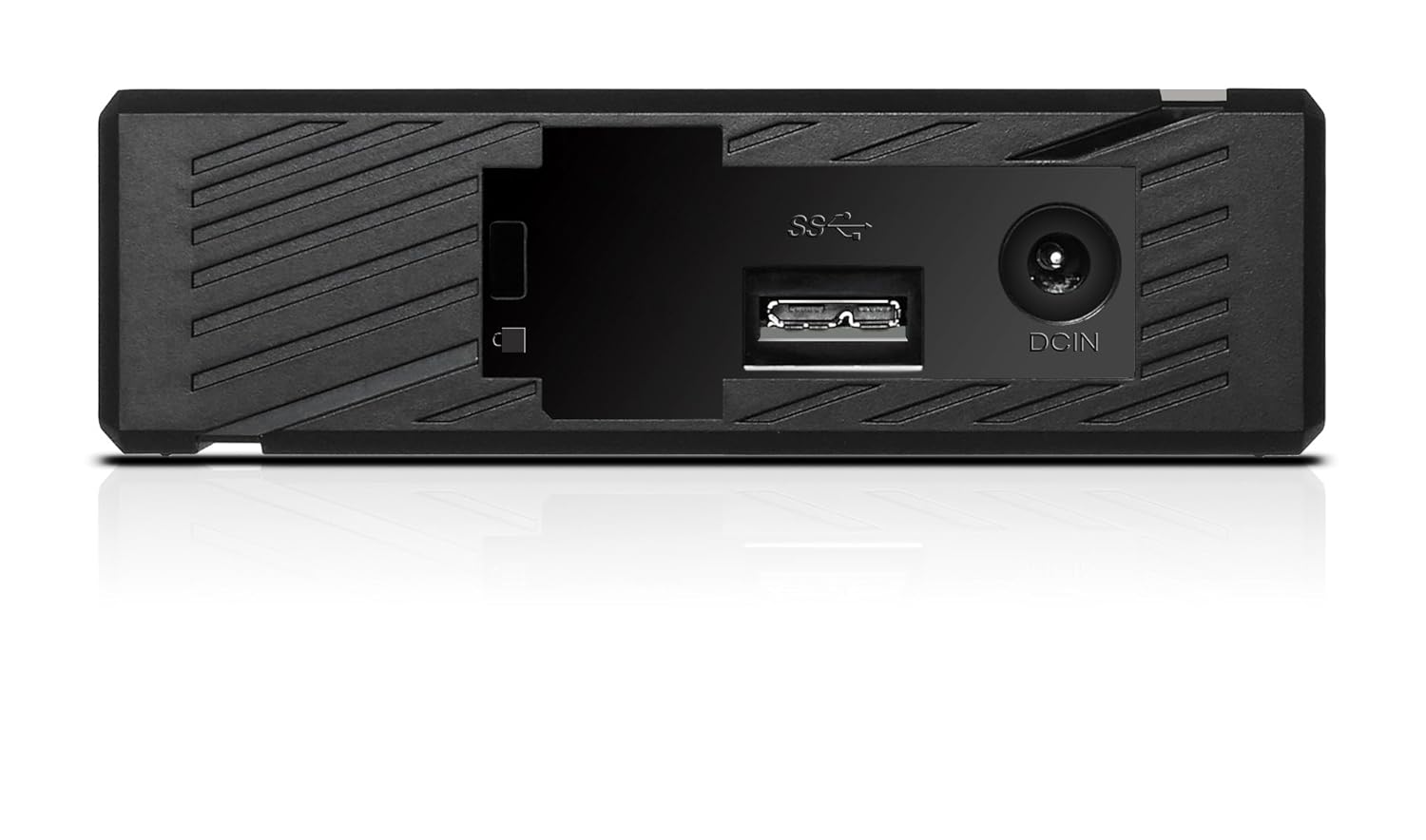
Rysunek 2: Tył view of the ADATA HM900, highlighting the USB and DC IN ports for connection.
3. Obsługa dysku twardego
3.1 Rozpoznanie początkowe
Upon first connection, your operating system (Windows, macOS, Linux) or compatible device (e.g., smart TV) should automatically detect the ADATA HM900. For computers, it may appear as a new drive letter or volume in 'My Computer'/'This PC' or 'Finder'.
3.2 Przesyłanie danych
Przenieść files, simply drag and drop them to and from the HM900 drive icon. For larger transfers, it is recommended to use your operating system's copy/paste functions or dedicated backup software.
3.3 Using with a Television
The ADATA HM900 is compatible with televisions that support external storage devices. Connect the drive as described in Section 2.2. Refer to your television's user manual for specific instructions on how to access and play media files from an external USB drive.
4. Konserwacja i pielęgnacja
Proper care ensures the longevity and reliability of your ADATA HM900 external hard drive:
- Bezpieczne odłączenie: Always safely eject or unmount the hard drive from your operating system before physically disconnecting the USB cable or power. This prevents data corruption.
- Ochrona fizyczna: Avoid dropping or subjecting the drive to strong impacts, as it contains a mechanical hard disk that can be damaged.
- Warunki środowiskowe: Store and operate the drive in a cool, dry environment, away from direct sunlight, extreme temperatures, and high humidity.
- Czyszczenie: Do czyszczenia zewnętrznej części napędu należy używać miękkiej, suchej ściereczki. Nie należy używać płynnych środków czyszczących ani rozpuszczalników.
5. Rozwiązywanie Problemów
5.1 Napęd nie został wykryty
- Sprawdź połączenia: Ensure both the power adapter and USB cable are securely connected to the drive and your device.
- Wypróbuj inny port USB: Connect the drive to a different USB port on your computer or device.
- Sprawdź moc: Confirm the power adapter is plugged into a working electrical outlet and the drive's indicator light is on.
- Uruchom ponownie urządzenie: Restart your computer or television and try connecting the drive again.
- Sprawdź Zarządzanie dyskami (Windows) / Narzędzie dyskowe (macOS): For computers, check if the drive appears in disk management tools, even if it doesn't have a drive letter assigned.
5.2 Niska prędkość przesyłania danych
- Użyj portu USB 3.0: Ensure the drive is connected to a USB 3.0 (or higher) port on your device for optimal speeds. USB 2.0 ports will result in slower transfers.
- Unikaj innych urządzeń USB: Disconnect other high-bandwidth USB devices during large transfers.
- Sprawdź stan dysku: Run a disk check utility on your computer to ensure the drive is healthy.
6. Specyfikacje
| Funkcja | Specyfikacja |
|---|---|
| Marka | Dane |
| Numer modelu | AHM900-6TU3-CEUBK |
| Pojemność pamięci cyfrowej | 6 TB |
| Opis dysku twardego | Mechaniczny dysk twardy |
| Współczynnik kształtu dysku twardego | 2.5 cali |
| Technologia łączności | USB |
| Wymiary produktu (DxSxW) | 19 x 12.1 x 3.65 centymetrów |
| Waga przedmiotu | 998 gramów |
| Cotage | 12 watów |
| Kompatybilne urządzenia | Television, Personal Computers |
| Pierwsza dostępna data | 11 listopada 2016 |
7. Gwarancja i wsparcie
Aby uzyskać szczegółowe informacje dotyczące gwarancji, zapoznaj się z kartą gwarancyjną dołączoną do produktu lub odwiedź oficjalną stronę internetową ADATA website. Support resources, including drivers and firmware updates, may also be available on the ADATA support portal.


