1. Wprowadzenie
Dziękujemy za zakupasing the Sony Signature Series Audio Component Amplifier TA-ZH1ES. This high-resolution headphone amplifier is designed to deliver exceptional audio quality, featuring advanced technologies such as Sony's enhanced S-Master HX digital amplifier and DSD Remastering Engine. This manual provides essential information for the proper setup, operation, and maintenance of your device.
2. Informacje dotyczące bezpieczeństwa
Please read all safety instructions carefully before using the ampLifik. Zachowaj tę instrukcję do wykorzystania w przyszłości.
- Źródło zasilania: Connect the unit only to the AC power outlet specified in the specifications.
- Wentylacja: Zapewnij odpowiednią wentylację wokół urządzenia, aby zapobiec przegrzaniu. Nie blokuj otworów wentylacyjnych.
- Wilgoć: Nie wystawiać urządzenia na deszcz lub wilgoć, aby zmniejszyć ryzyko pożaru lub porażenia prądem.
- Obce przedmioty: Nie wkładaj żadnych przedmiotów do otworów urządzenia.
- Serwisowanie: Wszelkie prace serwisowe należy zlecać wykwalifikowanemu personelowi. Nie należy podejmować prób samodzielnego otwierania ani naprawy urządzenia.
- Umieszczenie: Urządzenie należy ustawić na stabilnej, równej powierzchni, z dala od bezpośredniego światła słonecznego, źródeł ciepła oraz nadmiernego kurzu i wibracji.
3. Koniec produktuview
3.1 Panel przedni
The front panel provides various headphone output connections and essential controls for operation.

Rysunek 3.1: Układ panelu przedniego
This image displays the front panel of the TA-ZH1ES amplifier, highlighting the various headphone output jacks and the volume control knob. From left to right, you can see the XLR4 balanced output, multiple 4.4mm and 3.5mm balanced outputs, and 6.3mm and 3.5mm unbalanced outputs. The large rotary knob on the right is for volume control, and a Walkman/Xperia USB input is also visible.
- Przycisk zasilania: Włącza lub wyłącza urządzenie.
- Selektor wejścia: Przełącza się pomiędzy dostępnymi źródłami danych wejściowych.
- Selektor wyjścia: Selects the desired output mode.
- Wyświetlacz: Pokazuje bieżące ustawienia i status.
- Przycisk Menu/Wstecz: Navigates menu options or returns to the previous screen.
- Przycisk Enter: Potwierdza wybór.
- Gain Button: Adjusts the output gain for different headphone impedances.
- Pokrętło głośności: Steruje głośnością wyjściową.
- Wyjścia słuchawkowe:
- Balanced Connections: 4.4mm, 3.5mm x 2, XLR4
- Unbalanced Connections: 6.3mm, 3.5mm
- Walkman/Xperia USB Input: For connecting compatible portable devices.
3.2 Panel tylny
The rear panel houses various input and output terminals for connecting to other audio components and the power supply.
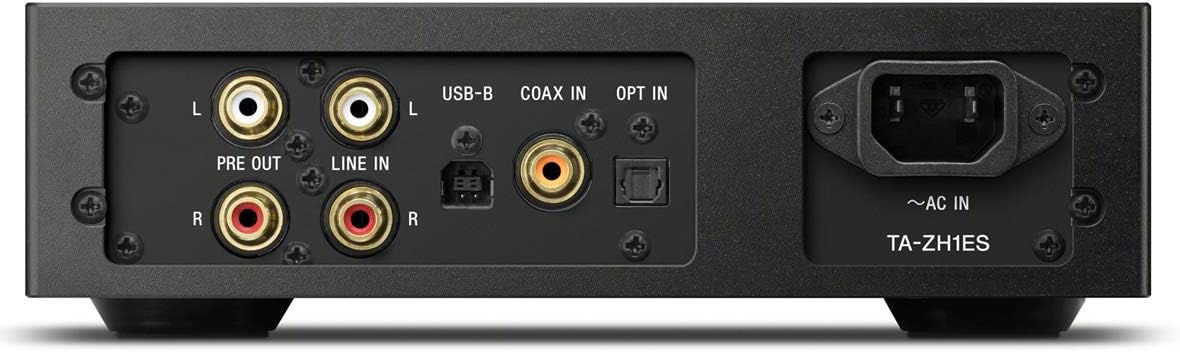
Rysunek 3.2: Układ panelu tylnego
This image illustrates the rear panel of the TA-ZH1ES amplifier, detailing the various connectivity options. Visible ports include RCA Line In (L/R), RCA Pre Out (L/R), USB-B input, Coaxial input, Optical input, and the AC power inlet. Each port is clearly labeled for easy identification.
- LINE IN (RCA L/R): Analog audio input for connecting external devices.
- PRE OUT (RCA L/R): Analog audio output for connecting to a power ampgłośniki niskotonowe lub aktywne.
- Wejście USB-B: For connecting to a computer or other digital audio sources.
- WEJŚCIE KONCENTRYCZNE: Współosiowe cyfrowe wejście audio.
- WYBIERZ: Optyczne cyfrowe wejście audio.
- ~AC IN: Power input for the AC power cord.
4. Konfiguracja
Follow these steps to set up your TA-ZH1ES ampliyfikator.
4.1 Umieszczenie
Umieść amplifier on a flat, stable surface with adequate space for ventilation. Avoid placing it near heat sources or in direct sunlight.

Rysunek 4.1: AmpUmieszczenie lifiera
This image shows the Sony TA-ZH1ES amplifier positioned on a flat surface, demonstrating a typical setup environment. Ensure the unit has sufficient space around it for proper airflow.
4.2 Podłączanie źródeł dźwięku
Connect your audio sources to the appropriate input terminals on the rear panel.
- Digital Sources (Computer, CD Player, etc.):
- For a computer, connect a USB-B cable from your computer to the Wejście USB-B.
- For a CD player or other digital audio device, use a coaxial cable for the KONCENTRAT W or an optical cable for the ZGŁOŚ SIĘ.
- Analog Sources (Turntable with pre-amp, etc.): Connect RCA cables from your analog source to the WEJŚCIE LINIOWE (RCA L/R) terminale.
- Portable Devices (Walkman/Xperia): Connect compatible portable devices to the Walkman/Xperia USB Input on the front panel. This input also supports charging for Walkman devices.
4.3 Podłączanie słuchawek lub zewnętrznego urządzenia Ampżywsze
- Słuchawki: Connect your headphones to the appropriate balanced (4.4mm, 3.5mm x 2, XLR4) or unbalanced (6.3mm, 3.5mm) output jacks on the front panel.
- Zasilanie zewnętrzne Amplifier/Głośniki aktywne: If using the TA-ZH1ES as a DAC or pre-amplifier, podłącz kable RCA z PRE OUT (RCA L/R) terminals on the rear panel to your power ampgłośniki niskotonowe lub aktywne.
4.4 Połączenie zasilania
Podłącz dostarczony przewód zasilający prądem zmiennym do ~AC WEJŚCIE terminal on the rear panel, then plug the other end into a wall outlet.
5. Instrukcja obsługi
5.1 Podstawowa obsługa
- Włączanie: Press the Power button on the front panel.
- Wybierz wejście: Use the Input Selector button to choose the desired audio source (e.g., USB-B, COAX, OPT, LINE IN).
- Podłącz słuchawki: Plug your headphones into the appropriate jack.
- Dostosuj głośność: Slowly turn the Volume knob clockwise to increase the volume to a comfortable listening level.

Rysunek 5.1: Elementy sterujące na górnym panelu
Na tym obrazie widać widok z góry view of the TA-ZH1ES amplifier, clearly showing the power button, input/output selectors, display screen, menu navigation buttons (Menu/Back, Enter), and the Gain button. These controls are used for basic operation and feature adjustments.
5.2 DSD Remastering Engine
The DSD Remastering Engine converts all PCM audio sources to DSD 11.2MHz, aiming to provide a more natural and analog-like sound experience. This feature can be enabled or disabled through the unit's menu settings.
5.3 DSEE HX
DSEE HX (Digital Sound Enhancement Engine HX) upscales compressed audio files to near high-resolution quality. This feature is particularly effective for improving the sound of lower-resolution files, such as those from streaming services or older recordings. Access DSEE HX settings via the unit's menu.
5.4 Ustawienia wzmocnienia
Ten amplifier features adjustable gain settings to optimize performance with various headphone impedances. Press the Osiągać button on the front panel to cycle through available gain levels (e.g., Low, Mid, High). Select the setting that provides sufficient volume without distortion for your specific headphones.
6. Konserwacja
Właściwa pielęgnacja zapewnia długowieczność i optymalną wydajność Twojego ampliyfikator.
- Czyszczenie: Przetrzyj urządzenie miękką, suchą ściereczką. Nie używaj szorstkich gąbek, proszku do szorowania ani rozpuszczalników, takich jak alkohol lub benzen.
- Wentylacja: Periodically check that the ventilation openings are free from dust and obstructions.
- Składowanie: If storing the unit for an extended period, disconnect it from the power outlet and store it in a clean, dry place.
7. Rozwiązywanie Problemów
Jeśli masz problemy z urządzeniem amplifier, zapoznaj się z poniższymi typowymi problemami i rozwiązaniami.
| Problem | Możliwa przyczyna / rozwiązanie |
|---|---|
| Brak zasilania | Ensure the AC power cord is securely connected to both the unit and the wall outlet. Check if the power outlet is functional. |
| Brak dźwięku |
|
| Zniekształcony dźwięk |
|
| Unit becomes hot | Ensure adequate ventilation around the unit. Do not block the ventilation openings. If overheating persists, discontinue use and contact service. |
Jeśli po wypróbowaniu tych rozwiązań problem nadal występuje, skontaktuj się z działem obsługi klienta firmy Sony.
8. Specyfikacje
| Funkcja | Szczegół |
|---|---|
| Numer modelu | TA-ZH1ES |
| Wymiary produktu (szer. X wys. X gł.) | 2.56 x 12.36 x 8.27 cala (ok. 65 x 314 x 210 mm) |
| Waga przedmiotu | 1 funta (ok. 0.45 kg) |
| Impedancja słuchawek | 12-600 omów |
| Wyjścia słuchawkowe | Balanced: 4.4mm, 3.5mm x 2, XLR4 Unbalanced: 6.3mm, 3.5mm |
| Wejścia cyfrowe | USB-B, Coaxial, Optical, Walkman/Xperia USB |
| Wejścia analogowe | RCA Line In (L/R) |
| Wyjścia analogowe | RCA Pre Out (L/R) |
| Producent | Sony |
| Data pierwszej dostępności | 1 września 2016 r. |
Uwaga: Specyfikacje mogą ulec zmianie bez powiadomienia.
9. Gwarancja i wsparcie
Aby uzyskać szczegółowe informacje dotyczące gwarancji, zapoznaj się z kartą gwarancyjną dołączoną do produktu lub odwiedź oficjalną stronę pomocy technicznej firmy Sony website for your region. For technical assistance, product registration, or service inquiries, please contact Sony customer support.
Wsparcie Sony Webstrona: https://www.sony.com/electronics/support