1. Wprowadzenie
This manual provides comprehensive instructions for the installation, operation, and maintenance of your ALC AWF61 SightHD 1080p Full HD Outdoor Wi-Fi Camera. Designed for outdoor security, this camera delivers crystal-clear 1080p video, robust night vision, and reliable Wi-Fi connectivity, allowing you to monitor your property remotely via your smartphone or tablet.
Przed użyciem produktu należy dokładnie przeczytać tę instrukcję, aby mieć pewność, że zostanie on prawidłowo skonfigurowany i będzie działał z optymalną wydajnością.
2. Koniec produktuview
2.1 Główne cechy
- Wideo w rozdzielczości Full HD 1080p: Captures high-definition video at 1280 x 1080 resolution for clear streaming, playback, and recording.
- Szerokie pole View: Offers a 90-degree field of view to cover a broad area.
- Zaawansowane widzenie w nocy: Equipped with 6 surface-mounted high-power infrared LEDs, providing sharp black and white contrast up to 65 feet (20 meters) in low-light or total darkness. Infrared (IR-cut) filters ensure accurate colors during daylight.
- Odporna na warunki atmosferyczne konstrukcja: Features IP66-rated durable metal housing, designed to withstand various inclement weather conditions.
- Łączność Wi-Fi: Connects wirelessly to your home network for remote access.
- Detekcja ruchu: Smart motion detection triggers alerts and recording.
- Elastyczne opcje przechowywania: Supports on-camera recording (microSD card not included) and free cloud storage integration with Google Drive and Dropbox.
- Zdalne monitorowanie: Accessible via smartphone and tablet applications (Android and Apple compatible).
2.2 Zawartość opakowania
Sprawdź, czy w przesyłce znajdują się wszystkie elementy:
- ALC AWF61 SightHD 1080p Full HD Outdoor Wi-Fi Camera
- Zasilacz (AC/DC)
- Sprzęt montażowy
- Instrukcja obsługi (ten dokument)
2.3 Komponenty kamery
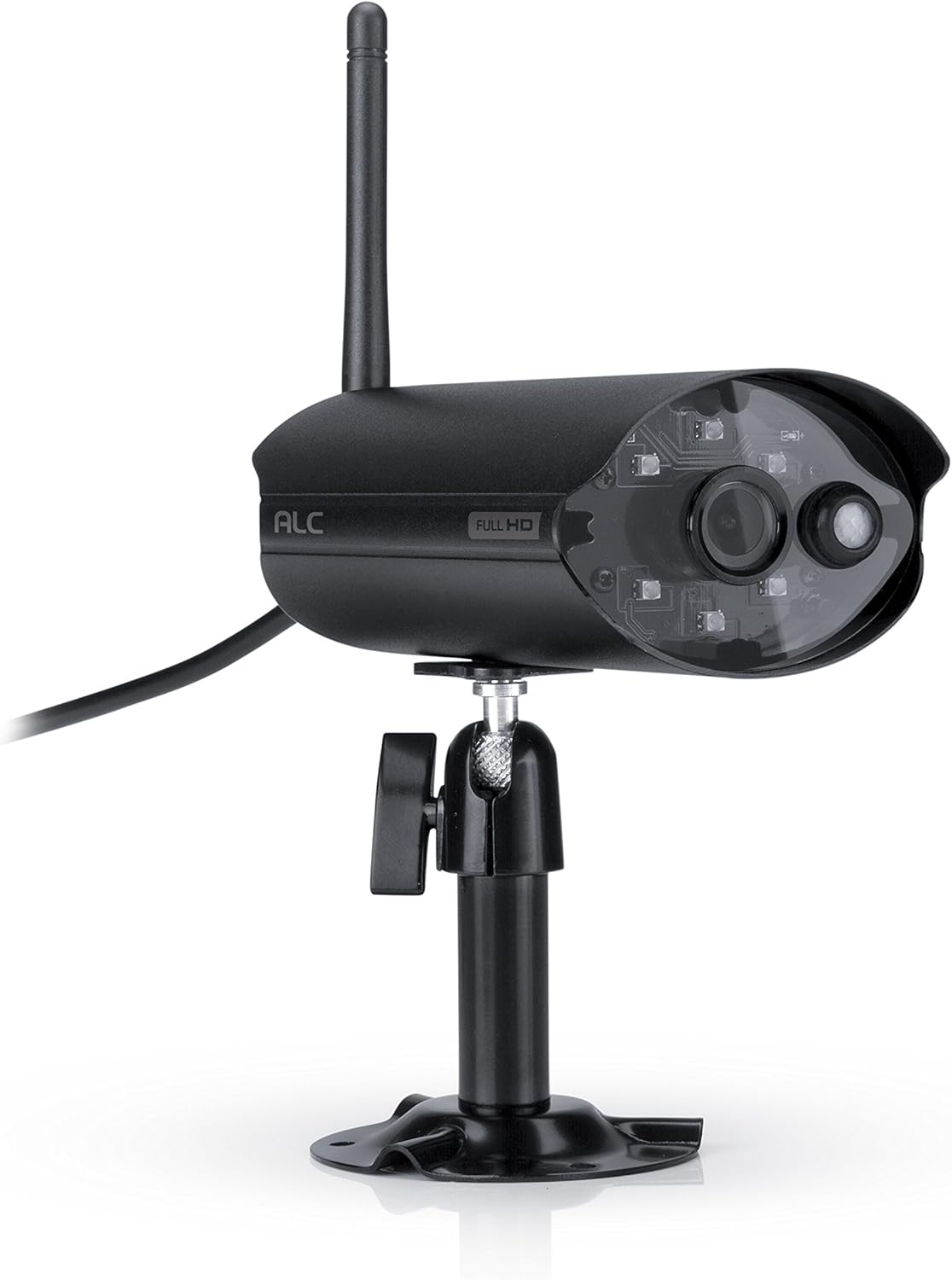
Rysunek 2.3.1: Przód view of the ALC AWF61 camera, showing the lens, infrared LEDs, and antenna. This image displays the camera's main body, mounted on its stand, with the antenna extending upwards and the power cable visible.
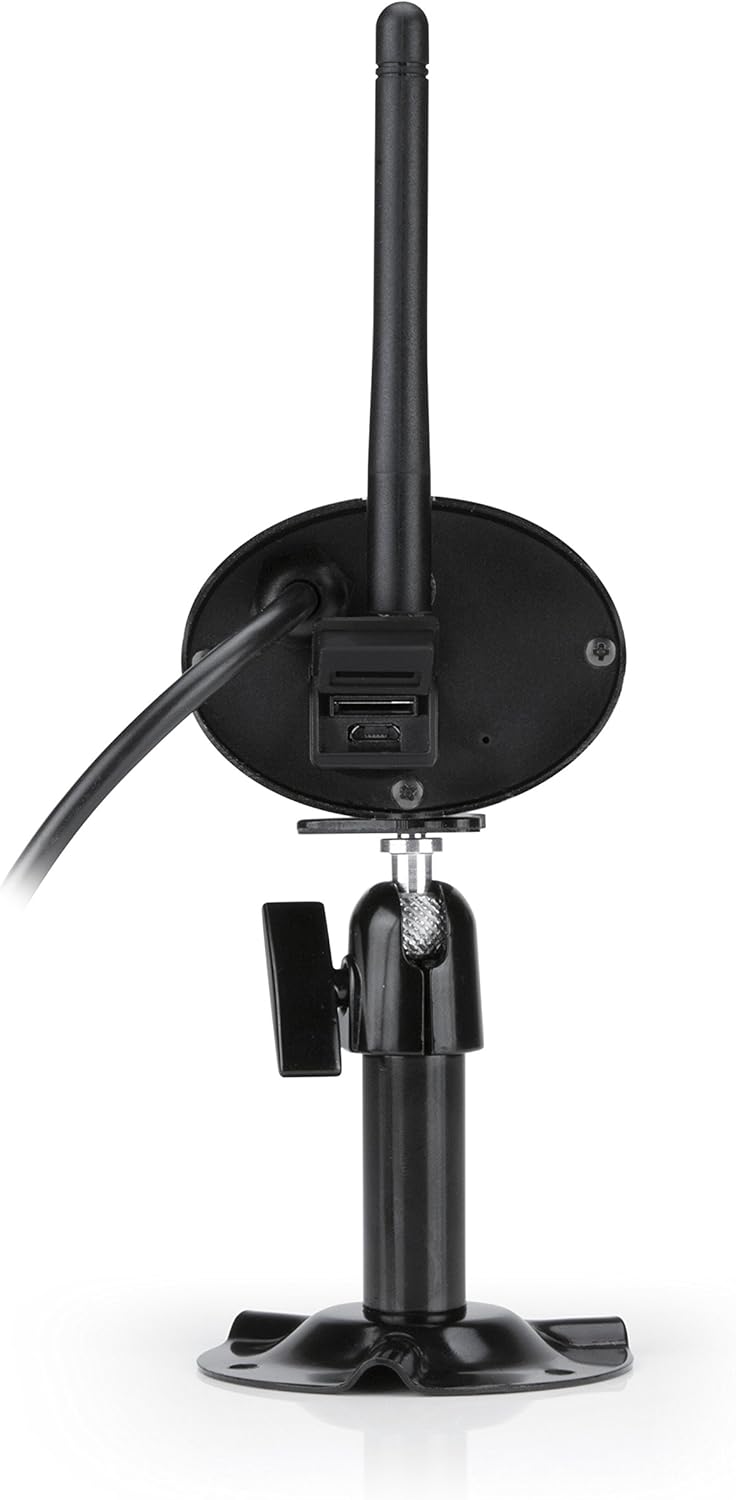
Rysunek 2.3.2: Tył view of the ALC AWF61 camera, showing the power input and possibly a microSD card slot (if applicable). This image highlights the back of the camera unit, including the base and connection points.
3. Konfiguracja i instalacja
3.1 Zanim zaczniesz
- Ensure you have a stable Wi-Fi network with good signal strength at the camera's intended installation location.
- Przygotuj nazwę sieci Wi-Fi (SSID) i hasło.
- A smartphone or tablet (Android or iOS) is required for setup and operation.
3.2 Pobieranie aplikacji i tworzenie konta
- Pobierz Celownik ALCHD aplikację ze sklepu Apple App Store (dla urządzeń z systemem iOS) lub Google Play Store (dla urządzeń z systemem Android).
- Zainstaluj aplikację na swoim smartfonie lub tablecie.
- Otwórz aplikację i postępuj zgodnie z instrukcjami wyświetlanymi na ekranie, aby utworzyć nowe konto użytkownika lub zaloguj się, jeśli już je posiadasz.
3.3 Camera Connection and Pairing
- Podłącz kamerę do zasilacza i gniazdka elektrycznego. Kamera włączy się i rozpocznie sekwencję startową.
- Within the ALC SightHD app, select the option to add a new camera or device.
- Follow the app's instructions to connect the camera to your Wi-Fi network. This typically involves scanning a QR code on the camera or entering your Wi-Fi credentials into the app.
- Once connected, the camera will be paired with your account and ready for live viewing.
3.4 Montaż kamery
The ALC AWF61 camera is designed for surface mounting. Choose a location that provides the desired field of view and has access to a power outlet. Ensure the mounting surface is stable and can support the camera's weight.
- Use the provided mounting hardware to securely attach the camera's base to the chosen surface.
- Adjust the camera's angle and orientation using the adjustable mount to achieve the optimal viewObszar objęty badaniem.
- Ensure the camera's antenna is positioned for best Wi-Fi signal reception.
4. Instrukcja obsługi
4.1 Na żywo View i odtwarzanie
- Open the ALC SightHD app on your smartphone or tablet.
- Select the AWF61 camera from your device list to access the live video feed.
- Use the app's interface to initiate manual recordings, take snapshots, or review nagrano footage from your microSD card or cloud storage.
4.2 Detekcja ruchu i alerty
- Navigate to the camera settings within the ALC SightHD app.
- Enable and configure motion detection sensitivity and detection zones.
- Ensure push notifications are enabled in the app and on your device's operating system to receive alerts when motion is detected.
4.3 Widzenie nocne
The camera automatically switches to night vision mode in low-light conditions. The infrared LEDs will illuminate, providing clear black and white video up to 65 feet. No manual intervention is typically required for this feature.
4.4 Cloud Storage Integration
The ALC AWF61 supports free cloud storage integration with Google Drive and Dropbox. To utilize this feature:
- Ensure you have an active Google Drive or Dropbox account.
- Within the ALC SightHD app settings for your camera, link your preferred cloud storage account.
- Recordings can then be automatically transferred from the camera's microSD card (if installed) to your linked cloud account.
5. Konserwacja
5.1 Czyszczenie aparatu
- Okresowo czyść obiektyw i obudowę aparatu miękką,amp płótno.
- Nie należy używać silnych środków chemicznych ani ściernych środków czyszczących, gdyż mogą one uszkodzić powłokę aparatu lub obiektyw.
- Przed czyszczeniem upewnij się, że aparat jest wyłączony.
5.2 aktualizacji oprogramowania sprzętowego
From time to time, ALC may release firmware updates to improve camera performance or add new features. Check the ALC SightHD app regularly for notifications regarding available firmware updates and follow the in-app instructions to apply them.
6. Rozwiązywanie Problemów
| Problem | Możliwa przyczyna | Rozwiązanie |
|---|---|---|
| Camera not connecting to Wi-Fi or frequently disconnects. | Weak Wi-Fi signal; incorrect Wi-Fi credentials; network interference. |
|
| ALC SightHD app freezes or crashes. | App software glitch; outdated app version; insufficient device memory. |
|
| Motion alerts are delayed or not received. | Network latency; incorrect app notification settings; device power saving modes. |
|
| Cannot access camera from a PC. | Ograniczenia konstrukcyjne produktu. | The ALC AWF61 camera is primarily designed for control and viewing via smartphone and tablet applications. Direct PC access is not supported. |
7. Specyfikacje
| Funkcja | Szczegół |
|---|---|
| Numer modelu | AWF61 |
| Rozdzielczość przechwytywania wideo | 1080p (1280x1080) |
| Pole View | 90 stopni |
| Zakres noktowizora | 60 stóp |
| Technologia łączności | Bezprzewodowy (Wi-Fi) |
| Zastosowanie wewnątrz/na zewnątrz | Plenerowy |
| Międzynarodowa Ocena Ochrony | IP66 (odporny na warunki atmosferyczne) |
| Źródło zasilania | Prąd zmienny/stały |
| Kompatybilne urządzenia | Smartfon, tablet (Android, iOS) |
| Tworzywo | Metal |
| Pozycja Wymiary (dł. x szer. x wys.) | 2 x 5 x 2.5 cala |
| Waga przedmiotu | 1.95 funtów |
| Szybkość klatek | 30 klatek na sekundę |
| Tryb pracy | Tylko ruch |
| UPC | 857067005222 |
8. Gwarancja i wsparcie
For warranty information, technical support, or service inquiries regarding your ALC AWF61 SightHD camera, please refer to the official ALC website or contact their customer support directly. Details for contacting support are typically found on the manufacturer's webmiejscu lub na opakowaniu produktu.
It is recommended to have your product model number (AWF61) and purchase date available when contacting support.


