Wstęp
The Motorola T260 Talkabout 2-Way Radio is designed for reliable communication in various outdoor and indoor environments. With a range of up to 25 miles under optimal conditions, it allows users to stay connected with family and friends. This lightweight and durable radio includes essential features such as NOAA weather channels and alerts, and iVOX/VOX hands-free communication.

Image: Motorola T260 Talkabout Two-Way Radios banner highlighting the 'Go Further' capability.
Co jest w pudełku
Your Motorola T260 package includes the following items:
- 2 Radia
- 2 klipsy do paska
- 2 NiMH Battery Packs
- 1 "Y" Cable Charging Adapter with dual-micro-USB connectors
- 1 Podręcznik użytkownika
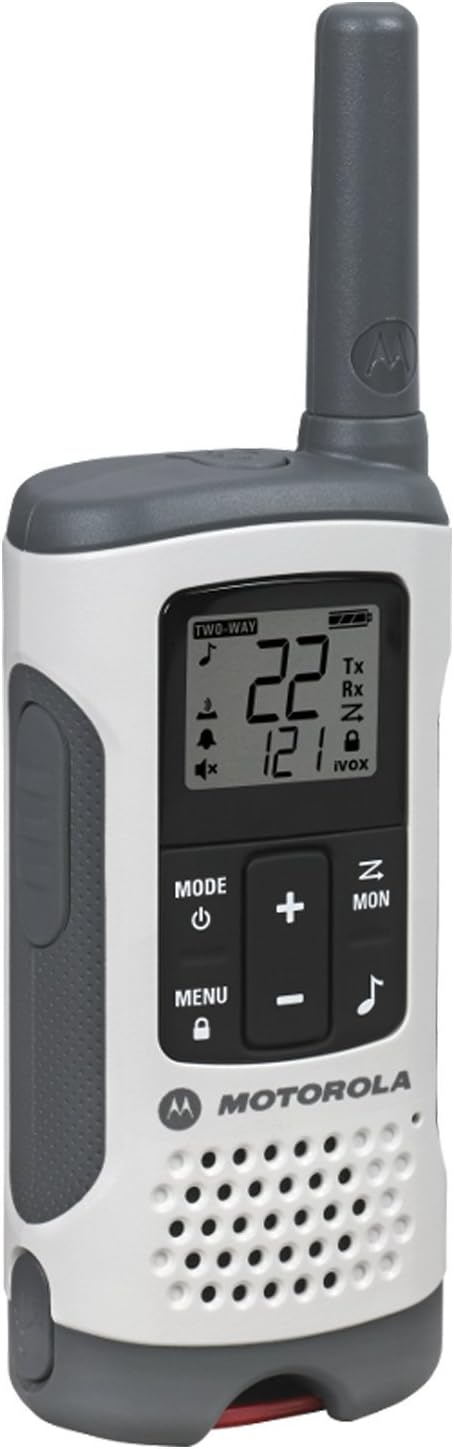
Image: A single Motorola T260 Talkabout 2-Way Radio, showcasinjego projekt i wygląd.
Instrukcje konfiguracji
1. Montaż i ładowanie akumulatora
The T260 radios can be powered using the included NiMH rechargeable battery packs or 3 AA alkaline batteries (not included for AA). For initial use, install the NiMH battery packs and charge the radios.
- Sprawdź, czy radio jest wyłączone.
- Otwórz pokrywę komory baterii z tyłu radia.
- Insert the NiMH battery pack, ensuring correct polarity.
- Dokładnie zamknij pokrywę komory baterii.
- Connect the "Y" cable charging adapter to a power source and then to the micro-USB ports on both radios.
- Charge the radios for approximately 10 hours for a full charge. The battery indicator on the display will show charging status.
2. Mocowanie zaczepu na pasek
To attach the belt clip, align the clip with the slots on the back of the radio and slide it down until it clicks into place.
Instrukcja obsługi
1. Włączanie/wyłączanie zasilania
Naciśnij i przytrzymaj Zasilanie/Menu button until the display lights up to turn the radio on. Repeat to turn off.
2. Wybór kanału i kodu prywatności
The T260 offers 22 channels and 121 privacy codes, totaling 2,662 combinations for clear communication.
- Naciśnij Menu button until the channel number flashes.
- Użyj Up or W dół przyciski umożliwiające wybór interesującego Cię kanału.
- Naciskać Menu again until the privacy code flashes.
- Użyj Up or W dół buttons to select your desired privacy code.
- Naciskać Menu lub PTT aby potwierdzić swój wybór.
3. Naciśnij i mów (PTT)
Aby przesłać, naciśnij i przytrzymaj PTT button and speak clearly into the microphone. Release the PTT button to listen.
4. Zagadnienia dotyczące zasięgu
The maximum communication range is up to 25 miles under ideal, unobstructed conditions. Actual range will vary based on terrain, weather, electromagnetic interference, and obstructions.
5. NOAA Weather Channels and Alerts
Stay informed about real-time weather conditions by accessing one of 11 NOAA weather channels or initiating weather alerts. NOAA radio service availability may vary by area.
6. iVOX/VOX Hands-Free Communication
The iVOX/VOX feature allows for hands-free operation. When activated, the radio transmits automatically when it detects your voice, eliminating the need to press the PTT button.
7. Scanning Feature
Use the scanning feature to quickly find active channels. This helps identify channels currently in use for communication.
8. Alarm niskiego poziomu baterii
The radio will provide an audible alert and/or a visual indicator on the display when the battery level is low, reminding you to recharge or replace batteries.


Images: Icons representing various outdoor activities like hiking, driving, camping, and biking, where the T260 radios can be utilized.
Wideo: Oficjalny film prezentujący produktasing the Motorola T260 Talkabout Radio, highlighting its features and ease of use in various scenarios.
Konserwacja
To ensure optimal performance and longevity of your Motorola T260 radios, follow these maintenance guidelines:
- Czyszczenie: Użyj miękkiego, damp Do czyszczenia obudowy radia należy używać ściereczki. Nie należy używać środków czyszczących o działaniu ściernym ani rozpuszczalników.
- Pielęgnacja baterii: Fully charge NiMH battery packs before long periods of storage. Store batteries in a cool, dry place.
- Składowanie: Store radios in a dry, dust-free environment when not in use.
- Narażenie na działanie wody: While durable, the T260 is not water resistant. Avoid submerging the radio in water.
Rozwiązywanie problemów
If you encounter issues with your Motorola T260 radio, refer to the following common troubleshooting tips:
- Brak zasilania: Ensure batteries are correctly installed and fully charged. Check if the radio is turned on.
- Słaby zasięg/zakłócenia: Verify both radios are on the same channel and privacy code. Move to an area with fewer obstructions.
- Nie można przesyłać/odbierać: Check if the PTT button is being pressed correctly. Ensure the radio is not in scan mode or iVOX/VOX mode if manual transmission is desired.
- Alert niskiego poziomu baterii: Recharge or replace the batteries promptly.
Specyfikacje
| Funkcja | Szczegół |
|---|---|
| Numer modelu | T260 |
| Wymiary produktu | 1.24 x 2.13 x 6.42 cala |
| Waga przedmiotu | 6.4 uncji |
| Liczba kanałów | 22 |
| Kody prywatności | 121 |
| Zakres częstotliwości | FRS/GMRS 462 - 467 MHz |
| Maksymalny zasięg rozmów | 25 mil (optymalne warunki) |
| Źródło zasilania | 2 NiMH Battery Packs (included) or 3 AA batteries (not included) |
| Tomtage | 4.5 V (prąd stały) |
| Cechy specjalne | Lightweight, NOAA Weather Channels/Alerts, iVOX/VOX Hands-Free |
| Poziom wodoodporności | Nie jest wodoodporny |
| Kolor | Biały |
Gwarancja i wsparcie
Specific warranty details and customer support contact information are typically provided in the user guide included with your product. Please refer to the physical user guide for the most accurate and up-to-date information regarding warranty coverage and technical support.


