FORTINET FortiGate FG-600D Firewall User Manual
Model: FG-600D
1. Wprowadzenie
The FortiGate FG-600D is a high-performance network security appliance designed for mid-sized to large enterprises. It provides advanced threat protection, deep visibility into network traffic, and flexible deployment options for campus, data center edge, and internal segments. This manual provides essential information for the proper installation, configuration, operation, and maintenance of your FortiGate FG-600D device.
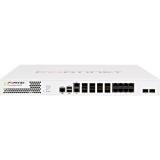
Obraz 1.1: Przód view of the FortiGate FG-600D Firewall, showcasing its ports and indicators.
2. Informacje dotyczące bezpieczeństwa
Please read all safety instructions carefully before installing or operating the FortiGate FG-600D. Failure to comply with these instructions may result in injury, damage to the device, or voiding the warranty.
- Moc: Use only the power supply provided with the device. Ensure the power source matches the voltagi wymagania.
- Wentylacja: Nie zasłaniaj otworów wentylacyjnych. Zapewnij odpowiedni przepływ powietrza wokół urządzenia, aby zapobiec przegrzaniu.
- Środowisko: Operate the device in a clean, dry environment within the specified temperature and humidity ranges. Avoid direct sunlight, heat sources, and excessive dust.
- Serwisowanie: Nie próbuj samodzielnie naprawiać urządzenia. Wszelkie naprawy zlecaj wykwalifikowanemu personelowi.
- Montowanie: If rack-mounting, ensure the rack is stable and can support the device's weight (approximately 32 pounds).
3. Zawartość opakowania
Verify that all items are present and in good condition upon unpacking your FortiGate FG-600D. If any items are missing or damaged, contact your vendor immediately.
- FortiGate FG-600D Appliance
- Przewody zasilające)
- Zestaw do montażu w szafie rack (jeśli dotyczy)
- Console Cable (RJ45 to DB9)
- Podręcznik użytkownika (ten dokument)
- Szybki przewodnik
4. Konfiguracja i instalacja
4.1 Fizyczna instalacja
- Montaż w szafie: Securely mount the FortiGate FG-600D into a standard 19-inch equipment rack using the provided rack mount kit. Ensure proper weight distribution and ventilation.
- Podłączenie zasilania: Connect the power cable(s) to the appliance and a grounded electrical outlet.
- Pierwsze włączenie: Press the power button. Observe the system status LEDs for initial boot sequence.
4.2 Połączenia sieciowe
The FortiGate FG-600D features multiple RJ45 interfaces for network connectivity. Connect your network cables to the appropriate ports based on your network design.
- Porty WAN: Connect to your Internet Service Provider (ISP) or upstream network.
- Porty LAN: Connect to your internal network segments.
- Port zarządzania: Use for initial configuration and management access.
4.3 Dostęp do konfiguracji początkowej
Access the FortiGate FG-600D for initial configuration via a console cable or a web przeglądarka.
- Dostęp do konsoli: Connect a console cable from your computer to the FortiGate's console port. Use a terminal emulator (e.g., PuTTY) with settings: 9600 baud, 8 data bits, no parity, 1 stop bit, no flow control.
- Web-based Manager: Once the device has an IP address configured (either manually via console or via DHCP), you can access the web-based manager by entering the device's IP address into a web przeglądarka.
5. Działanie
The FortiGate FG-600D operates as a next-generation firewall, providing comprehensive security features. Its primary function is to inspect and control network traffic based on defined security policies.
5.1 Key Operational Aspects
- Policy Configuration: Define firewall policies to control traffic flow between different network interfaces and zones.
- Kontrola aplikacji: The FortiGate FG-600D can identify thousands of applications, including cloud applications, for deep inspection and granular control over network traffic.
- Ochrona przed zagrożeniami: Utilize features like Intrusion Prevention System (IPS), antivirus, web filtering, and anti-spam to protect against cyber threats.
- Sieć VPN: Configure Virtual Private Networks (VPNs) for secure remote access and site-to-site connectivity.
- Monitorowanie i rejestrowanie: Regularly monitor system logs, traffic logs, and security events to ensure optimal performance and detect potential issues.
For detailed configuration and advanced operational procedures, refer to the FortiGate Administration Guide available on the Fortinet support webstrona.
6. Konserwacja
Regular maintenance ensures the longevity and optimal performance of your FortiGate FG-600D.
- Aktualizacje oprogramowania układowego: Periodically check for and apply the latest firmware updates from Fortinet to ensure you have the most current security features and bug fixes.
- Kopia zapasowa konfiguracji: Regularly back up your device configuration. This is crucial for disaster recovery.
- Kontrole środowiskowe: Ensure the operating environment remains within specified temperature and humidity ranges. Keep ventilation clear.
- Kontrola fizyczna: Periodically inspect cables and connections for wear or damage.
7. Rozwiązywanie Problemów
This section provides solutions to common issues you might encounter with your FortiGate FG-600D.
| Problem | Możliwa przyczyna | Rozwiązanie |
|---|---|---|
| Urządzenie nie włącza się. | Brak zasilania, uszkodzony kabel zasilający lub problem z zasilaniem. | Check power cable connections. Ensure the power outlet is functional. Try a different power cable if available. |
| Nie można uzyskać dostępu web- menadżer. | Incorrect IP address, network connectivity issue, or browser problem. | Verify the device's IP address. Check network cable connections. Try clearing browser cache or using a different browser. Ensure your computer is on the same network segment or has a route to the FortiGate. |
| Network traffic not flowing as expected. | Incorrect firewall policies, routing issues, or interface configuration errors. | Review your firewall policies and routing tables. Check interface status and configuration. Use diagnostic tools available in the FortiGate CLI. |
If you continue to experience issues, consult the Fortinet support documentation or contact technical support.
8. Specyfikacje
| Funkcja | Szczegół |
|---|---|
| Numer modelu | FG-600D |
| Marka | FORTINET |
| Typ interfejsu | RJ45 |
| Liczba portów | 8 |
| Waga przedmiotu | 32 funta |
| Wymiary opakowania | 23 x 17 x 6.5 cala |
| Pierwsza dostępna data | 17 listopada 2015 r. |
| UPC | 619587321387, 712155581920, 040232305542 |
9. Gwarancja i wsparcie
FORTINET products are backed by a limited warranty. For detailed warranty information, please refer to the warranty statement included with your product or visit the official Fortinet webstrona.
For technical support, documentation, and software downloads, please visit the Fortinet support portal. You can also find more information about FORTINET products by visiting the FORTINET Store on Amazon.


