1. Wprowadzenie
Dziękujemy za zakupasing the Gotech GTV-7-TFT 7-inch Portable Color TFT LCD TV. This manual provides essential information for the safe and efficient operation of your device. Please read it thoroughly before use and retain it for future reference.
2. Ważne instrukcje bezpieczeństwa
- Aby uniknąć pożaru lub porażenia prądem, nie wystawiaj urządzenia na działanie deszczu i wilgoci.
- Nie otwierać casing. Wszelkie prace serwisowe powierzaj wykwalifikowanemu personelowi.
- Unikać umieszczania urządzenia w pobliżu źródeł ciepła lub w bezpośrednim świetle słonecznym.
- Zapewnij odpowiednią wentylację wokół urządzenia.
- Używaj wyłącznie wskazanego zasilacza.
- Trzymaj urządzenie z dala od silnych pól magnetycznych.
- Czyść urządzenie miękką, suchą ściereczką. Nie używaj płynnych środków czyszczących.
3. Zawartość opakowania
Sprawdź, czy w opakowaniu znajdują się wszystkie elementy:
- Gotech GTV-7-TFT Portable TV Unit
- Zdalne sterowanie
- Zasilacz AC/DC
- Car Cord (Car Holder not explicitly listed as included, but mentioned as a feature)
- Antena Jack
- Kabel AV
- Odłączany stojak

Image 3.1: The retail box for the Gotech GTV-7-TFT Portable TV, showing the product, remote control, and included accessories.
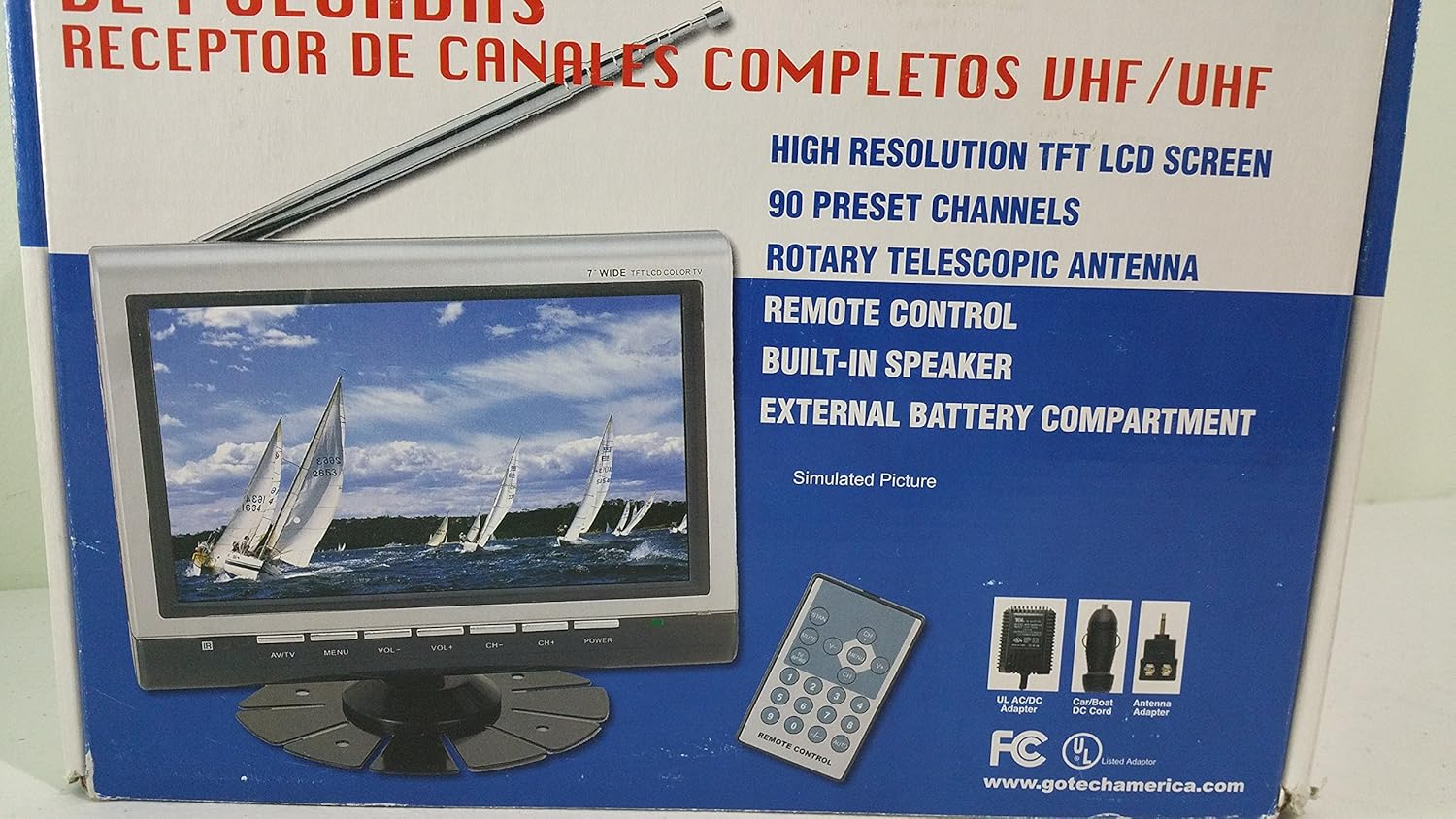
Obraz 3.2: Bliższe spojrzenie view of the Gotech GTV-7-TFT TV screen and the remote control, as depicted on the product packaging.
4. Koniec produktuview
4.1 Główne cechy
- 7-inch High Resolution TFT LCD Screen
- Full Channel VHF/UHF Receiver
- 90 zaprogramowane kanały
- Digital Up/Down Tuning
- Auto Channel Programming
- Antena teleskopowa obrotowa
- On-Screen Display (OSD) for Picture and Volume Adjustment
- Wbudowany głośnik
- External Battery Compartment (requires 10x AA batteries, not included)
- Remote Control with Button Cell
- New Detachable Stand with Battery

Image 4.1: Side panel of the Gotech GTV-7-TFT packaging, detailing the product's main features.
5. Konfiguracja
5.1 Powering the TV
The GTV-7-TFT can be powered in several ways:
- Zasilacz AC/DC: Connect the provided AC/DC adapter to the TV's power input and then to a standard wall outlet.
- Car Cord: For in-vehicle use, connect the car cord to the TV's power input and then to your vehicle's 12V power outlet.
- Baterie zewnętrzne: Open the external battery compartment and insert 10x AA size batteries (UM3) according to the polarity indicators. Ensure the batteries are fresh and correctly oriented.
5.2 Podłączenie anteny
Extend the rotary telescopic antenna for optimal signal reception. For improved reception, you may connect an external antenna to the antenna jack using the provided antenna jack adapter.
5.3 Connecting External Devices (AV Input)
To connect external devices such as a DVD player or gaming console, use the provided AV cable. Connect one end to the TV's AV input port and the other end to the AV output ports of your external device. Select the AV input source on the TV to view treści z podłączonego urządzenia.
6. Działanie
6.1 Włączanie/wyłączanie zasilania
Naciśnij MOC button on the TV unit or the remote control to turn the TV on or off.
Strojenie kanałów 6.2
- Automatyczne programowanie kanałów: It is recommended to perform an auto channel scan upon first use or when moving to a new location. Access the menu, navigate to the channel setup, and select 'Auto Scan' or 'Auto Program'. The TV will search and store available channels.
- Digital Up/Down Tuning: Użyj CH+ I CH- buttons on the TV or remote control to navigate through the preset channels.
6.3 Volume and Picture Adjustment
Użyj Objętość + I TOM- buttons on the TV or remote control to adjust the volume. Picture settings (brightness, contrast, color) can be adjusted via the on-screen display (OSD) menu. Press the MENU button to access these options.
6.4 Pilot zdalnego sterowania
The remote control allows convenient operation from a distance. Ensure the button cell battery is correctly inserted. Point the remote control directly at the TV's infrared sensor.
7. Konserwacja
7.1 Czyszczenie
Wipe the TV screen and casing with a soft, dry, lint-free cloth. Do not use abrasive cleaners, waxes, or solvents as they may damage the finish or screen.
7.2 Przechowywanie
If the TV will not be used for an extended period, remove the external batteries to prevent leakage. Store the unit in a cool, dry place away from direct sunlight and extreme temperatures.
8. Rozwiązywanie Problemów
| Problem | Możliwa przyczyna | Rozwiązanie |
|---|---|---|
| Brak zasilania | Zasilacz nie jest podłączony; baterie są rozładowane lub nieprawidłowo włożone. | Check power connections; Replace or correctly insert batteries. |
| Brak obrazu/dźwięku | Incorrect input source; Antenna not connected or extended; No channels scanned. | Select correct input (TV/AV); Extend antenna or connect external one; Perform auto channel scan. |
| Słaby odbiór | Słaby sygnał. Pozycja anteny. | Adjust antenna position; Try an external antenna; Check for local signal strength. |
| Pilot nie działa | Battery depleted; Obstruction between remote and TV. | Replace remote control battery; Remove any obstructions. |
9. Specyfikacje
| Funkcja | Szczegół |
|---|---|
| Numer modelu | gtv-7-tft |
| Rozmiar ekranu | 7 cali (17.8 cm) |
| Typ wyświetlacza | Kolorowy wyświetlacz TFT LCD |
| Typ tunera | Full Channel VHF/UHF Receiver |
| Zaprogramowane kanały | 90 |
| Typ wyjścia audio | Wbudowany głośnik |
| Metoda kontroli | Zdalne sterowanie |
| Kompatybilne urządzenia | Telewizja, Głośnik |
| Źródło zasilania | AC/DC Adapter, Car Cord, External Battery Compartment (10x AA batteries, not included) |
10. Gwarancja i wsparcie
Specific warranty information and customer support details are not provided within this manual. Please refer to the product packaging or contact your retailer for warranty claims and technical assistance.


