Wstęp
Dziękujemy za zakupasing the Madison FREESOUND-VR40R Vintage Portable Radio. This device combines a classic retro design with modern audio technology, offering versatile listening options. This manual provides detailed instructions on how to set up, operate, and maintain your radio to ensure optimal performance and longevity.
The FREESOUND-VR40R is a portable, USB-rechargeable radio designed for those who appreciate a vintage aesthetic combined with modern audio technologies. It features an analog dial tuner, Bluetooth, USB, AUX, and FM connectivity, bass enhancement, and a convenient dual metal handle for portability.
Instrukcje bezpieczeństwa
Przed użyciem urządzenia należy uważnie przeczytać niniejszą instrukcję bezpieczeństwa i zachować ją do wykorzystania w przyszłości. Nieprawidłowe użycie może spowodować porażenie prądem, pożar lub inne zagrożenia.
- Aby uniknąć pożaru lub porażenia prądem, nie wystawiaj urządzenia na działanie deszczu i wilgoci.
- Nie wystawiaj urządzenia na bezpośrednie działanie promieni słonecznych ani ekstremalnych temperatur.
- Nie otwierać casing. Wewnątrz nie ma żadnych części, które mogłyby być naprawiane przez użytkownika. Wszelkie prace serwisowe należy zlecać wykwalifikowanemu personelowi.
- Use only the specified power adapter/charging cable.
- Trzymaj urządzenie z dala od silnych pól magnetycznych.
- Clean the device only with a dry, soft cloth. Do not use liquid cleaners.
- Zapewnij odpowiednią wentylację wokół urządzenia. Nie blokuj otworów wentylacyjnych.
Produkt ponadview
Familiarize yourself with the components and features of your Madison FREESOUND-VR40R radio.

Rycina 1: Przód View. Shows the analog dial tuner, speaker grille, Madison logo, and control knobs for volume and source selection.
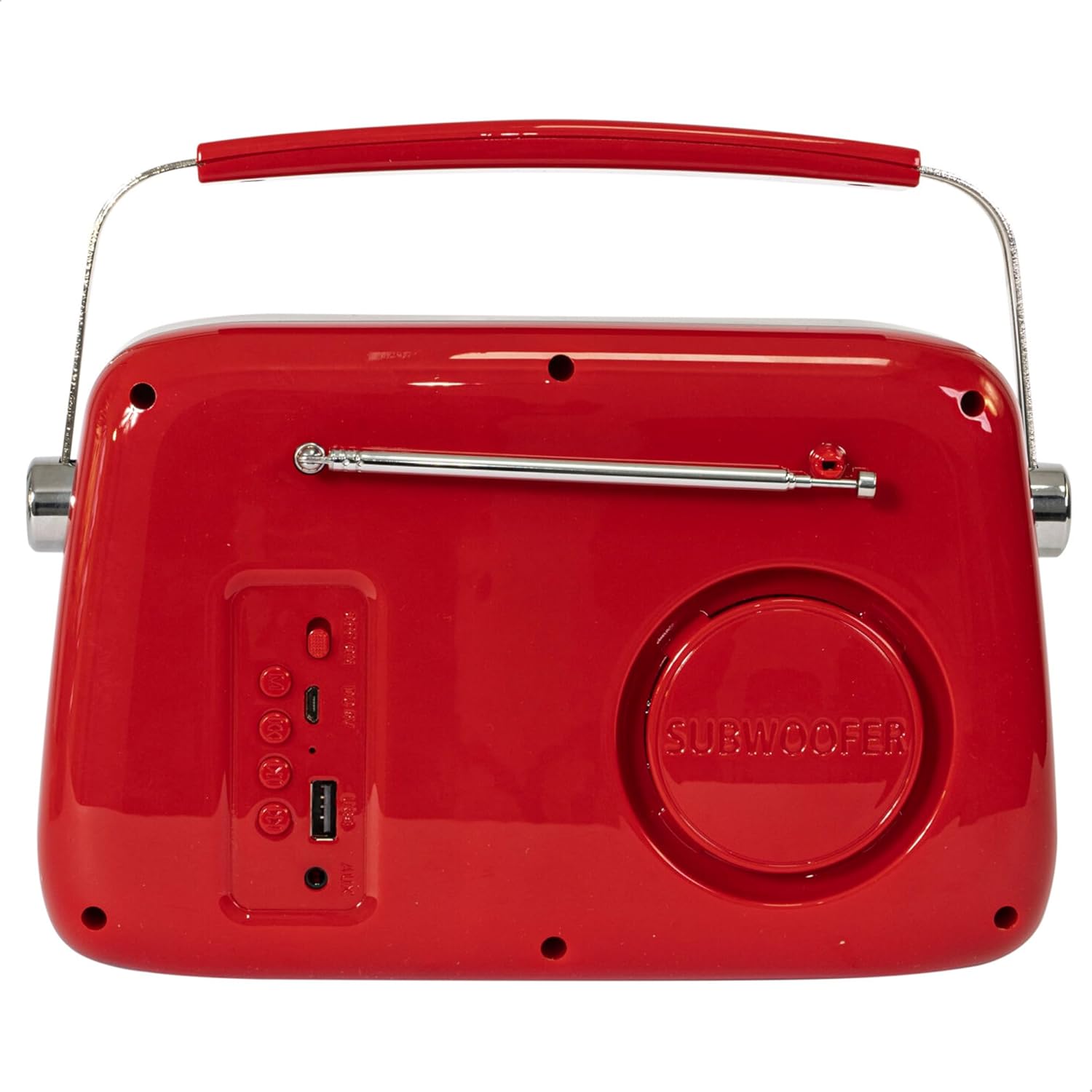
Rysunek 2: Tył View. Displays the subwoofer, USB port, AUX input, and power/mode buttons.
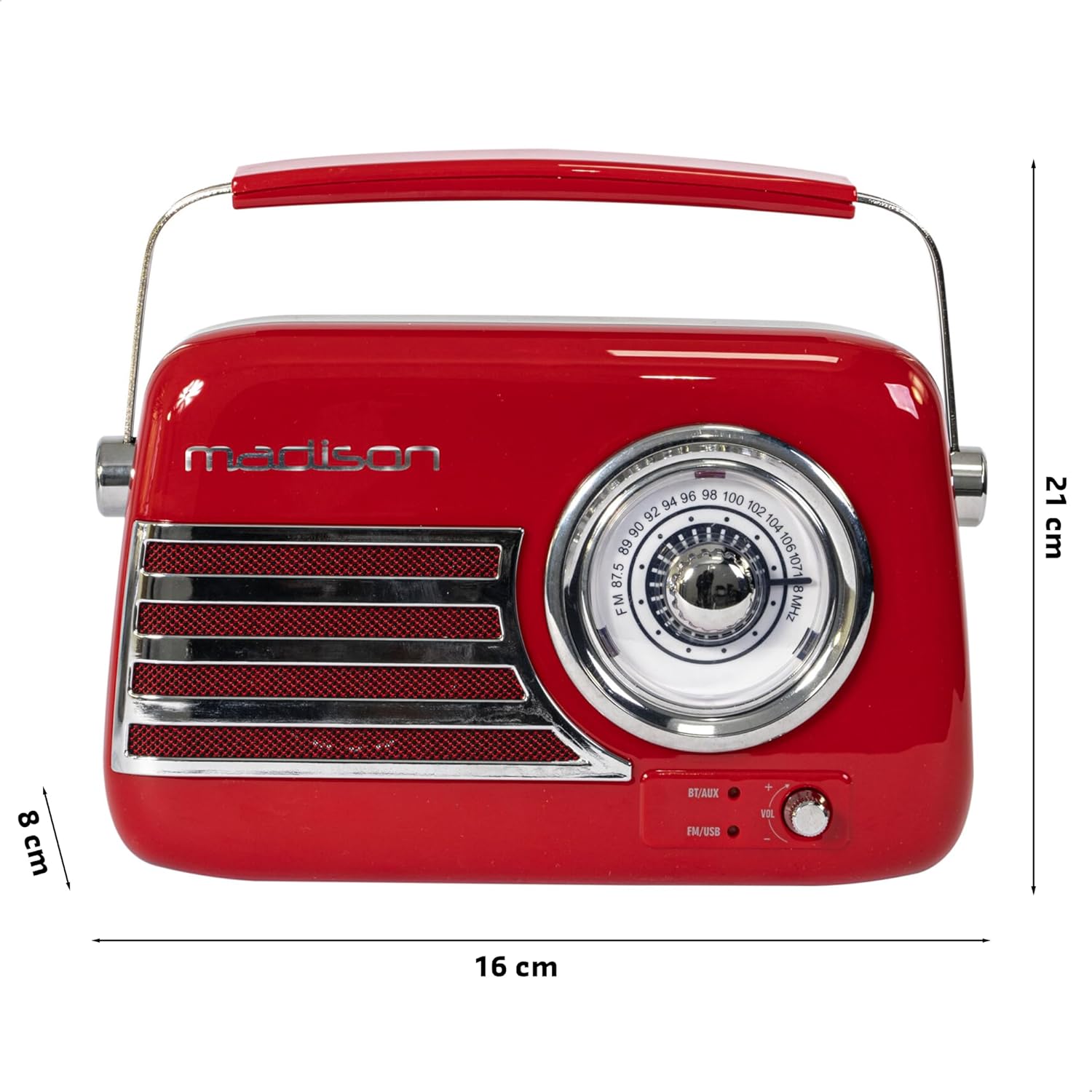
Rysunek 3: Wymiary produktu. Illustrates the radio's approximate dimensions: 21 cm length, 8 cm width, and 16 cm height.

Rysunek 4: Tył View z wysuniętą anteną. Shows the telescopic antenna fully extended for improved FM reception.
Główne cechy:
- Analog Dial Tuner: For classic FM radio tuning.
- Łączność Bluetooth: Przesyłaj strumieniowo dźwięk bezprzewodowo ze swojego smartfona lub tabletu.
- Odtwarzanie z USB: Odtwarzaj muzykę bezpośrednio z dysku USB.
- Wejście AUX: Podłącz zewnętrzne urządzenia audio za pomocą kabla audio 3.5 mm.
- Radio FM: Enjoy your favorite FM stations with the retractable antenna.
- Wzmocnienie basu: Integrated subwoofer for richer bass sound.
- Akumulator: Built-in long-lasting battery for portable use.
- Przenośna konstrukcja: Lightweight with a dual metal handle for easy carrying.
Organizować coś
Ładowanie akumulatora:
- Locate the USB charging port on the rear of the radio.
- Connect the provided USB charging cable to the radio's USB port.
- Podłącz drugi koniec kabla USB do kompatybilnego zasilacza USB (nie ma go w zestawie) lub do portu USB komputera.
- Zaświeci się kontrolka ładowania. Po pełnym naładowaniu kontrolka może zmienić kolor lub zgasnąć, w zależności od modelu.
- Pełne naładowanie trwa zazwyczaj kilka godzin.
Pierwsze włączenie:
- Ensure the radio is sufficiently charged.
- Press and hold the Power/Mode button (usually located on the rear or front panel) to turn on the radio.
- The front indicator lights will show the currently selected source.
Instrukcja obsługi
Regulacja głośności:
Obróć Tom knob (VOL) on the front panel to adjust the sound level. Turn clockwise to increase volume, counter-clockwise to decrease.
Wybór źródła:
Naciśnij Źródło/Tryb button (often labeled BT/AUX or FM/USB) repeatedly to cycle through the available input modes: Bluetooth, AUX, FM Radio, and USB.
- Tryb Bluetooth:
- Switch the radio to Bluetooth mode. The Bluetooth indicator light will blink, indicating it's ready for pairing.
- Na smartfonie lub tablecie włącz Bluetooth i wyszukaj dostępne urządzenia.
- Select "FREESOUND-VR40R" (or similar name) from the list.
- Once paired, the Bluetooth indicator light will become solid, and you can stream audio from your device.
- Tryb radia FM:
- Switch the radio to FM mode.
- Aby uzyskać optymalny odbiór, całkowicie rozłóż antenę teleskopową.
- Obróć Pokrętło strojenia on the front panel to manually select your desired FM radio station.
- Tryb odtwarzania USB:
- Włóż dysk flash USB zawierający dźwięk w formacie MP3 filedo portu USB z tyłu radia.
- Switch the radio to USB mode. The radio will automatically begin playing the audio files.
- Use the playback controls (if available, usually on the rear panel) to skip tracks or pause/play.
- Tryb wejścia AUX:
- Connect one end of a 3.5mm audio cable (not included) to the AUX input port on the rear of the radio.
- Connect the other end of the cable to the headphone jack or audio output of your external device (e.g., MP3 player, CD player).
- Switch the radio to AUX mode. Audio from your external device will now play through the radio.
Konserwacja
Czyszczenie:
Aby zachować wygląd i funkcjonalność radia:
- Wytrzyj powierzchnie zewnętrzne miękką, suchą i niepozostawiającą włókien szmatką.
- Nie należy używać środków czyszczących o działaniu ściernym, wosków ani rozpuszczalników, gdyż mogą one uszkodzić powłokę.
- Unikaj rozpylania płynów bezpośrednio na radio.
Składowanie:
If you plan to store the radio for an extended period:
- Przed przechowywaniem należy całkowicie naładować akumulator.
- Przechowuj radio w chłodnym i suchym miejscu, z dala od bezpośredniego światła słonecznego i ekstremalnych temperatur.
- For optimal battery health, recharge the battery every 3-6 months, even if not in use.
Rozwiązywanie problemów
| Problem | Możliwa przyczyna | Rozwiązanie |
|---|---|---|
| Brak zasilania / Radio nie włącza się. | Bateria jest rozładowana. | Naładuj radio za pomocą dołączonego kabla USB. |
| Brak dźwięku. | Głośność jest zbyt niska lub wyciszona. Wybrano nieprawidłowe źródło. | Increase the volume. Ensure the correct input source (Bluetooth, FM, USB, AUX) is selected. |
| Słaby odbiór FM. | Antena nie jest wysunięta. Słaby sygnał. | Całkowicie rozłóż antenę teleskopową. Spróbuj zmienić położenie radia, aby uzyskać lepszy sygnał. |
| Nie można sparować urządzenia Bluetooth. | Radio not in pairing mode. Device too far. Bluetooth disabled on source device. | Ensure radio is in Bluetooth pairing mode (blinking light). Move device closer. Enable Bluetooth on your smartphone/tablet. |
| Odtwarzanie USB nie działa. | USB drive not inserted correctly. Unsupported file format. | Ensure USB drive is fully inserted. Check if audio files są w formacie MP3. |
Specyfikacje
| Numer modelu: | 10-5567MA |
| Wymiary produktu (dł. x szer. x wys.): | Wymiary 21 x 8 x 16 cm |
| Waga: | 635 gramów |
| Kolor: | Czerwony |
| Tworzywo: | Plastikowy |
| Źródło zasilania: | Internal Rechargeable Battery (via USB) |
| Typ baterii: | 1 litowo-polimerowy (w zestawie) |
| Łączność: | Bluetooth, USB, Auxiliary (AUX) |
| Zespoły radiowe: | FM |
| Cechy szczególne: | Telescopic antenna, Analog dial tuner, Bass enhancement |
| Zawartość zestawu: | Kabel ładujący USB |
| Producent: | Lotronic S.A. |
| Kraj pochodzenia: | Chiny |
Gwarancja i wsparcie
For warranty information and customer support, please refer to the warranty card included with your product or visit the official Madison webZachowaj dowód zakupu na wypadek roszczeń gwarancyjnych.
For technical assistance or troubleshooting beyond this manual, please contact Madison customer service.
Note: Availability of spare parts is not specified in the product information.


