Wstęp
This manual provides detailed instructions for the installation, operation, and maintenance of your VTech CS6919-26 DECT 6.0 Cordless Phone System. This system includes two full-duplex handsets and a base unit, designed for reliable communication. Please read this manual thoroughly to ensure proper use and to take full advantagze wszystkich dostępnych funkcji.
Zawartość opakowania
Before beginning installation, verify that your package contains the following items:
- VTech CS6919-26 Base Unit
- Dwie (2) słuchawki bezprzewodowe
- Two (2) Handset Chargers
- Two (2) Power Adapters for Base Unit and Charger
- Two (2) Rechargeable Battery Packs
- Jeden (1) przewód telefoniczny
- Uchwyt do montażu na ścianie (opcjonalny)
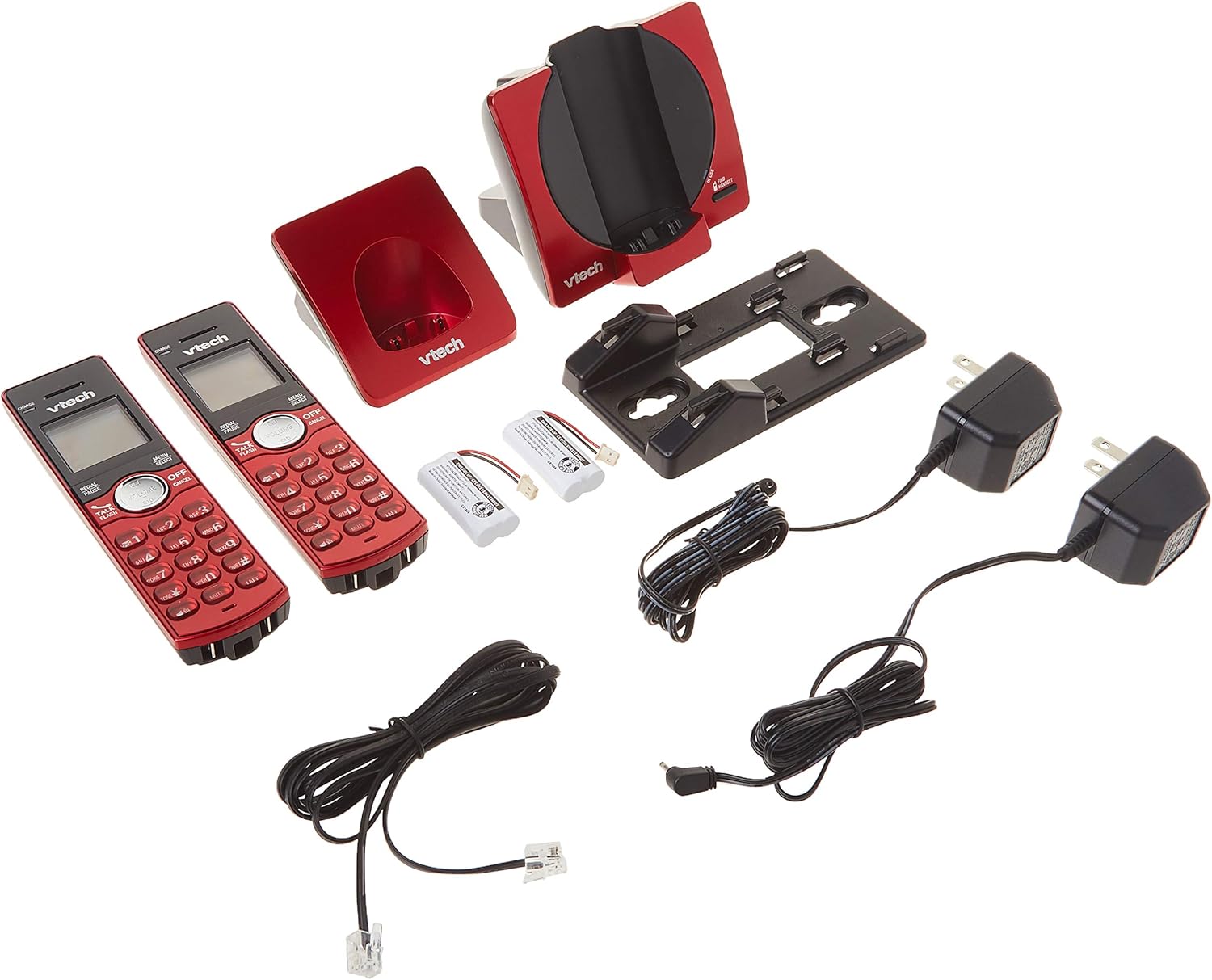
Image: All components of the VTech CS6919-26 Cordless Phone System, including the base unit, two handsets, two chargers, power adapters, battery packs, and telephone line cord.
Organizować coś
1. Instalacja baterii
- Otwórz pokrywę komory baterii z tyłu każdego telefonu.
- Podłącz wtyczkę akumulatora do gniazda wewnątrz komory.
- Place the battery pack with the label facing up, as indicated.
- Załóż z powrotem pokrywę komory baterii.
2. Podłączenie jednostki bazowej i ładowarki
- Podłącz jeden koniec przewodu telefonicznego do gniazda TEL LINE z tyłu jednostki bazowej.
- Podłącz drugi koniec przewodu telefonicznego do gniazdka telefonicznego w ścianie.
- Podłącz mniejszy koniec zasilacza jednostki bazowej do gniazda POWER z tyłu jednostki bazowej.
- Podłącz większy koniec zasilacza jednostki bazowej do gniazdka elektrycznego, którego nie można kontrolować za pomocą przełącznika ściennego.
- For each handset charger, plug the small end of its power adapter into the POWER jack on the back of the charger.
- Plug the large end of each charger power adapter into an electrical outlet not controlled by a wall switch.

Obraz: Tył view of the VTech CS6919-26 handsets and base unit, illustrating the battery compartments and connection ports for power and telephone line.
3. Ładowanie początkowe
Place each handset face forward in its respective base unit or charger. The CHARGE light on the handset will illuminate, indicating proper charging. Allow the handsets to charge for at least 16 hours before initial use to ensure optimal battery performance.

Image: Two VTech CS6919-26 cordless handsets, red in color, resting in their charging cradles. The handsets feature a black display and keypad with red buttons.
4. Rejestracja telefonu komórkowego
The handsets included in this package are pre-registered to the base unit. If a handset becomes unregistered or if you purchase additional handsets (up to 5 total), refer to the full user manual for registration procedures.
5. Montaż na ścianie (opcjonalnie)
The base unit is designed to be table-mountable or wall-mountable. Use the included wall mount bracket and follow the instructions provided in the full user manual for secure wall installation.
Instrukcja obsługi
Wykonywanie i odbieranie połączeń
- Zadzwonić: Naciskać ROZMOWA/BŁYSK or any dial key, then dial the phone number.
- Aby odebrać połączenie: Gdy telefon zadzwoni, naciśnij ROZMOWA/BŁYSK or any dial key.
- Aby zakończyć połączenie: Naciskać WYŁĄCZ/ANULUJ lub umieść słuchawkę w ładowarce.
Głośnik z funkcją pełnego dupleksu
Aby włączyć głośnik podczas połączenia, naciśnij przycisk GŁOŚNIK button. This allows both parties to speak and be heard simultaneously, enhancing conversation clarity.
Identyfikator dzwoniącego/oczekiwanie na połączenie
The handset display shows the caller's name and number (if available) for incoming calls. The system stores up to 30 caller ID entries. If you subscribe to call waiting, you will hear a tone when another call comes in while you are on the phone. Press BŁYSK aby przełączać się między połączeniami.
Książka telefoniczna
Store up to 50 names and numbers in the phonebook directory for quick dialing. Access the phonebook by pressing MENU/WYBIERZ and navigating to the Phonebook option.
Interkom między słuchawkami
To initiate an intercom call between two handsets, press INT on one handset and select the desired handset to call.
Konferencje telefoniczne
The system supports conferencing between an outside line and up to two cordless handsets. Refer to the full user manual for detailed instructions on setting up a three-way conference call.
Redial and Mute
- Ponowne wybieranie: Naciskać WYBIERZ PONOWNIE/PAUZA Do view 10 ostatnio wybieranych numerów. Naciśnij ROZMOWA/BŁYSK to dial a selected number.
- Niemy: Podczas połączenia naciśnij WYCISZ/USUŃ to temporarily silence your microphone. Press it again to unmute.
Kontrola głośności
Adjust the earpiece or speakerphone volume during a call by pressing the TOM buttons on the side of the handset.
Tryb cichy
Activate Quiet Mode to silence all ringers for a set period. This feature is useful for uninterrupted rest. Access this setting through the handset menu.
Blokowanie połączeń
Block unwanted numbers from ringing your phone. You can add numbers to the call block list through the handset menu.
Tryb ekologiczny
The system features ECO mode power-conserving technology, which automatically adjusts power consumption for optimal battery life and energy efficiency.
Konserwacja
Czyszczenie
Clean the phone and charger surfaces with a soft, slightly damp ściereczką. Nie używaj sprayów czyszczących ani silnych środków chemicznych, ponieważ mogą one uszkodzić wykończenie lub elementy elektryczne.
Pielęgnacja baterii
To maintain optimal battery life, fully charge the handsets regularly. If the phone will not be used for an extended period, remove the batteries from the handsets.
Rozwiązywanie problemów
If you experience issues with your phone system, try the following basic troubleshooting steps:
- Brak sygnału wybierania: Ensure the telephone line cord is securely plugged into both the base unit and the wall jack. Check that the base unit power adapter is properly connected to a working electrical outlet.
- Nie można wykonywać/odbierać połączeń: Verify that the handset batteries are charged. Ensure the handset is within range of the base unit. Check if the telephone line is active.
- Słaba jakość dźwięku: Zbliż się do jednostki bazowej. Sprawdź, czy nie występują zakłócenia ze strony innych urządzeń elektronicznych (np. routerów Wi-Fi, kuchenek mikrofalowych).
- Słuchawka nie ładuje się: Ensure the handset is correctly seated in the charger. Check that the charger's power adapter is plugged into a working outlet. Clean the charging contacts on both the handset and charger.
- Wyświetlacz jest pusty: Charge the handset battery. If the issue persists, the battery may need replacement.
For more detailed troubleshooting, refer to the comprehensive user manual or VTech's customer support resources.
Specyfikacje
| Numer modelu | CS6919-26 |
| Technologia | Technologia cyfrowa DECT 6.0 |
| W zestawie słuchawki | 2 (rozszerzalne do 5) |
| Wymiary (jednostka bazowa) | Około 4.49 x 7.09 x 5.98 cala |
| Waga przedmiotu | Około 1.65 funtów |
| Tworzywo | Plastikowy |
| Źródło zasilania | Elektryczny przewodowy |
| Typ baterii | Product Specific Rechargeable Batteries (included) |
| Pamięć identyfikacji dzwoniącego | 30 połączeń |
| Książka telefoniczna | 50 nazwisk i numerów |
Informacje o gwarancji
Specific warranty details for the VTech CS6919-26 Cordless Phone System are typically included with the product packaging or available on the official VTech webStrona internetowa. Aby uzyskać informacje dotyczące zakresu gwarancji, warunków i postanowień, zapoznaj się z tymi materiałami.
Wsparcie
For further assistance, technical support, or to access additional resources such as FAQs and detailed user guides, please visit the official VTech support website or contact their customer service department. Contact information can usually be found in the product packaging or on the VTech webstrona.


