1. Wprowadzenie
This manual provides comprehensive instructions for the safe and efficient operation, setup, and maintenance of your Sealey SDH70 Industrial Dehumidifier. Please read this manual thoroughly before operating the unit and retain it for future reference. The Sealey SDH70 is designed for professional use in various industrial and commercial environments to effectively control humidity levels.
2. Instrukcje bezpieczeństwa
Aby zmniejszyć ryzyko pożaru, porażenia prądem lub obrażeń, należy zawsze przestrzegać poniższych środków ostrożności.
- Upewnij się, że zasilanie jest zgodne z objtagpodane na tabliczce znamionowej osuszacza powietrza.
- Do not operate the unit with a damaged power cord or plug. Contact qualified service personnel for repair.
- Place the dehumidifier on a stable, level surface to prevent tipping.
- Maintain adequate clearance around the unit for proper airflow (at least 20 cm from walls or other objects).
- Nie wkładaj żadnych przedmiotów do kratki wlotowej lub wylotowej powietrza.
- Unplug the unit before cleaning, performing maintenance, or moving it.
- Urządzenie to nie jest przeznaczone do użytku przez osoby (w tym dzieci) o ograniczonej sprawności fizycznej, sensorycznej lub umysłowej, a także osoby nieposiadające odpowiedniego doświadczenia lub wiedzy, chyba że znajdują się one pod nadzorem osoby odpowiedzialnej za ich bezpieczeństwo lub otrzymały od niej instrukcje dotyczące korzystania z urządzenia.
- Nie należy używać osuszacza powietrza w pomieszczeniach, w których przechowywane są łatwopalne ciecze lub gazy.
- The unit contains R290 refrigerant. Servicing should only be performed by qualified personnel.
3. Koniec produktuview
Familiarize yourself with the components of your Sealey SDH70 Industrial Dehumidifier.

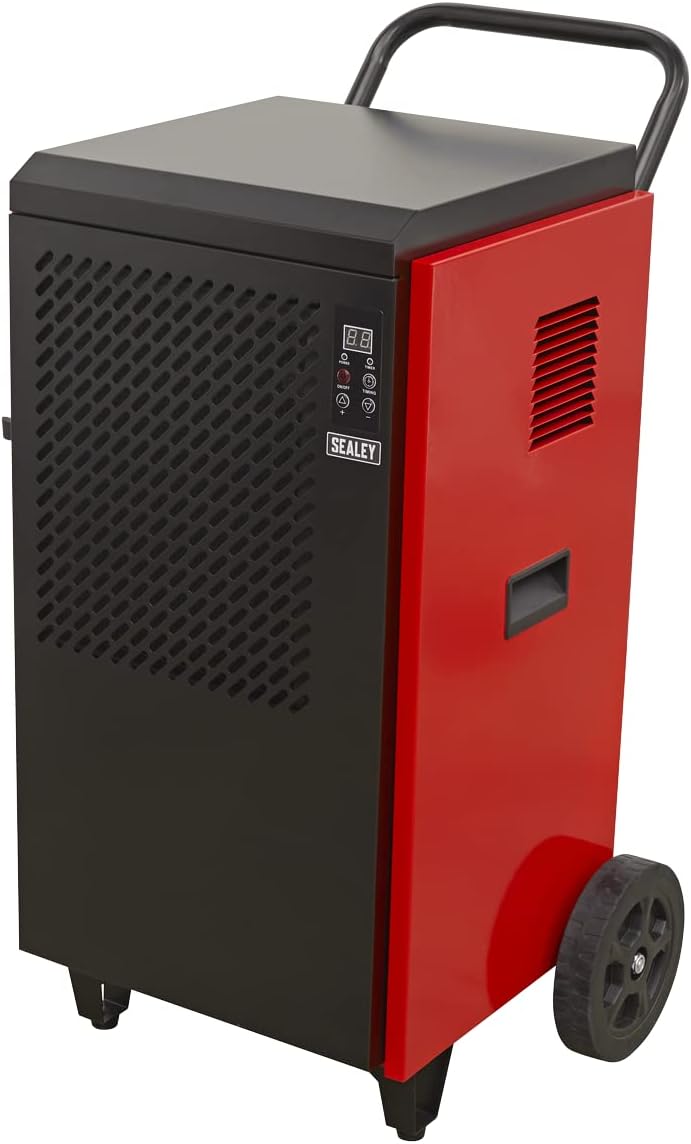
Rysunek 3.1: Przód view of the Sealey SDH70 Industrial Dehumidifier. This image shows the robust red and black casing, the control panel on the side, and the durable wheels for portability.
Rysunek 3.2: Strona view of the dehumidifier, highlighting the continuous drainage hose connection point at the bottom. The hose allows for direct water removal without manual emptying.

Rysunek 3.3: Szczegółowy view of the digital control panel. It features a digital display for humidity readings, power button, full tank indicator, timer indicator, and up/down buttons for setting desired humidity levels and timer functions.
4. Konfiguracja
- Rozpakowywanie: Carefully remove the dehumidifier from its packaging. Inspect for any shipping damage. Retain packaging for future transport or storage.
- Umieszczenie: Position the unit on a firm, level surface in the area requiring dehumidification. Ensure there is at least 20 cm (8 inches) of clear space around all sides of the unit to allow for proper air circulation. Do not block the air inlet or outlet.
- Konfiguracja drenażu: The SDH70 is designed for continuous drainage. Connect the provided drainage hose to the drainage outlet at the bottom of the unit. Route the hose to a suitable drain or collection container, ensuring it is sloped downwards to allow gravity flow. Ensure the hose is not kinked or blocked.
- Podłączenie zasilania: Podłącz przewód zasilający do uziemionego gniazdka elektrycznego o napięciu zgodnym z objtagwymagania jednostki.
5. Instrukcja obsługi
- Włączanie/wyłączanie: Naciśnij MOC button on the control panel to turn the unit on or off. The digital display will illuminate.
- Ustawianie pożądanej wilgotności:
- When the unit is running, the display shows the current room humidity.
- Naciśnij UP (▲) Lub W DÓŁ (▼) buttons to adjust the desired humidity level. The setting range is typically between 30% and 90% Relative Humidity (RH).
- The unit will operate until the set humidity level is reached, then cycle off. It will restart automatically if the humidity rises above the set level.
- Funkcja timera:
- Naciśnij CHRONOMETRAŻ button to set the auto-off timer. Each press increases the timer by one hour, up to 24 hours.
- The unit will automatically shut off after the set number of hours.
- Aby anulować minutnik, naciśnij CHRONOMETRAŻ button until "00" is displayed.
- Praca ciągła: For continuous dehumidification, set the desired humidity level to the lowest possible setting (e.g., 30% RH). The unit will run continuously, provided the drainage hose is properly set up.
6. Konserwacja
Regularna konserwacja zapewnia optymalną wydajność i wydłuża żywotność osuszacza powietrza.
- Czyszczenie filtra powietrza:

Rysunek 6.1: Demonstrates the removal of the washable air filter from the side of the dehumidifier for cleaning.
- The air filter should be cleaned every two weeks or more frequently depending on the operating environment.
- Unplug the unit before attempting to clean the filter.
- Locate the air filter access panel (typically on the side or rear). Remove the filter.
- Umyj filtr ciepłą wodą z mydłem. Dokładnie wypłucz i pozostaw do całkowitego wyschnięcia przed ponownym włożeniem. Nie używaj zmywarki.
- A clean filter ensures efficient operation and prevents dust buildup inside the unit.
- Czyszczenie powierzchni zewnętrznej: Wytrzyj obudowę urządzenia miękką, damp ściereczką. Nie używaj silnych środków chemicznych, środków ściernych ani rozpuszczalników.
- Składowanie: If storing the unit for an extended period, ensure it is clean and dry. Coil the power cord neatly. Store in a cool, dry place, preferably in its original packaging.
7. Rozwiązywanie Problemów
Przed skontaktowaniem się z obsługą klienta zapoznaj się z poniższą tabelą zawierającą listę typowych problemów i ich rozwiązania.
| Problem | Możliwa przyczyna | Rozwiązanie |
|---|---|---|
| Jednostka się nie włącza. | Brak zasilania; Luźny przewód zasilający; Zadziałał wyłącznik automatyczny. | Sprawdź gniazdko elektryczne; Upewnij się, że przewód zasilający jest prawidłowo podłączony; Zresetuj wyłącznik automatyczny. |
| Osuszacz nie zbiera wody. | Humidity setting too high; Room temperature too low; Air filter clogged; Drainage hose kinked/blocked. | Lower humidity setting; Ensure room temperature is above 5°C (41°F); Clean air filter; Check drainage hose for obstructions. |
| Urządzenie jest głośne. | Unit not level; Air filter clogged; Internal components loose. | Place on a level surface; Clean air filter; If noise persists, contact service. |
| Przepływ powietrza jest słaby. | Zatkany filtr powietrza; zablokowany wlot/wylot powietrza. | Clean air filter; Ensure no obstructions around air vents. |
8. Specyfikacje
Technical specifications for the Sealey SDH70 Industrial Dehumidifier.
| Funkcja | Szczegół |
|---|---|
| Marka | Sealey |
| Numer modelu | SDH70 |
| Kolor | Czerwony |
| Wymiary produktu (dł. x szer. x wys.) | Wymiary 49 x 60 x 105 cm |
| Waga przedmiotu | 46.7 kilograma |
| Pojemność | 70 Litres (dehumidification capacity per day) |
| Chłodziwo | R290 (ekologiczny) |

Rysunek 8.1: The R290 Eco Friendly logo, indicating the type of refrigerant used in the SDH70 dehumidifier.
9. Gwarancja i wsparcie
Your Sealey SDH70 Industrial Dehumidifier comes with a manufacturer's warranty.

Rysunek 9.1: Sealey 1 Year Guarantee logo, indicating the product warranty.
Sealey products are manufactured to a high standard and are guaranteed for 1 year from the date of purchase against manufacturing defects. This guarantee is subject to the terms and conditions available on the official Sealey website or from your retailer.
For technical support, spare parts, or warranty claims, please contact your authorized Sealey dealer or visit the official Sealey website for contact information. When contacting support, please have your model number (SDH70) and purchase details ready.


