1. Wprowadzenie
This manual provides essential information for the safe and effective use of the IFM IFC258 Inductive Proximity Sensor. The IFC258 is a 12mm diameter inductive proximity sensor designed for reliable detection of metallic objects without physical contact. It features a 3mm flush range, 3-wire DC PNP output, and an N.O. (Normally Open) configuration with an M12 connector.
Główne cechy obejmują:
- Compact 12mm diameter design.
- 3mm flush mounting detection range.
- 3-wire DC PNP output.
- Normally Open (N.O.) switching function.
- M12 connector for easy integration.
2. Informacje dotyczące bezpieczeństwa
Always observe the following safety precautions to prevent personal injury and damage to the sensor or connected equipment:
- Odłącz zasilanie: Ensure all power is disconnected from the circuit before installation, wiring, or maintenance.
- Wykwalifikowany personel: Installation and wiring should only be performed by qualified personnel familiar with electrical systems and industrial controls.
- Warunki środowiskowe: Nie należy wystawiać czujnika na działanie warunków wykraczających poza zakres temperatury i wilgotności przewidziane dla jego pracy.
- Prawidłowe okablowanie: Follow the wiring diagrams precisely. Incorrect wiring can damage the sensor or connected devices.
- Mechanical Stress: Avoid excessive mechanical stress, impact, or vibration on the sensor.
- Przeznaczenie: Use the sensor only for its intended purpose of detecting metallic objects.
3. Koniec produktuview
The IFC258 is an inductive proximity sensor, meaning it detects the presence of metallic objects without physical contact by generating an electromagnetic field. When a metallic object enters this field, it causes a change in the field, which the sensor detects, triggering its output.
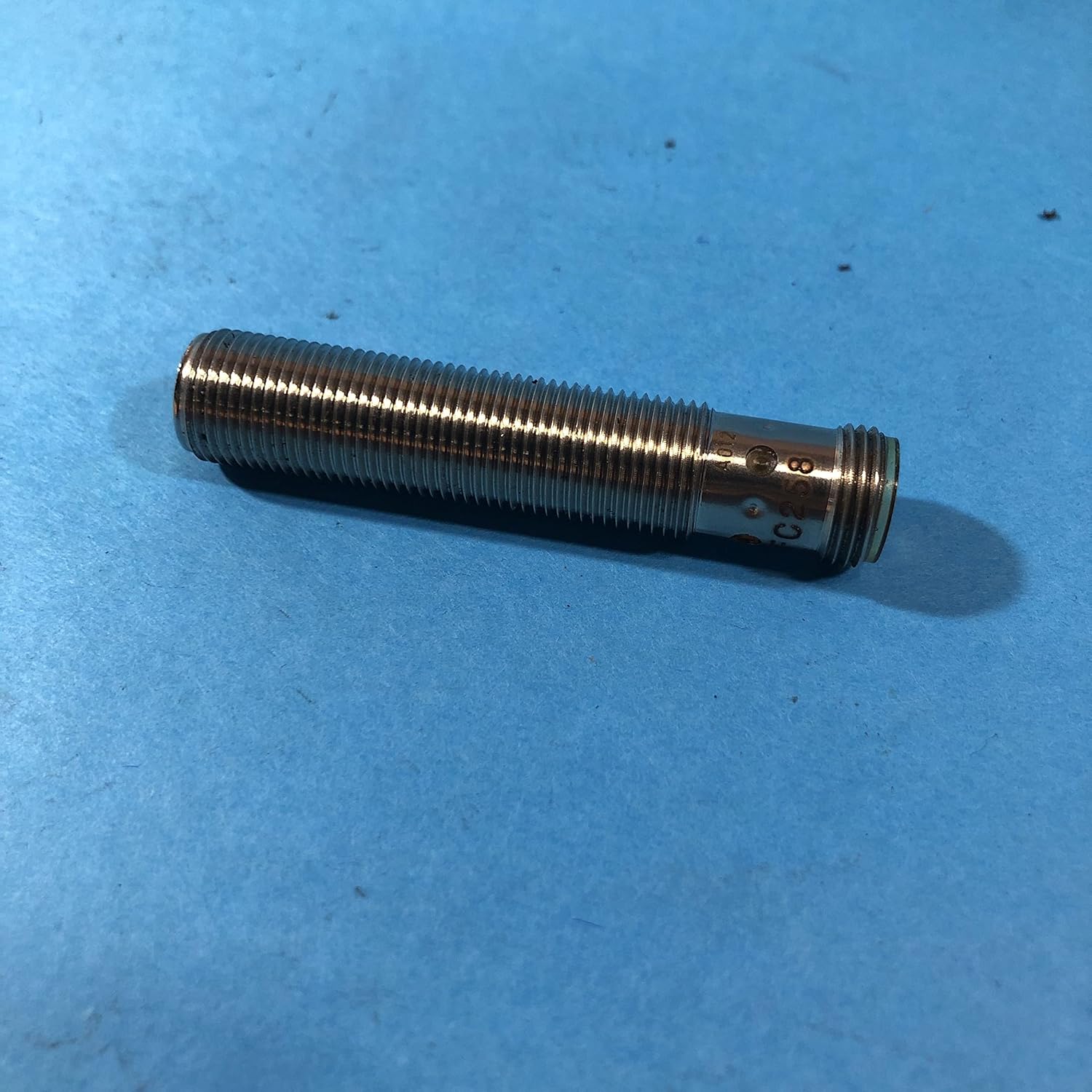
Figure 3.1: The IFM IFC258 Inductive Proximity Sensor. This image shows the cylindrical, threaded body of the sensor, which is metallic, indicating its robust construction and suitability for industrial environments. The M12 connector is visible at one end.

Figure 3.2: IFM IFC258 Inductive Proximity Sensor in its original sealed packaging. The packaging displays the IFM logo, model number IFC258, and "Made in Germany" along with various certifications like CE and UL Listed, indicating compliance with international standards.
4. Konfiguracja i instalacja
4.1 Montaż
The IFC258 sensor has a 12mm diameter threaded body for easy mounting. It is designed for flush mounting, meaning it can be embedded directly into a metallic surface without affecting its performance, provided the surrounding material is also metallic and within the specified limits.
- Select a mounting location where the sensor can reliably detect the target object without interference from other metallic parts.
- Drill a 12mm hole in the mounting surface. Ensure the hole is clean and free of burrs.
- Insert the sensor into the hole and secure it using the provided nuts (if applicable) or by threading it into a compatible mounting bracket.
- Ensure the sensing face is flush with the mounting surface for optimal performance in flush-mount applications.
4.2 Okablowanie
The IFC258 is a 3-wire DC PNP sensor with an M12 connector. Refer to the wiring diagram below for proper connection. Always ensure power is disconnected before wiring.
- Brown Wire (Pin 1): Connect to +DC (e.g., +10-30V DC).
- Blue Wire (Pin 3): Connect to -DC (0V / Ground).
- Black Wire (Pin 4): Connect to Load (Output). This is the Normally Open (N.O.) output.
The M12 connector provides a secure and reliable connection. Ensure the connector is fully tightened to prevent environmental ingress.
5. Instrukcja obsługi
Once properly installed and wired, the IFC258 sensor operates automatically. It continuously emits an electromagnetic field from its sensing face. When a metallic object enters this field within the 3mm detection range, the sensor's internal circuitry detects the change and activates its output.
- Zasada wykrywania: Inductive sensors detect all metals (ferrous and non-ferrous). The detection distance may vary slightly depending on the type and size of the metal.
- Normally Open (N.O.) Output: In its normal state (no object detected), the output (black wire) is open (no voltage). When a metallic object is detected within the sensing range, the output switches to a high state (PNP, providing positive voltage to the load).
- Prędkość docelowa: The sensor is designed for high-speed detection, suitable for various industrial automation applications.
6. Konserwacja
The IFM IFC258 sensor is designed for long-term, maintenance-free operation. However, periodic inspection can help ensure optimal performance and longevity.
- Czyszczenie: Keep the sensing face clean and free from excessive dirt, dust, or metallic chips. Use a soft, dry cloth. Avoid abrasive cleaners or solvents.
- Kontrola kabli i złączy: Periodically check the M12 connector and cable for signs of damage, wear, or loose connections. Ensure the connector is securely fastened.
- Bezpieczeństwo montażu: Verify that the sensor remains securely mounted and has not shifted, which could affect its detection accuracy.
- Kontrola środowiskowa: Ensure the operating environment remains within the sensor's specified limits for temperature and humidity.
7. Rozwiązywanie Problemów
Jeśli czujnik nie działa zgodnie z oczekiwaniami, należy rozważyć wykonanie następujących czynności rozwiązywania problemów:
- No Detection / Sensor Always OFF:
- Check power supply: Ensure correct voltage (10-30V DC) is applied to the brown and blue wires.
- Verify wiring: Confirm the black output wire is correctly connected to the load and the load is properly grounded.
- Check target material: Ensure the object being detected is metallic.
- Check detection distance: Is the target object within the 3mm sensing range?
- Inspect sensing face: Is it clean and free from obstructions?
- Sensor damage: Check for visible damage to the sensor body or cable.
- Sensor Always ON / False Detection:
- Check for nearby metallic objects: Is there any unintended metallic material within the sensing range?
- Mounting: Ensure the sensor is correctly flush-mounted and not detecting its own mounting hardware if not designed for non-flush mounting.
- Electrical noise: Excessive electrical noise in the environment can sometimes cause erratic behavior. Ensure proper grounding and shielding if necessary.
- Działanie przerywane:
- Loose connections: Check all wiring connections, especially the M12 connector, for tightness.
- Vibration: Excessive vibration might cause the target to move in and out of the sensing range or affect internal components.
- Power fluctuations: Ensure a stable power supply.
If these steps do not resolve the issue, contact IFM technical support for further assistance.
8. Specyfikacje
| Parametr | Wartość |
|---|---|
| Numer modelu | IFC258 |
| Typ | Indukcyjny czujnik zbliżeniowy |
| Średnica | 12mm |
| Zakres wykrywania | 3mm (flush) |
| Typ wyjścia | PNP, Normally Open (N.O.) |
| Okablowanie | 3-wire DC |
| Połączenie | Złącze M12 |
| Wymiary produktu | 0.31 x 0.31 x 0.31 cal (w przybliżeniu, zgodnie z danymi produktu) |
| Waga przedmiotu | 1 funt |
| Producent | Efektor IFM |
9. Gwarancja i wsparcie
For information regarding the warranty period and terms for your IFM IFC258 Inductive Proximity Sensor, please refer to the official IFM website or contact your local IFM distributor. Warranty terms typically cover defects in materials and workmanship under normal use.
For technical support, troubleshooting assistance beyond this manual, or spare parts inquiries, please contact IFM technical support directly. Contact details can usually be found on the official IFM webStrona (www.ifm.com) or through your product supplier.


