1. Wprowadzenie
Dziękujemy za zakupasing the Intex IT-11500 SUF Multimedia Speaker system. This 2.0 channel speaker system is designed to provide high-quality audio for your entertainment needs. It features multiple connectivity options including AUX, USB, SD/MMC card playback, and a digital FM radio. The system also includes a cordless microphone for added versatility and a fully functional remote control for convenient operation. Please read this manual carefully before using the product to ensure proper setup and optimal performance.
2. Zawartość opakowania
Proszę sprawdzić zawartość opakowania po rozpakowaniu. Jeśli brakuje któregokolwiek elementu lub jest on uszkodzony, prosimy o natychmiastowy kontakt ze sprzedawcą.
- Main Speaker Unit (Subwoofer)
- Głośniki satelitarne (2 szt.)
- Cordless Microphone
- Zdalne sterowanie
- Audio Input Cable (AUX)
- Przewód zasilający
- Instrukcja obsługi
3. Funkcje produktu
- 2.0 Channel multimedia speaker with Cordless MIC
- AUX audio input compatible with DVD/PC/LCD TV
- MP3 playability with USB/SD/MMC
- Digital FM playability
- Fully function smart remote control
- Wyświetlacz LED
- Frequency Response : 50Hz - 20KHz
- Stosunek sygnał/szum: ≥ 60dB
- Separacja: ≥ 40dB
- Bass Up/down : ±15dB
4. Konfiguracja
4.1 Rozpakowywanie i umieszczanie
Carefully remove all components from the packaging. Place the main speaker unit on a stable, flat surface. Position the satellite speakers to the left and right of your listening area for optimal stereo separation. Ensure adequate ventilation around the units.
4.2 Podłączanie głośników
Connect the satellite speakers to the corresponding output jacks on the rear panel of the main speaker unit. Ensure the connections are secure.
4.3 Connecting Audio Source (AUX)
To connect an external audio device (e.g., DVD player, PC, TV), use the provided audio input cable. Insert one end into the AUX input jack on the main speaker unit and the other end into the audio output jack of your external device.
4.4 Połączenie zasilania
Connect the power cord to the AC power input on the rear of the main speaker unit, then plug the other end into a standard AC 200V ~ 240V / 50Hz power outlet.
4.5 Pierwsze włączenie zasilania
After all connections are made, switch on the power button located on the main speaker unit. The LED display will illuminate.
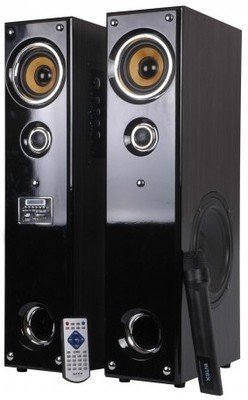
Obraz: Przód view of the Intex IT-11500 SUF Multimedia Speaker, showing the main unit with control panel and LED display, and two satellite speakers.
5. Instrukcja obsługi
5.1 Włączanie/wyłączanie zasilania
Naciśnij MOC przycisk na jednostce głównej lub pilocie, aby włączyć lub wyłączyć system.
5.2 Wybór trybu
Naciśnij TRYB button on the main unit or remote control to cycle through available input modes: AUX, USB, SD/MMC, and FM.
5.3 Regulacja głośności
Dostosuj głośność główną za pomocą GŁOŚNOŚĆ +/- buttons on the main unit or remote control. Bass levels can be adjusted using the BAS +/- controls on the remote.
5.4 USB/SD/MMC Playback
Insert a USB drive or an SD/MMC card into the respective slot on the main unit. The system will automatically switch to USB/SD/MMC mode and begin playing compatible MP3 audio files. Użyj ODTWÓRZ/PAUZA, POPRZEDNI, I NASTĘPNY przyciski do sterowania odtwarzaniem.
5.5 Obsługa radia FM
W trybie FM naciśnij SKANDOWAĆ button on the remote control to automatically scan and save available FM stations. Use the POPRZEDNI I NASTĘPNY przyciski do poruszania się po zapisanych stacjach.
5.6 Using the Cordless Microphone
Ensure the cordless microphone has fresh batteries. Turn on the microphone. The microphone's audio will be mixed with the main audio source. Adjust microphone volume if available on the main unit or remote.
5.7 Funkcje zdalnego sterowania
The remote control provides full functionality for the speaker system. Refer to the diagram on the remote for specific button functions, including power, mode, volume, track control, FM scan, and bass adjustment.
6. Konserwacja
6.1 Czyszczenie
Wipe the speaker surfaces with a soft, dry cloth. Do not use abrasive cleaners, waxes, or solvents as they may damage the finish. Ensure the unit is powered off and unplugged before cleaning.
6.2 Przechowywanie
Jeśli urządzenie będzie przechowywane przez dłuższy czas, należy odłączyć je od gniazdka zasilania i przechowywać w chłodnym, suchym miejscu, z dala od bezpośredniego światła słonecznego i ekstremalnych temperatur.
6.3 Środki ostrożności
- Nie wystawiaj urządzenia na działanie wody ani nadmiernej wilgoci.
- Nie otwierać głośnika casing; wewnątrz nie ma żadnych części nadających się do samodzielnej naprawy przez użytkownika.
- Trzymać z dala od źródeł ciepła i bezpośredniego światła słonecznego.
- Aby zapobiec przegrzaniu, należy zapewnić odpowiednią wentylację.
7. Rozwiązywanie Problemów
| Problem | Możliwa przyczyna | Rozwiązanie |
|---|---|---|
| Brak zasilania | Przewód zasilający nie jest podłączony; gniazdko elektryczne jest uszkodzone; wyłącznik zasilania jest wyłączony. | Sprawdź podłączenie przewodu zasilającego; Spróbuj użyć innego gniazdka; Upewnij się, że wyłącznik zasilania jest w pozycji WŁ. |
| Brak dźwięku | Volume too low; Incorrect input mode; Audio cable loose/faulty; Mute activated. | Increase volume; Select correct input mode (AUX, USB, FM); Reconnect audio cable; Deactivate mute. |
| Zniekształcony dźwięk | Volume too high; Source audio quality poor; Speaker placement. | Reduce volume; Check audio source; Adjust speaker position. |
| Pilot nie działa | Baterie są rozładowane; Przeszkoda między pilotem a urządzeniem; Czujnik pilota jest zablokowany. | Replace batteries; Remove obstructions; Ensure clear line of sight to sensor. |
| FM reception poor | Słaby sygnał; antena nie jest wysunięta. | Adjust antenna position; Rescan for stations. |
8. Specyfikacje
| Typ głośnika | Multimedia |
| Konfiguracja kanałów | 2.0 |
| Odpowiedź częstotliwościowa | 50Hz - 20KHz |
| Stosunek sygnału do szumu | ≥ 60dB |
| Rozdzielenie | ≥ 40dB |
| Bas w górę/w dół | ±15dB |
| Wrażliwość | <500mV |
| Odbiornik częstotliwości FM | 88MHz do 108MHz |
| Zasilacz | AC 200 V ~ 240 V / 50 Hz |
| Technologia łączności | USB |
| Metoda kontroli | Zdalny |
| Waga przedmiotu | 17 kilogramów |
| Numer modelu | 1112-1150-0 |
9. Gwarancja i wsparcie
For warranty information, please refer to the warranty card included with your product or contact your local Intex customer service. Keep your purchase receipt as proof of purchase. For technical support or service inquiries, please visit the official Intex webodwiedź witrynę lub skontaktuj się z infolinią obsługi klienta.
Uwaga: Dane techniczne mogą ulec zmianie bez wcześniejszego powiadomienia w celu ulepszenia produktu.


