Wstęp
Dziękujemy za zakupasing the Samsung 34-Inch Curved Screen LED-Lit Monitor S34E790C. This monitor features an ultra WQHD resolution (3440x1440) and a 21:9 curved panel designed to provide an immersive viewing experience. It includes an ergonomic, height-adjustable stand with tilt functionality and a 4-port USB hub for convenient peripheral access. This manual provides essential information for setting up, operating, maintaining, and troubleshooting your monitor.

Rycina 1: Przód view of the Samsung S34E790C monitor, showcasing its curved display and sleek design.
Organizować coś
1. Rozpakowywanie
Ostrożnie wyjmij wszystkie elementy z opakowania. Upewnij się, że znajdują się w nim następujące elementy:
- Samsung 34-Inch Curved Screen LED-Lit Monitor
- Height Adjustable Stand With Tilt Functionality
- Kabel zasilający
- Kabel HDMI (może się różnić w zależności od regionu)
- Kabel DisplayPort (może się różnić w zależności od regionu)
- Kabel przesyłania danych USB 3.0
2. Montaż stojaka
Attach the height-adjustable stand to the monitor panel. Ensure the stand is securely fastened according to the instructions provided in the quick setup guide included in the box. Place the assembled monitor on a stable, flat surface.
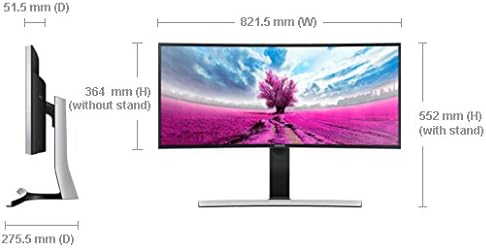
Figure 2: Dimensions of the Samsung S34E790C monitor, illustrating its width, height (with and without stand), and depth.
3. Connecting to a Source Device
Connect your PC, game console, Blu-ray player, or other compatible device to the monitor using the available ports.
- Połączenie HDMI: Za pomocą kabla HDMI podłącz monitor do wyjścia HDMI swojego urządzenia.
- Połączenie DisplayPort: Use a DisplayPort cable to connect the monitor to your device's DisplayPort output.
- Rozdzielacz USB: Connect the monitor's USB 3.0 upstream port to your computer using the provided USB 3.0 upstream cable to enable the 4-port USB hub for peripherals.
4. Włącz zasilanie
Connect the power cable to the monitor and then to a power outlet. Press the power button on the monitor to turn it on.
Instrukcja obsługi
1. Podstawowe sterowanie
The monitor features an intuitive joystick-style menu button, typically located on the rear or bottom-right of the display. This button allows you to navigate the On-Screen Display (OSD) menu to adjust various settings.
2. Ustawienia wyświetlania
Access the OSD menu to configure display settings:
- Rezolucja: The native resolution is 3440x1440 (WQHD). Ensure your connected device is set to this resolution for optimal clarity.
- Proporcje obrazu: The monitor features a 21:9 aspect ratio.
- Jasność/Kontrast: Adjust these settings to your preference. Note that in PC mode, some image adjustments might be controlled via your computer's graphics settings.
- Tryby obrazu: Select from various preset picture modes (e.g., Standard, Custom, Cinema) to optimize viewing for different content types.
3. Picture-by-Picture (PBP) Functionality
The S34E790C supports Picture-by-Picture (PBP), allowing you to view content from two different sources simultaneously on the screen. This feature is ideal for multitasking or comparing content side-by-side.
- Connect two source devices to the monitor (e.g., one via HDMI, one via DisplayPort).
- Access the OSD menu and navigate to the PBP settings.
- Select the desired input sources for each side of the screen.
- Adjust the layout as needed.
4. Regulacje ergonomiczne
Podstawka pod monitor umożliwia regulację wysokości i nachylenia, aby zoptymalizować viewing comfort and reduce strain.
- Regulacja wysokości: Gently push or pull the monitor panel up or down to adjust its height.
- Regulacja nachylenia: Tilt the monitor panel forward or backward to find your preferred viewkąt.
Konserwacja
1. Czyszczenie ekranu
Aby wyczyścić ekran, delikatnie przetrzyj go miękką, niepozostawiającą włókien ściereczką. W przypadku uporczywych zabrudzeń delikatnie przetrzyj.ampPrzetrzyj ściereczkę wodą lub specjalnym środkiem do czyszczenia ekranów. Unikaj stosowania silnych środków chemicznych, materiałów ściernych ani spryskiwania ekranu płynem bezpośrednio.
2. Czyszczenie monitora Casing
Wytrzyj monitor casinPrzetrzyj miękką, suchą ściereczką. W razie potrzeby użyj lekkoamp płótno. Nie używaj rozpuszczalników ani ściernych środków czyszczących.
3. Ogólna opieka
- Unikaj umieszczania ciężkich przedmiotów na monitorze i jego kablach.
- Do not expose the monitor to direct sunlight, high temperatures, or excessive humidity.
- Aby zapobiec przegrzaniu, należy zapewnić odpowiednią wentylację wokół monitora.
Rozwiązywanie problemów
Jeśli masz problemy z monitorem, zapoznaj się z poniższymi typowymi procedurami rozwiązywania problemów:
- Brak zasilania: Upewnij się, że kabel zasilający jest prawidłowo podłączony zarówno do monitora, jak i do gniazdka elektrycznego. Sprawdź, czy gniazdko elektryczne działa.
- Brak sygnału: Verify that the video cable (HDMI or DisplayPort) is correctly connected to both the monitor and the source device. Ensure the correct input source is selected on the monitor via the OSD menu. Check if the source device is powered on and outputting a signal.
- Problemy z wyświetlaniem (np. migotanie, zniekształcony obraz): Check the video cable for damage. Try a different cable or port. Ensure your computer's graphics drivers are up to date. Adjust the resolution and refresh rate settings on your computer to match the monitor's specifications.
- Problemy z dźwiękiem: If using the monitor's built-in speakers, ensure the volume is not muted and is set to an audible level in both the monitor's OSD and your computer's sound settings.
- Picture-by-Picture (PBP) Not Working: Confirm both source devices are connected and active. Ensure the PBP function is correctly configured in the OSD menu.
For more complex issues or persistent problems, please refer to the full user manual available on the Samsung support webodwiedź witrynę lub skontaktuj się z obsługą klienta firmy Samsung.
Specyfikacje
| Funkcja | Specyfikacja |
|---|---|
| Numer modelu | S34E790C |
| Rozmiar ekranu | 34 cali |
| Rozdzielczość ekranu | 3440 x 1440 pikseli (WQHD) |
| Proporcje obrazu | 21:9 |
| Typ panelu | Curved LED-Lit |
| Łączność | HDMI, DisplayPort, 4x USB 3.0 Ports |
| Waga przedmiotu | 22 funty (około 9.98 kg) |
| Wymiary produktu (dł. x szer. x wys.) | 32.37 x 10.84 x 21.73 cala (82.22 x 27.53 x 55.19 cm) |
| Kolor | Black High Glossy |
| Producent | Samsung IT |
| Pierwsza dostępna data | 2 sierpnia 2013 r. |
Gwarancja i wsparcie
Your Samsung S34E790C monitor is covered by a limited warranty. For detailed information regarding warranty terms, conditions, and duration, please refer to the warranty card included with your product or visit the official Samsung support webstrona.
For technical assistance, product registration, or to download the latest drivers and software, please visit the Wsparcie Samsunga webstrona lub skontaktuj się bezpośrednio z obsługą klienta firmy Samsung.


