Wstęp
This manual provides comprehensive instructions for the setup, operation, and maintenance of your Genius SW-2.1 355 Speaker System. Please read this manual thoroughly before using the product to ensure proper functionality and to maximize your listening experience.
Informacje dotyczące bezpieczeństwa
Aby zapobiec uszkodzeniu urządzenia lub obrażeniom ciała, należy przestrzegać następujących środków ostrożności:
- Nie wystawiaj głośników na działanie wody i wilgoci.
- Unikaj umieszczania głośników w pobliżu źródeł ciepła lub w bezpośrednim świetle słonecznym.
- Aby zapobiec przegrzaniu, należy zapewnić odpowiednią wentylację wokół subwoofera.
- Używaj wyłącznie zasilacza dostarczonego wraz z urządzeniem.
- Nie próbuj samodzielnie otwierać ani naprawiać urządzenia. Wszelkie prace serwisowe zleć wykwalifikowanemu personelowi.
- Przechowywać w miejscu niedostępnym dla dzieci.
Zawartość opakowania
Sprawdź, czy w opakowaniu znajdują się wszystkie elementy:
- 1 x jednostka subwoofera
- 2 x głośniki satelitarne
- 1 x kabel wejściowy audio (gniazdo stereo 3.5 mm)
- 1 x zasilacz
- 1 x Instrukcja obsługi (ten dokument)
Produkt ponadview
The Genius SW-2.1 355 Speaker System consists of a subwoofer and two satellite speakers designed to deliver clear audio and powerful bass for your multimedia needs.
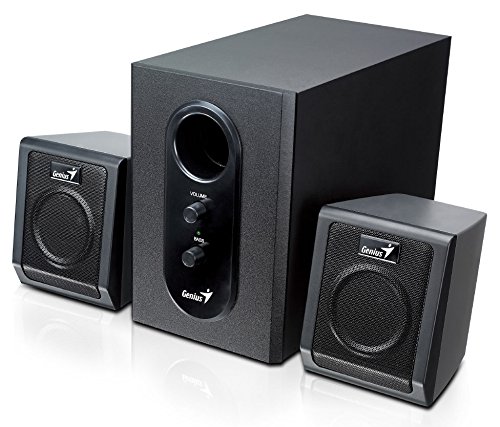
This image displays the Genius SW-2.1 355 Speaker System. It features a central, larger subwoofer unit with volume and bass control knobs on its front panel, and two smaller satellite speakers positioned on either side. All components are black.
Składniki:
- Głośnik niskotonowy: The main unit housing the bass driver and control panel.
- Głośniki satelitarne: Two compact speakers for mid-range and high-frequency audio.
- Panel sterowania: Located on the subwoofer, featuring Volume and Bass adjustment knobs.
Organizować coś
- Pozycjonowanie głośników: Place the subwoofer on the floor or a sturdy surface. Position the satellite speakers on either side of your listening area, facing towards you for optimal stereo separation.
- Connecting Satellite Speakers: Connect the cables from the two satellite speakers to the corresponding output jacks on the rear of the subwoofer unit. Ensure a secure connection.
- Connecting Audio Source: Connect one end of the 3.5mm audio input cable to the "Audio In" jack on the subwoofer. Connect the other end to the audio output jack (e.g., headphone jack) of your computer, MP3 player, smartphone, or other audio source.
- Podłączanie zasilania: Plug the power adapter into the DC input jack on the subwoofer. Then, plug the power adapter into a standard electrical outlet.
- Włączanie: Turn on the speaker system using the power switch, usually integrated with the volume knob.
Działanie
- Włączanie/wyłączanie zasilania i regulacja głośności: The main knob on the subwoofer controls both power and overall volume. Rotate clockwise to turn on and increase volume; rotate counter-clockwise to decrease volume and turn off.
- Regulacja basów: Use the "Bass" knob on the subwoofer to adjust the level of low-frequency sound. Rotate clockwise to increase bass, and counter-clockwise to decrease it, according to your preference.
- Głośność źródła dźwięku: For optimal sound quality, set the volume on your audio source (computer, phone, etc.) to about 75% and then use the speaker system's volume control for fine adjustments.
Konserwacja
- Czyszczenie: Do czyszczenia powierzchni głośników należy używać miękkiej, suchej ściereczki. Nie należy używać płynnych środków czyszczących ani materiałów ściernych.
- Składowanie: Jeśli głośniki będą przechowywane przez dłuższy czas, odłącz je od zasilania i przechowuj w chłodnym, suchym miejscu.
- Zarządzanie kablami: Aby zapobiec uszkodzeniom, należy upewnić się, że kable nie są splątane ani ściśnięte.
Rozwiązywanie problemów
| Problem | Możliwa przyczyna | Rozwiązanie |
|---|---|---|
| Brak dźwięku |
|
|
| Zniekształcony dźwięk |
|
|
| Słaby bas |
|
|
Specyfikacje
| Funkcja | Szczegół |
|---|---|
| Nazwa modelu | SW-2.1 355 |
| Typ głośnika | 2.1 Channel Multimedia Speaker System (Bookshelf, Satellite, Subwoofer) |
| Całkowita moc wyjściowa | 10 Watts RMS (5W Subwoofer + 2.5W x 2 Satellites) |
| Tworzywo | Wood (Subwoofer) |
| Technologia łączności | Przewodowy (wejście audio 3.5 mm) |
| Kompatybilne urządzenia | MP3 Player, Personal Computer, Smartphones, Tablets, Televisions |
| Sterownica | Głośność, bas |
| Źródło zasilania | DC |
| Waga przedmiotu | 2.78 kilogramów |
| Wymiary opakowania | Wymiary 39.6 x 25 x 18.4 cm |
Gwarancja i wsparcie
Genius products are designed for reliability and performance. For information regarding warranty coverage, technical support, or service inquiries, please refer to the warranty card included with your product or visit the official Genius webZachowaj paragon jako dowód zakupu.


