1. Wprowadzenie
The Ematic AT103B Digital TV Converter Box is designed to enable your television without a built-in digital tuner to receive new digital broadcasts. This device enhances your viewing experience by offering features such as an electronic program guide, parental controls, real-time and scheduled recording capabilities, and multimedia playback via a USB connection. This manual provides detailed instructions to help you set up and operate your converter box effectively.
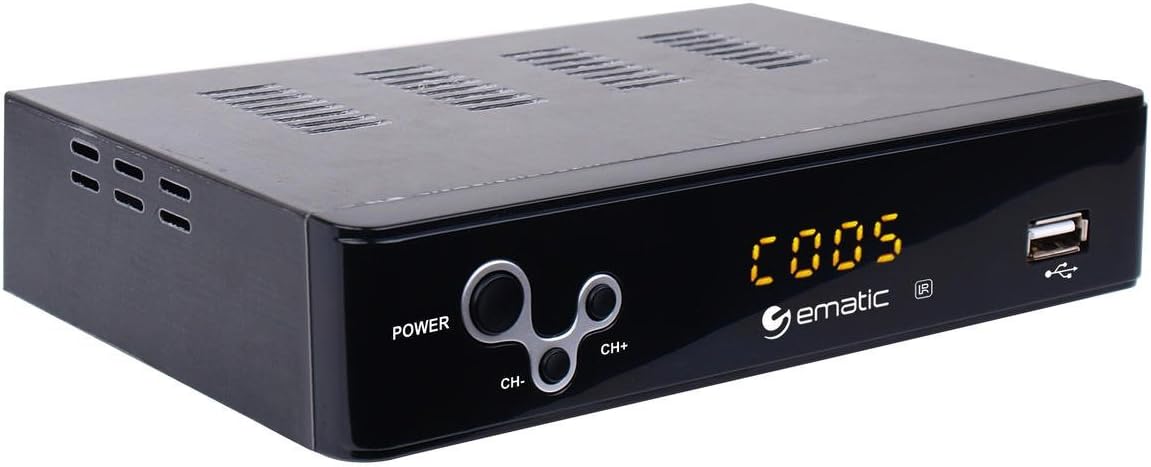
Figure 1: Ematic AT103B Digital TV Converter Box, front view.
2. Co znajduje się w pudełku
Sprawdź, czy w przesyłce znajdują się wszystkie elementy wymienione poniżej:
- Ematic AT103B Digital TV Converter Box
- Full Function Remote Control (requires 2 AA batteries, not included)
- Kabel HDMI
- AV Cable (RCA)
- Kabel odbiornika podczerwieni
- USB-C Cable (for power)
- Zasilacz
- Instrukcja obsługi (ten dokument)
- Przewodnik szybkiej instalacji
- Karta gwarancyjna

Figure 2: Ematic AT103B Digital TV Converter Box with remote control, HDMI cable, AV cable, IR receiver, USB-C cable, and power adapter.
Wideo z rozpakowywania
Video 1: Unboxing of a similar digital converter box, demonstrating typical package contents and initial presentation.
3. Przewodnik konfiguracji
3.1 Podłączanie skrzynki konwertera
Follow these steps to connect your Ematic AT103B Digital TV Converter Box to your television and antenna:
- Podłącz antenę: Connect your outdoor or indoor antenna to the 'RF IN' port on the back of the converter box.
- Połącz z telewizorem:
- HDMI (Recommended for HD): Use the provided HDMI cable to connect the 'HDMI' port on the converter box to an available HDMI input on your TV.
- AV (RCA for Standard Definition): Use the provided AV cable (red, white, yellow) to connect the 'L-AUDIO-R' and 'VIDEO' ports on the converter box to the corresponding AV input ports on your TV.
- Podłącz odbiornik podczerwieni: Plug the IR receiver cable into the 'IR' port on the converter box. Position the IR receiver in a location where it has a clear line of sight to your remote control.
- Podłącz zasilanie: Connect the USB-C power cable to the converter box and then plug the power adapter into a wall outlet.
- Włączanie: Turn on your TV and the converter box. Select the correct input source (HDMI or AV) on your TV that corresponds to the connection you made.

Rysunek 3: Tył view of the converter box with various input/output ports.
3.2 Początkowe skanowanie kanałów
After connecting your converter box, you need to scan for available digital channels:
- Ensure your TV is on the correct input source for the converter box.
- On the converter box remote, press the MENU przycisk.
- Navigate to the 'Channel Search' or 'Program' menu using the arrow keys on the remote.
- Select 'Auto Search' or 'Auto Tune' and press OK. The converter box will now scan for all available digital channels in your area. This process may take several minutes.
- Once the scan is complete, the converter box will automatically tune to the first available channel.
Setup and Channel Search Video
Video 2: Demonstrates wiring connections, manual search, and automated search functions for a digital converter box.
4. Instrukcja obsługi
4.1 Podstawowa telewizja Viewwchodzenie
- Kanał w górę/w dół: Użyj CH+ I CH- Przyciski na pilocie do zmiany kanałów.
- Regulacja głośności: Użyj Objętość + I TOM- Przyciski do regulacji głośności.
- Elektroniczny przewodnik po programach (EPG): Naciśnij EPG przycisk do view program information for upcoming broadcasts.
- Informacja: Naciśnij INFORMACJE button to display current channel and program details.

Figure 4: Remote control for the Ematic AT103B Digital TV Converter Box.
4.2 Recording Features (PVR/DVR)
The converter box supports recording TV programs to a USB storage device (not included).
- Nagrywanie w czasie rzeczywistym: Podczas oglądania programu naciśnij przycisk REK Naciśnij przycisk na pilocie, aby natychmiast rozpocząć nagrywanie. Naciśnij ZATRZYMYWAĆ SIĘ i wtedy OK zakończyć i zapisać nagranie.
- Zaplanowane nagrywanie: Naciśnij EPG button, select the program you wish to record, and press OK. Follow the on-screen prompts to set the recording schedule (date, time, repeat options).
- Odtwarzanie nagrań: Naciśnij PVR or USB button on the remote, navigate to the 'PVR' section, and select your desired recording from the list.
4.3 Odtwarzanie multimediów
Możesz odtwarzać różne media filez urządzenia pamięci masowej USB:
- Włóż dysk flash USB lub zewnętrzny dysk twardy do portu USB znajdującego się z przodu konwertera.
- Naciśnij USB przycisk na pilocie.
- Select the media type (Music, Photo, Movie) and navigate to your files. naciskać OK grać.
4.4 Kontrola rodzicielska
To restrict access to certain channels or programs:
- Naciśnij MENU button and navigate to 'Program Edit'.
- Enter the default password (usually '000000' or '888888').
- Select the channel you wish to lock and press the ZAMEK button (often a colored button on the remote).
4.5 Favorite Channel List
Create a personalized list of your preferred channels:
- Naciśnij MENU button and navigate to 'Program Edit'.
- Wprowadź hasło.
- Select the channel you want to add to favorites and press the ULUBIONY button (often a colored button). Choose a favorite type (e.g., Movie, News, Sport).
- To access your favorite channels, press the ULUBIONY button during normal viewing and select your desired category.
4.6 Timeshift Function
The timeshift function allows you to pause live television broadcasts. A USB storage device is required for this feature.
- Podczas oglądania telewizji na żywo naciśnij przycisk PAUZA button on the remote. The program will pause and begin recording to the connected USB device.
- Naciskać GRAĆ wznowić viewing from where you paused.
- Możesz użyć PRZEWIJAĆ I SZYBKO PRZEWIJAJ buttons to navigate within the buffered content.

Figure 5: The timeshift function allows pausing live TV.
5. Konserwacja
- Czyszczenie: Do czyszczenia zewnętrznej części obudowy konwertera należy używać miękkiej, suchej ściereczki. Nie należy używać płynnych środków czyszczących ani aerozoli.
- Wentylacja: Ensure the converter box has adequate ventilation. Do not block any ventilation openings.
- Moc: Odłącz zasilacz od gniazdka ściennego, jeśli urządzenie nie będzie używane przez dłuższy czas.
- Aktualizacje oprogramowania: Okresowo sprawdzaj producenta website for any available firmware updates to ensure optimal performance and access to the latest features.
6. Rozwiązywanie Problemów
| Problem | Możliwa przyczyna | Rozwiązanie |
|---|---|---|
| Brak obrazu/Brak sygnału | Incorrect TV input selected; Loose cable connections; Antenna not connected or positioned correctly. | Verify TV input source; Check all cable connections (HDMI/AV, antenna, power); Adjust antenna position and rescan channels. |
| Poor picture quality/Pixelation | Weak antenna signal; Antenna interference. | Reposition antenna for better signal reception; Consider a stronger antenna or signal amplifier; Check for nearby electronic interference. |
| Pilot nie działa | Dead batteries; Obstruction between remote and IR receiver; IR receiver not properly connected. | Replace remote batteries; Ensure clear line of sight to IR receiver; Check IR receiver cable connection. |
| Nie można nagrywać na USB | USB device not formatted correctly; USB device full; USB device not compatible. | Ensure USB device is formatted to FAT32 or NTFS; Delete old recordings to free space; Try a different USB device. |
| Brak dźwięku | TV or converter box volume muted; Incorrect audio settings. | Check volume levels on both TV and converter box; Ensure TV is not muted; Verify audio settings in the converter box menu. |
7. Specyfikacje techniczne
| Funkcja | Specyfikacja |
|---|---|
| Numer modelu | AT103B |
| Marka | Ematyczny |
| Rozdzielczość wyjściowa | Do 1080P |
| Wyjście wideo | HDMI, CVBS (RCA) |
| Wyjście audio | Stereo L/P (RCA) |
| Wsparcie USB | USB 2.0 for PVR, multimedia playback (MP3, AAC, AVI, MPG, DAT, VOB, MKV, MJPEG, JPEG, BMP, PNG) |
| Typ tunera | Digital ATSC |
| Cechy | Electronic Program Guide (EPG), Parental Control, Real-time Recording, Scheduled Recording, Timeshift, Favorite Channel List, Closed Captioning, EAS (Emergency Alert System) |
| Zasilacz | DC 5V/3A (via USB-C) |
| Wymiary | 16.6 x 16 x 14.4 inches (Product Dimensions, likely packaging) |
| Waga przedmiotu | 1.6 uncji |
8. Gwarancja i pomoc techniczna
The Ematic AT103B Digital TV Converter Box comes with a limited manufacturer's warranty. Please refer to the included Warranty Card in your package for specific terms, conditions, and duration of coverage. For technical support, product registration, or to inquire about replacement parts, please visit the official Ematic webstronie lub skontaktuj się z działem obsługi klienta.
Możesz również odwiedzić Ematic Store on Amazon Aby uzyskać więcej informacji o produkcie i zasobach pomocy.


