1. Wprowadzenie
This instruction manual provides essential information for the proper handling, installation, and maintenance of the Blaupunkt B8920A06O Radio Tuner Module PCB. This module is an original Blaupunkt spare part, identified by part number 8638308920, designed for integration into compatible Blaupunkt radio systems. Please read this manual thoroughly before proceeding with any installation or service to ensure safe and correct operation.
2. Informacje dotyczące bezpieczeństwa
- Zalecana profesjonalna instalacja: Installation of this module should ideally be performed by a qualified technician to prevent damage to the component or the host device.
- Odłączenie zasilania: Always ensure that the main power supply to the host radio unit is disconnected before attempting to install, remove, or service the tuner module.
- Środki ostrożności dotyczące wyładowań elektrostatycznych (ESD): Electronic components are sensitive to static electricity. Handle the module by its edges and use appropriate ESD protection (e.g., anti-static wrist strap, mat) to prevent damage.
- Unikaj uszkodzeń fizycznych: Do not bend, drop, or apply excessive force to the module. Avoid touching the exposed circuitry and connectors.
- Wilgoć i ciecze: Keep the module away from moisture, liquids, and extreme temperatures.
- Prawidłowa orientacja: Ensure the module is installed in the correct orientation as specified by the host device's service manual.
3. Koniec produktuview
The Blaupunkt B8920A06O is a radio tuner module designed as a replacement or spare part for compatible Blaupunkt car radio systems. It is a printed circuit board (PCB) containing the necessary electronic components for radio frequency reception and processing.
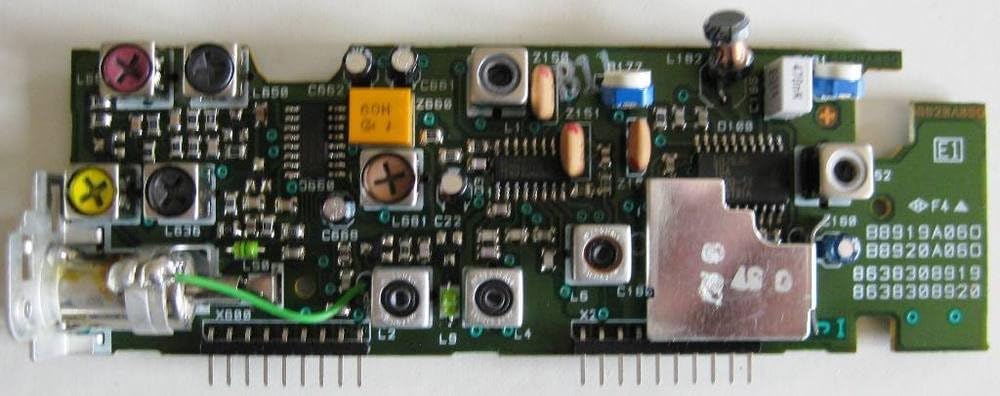
Rysunek 3.1: Góra View of the B8920A06O Tuner Module. This image displays the component side of the printed circuit board, showing various integrated circuits, capacitors, resistors, and tuning coils. Key identifiers like "B8920A06O" and "8638308920" are visible on the board itself, confirming its identity as an original Blaupunkt spare part. The green wire indicates a specific connection point.

Rysunek 3.2: Dół View of the B8920A06O Tuner Module. This image shows the solder side of the PCB, revealing the numerous solder points and traces that connect the components on the top side. The clean and precise soldering indicates a factory-manufactured component. The part number "88920A06O" is also visible on this side.

Figure 3.3: Identification Label. This label confirms the module's authenticity as a Blaupunkt spare part, displaying the brand logo, the part number "8638308920", and the text "Ersatzteil - Spare Part". This label is crucial for verifying the correct component.
4. Konfiguracja i instalacja
This section outlines the general steps for installing the Blaupunkt B8920A06O tuner module. Due to the specialized nature of this component, it is strongly recommended that installation be performed by a certified automotive electronics technician.
4.1. Kontrole przed instalacją
- Verify that the B8920A06O module is the correct spare part for your specific Blaupunkt radio model. Refer to your radio's service manual for compatibility.
- Inspect the module for any visible signs of damage (e.g., bent pins, cracked components) before installation.
- Gather necessary tools, which may include screwdrivers, prying tools, and an anti-static wrist strap.
4.2. Kroki instalacji (ogólne)
- Odłącz zasilanie: Ensure the vehicle's battery is disconnected to prevent electrical shorts or damage.
- Access Radio Unit: Carefully remove the car radio unit from its dashboard housing. Consult your vehicle's service manual for specific removal instructions.
- Open Radio Casing: Otwórz casing of the Blaupunkt radio unit to access its internal components.
- Znajdź i usuń stary moduł: Identify the existing tuner module (if any) and carefully disconnect its connectors and mounting screws. Note its orientation.
- Zainstaluj nowy moduł: Gently align the B8920A06O module with the designated slot or connectors. Ensure all pins are correctly seated without bending. Secure it with any retaining clips or screws.
- Na nowo połączyć: Reassemble the radio casing, reinstall the radio unit into the dashboard, and reconnect the vehicle's battery.
- Funkcjonalność testu: Power on the radio and test the tuner functionality to ensure proper reception and operation across all bands.
5. Operating the Tuner Module
The B8920A06O is an internal component of a Blaupunkt radio system. Its operation is integrated into the overall functionality of the host radio unit. Users interact with the tuner module indirectly through the radio's controls (e.g., tuning knobs, station presets, band selection buttons).
- Odbiór radiowy: The module is responsible for receiving and processing radio signals (AM/FM).
- Strojenie stacji: When you tune to a station on your radio, the module adjusts its internal circuitry to lock onto the selected frequency.
- Jakość dźwięku: A properly functioning tuner module contributes to clear and stable audio reception.
Refer to the instruction manual of your specific Blaupunkt radio model for detailed operating instructions related to radio functions.
6. Konserwacja
As an internal electronic component, the B8920A06O tuner module requires minimal user maintenance. However, proper handling and environmental conditions are crucial for its longevity.
- Czyszczenie: If the module needs cleaning, use a soft, dry, anti-static brush or compressed air to remove dust. Do not use liquid cleaners or solvents.
- Składowanie: If storing the module, keep it in its original anti-static packaging in a cool, dry place, away from direct sunlight and extreme temperatures.
- Obsługiwanie: Always handle the module by its edges to avoid touching the circuitry and connectors.
7. Rozwiązywanie Problemów
If you experience issues with radio reception after installing the B8920A06O module, consider the following troubleshooting steps. Note that complex issues may require professional diagnosis.
- No Radio Reception:
- Ensure the antenna is properly connected to the radio unit.
- Verify that the B8920A06O module is correctly seated in its slot and all connectors are secure.
- Check the radio's fuse.
- Poor or Intermittent Reception:
- Check the antenna connection for looseness or damage.
- Ensure the antenna itself is in good condition and properly installed on the vehicle.
- Test in different locations to rule out local interference.
- Brak dźwięku z radia:
- Verify that the radio unit is powered on and not muted.
- Sprawdź połączenia głośników.
- This issue might not be directly related to the tuner module but rather to the radio's amplifier or audio output section.
If troubleshooting steps do not resolve the issue, it is advisable to consult a qualified technician or contact Blaupunkt customer support.
8. Specyfikacje
| Funkcja | Szczegół |
|---|---|
| Typ produktu | Radio Tuner Module PCB |
| Marka | Blaupunkt |
| Numer modelu | B8920A06O |
| Blaupunkt Part Number | 8638308920 |
| Zgodność | Specific Blaupunkt car radio systems (refer to host device's service manual) |
| Pierwsza dostępna data | 15 stycznia 2020 r. |
9. Informacje o gwarancji
Specific warranty details for this spare part are not provided in this manual. Warranty coverage typically depends on the point of purchase and local regulations. Please retain your proof of purchase.
- For warranty claims or inquiries, please contact the seller or authorized Blaupunkt distributor from whom you purchased the module.
- Damage resulting from improper installation, misuse, or unauthorized modifications may void any applicable warranty.
10. Wsparcie i kontakt
If you require further assistance or have questions regarding the Blaupunkt B8920A06O Radio Tuner Module, please utilize the following resources:
- Wsparcie sprzedawcy: Contact the retailer or online store where you purchased the module for initial support.
- Blaupunkt Official Webstrona: Visit the official Blaupunkt website for product information, FAQs, and potential service center locations. You can often find support contact details there.
- Professional Technician: For installation or complex diagnostic issues, consult a qualified automotive electronics technician.
When contacting support, please have your product model number (B8920A06O) and part number (8638308920) readily available.


