Wstęp
This manual provides essential instructions for the safe and efficient use of your ONKYO RC-1000M Audio Remote Control. Please read this manual thoroughly before using the product and retain it for future reference.
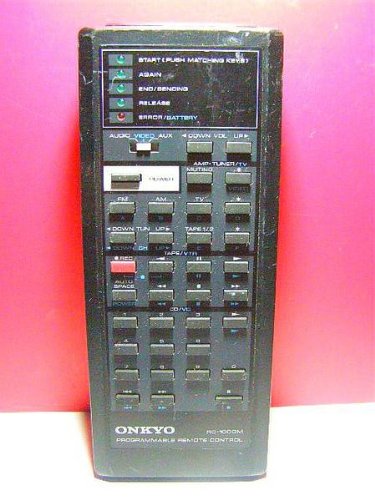
Image: The ONKYO RC-1000M Audio Remote Control, a black rectangular device with various control buttons.
Organizować coś
1. Instalacja baterii
- Znajdź pokrywę komory baterii z tyłu pilota.
- Aby otworzyć pokrywę, przesuń ją w dół lub naciśnij zatrzask.
- Insert two AAA batteries (not included), ensuring the positive (+) and negative (-) terminals align with the indicators inside the compartment.
- Załóż pokrywę komory baterii i upewnij się, że jest dobrze zamocowana.
Notatka: Zawsze używaj nowych baterii i wymieniaj obie jednocześnie. Nie mieszaj starych i nowych baterii ani różnych typów baterii.
2. Początkowe parowanie (jeśli dotyczy)
The ONKYO RC-1000M is typically pre-programmed for compatible ONKYO audio devices. No manual pairing is usually required. If the remote does not respond, ensure your audio device is powered on and within range. Refer to your ONKYO audio component's manual for specific remote control compatibility and setup instructions if issues persist.
Instrukcja obsługi
The RC-1000M remote control provides comprehensive control over your ONKYO audio system. Point the remote control directly at the main unit's remote sensor.
- MOC: Press to turn the audio component on or off.
- SELEKTOR WEJŚCIA: Use dedicated buttons (e.g., CD, TUNER, DVD) to switch between audio input sources.
- OBJĘTOŚĆ +/-: Dostosowuje główny poziom głośności.
- NIEMY: Temporarily silences the audio output. Press again to restore sound.
- PLAY/PAUSE/STOP/SKIP: Control playback functions for compatible media players (e.g., CD player, network player).
- MENU/ENTER/NAVIGATION: Access and navigate on-screen menus of your ONKYO audio component.
For detailed functions of specific buttons, refer to the instruction manual of the ONKYO audio component you are controlling.
Konserwacja
Czyszczenie
Wipe the remote control with a soft, dry cloth. Do not use abrasive cleaners, waxes, or solvents. Avoid spraying liquids directly onto the remote control.
Wymiana baterii
If the remote control's range decreases or it becomes unresponsive, replace the batteries as described in the "Battery Installation" section. Dispose of used batteries according to local regulations.
Składowanie
When storing the remote control for extended periods, remove the batteries to prevent leakage and potential damage to the unit.
Rozwiązywanie problemów
| Problem | Możliwa przyczyna | Rozwiązanie |
|---|---|---|
| Remote control does not operate. |
|
|
| Remote control operates intermittently. |
|
|
Specyfikacje
- Model: RC-1000M
- Marka: ONKYO
- Zasilanie: DC 3V (AAA batteries x 2)
- Zasięg działania: Approximately 7 meters (23 feet) under normal conditions.
- Wymiary (w przybliżeniu): Nie określono w danych produktu.
- Waga (w przybliżeniu): Nie określono w danych produktu.
Dane techniczne mogą ulec zmianie bez powiadomienia w celu wprowadzenia ulepszeń.
Gwarancja i wsparcie
For warranty information, technical support, or service inquiries, please refer to the documentation included with your ONKYO audio component or visit the official ONKYO webZachowaj paragon jako dowód zakupu na wypadek reklamacji.
Official ONKYO Webstrona: www.onkyo.pl


