1. Wprowadzenie
This manual provides essential instructions for the safe and efficient use of your Kyocera EBVK-2650 Engine Blower Vacuum. Please read this manual thoroughly before operating the machine and keep it for future reference. The EBVK-2650 is designed for blowing and vacuuming leaves and light debris in outdoor environments.
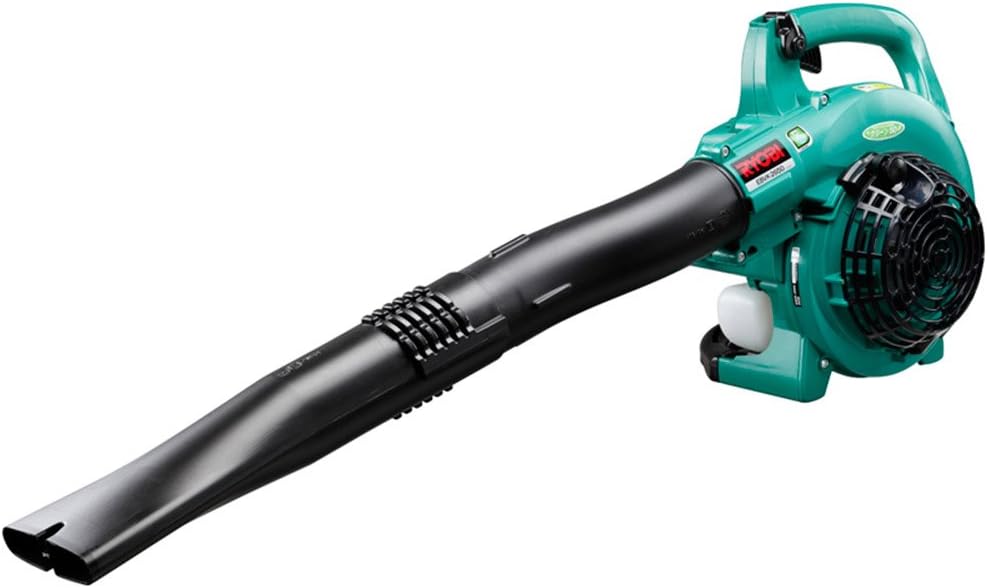
Image 1.1: The Kyocera EBVK-2650 Engine Blower Vacuum in its primary blower configuration. This image shows the main unit with the straight nozzle attached, ready for blowing leaves and debris.
2. Informacje dotyczące bezpieczeństwa
Podczas obsługi elektronarzędzi zawsze priorytetem jest bezpieczeństwo. Nieprzestrzeganie tych instrukcji może spowodować poważne obrażenia ciała lub uszkodzenie mienia.
2.1 Ogólne zasady bezpieczeństwa
- Przed przystąpieniem do obsługi maszyny przeczytaj i zrozum wszystkie instrukcje.
- Należy nosić odpowiedni sprzęt ochrony osobistej (PPE), obejmujący ochronę oczu, ochronniki słuchu, rękawice i solidne obuwie.
- Nie należy obsługiwać urządzenia w wilgotnych warunkach ani w obecności łatwopalnych cieczy lub gazów.
- Keep children, bystanders, and pets at a safe distance (at least 15 meters / 50 feet) from the operating area.
- Inspect the machine for loose parts, damage, or wear before each use. Do not operate a damaged machine.
- Ensure proper ventilation when operating the engine, as exhaust fumes contain carbon monoxide.
- Nigdy nie kieruj dyszy dmuchawy w stronę ludzi lub zwierząt.
- Turn off the engine and allow it to cool before refueling, cleaning, or performing maintenance.
- Store the machine in a dry, secure location, out of reach of children.
2.2 Bezpieczeństwo paliwa
- Use only the recommended fuel mixture: unleaded gasoline and 2-cycle engine oil at a 50:1 ratio.
- Mix fuel in a well-ventilated area, away from sparks or open flames.
- Do not smoke while mixing or refueling.
- Natychmiast wytrzyj rozlane paliwo.
- Paliwo należy przechowywać w atestowanym pojemniku, w chłodnym i suchym miejscu.
3. Zawartość opakowania i jego składniki
Przed rozpakowaniem sprawdź, czy wszystkie elementy są obecne i nieuszkodzone.
3.1 Dołączone akcesoria
- Main Unit (Engine Blower Vacuum)
- Prosta dysza
- Zakrzywiona dysza
- Rura ssąca
- Dysza wentylatora
- Worek na kurz
- Socket Wrench (13x19mm)
- Instrukcja obsługi
3.2 Key Components Overview
Familiarize yourself with the main parts of the EBVK-2650.

Image 3.1: The Kyocera EBVK-2650 configured for vacuuming. This view shows the suction pipe and the dust bag attached, ready to collect leaves and debris.
- Jednostka silnika: The core power source.
- Zbiornik paliwa: For mixed fuel.
- Uchwyt rozrusznika: For manual engine start.
- Dźwignia przepustnicy: Kontroluje prędkość obrotową silnika.
- Przełącznik zatrzymania: To turn off the engine.
- Pokrywa filtra powietrza: Chroni filtr powietrza.
- Świeca: For ignition.
- Blower/Vacuum Port: Where nozzles or suction pipe attach.
- Dust Bag Connection: For attaching the collection bag in vacuum mode.
4. Instalacja i montaż
4.1 Assembling for Blower Mode
- Upewnij się, że silnik jest wyłączony i zimny.
- Attach the desired nozzle (straight or curved) to the blower port. Twist until securely locked.
- Confirm all connections are tight before use.

Obraz 4.1: Zbliżenie view of the Kyocera EBVK-2650 in operation, demonstrating the blower function. The user is holding the unit, directing the airflow.
4.2 Assembling for Vacuum/Mulching Mode
- Upewnij się, że silnik jest wyłączony i zimny.
- Remove any blower nozzles from the blower port.
- Attach the suction pipe to the intake port. Secure it firmly.
- Connect the dust bag to the exhaust port. Ensure the bag is properly sealed to prevent debris leakage.
- Confirm all connections are tight before use.

Image 4.2: The Kyocera EBVK-2650 being used in vacuum mode. The suction pipe is directed towards leaves, and the dust bag is visible, collecting the mulched debris.
4.3 Fuel Preparation and Filling
The EBVK-2650 uses a 2-cycle engine. It requires a specific mixture of unleaded gasoline and 2-cycle engine oil.
- Fuel Ratio: Unleaded Gasoline : 2-Cycle Engine Oil = 50:1
- Use high-quality 2-cycle engine oil specifically designed for air-cooled engines.
- Mix the fuel in a separate, approved fuel container. Shake well before filling.
- Open the fuel tank cap slowly to release pressure.
- Fill the fuel tank (capacity 0.47 L) carefully, avoiding overfilling.
- Dokładnie zamknij korek wlewu paliwa.
5. Instrukcja obsługi
5.1 Uruchomienie silnika
- Umieść maszynę na płaskiej, stabilnej powierzchni.
- Upewnij się, że wyłącznik jest w pozycji „ON”.
- Engage the choke lever (if cold start).
- Naciśnij pompkę paliwa kilka razy, aż paliwo stanie się widoczne.
- Pull the starter handle firmly and smoothly until the engine starts. Do not pull the rope to its full extension.
- Po uruchomieniu silnika stopniowo wyłączaj ssanie.
- Przed pełnym otwarciem przepustnicy należy odczekać chwilę, aż silnik się rozgrzeje.

Image 5.1: A user demonstrating the engine starting procedure for the Kyocera EBVK-2650. The starter handle is being pulled to ignite the engine.
5.2 Działanie dmuchawy
- Hold the machine firmly with both hands.
- Direct the nozzle towards the debris you wish to move.
- Gradually increase the throttle to achieve the desired airflow.
- Zbierz liście i zanieczyszczenia, tworząc stosy, wykonując ruch zamiatania.

Image 5.2: A user operating the Kyocera EBVK-2650 in blower mode, clearing leaves from a path. The machine is held comfortably, directing the airflow.
5.3 Vacuum/Mulching Operation
- Ensure the machine is correctly assembled for vacuum mode with the dust bag attached.
- Hold the machine firmly, guiding the suction pipe over the leaves.
- Move slowly and steadily to allow the machine to pick up and mulch debris.
- Monitor the dust bag and empty it when it becomes full to maintain optimal performance.
- Note: Mulching performance varies based on leaf type, size, and moisture content. Avoid vacuuming wet leaves or large, hard objects.

Image 5.3: A user operating the Kyocera EBVK-2650 in vacuum mode, actively collecting leaves from a paved area. The dust bag is visible, indicating collection.
5.4 Zatrzymywanie silnika
- Release the throttle lever to allow the engine to idle.
- Przesuń wyłącznik stopu do pozycji „WYŁ”.
- Allow the machine to cool down before storage or maintenance.
6. Konserwacja
Regular maintenance ensures optimal performance and extends the lifespan of your EBVK-2650. Always ensure the engine is off and cool before performing any maintenance.
6.1 Czyszczenie filtra powietrza
- Zdejmij pokrywę filtra powietrza.
- Ostrożnie wyjmij element filtra powietrza.
- Clean the filter by tapping it gently or using compressed air. If heavily soiled, wash with warm, soapy water, rinse thoroughly, and allow to dry completely before reinstallation.
- Załóż ponownie pokrywę filtra powietrza.
6.2 Kontrola i wymiana świec zapłonowych
- Zdejmij nasadkę świecy zapłonowej.
- Use the provided socket wrench to remove the spark plug (NGK BPM8Y).
- Inspect the spark plug for wear, carbon buildup, or damage. Clean if necessary.
- Check the electrode gap and adjust if needed.
- Replace with a new spark plug of the recommended type if worn or damaged.
- Reinstall the spark plug and cap securely.
6.3 Filtr paliwa
The fuel filter is located inside the fuel tank. Inspect it periodically for debris. If clogged, replace it. This procedure may require professional assistance.
6.4 Regulacja gaźnika
Carburetor adjustments should ideally be performed by a qualified service technician. Incorrect adjustments can lead to engine damage or poor performance.
6.5 Przechowywanie
- For long-term storage, drain all fuel from the tank and run the engine until it stops to clear the carburetor.
- Wyczyść zewnętrzną część urządzenia.
- Store in a dry, dust-free location, away from direct sunlight and extreme temperatures.
7. Rozwiązywanie Problemów
W tej sekcji omówiono typowe problemy, które mogą wystąpić. W przypadku problemów, których tutaj nie wymieniono, skontaktuj się z obsługą klienta.
| Problem | Możliwa przyczyna | Rozwiązanie |
|---|---|---|
| Silnik nie uruchamia się |
|
|
| Silnik działa, ale brakuje mu mocy |
|
|
| Nadmierne wibracje |
|
|
8. Specyfikacje
| Funkcja | Szczegół |
|---|---|
| Marka | Kyocera |
| Numer modelu | EBVK-2650 |
| Typ silnika | Air-cooled 2-cycle single cylinder gasoline engine |
| Przemieszczenie | 25.4 ml |
| Average Air Volume | 8.7 m³/min |
| Maksymalna objętość powietrza | 67.5 m³/min |
| Metoda zapłonu | Electronic ignition (Flywheel magnet) |
| Świeca zapłonowa | NGK BPM8Y |
| Rodzaj gaźnika | Typ membrany |
| Paliwo | Mixed fuel (Unleaded gasoline: 2-cycle engine oil = 50:1) |
| Pojemność zbiornika paliwa | 0.47 Ł |
| Dimensions (L x W x H, excluding nozzle) | Wymiary: 330 x 270 x 345 mm |
| Weight (excluding nozzle, fuel) | 4.2 kilogramów |
| Dołączone akcesoria | Straight nozzle, Curved nozzle, Suction pipe, Fan nozzle, Dust bag, Socket wrench (13x19mm) |
| Zalecane zastosowanie | Dust cleaning, Leaf cleaning |
Note: Product specifications are subject to change without notice for improvement. The listed weight of 8.1 kg in some product descriptions likely includes packaging and all accessories, while 4.2 kg refers to the bare unit.
9. Gwarancja i wsparcie
For warranty information, service, or technical support, please refer to the warranty card included with your product or visit the official Kyocera webZachowaj dowód zakupu na wypadek roszczeń gwarancyjnych.
Kyocera Customer Support: Please visit the official Kyocera website or contact your local dealer for assistance.


